AI workflows can save businesses millions by reducing inefficiencies and automating repetitive processes. Yet, scaling these workflows across platforms like CRMs, ERPs, and communication tools remains a challenge. Here's a quick breakdown of how to deploy AI workflows effectively:
- Start with Business Goals: Focus on solving specific problems like reducing costs, improving efficiency, or enhancing customer experience.
- Identify High-Impact Use Cases: Automate areas with high manual effort, like customer support or accounts payable, for measurable results.
- Ensure Data Readiness: Clean, consistent data is critical. Allocate resources to prepare and standardize data inputs.
- Build Scalable Infrastructure: Use a five-layer stack (compute, storage, communication, observability, security) to ensure seamless integration.
- Test Thoroughly: Validate workflows with real-world inputs, aiming for 95% accuracy and low latency.
- Deploy Gradually: Use phased rollouts (pilot, limited release, wave-based) to minimize risks and refine performance.
- Monitor and Optimize: Continuously track metrics like latency, failure rates, and accuracy to improve workflows over time.
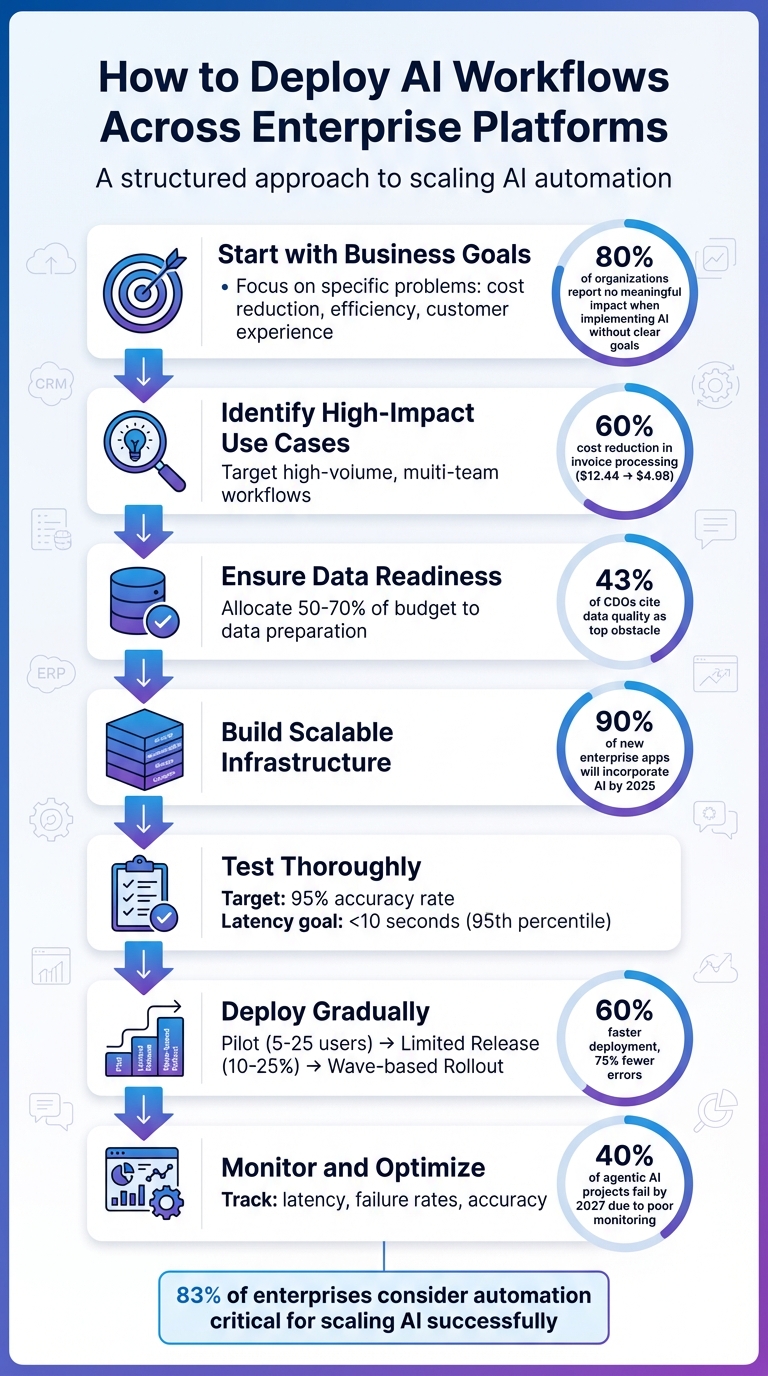
7-Step Process for Deploying AI Workflows Across Enterprise Platforms
Assess Your Enterprise Needs and Set AI Workflow Goals
When thinking about deploying an AI workflow, the starting point should always be the problem you're trying to solve - not the technology itself. As Paul Estes, Editor-in-Chief at Virtasant, wisely advises:
Always start with the problem you want to solve and then add the tech into the mix [7].
This approach helps avoid a common pitfall: implementing AI just for the sake of it. The numbers speak for themselves - while 78% of organizations have adopted generative AI, a staggering 80% report no meaningful impact on their earnings [7]. By focusing on the problem first, you can identify workflows where AI can make the biggest difference.
During the assessment phase, it's essential to outline specific, measurable business goals in four key areas:
- Revenue growth (e.g., boosting qualified lead conversion rates)
- Operational efficiency (e.g., cutting down cycle times or reducing manual processes)
- Cost reduction (e.g., minimizing labor and transaction expenses)
- Customer experience (e.g., offering 24/7 availability and faster response times) [7][8][10]
For industries with strict compliance requirements, governance goals should also be a priority. This could include maintaining audit trails or adhering to standards like SOC 2, GDPR, or HIPAA [6][9].
Find High-Impact Use Cases
To maximize the benefits of AI, focus on workflows that are high-volume, involve multiple teams, and rely on outdated manual methods like spreadsheets or email chains [8]. These inefficiencies present the best opportunities for transformation. For instance, customer support is a standout use case. Platforms like ChatSpark use conversational AI to deliver instant responses in over 85 languages, while simultaneously capturing leads around the clock. This directly improves customer satisfaction and revenue metrics.
The financial payoff can be significant. Take accounts payable as an example: AI can lower the cost of processing an invoice from $12.44 to $4.98 - a 60% reduction [10]. When selecting use cases, prioritize areas where automation can scale operations without requiring a proportional increase in staff [8]. It's no surprise that CFOs are allocating 25% of their AI budgets to AI agents, recognizing the clear return on investment in these areas [6].
Check Data Readiness and Scalability
One of the biggest hurdles to AI success is data quality, with 43% of Chief Data Officers citing it as their top challenge [11]. The reality is that about 80% of AI agent pilots fail to move beyond the testing phase. Why? Many pilots work well with carefully curated data but break down when faced with messy, fragmented real-world inputs [11].
To overcome this, successful organizations dedicate 50% to 70% of their AI budgets and timelines to preparing their data [11]. Start by testing real-world inputs - such as 100 invoices or customer inquiries - to identify variations and potential exceptions [10]. Assess your data for completeness, accuracy, and consistency across systems. For example, ensure that terms like "customer" mean the same thing in both Sales and Support [11].
Scalability is another critical factor. Your system must handle the leap from a few hundred pilot queries to millions of daily interactions and thousands of simultaneous connections in production [11]. Establish data contracts - clear agreements between data producers and consumers that define schema standards, quality benchmarks, and update frequencies [11]. Companies that use cross-functional teams for this preparation report AI adoption rates 34% higher than those with siloed teams [11]. With these steps, you'll be ready to build infrastructure that supports scalable, multi-platform AI integration effectively.
Set Up Infrastructure for Multi-Platform AI Integration
Once you've prepared your data and assessed scalability, it's time to build an infrastructure that works seamlessly across multiple platforms. To do this, create a five-layer stack: compute, storage, communication, observability, and security. Here's a breakdown of each layer:
- Compute Layer: Use serverless functions like AWS Lambda or container orchestration tools like Kubernetes to handle workloads efficiently.
- Storage Layer: Manage session states with Redis, store long-term data in traditional databases, and use vector databases like Pinecone for semantic memory.
- Communication Layer: Connect systems through APIs and message queues to ensure smooth interactions.
- Observability Layer: Monitor performance using structured logging and distributed tracing to track and optimize workflows.
- Security Layer: Safeguard API keys and implement measures to prevent data breaches.
The importance of infrastructure can't be overstated. By 2025, 90% of new enterprise applications are expected to incorporate AI, but 95% of generative AI pilots fail to reach production [3][18]. Amy from Auralis sums it up perfectly:
The choice isn't simply technical. It's about aligning infrastructure with the organization's compliance obligations, growth ambitions, and ability to adapt to shifting business demands [14].
By setting up this infrastructure, you'll be better equipped to choose the right deployment model for your needs.
Choose Your Deployment Model
Your deployment model plays a key role in determining how your AI operates and scales. The three primary options - cloud, on-premises, and hybrid - each come with their own strengths:
- Cloud: Perfect for quick pilots, minimum viable products (MVPs), and workloads with fluctuating demands. It offers fast setup and elastic scaling with a pay-as-you-go cost structure.
- On-Premises: Suited for industries with strict regulations or high-security needs. While it requires significant upfront investment, it provides stable costs and maximum control.
- Hybrid: Combines the best of both worlds, keeping sensitive operations on-site while using cloud resources for flexibility. This option is ideal for businesses with mixed data sensitivity or regional compliance requirements.
For example, in October 2025, Ramp used OpenAI's AgentKit to build a buyer agent in just 4 weeks, cutting iteration cycles by 70% [17]. Similarly, FinTech Solutions automated its deployment pipeline for 200+ clients, slashing deployment time by 70% and reducing configuration errors by 90% [3].
| Deployment Model | Best For | Cost Structure | Latency | Control Level |
|---|---|---|---|---|
| Cloud | Rapid pilots, MVPs, bursty workloads | OpEx; pay-as-you-go | Variable | Managed services |
| On-Premises | Regulated industries, high security, stable inference | CapEx; high upfront but predictable | Low and deterministic | Maximum custody |
| Hybrid | Mixed data sensitivity, regional residency needs | Balanced | Optimized; sensitive tasks stay local | Complex orchestration |
When deciding, consider factors like data sovereignty laws or the need for sub-100 millisecond latency. Also, don't forget to calculate the 3-year total cost of ownership (TCO), factoring in hidden costs like GPU power and cooling for on-prem setups or data egress fees for cloud solutions [19].
Integrate Across Platforms
To ensure your AI delivers a consistent experience across multiple channels - like websites, WhatsApp, Slack, or CRMs - you'll need a robust API orchestration layer. This layer should streamline authentication, logging, and routing. Platforms like ChatSpark make this easier by offering integration with popular channels like Instagram, Facebook, Telegram, and Slack through a unified interface.
Your orchestration layer must support both synchronous and asynchronous communication [15]. To improve accuracy when retrieving information from internal knowledge bases, implement hybrid search - a combination of keyword and vector search - with semantic reranking [16]. This ensures your AI can deliver the right information at the right time, no matter where your customers interact with it.
Build and Test AI Workflows
Design Your AI Workflows
Start by auditing your tech stack - CRMs, ERPs, APIs - to map out your existing systems. This step ensures you understand your infrastructure and can address any data quality issues that might lead to inconsistent outcomes [2]. Once you’ve mapped everything, decide between deterministic workflows for tasks with clear, predictable outcomes or dynamic AI agents for more complex, adaptive tasks [23]. This approach allows your AI workflows to integrate smoothly with your current systems, making multi-platform deployment easier.
When designing your workflows, structure your production pipeline into clear stages, such as:
- Trigger: The event that kicks off the workflow.
- Preprocess: Preparing data for AI processing.
- AI Processing: Running the core AI tasks.
- Tool Calls: Interacting with external tools or APIs.
- Post-process: Refining outputs for usability.
- Store/Log: Saving results for future reference.
For complex tasks, break them into manageable steps like Understand, Plan, Execute, Verify, and Format. Prompt chaining can help guide AI through these sequential steps [21]. Additionally, shared state variables can maintain context across workflow nodes, ensuring smooth transitions between tasks [20].
For tasks with higher stakes, consider adding human-in-the-loop checkpoints to review and approve critical decisions [20][22]. For example, in August 2025, Popl - a digital business card company - streamlined over 100 workflows using Zapier. Their system verified lead details in Google Sheets, categorized emails with AI, and routed them to sales reps based on region and company size. This automation saved them $20,000 annually and eliminated manual bottlenecks [24].
Once your workflow is designed, the next step is testing to ensure it functions as intended.
Test for Accuracy and Performance
Testing is where you validate the reliability and efficiency of your workflows. Aim for your production AI system to achieve at least a 95% success rate [21]. Focus on testing the orchestration layer - this includes tool integration, error handling, and logic flow - rather than just the AI model itself [27]. Scenario-based testing with AI personas can simulate real-world interactions, capturing subtleties like topic changes or user frustration [26]. Use a scoring rubric (1–5 scale) to evaluate key dimensions such as accuracy, tone, and adherence to policies [26].
To catch undetected errors, include verification loops after each tool call. These loops can identify issues where an API might fail silently but still allow the workflow to proceed [27]. Keep an eye on latency, aiming for the 95th percentile of response times to stay under 10 seconds [21]. Before rolling out new workflows, run them in shadow mode alongside existing systems. This lets you compare outputs without impacting actual users [25].
Platforms like ChatSpark can simplify the integration, testing, and monitoring of AI workflows across various enterprise systems.
"The difference between a prototype and a production system isn't the model you use. It's everything around the model." - Oronts Engineering Team [21]
Deploy AI Workflows in Phases
Once workflows are thoroughly tested, the next step is to roll them out in a controlled, phased manner. This helps reduce risks and fine-tune performance along the way.
Use Phased Rollout Methods
Rolling out AI workflows all at once can be risky - studies show that over 80% of such projects fail to reach production when rushed [29]. A phased approach minimizes these risks, allowing for adjustments if issues arise.
Start with a pilot phase involving 5–25 users and 1–3 specific use cases. This step helps confirm that the workflow functions well in your actual environment [29]. Once the pilot proves successful, expand to a limited release, targeting 10–25% of your user base. This phase provides broader feedback and helps scale support resources effectively. Finally, proceed with a wave-based rollout, introducing the workflow department by department to maintain control [29]. At each step, conduct gate reviews to ensure key metrics - like accuracy (over 90%), acceptable latency, and user adoption - are met before moving forward [29].
For smoother transitions, consider techniques like:
- Shadow deployment: Run the new workflow alongside the current one to compare outputs.
- Canary deployments: Direct 5% of traffic to the new version before scaling up.
- Blue-green deployments: Use two identical environments to allow instant rollbacks if needed [15][30][31].
A great example of this approach is Remote.com’s rollout of an AI-powered IT helpdesk in April 2025. Using Zapier’s orchestration platform, the system supported 1,700 global employees by capturing requests via Slack and email. Led by Marcus Saito, Head of IT and AI Automation, the phased deployment automated 28% of routine tickets, saving the company about $500,000 in hiring costs and reclaiming 2,219 workdays per month [32].
Once the phased rollout is validated through gate reviews, automate the deployment process to simplify future updates.
Set Up Automated Deployment Pipelines
After solid testing and design, automating deployment with CI/CD pipelines ensures consistency and reduces errors. Manual deployments often create bottlenecks and increase the likelihood of mistakes. CI/CD pipelines tailored for AI workflows can cut deployment time by 60% and reduce production errors by 75% [30]. These pipelines should include stages for source control, build, testing, staging, production, and post-deployment validation [33].
Here’s how to strengthen your pipeline:
- Version control for prompts: This allows for A/B testing and quick rollbacks [5][31].
- Automated quality gates: Halt deployments if success rates fall below 90% [5][33].
- "LLM-as-judge" evaluations: Detect quality issues before merging code changes [28].
- Feature flags: Deploy code changes without releasing features immediately, offering a quick "kill switch" if something goes wrong [33].
- Drift detection: Use nightly sync jobs to spot discrepancies between production AI configurations and code defaults [28].
- Manual approval gates: For high-stakes decisions, require human sign-off before moving from staging to production [30].
"Your deployment shouldn't fail because an AI config is misconfigured. And you shouldn't wait until production rollout to discover your new prompt performs worse than the old one." - Scarlett Attensil, LaunchDarkly [28]
Platforms like ChatSpark can simplify these processes by offering built-in integrations across enterprise platforms, making it easier to manage AI workflows at scale.
Monitor, Optimize, and Scale AI Workflows
Getting your AI workflows up and running is just the first step. To keep things running smoothly and avoid costly pitfalls, continuous monitoring and improvement are essential. According to Gartner, more than 40% of agentic AI projects could be scrapped by 2027 due to poor risk management and a lack of operational clarity [35]. And let’s face it - an AI giving incorrect answers can be far more damaging than one that’s simply offline, as users often trust the results they’re presented with [36].
Monitor Performance Continuously
Once your workflows are live, the focus shifts to ensuring they function reliably across all platforms. Monitoring every stage - from the initial prompt to tool execution - is critical for understanding overall performance. Advanced observability tools can help by reconstructing the entire decision-making process, capturing every execution and decision point along the way [35]. Structured logging, using JSON formats with identifiers like traceId and conversationId, can link technical events to business outcomes. Storing this data in a centralized database (such as Postgres) ensures you can recover from failures and create real-time dashboards [34][35][36].
Think of your workflows as state machines, where you can audit transitions between steps. For uncertain outputs, set confidence thresholds (typically below 0.80–0.90) to route them for human review [12][34].
Here are a few key metrics to keep an eye on:
- Turn latency: Keep p50 latency under 2 seconds, with alerts for anything over 5 seconds.
- Tool failure rates: Aim for below 1%, with alerts kicking in above 5%.
- Verification pass rates: Maintain rates above 95%, with alerts below 90% [35][36].
Comparing current performance against a two-week rolling baseline can help you spot gradual declines that fixed thresholds might miss [35][36]. Additionally, sampling 5–10% of production conversations for evaluation by an "LLM Judge" can uncover issues with accuracy or tone before they affect users [35][36].
Monitoring infrastructure can take up 5–15% of your total agent API spend, but it’s a worthwhile investment to avoid expensive breakdowns. Tools like ChatSpark provide built-in analytics across multiple platforms, including websites, Instagram, Facebook, WhatsApp, Telegram, and Slack, making it easier to track performance consistently across your enterprise.
Optimize for Long-Term Results
The data you gather from monitoring isn’t just for show - it’s the key to fine-tuning your workflows. Continuous improvement helps you maximize the benefits of integrated AI systems. Store your prompts and configurations as code artifacts in version control (like in a /prompts/ directory), and use sandbox environments to safely test updates before rolling them out [13][37]. Organizations that follow structured workflows like "plan-execute-test-fix" have seen a 60–80% drop in AI errors compared to relying on single-shot prompting [13].
A "gold test set" of 20–200 real-world scenarios, including best-case, worst-case, and edge cases, can be invaluable. Running this regression suite before every update ensures you don’t accidentally reintroduce old problems [12][13][37]. To make quality assessments more objective, use rubric-based scoring systems. For example, rate factors like groundedness, helpfulness, and brand tone on a 0–2 scale [12][37].
For more complex tasks, consider breaking them down into specialized roles for subagents - such as Planner, Coder, Reviewer, and Validator. This separation of duties can lead to better results, as the agent generating content is different from the one evaluating it [4][13]. To avoid runaway costs, enforce strict limits on token usage and step counts, and set alerts if step counts exceed twice the 7-day median [12][36].
To prevent duplicate actions during retries (like double-billing), use idempotency keys, and establish retry budgets to avoid cascading failures [12]. Keep an eye on "prompt drift" (changes in model behavior) and "behavioral drift" (how the agent uses tools or formats responses) on a weekly basis [35].
With the multi-agent AI market expected to grow from $7.84 billion in 2025 to $52.62 billion by 2030, staying on top of these optimization practices will be crucial for maintaining a competitive edge [4].
Conclusion
To implement AI workflows effectively, follow a structured approach: plan carefully, build scalable systems, test thoroughly, roll out in phases, and continuously refine. Start by pinpointing use cases that align with your business objectives. Ensure your data is clean and your systems can handle growth. Create workflows that integrate smoothly across platforms, test them in real-world scenarios, and deploy them gradually to reduce risks. Once operational, monitor their performance and make adjustments based on actual usage to maintain efficiency and accuracy.
The importance of this process is clear - 83% of enterprises consider automation critical for scaling AI successfully [1]. When done right, these strategies can lead to substantial cost savings and improved operations.
For businesses navigating complex, multi-channel environments, ChatSpark offers a streamlined solution. This platform enables rapid omnichannel deployments across platforms like websites, WhatsApp, Instagram, Facebook Messenger, Telegram, and Slack in just 1–2 weeks [39]. With more than 140 pre-built AI Actions for platforms such as Salesforce, Zendesk, and HubSpot, ChatSpark eliminates the need for months of custom API development. It also provides centralized analytics and supports over 95 languages [38][39].
Take this example: A global leader in construction products used ChatSpark to manage 10,754 messages over four months. They achieved a 98% resolution rate, captured 153 new leads, and saved $47,880 in costs [39].
The lesson here? Treat AI workflows as dynamic systems that grow and adapt with your business. They’re not static tools to set and forget, but evolving assets that can deliver measurable value from day one and keep improving over time. With the right strategies and tools, your AI workflows can become a cornerstone of your business success.
FAQs
What’s the fastest way to choose an AI workflow that will show ROI?
To pick an AI workflow that delivers results quickly, look for workflows with well-defined inputs, rules, and outputs. These characteristics allow for faster implementation and easier evaluation. Focus on tools that can integrate smoothly with your current systems, handle automation on a larger scale, and support rapid testing and refinement. By following this approach, you can achieve measurable outcomes early in the process, making it easier to showcase ROI right from the start.
How do I know if my data is clean enough to scale an AI workflow?
To effectively scale an AI workflow, focus on maintaining data accuracy, completeness, consistency, and timeliness. Regular audits are essential to identify and resolve issues such as duplicate entries, missing data, or formatting inconsistencies. Establishing a robust data quality framework - with governance, lineage tracking, and continuous monitoring - helps ensure your data meets high standards. When your data meets these benchmarks and integrates smoothly across systems, it lays the groundwork for reliable AI performance.
What should I monitor in production to ensure AI workflows remain reliable across platforms?
To keep AI workflows running smoothly in production, focus on monitoring several critical areas: latency, token usage, tool success rates, and conversation quality. It's also important to use drift detection to identify any shifts in models or data that could affect performance. On top of that, setting up structured logging and alerting systems allows for quicker identification and resolution of potential issues. Together, these practices help maintain stable performance and ensure systems operate reliably across different platforms.