In 2026, AI automation is no longer optional for customer support - it’s essential for staying competitive. Businesses can now automate up to 80% of repetitive support tasks, significantly reducing costs (from $6–$12 per ticket to just $0.10–$0.50) and improving response times. Here are 10 customer support tasks you can fully automate with AI:
- Answering FAQs: Handle 40–60% of Tier 1 tickets instantly with AI-powered FAQ tools, reducing ticket volume by up to 40%.
- Ticket Routing: Automatically categorize and route tickets based on intent, priority, and sentiment, saving hours of manual processing.
- Live Chat Support: Provide instant responses and triage customer queries across platforms like WhatsApp and web chat.
- Multilingual Support: AI can manage over 85 languages, delivering localized responses without hiring bilingual agents.
- Email Response Automation: Draft and send personalized replies in seconds, cutting response times from 15 minutes to under 30 seconds.
- Knowledge Base Search: Turn static help articles into conversational, instant answers using AI-driven search.
- Refunds and Password Resets: Automate common tasks like refunds and account recovery with high accuracy and speed.
- Automated Notifications: Proactively send updates on orders, billing, or outages to reduce customer frustration.
- Sentiment Analysis: Detect customer emotions, prioritize urgent cases, and escalate high-priority tickets automatically.
- Onboarding and Troubleshooting: Guide customers through setup and resolve routine issues with AI-driven workflows.
Quick Comparison:
| Task | Automation Benefits | Example Impact |
|---|---|---|
| FAQs | Reduces ticket volume by 40% | Saves $14,000/month for a salon chain |
| Ticket Routing | Cuts processing time from hours to minutes | Travel company reduced time from 5 hours to 5 min |
| Live Chat Support | Handles 80% of queries instantly | E-commerce firm cut response time to 12 minutes |
| Multilingual Support | Supports 85+ languages, 24/7 | Casino saved hundreds of thousands in hiring |
| Email Automation | Replies in 23 seconds vs. 15 minutes | Boosts customer satisfaction by 17% |
| Knowledge Base Search | Deflects 40–70% of repetitive tickets | Speeds up answers to 3 seconds |
| Refunds/Password Resets | Closes tickets in under 2 minutes | Klarna saved $40M annually |
| Automated Notifications | Proactively updates customers | Reduces ticket volume and customer frustration |
| Sentiment Analysis | Flags urgent issues for quick resolution | Boosts CSAT by 20–32% |
| Onboarding/Troubleshooting | Automates repetitive steps, saving hours | Handles 70–80% of onboarding tasks |
AI tools like ChatSpark integrate with platforms like Zendesk, Salesforce, and Shopify, offering 24/7 support and scaling with your business needs. By implementing AI customer support for high-volume tasks, businesses save time, cut costs, and improve customer satisfaction.
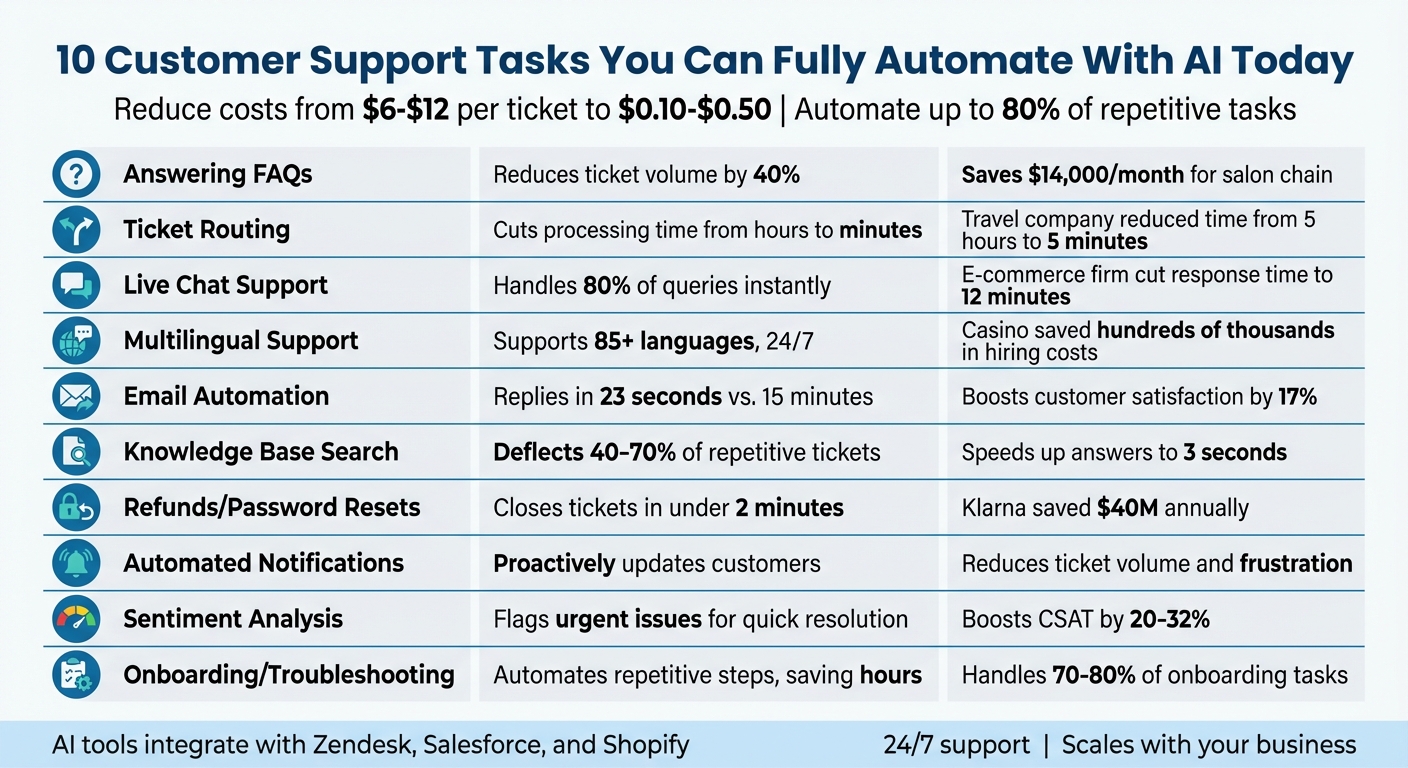
10 AI-Automated Customer Support Tasks: Benefits and Impact Comparison
1. Answering Frequently Asked Questions
Automation Potential (Task Complexity and Frequency)
FAQs are a prime candidate for automation. They account for 40–60% of Tier 1 support tickets, and AI can handle 60–80% of these directly by referencing verified documentation. This can lead to a 20–40% reduction in ticket volume [7]. By automating these repetitive tasks, your team can focus on more complex issues, improving overall efficiency and paving the way for a better customer experience.
Customer Experience Impact (Speed, Accuracy, Personalization)
Speed matters - 59% of customers expect a chatbot to respond within 5 seconds [9]. AI-powered systems use natural language processing to provide instant, accurate answers, effectively replacing static FAQ pages. For example, HelloSugar, a salon chain, automated 66% of its customer interactions with an AI FAQ assistant. This not only saved them about $14,000 per month but also supported their expansion from 81 to 160 salons in just one year [9]. Similarly, Baleària, a maritime transport company, achieved a 96% customer satisfaction rate using a Zendesk-powered chatbot [4].
"Knowledge-based AI works best. It answers questions by retrieving information directly from verified sources instead of following scripted flows." – CustomGPT.ai [7]
Integration with Existing Tools and Platforms
AI FAQ systems can integrate smoothly with your current helpdesk tools. They sync with live documentation, ensuring that any updates to help articles are immediately reflected in the AI's responses [7]. These systems can be deployed across websites, customer portals, and platforms like Zendesk [7][8]. When the AI encounters a question it can't resolve, it seamlessly transfers the full conversation context to a human agent, ensuring a smooth handoff [7].
Scalability for Businesses of Different Sizes
Whether you're handling 100 or 100,000 tickets, AI scales effortlessly to meet your needs. For example, Axis Bank implemented an AI virtual assistant that managed 12–15% of its total call volume independently, all while maintaining 90% accuracy [9]. This kind of scalable support is especially valuable during traffic spikes caused by product launches or outages, eliminating the need for additional staffing.
2. Ticket Routing and Categorization
Automation Potential (Task Complexity and Frequency)
Sorting tickets manually can be a huge time sink. AI steps in with Natural Language Processing (NLP) and Machine Learning to analyze incoming tickets instantly. It identifies key aspects like topic, priority, sentiment, and intent in real time [10][4]. AI can even determine the language of a ticket and direct it to the right language queue or an agent with the appropriate expertise [11][4]. Plus, it flags tickets missing critical information and prompts customers to fill in the gaps, shaving an average of 45 seconds off each ticket [4]. This quick and accurate process lays the groundwork for a smoother customer experience.
Customer Experience Impact (Speed, Accuracy, Personalization)
AI-powered customer service transforms how tickets are handled, with noticeable improvements in speed and precision. For instance, in 2025, Peek - a travel company - adopted AI for workforce management and ticket routing. This change slashed their manual processing time from 4–5 hours to just five minutes [4]. Similarly, Khan Academy's automated triaging system maintained a 92% satisfaction rate by effectively prioritizing and routing tickets [4].
"The insights obtained thanks to AI allow us to be more efficient as customer service agents and offer a better customer experience." – Billy Abrams, Executive Vice President of Distribution, Medline [4]
Integration with Existing Tools and Platforms
AI-powered routing systems seamlessly integrate with popular CRM tools like Zendesk, HubSpot, and Salesforce. These integrations can function through push-based methods (using webhooks to trigger AI classification) or pull-based methods (polling APIs for new tickets) [12][13][14]. For example, Medline, a distributor of medical products, uses AI to manage over 800,000 tickets annually. This approach not only boosts employee productivity but also ensures that issues are resolved with greater care [4].
Scalability for Businesses of Different Sizes
AI routing adapts effortlessly to businesses of any size, handling ticket volumes large or small. It provides 24/7 support and manages sudden surges - like holiday season spikes - without needing extra staff [4]. For businesses with over 20 intent categories, a "cascading" method works best. This involves a top-level classifier that broadly categorizes tickets (e.g., "Technical") before sub-classifiers handle more specific issues [12].
3. Live Chat Support and Initial Triage
Automation Potential (Task Complexity and Frequency)
AI-powered live chat support takes customer interactions to a new level, especially when it comes to handling initial queries. These systems can instantly identify customer needs - whether it’s tracking a shipment, resetting a password, or dealing with billing concerns - as soon as a message is received [1]. By leveraging Retrieval-Augmented Generation (RAG), they pull verified answers from databases and connect with internal tools to handle tasks like processing refunds, updating CRM records, or sending shipping updates [1][18]. For more complex or sensitive issues, AI drafts responses for agents to review, cutting response times by as much as 70% without sacrificing quality [16]. In fact, around 80% of repetitive support tasks, such as answering standard knowledge base questions, can be fully automated without losing quality [18].
Customer Experience Impact (Speed, Accuracy, Personalization)
Speed is everything in customer service, and AI delivers. With 62% of customers preferring immediate responses over waiting 15 minutes [19], AI provides answers in under 10 seconds, slashing wait times during peak hours. It also improves accuracy by pulling in details like past conversations, account statuses, and recent user actions, so customers don’t have to repeat themselves [15][17]. Take, for instance, a mid-size e-commerce company that adopted AI triage and response drafting in 2026. Over two months, their first response time dropped from 4 hours to just 12 minutes, customer satisfaction jumped from 72% to 89%, and AI independently resolved 45% of tickets [16]. By combining speed with personalized handling, AI creates a consistent and scalable live chat experience.
Integration with Existing Tools and Platforms
AI chat systems seamlessly connect with CRMs like Salesforce and HubSpot, embedding customer data into the chat interface to keep agents focused [1][15]. They also consolidate conversations across platforms like WhatsApp, Instagram, email, and SMS into one dashboard, ensuring smooth communication regardless of the channel [15]. For example, Stockbit, a stock-trading app, automated 30% of its incoming conversations in 2026, managing over 1 million interactions. This saved the company $1 million annually and reduced its need for 27 full-time employees [19]. After resolving issues, AI generates structured summaries and logs them into the CRM, making trend analysis and reporting more efficient [1].
Scalability for Businesses of Different Sizes
AI is built to handle surges in demand - whether from product launches, outages, or seasonal spikes - without slowing down response times or requiring additional staff [1][19]. A mid-size SaaS company managing 1,000–2,000 tickets per month implemented an AI agent in 2026, which handled 80% of the workload. This allowed the company to reduce its support team from three agents to one senior lead, saving $6,500–$7,000 monthly. Meanwhile, automated ticket resolution times dropped from 18 hours to just 12 minutes [18]. With proper training, AI can independently resolve up to 80% of customer interactions [15].
4. Multilingual Customer Support
AI's ability to handle multiple languages efficiently is transforming how businesses interact with customers worldwide.
Automation Potential (Task Complexity and Frequency)
One of AI's standout features is its ability to detect a customer's language right from the first interaction, eliminating the need for manual selection. Once identified, the system pulls information from a centralized (English) knowledge base and delivers responses in the customer's native language. This method avoids the outdated practice of translating every FAQ or decision tree individually for each language. AI can manage dozens of languages simultaneously, leveraging the same core data. Custom glossaries ensure consistency for brand names, product terms, and legal references. While routine questions are handled automatically, complex issues like refunds or legal matters are escalated to human agents for review—a key benefit of choosing a live chat vs AI chatbot hybrid approach.
Customer Experience Impact (Speed, Accuracy, Personalization)
Statistics reveal that 76% of online shoppers prefer product information in their own language, and 40% avoid purchasing from non-localized websites [20]. AI-powered multilingual support offers instant, accurate responses while maintaining the nuance and tone of conversations. By analyzing full dialogues and historical data, the system adjusts its communication style to align with cultural norms - for instance, using formal honorifics in Japanese or a friendlier tone in Brazilian Portuguese. In 2024, Jungle Lodges & Resorts introduced a multilingual AI chatbot and found that 35% of inquiries came in outside business hours. This allowed them to capture global leads and provide 24/7 support [20]. The system’s ability to adapt to various languages and integrate with existing platforms ensures a seamless experience for users.
Integration with Existing Tools and Platforms
AI translation tools work seamlessly with CRMs like Zendesk, HubSpot, and Salesforce, allowing agents to manage customer interactions within their usual workflows. Automated processes also remove personally identifiable information (PII) before processing, ensuring compliance with regulations like GDPR and SOC 2. In 2024, Jackpots.ch, a part of Grand Casino Baden in Switzerland, adopted an AI platform integrated with Zendesk to support English, German, French, and Italian. Under the leadership of Customer Service Manager Urs Klingler, the system allowed the company to maintain its team size while saving hundreds of thousands of dollars in hiring costs and offering 24/7 multilingual support [21].
Scalability for Businesses of Different Sizes
Hiring bilingual customer service representatives often comes with a salary premium of 5% to 20% [20]. AI eliminates this expense by supporting over 85 languages with a single deployment, without requiring additional staff. Even within the U.S., where 67 million residents speak languages other than English [20], businesses benefit from automated multilingual systems. Globally, 75% of consumers across 29 countries are more likely to remain loyal to brands that provide support in their native language. This scalable solution not only enhances customer retention - which is significantly cheaper than acquiring new customers - but also underscores the efficiency and cost-effectiveness of AI-driven multilingual support [21].
5. Email Response Automation
AI email automation takes customer communication to the next level by speeding up and personalizing responses while handling tasks more efficiently.
Automation Potential (Task Complexity and Frequency)
AI-driven email automation leverages Natural Language Processing (NLP) to grasp the intent behind customer messages, even when they involve multiple questions or intricate issues. This isn't just about spotting keywords - AI can distinguish between billing disputes, technical problems, and general inquiries with precision. By tapping into internal knowledge bases and document systems, it drafts responses that are both accurate and up-to-date. For straightforward tasks like password resets or order tracking, responses are generated in seconds. More complicated emails, however, are flagged for human review, complete with summaries and sentiment analysis to guide the agent.
Customer Experience Impact (Speed, Accuracy, Personalization)
AI can cut down email response times dramatically - from an average of 15 minutes to just 23 seconds [22]. This speed is crucial, as 73% of consumers say they’d switch to a competitor after multiple poor service experiences [22][23]. Unlike static templates, AI tailors responses by analyzing a customer's history and sentiment, ensuring messages feel personal and align with the brand's tone. Operating around the clock, it guarantees support is always available.
"The information obtained through the IA allows us to be better as customer service agents and offer a better customer experience." – Billy Abrams, Executive Vice President of Distribution at Medline [4]
By 2025, it's predicted that AI will power 95% of customer interactions [23].
Integration with Existing Tools and Platforms
These automation tools integrate seamlessly with platforms like Gmail and Outlook, often with a simple one-click setup. This enables real-time email categorization without requiring businesses to switch platforms [24][25]. Tools like Zendesk come equipped with AI agents that enhance workflow efficiency, speeding up the triaging process [4]. Middleware services like Zapier further simplify automation by connecting systems and creating workflows using plain English instructions - no coding required [24]. Additionally, the AI can review drafts for compliance with legal or policy standards, particularly useful in industries like finance and healthcare [23].
Scalability for Businesses of Different Sizes
AI in email support can trim operational costs by 20–30% and handle sudden increases in email volume without the need for additional staff or training [23]. According to the Freshworks CX 2025 Benchmark Report, 90% of business services practitioners say repetitive tasks prevent agents from addressing more complex issues [22]. AI systems support multilingual communication in over 15 languages while maintaining professionalism and respecting cultural nuances, eliminating the need for region-specific agents [22]. For smaller teams, AI can automate up to 70% of resolutions and achieve first response times of under a minute, proving how transformative this technology can be for businesses of any size [23].
6. Knowledge Base Search and Retrieval
AI takes knowledge base search to the next level by turning static information into instant, conversational responses.
Automation Potential (Task Complexity and Frequency)
Modern AI uses natural language processing (NLP) to understand what customers mean, even when they phrase things differently. For example, it knows that "I can't get in" likely means someone needs help logging in. Using Retrieval-Augmented Generation (RAG), AI pulls verified data from documents, ensuring answers come from trusted sources and flagging gaps in documentation for updates [29][8][28][18][7]. This approach eliminates the risk of AI inventing inaccurate responses.
Some advanced systems can even automate the creation of help articles. By analyzing resolved support tickets, they generate polished documentation, cutting the time it takes to create articles by as much as 90% [26].
"The heart of the problem is that traditional knowledge bases are static. They rely on someone manually capturing information... then remembering to update it." – Bildad Oyugi, Head of Content, Groove [26]
Customer Experience Impact (Speed, Accuracy, Personalization)
Repetitive questions already addressed in help centers make up 40–60% of Tier 1 support tickets [7]. AI-powered knowledge base search can deflect 40–70% of these tickets by delivering instant answers [28]. The speed difference is striking: AI typically responds in just 3 seconds, compared to the 4+ hours often required for email replies [28]. This aligns perfectly with customer preferences - 70% of people prefer solving issues themselves when they can get fast and accurate information [7].
AI achieves this accuracy by combining semantic search (which understands meaning) with traditional keyword search for specific terms like error codes or order numbers [18]. This hybrid approach ensures the system can handle both conversational queries and highly technical questions. Integrating these capabilities with existing support platforms further enhances the experience, making it seamless for users to find what they need.
Integration with Existing Tools and Platforms
AI-based knowledge tools are designed to work with your current systems, using simple APIs or URL crawling for fast setup [28][18]. They integrate smoothly with platforms like Zendesk, Intercom, Slack, and Salesforce, pulling context from CRMs and feeding resolutions back into ticketing systems [29][8][18].
For best results, follow the "One Intent, One Article" rule: break down long, complex articles into focused, single-topic pages [30]. Place direct answers at the start of help articles so AI can quickly identify relevant information [28]. Regular re-indexing (daily or weekly) ensures the AI stays updated whenever help center content changes [28][18].
Scalability for Businesses of Different Sizes
AI-powered search adapts to businesses of any size. By automating responses, companies can save $15–25 per ticket [28]. Small teams benefit from AI handling up to 60% of inquiries independently [7], while larger organizations can maintain a consistent brand voice across all interactions, 24/7 [1][27].
Additionally, AI acts as a "copilot" for human agents, surfacing relevant articles during live chats and eliminating the need to switch between tabs [29][8]. This streamlines up to 80% of traditional support tasks, where agents would otherwise spend time manually searching and paraphrasing information from the knowledge base [18].
7. Refunds, Password Resets, and Common Issue Resolution
AI doesn’t just retrieve information - it takes action. Tasks like password resets and refund processing make up 40–60% of support tickets for many SaaS companies[33]. These repetitive, rule-based tasks are perfect for automation, saving time and resources.
Automation Potential
Modern AI tools don’t just answer questions - they get things done. For instance, when a customer requests a refund or password reset, the AI can identify the intent, check it against company policies, and take action via direct API integrations with platforms like Stripe or Shopify[6][31]. Imagine this: the system processes a refund, generates a return label, and updates the order status - all without a human lifting a finger.
"The difference between deflection and resolution: A bot sends a link; an agent executes an API call."
AI also uses Retrieval-Augmented Generation (RAG) to ensure it follows your company’s refund policies to the letter. For situations that are more complex or sensitive, the AI drafts a resolution and sends it to a human for quick approval in tools like Slack[32]. This kind of automation doesn’t just save time - it slashes operational costs across the board.
Customer Experience Impact
Speed is everything when it comes to customer satisfaction. Fast resolutions - like refunds processed in under an hour - can boost customer loyalty, with buyers being 14% more likely to come back for future purchases[31]. AI-powered systems close tickets in under two minutes on average, compared to the 4–18+ hours it takes for human agents[32]. Plus, the cost difference is staggering: AI interactions cost $0.50–$1.00 per ticket, while human-handled tickets range from $8 to $25[31].
Take Klarna, for example. In February 2024, they launched an AI assistant that handled the equivalent workload of 700 full-time agents. In its first month, it managed 2.3 million customer interactions - covering two-thirds of all support chats - and reduced repeat inquiries by 25%. This led to an estimated $40 million in annual profit improvement[31]. AI systems can autonomously handle 60–80% of returns and other common issues, applying consistent policies every time.
Integration with Existing Tools and Platforms
AI agents integrate seamlessly with tools you’re already using. They connect to systems via APIs or use headless browser automation to mimic human workflows. High-confidence cases (above 95%) are resolved automatically, while anything less is escalated for human review[6][18][32]. Key integrations include:
- Payment processors like Stripe and PayPal
- E-commerce platforms such as Shopify and WooCommerce
- Helpdesk software like Zendesk and Intercom
- CRMs such as Salesforce and HubSpot
For a smooth rollout, many companies start in "review mode" for the first 2–4 weeks. During this phase, the AI drafts actions - like refunds or password resets - but waits for human approval before executing. To minimize fraud (which accounts for 9% of retail returns and costs over $100 billion annually), implement a tiered risk system. For example, auto-approve low-value requests from loyal customers but flag high-value items for extra verification[31].
Scalability for Businesses of Different Sizes
Manual returns can cost anywhere from $10 to $45 each[31]. With e-commerce return rates expected to hit 24.5% by 2025, even small teams can quickly get overwhelmed. AI automation scales effortlessly, handling massive traffic spikes - like those on Black Friday - without the need for surge hiring or additional training[32][34].
For smaller teams, AI can fully take over routine "Level 0" tasks, freeing up staff for more complex issues. Larger businesses can use AI to offer alternatives like exchanges or store credits before processing refunds, retaining 50–80% of revenue that might otherwise be lost. And because these systems run 24/7, customers aren’t left waiting during late-night account lockouts or other urgent problems[1][33]. This round-the-clock efficiency reinforces ChatSpark’s dedication to providing fast, reliable support in real time.
8. Customer Outreach and Automated Notifications
AI is changing the game when it comes to customer communication. Instead of waiting for customers to reach out, businesses now use automated notifications to keep people in the loop about order updates, shipping delays, billing changes, or service issues. This proactive approach not only builds trust but also cuts down on support tickets. Let’s dive into how this works across different channels.
Automation Potential
Modern AI systems jump into action the moment something happens. For example, when a lead fills out a form, AI-powered voice agents can call them right away, engaging them while their interest is still fresh [35]. For current customers, these systems can spot issues like shipping delays or service outages and send alerts through email, SMS, or even WhatsApp - stopping frustration before it starts [3][38].
AI doesn’t stop there. It can even pick up on customer sentiment. If someone uses phrases like "too expensive" or "thinking of leaving", the system triggers a retention strategy. This might involve offering a discount, sharing helpful resources, or escalating the issue to a human team member [1][36].
"Automation didn't replace support teams: it replaced waiting." - Crisp [1]
And because these systems work 24/7, customers get updates and acknowledgments instantly - even if it’s the middle of the night [1][15].
Customer Experience Impact
Speed and personalization are the secret ingredients here. By pulling data from your CRM, AI can craft messages tailored to each customer’s subscription level, purchase history, or past interactions [15][37]. Companies using AI outreach have reported a 37% drop in first response times and a 17% boost in customer satisfaction [15][37].
AI also adjusts its tone based on the customer’s mood. Frustrated customers get empathetic, high-priority responses, while simple questions are handled quickly and efficiently [3][15].
Looking ahead, it’s predicted that by 2027, nearly 25% of companies will rely on chatbots as their main customer service tool. Some platforms are already resolving up to 80% of queries instantly [36]. Automated systems also speed up resolution times by 30% to 50% by removing the need for manual data entry and searches [1].
Integration with Existing Tools and Platforms
AI outreach tools fit right into your current tech setup. They connect with CRMs like Salesforce and HubSpot, communication tools such as Slack and WhatsApp, and order management systems. This means real-time data gets pulled in, and all conversations are logged in one place [2][37].
Advanced AI systems even analyze customer responses to detect frustration, prioritizing those cases for human intervention [3][37]. Tools like ChatSpark ensure consistent messaging across multiple channels - whether customers are on Instagram, Facebook, WhatsApp, Telegram, or Slack.
Scalability for Businesses of Different Sizes
Automated outreach isn’t just for big companies - it works for businesses of all sizes. Small teams can handle huge spikes in activity, like during product launches or holiday sales, without needing extra staff [19][38]. Whether it’s order tracking, password resets, or appointment reminders, AI can send thousands of personalized notifications in minutes. This makes it a lifesaver for managing high-volume, repetitive tasks [1][37].
9. Sentiment Analysis and Priority Escalation
Not all support tickets carry the same weight. A simple inquiry about a product isn’t the same as a frustrated customer dealing with a delayed high-value order. This is where AI-powered sentiment analysis steps in. By analyzing word choice, punctuation, and sentence structure, it can instantly detect emotions like frustration, anger, or urgency. Instead of sticking to a strict first-come, first-served approach, the system flags critical issues for immediate attention [39].
Automation Potential
Modern AI tools assign numerical intensity scores to gauge the severity of a customer's frustration. They can even pick up on sarcasm, such as, “Great, another delayed shipment.” When a high-frustration ticket is flagged, the system can automatically escalate it to senior agents, adjust SLA deadlines, or initiate retention workflows - all without needing human input [39][40].
The most advanced systems take this a step further by combining sentiment analysis with business data. For instance, a frustrated customer with a high-value order gets prioritized over someone asking about a routine shipping update. This ensures eCommerce businesses meet tight response windows, like the 24-hour timeframe required to maintain seller ratings. According to Zendesk, AI-driven triage saves support teams an average of 45 seconds per ticket [39].
Customer Experience Impact
Speed is everything. A whopping 64% of shoppers expect a response within an hour, and 60% say they’d leave a brand after just one or two bad experiences [39]. By prioritizing urgent tickets, businesses can step in before small issues turn into big problems. Companies using AI in their customer service operations report a 20% to 32% boost in CSAT scores, along with lower costs and improved employee productivity [39].
"CX leaders rank AI-inferred sentiment of customer interactions as the single biggest driver of CSAT improvements." - Metrigy 2025 Study [39]
Integration with Existing Tools and Platforms
Sentiment analysis easily integrates with platforms like Zendesk, Freshdesk, and Gorgias. The AI scans incoming messages, analyzes emotional tone, and assigns scores that feed directly into the ticket prioritization system [39]. Advanced tools even support over 60 languages, making it possible for global teams to detect and escalate issues effectively. For eCommerce businesses, these systems can also pull in order details, shipping updates, and customer history, ensuring that a delayed shipment complaint gets routed differently than a general inquiry. Confidence thresholds can be set to automatically send high-anger or low-confidence tickets to human agents for review [18].
Scalability for Businesses of Different Sizes
Whether you’re handling 100 tickets a month or 100,000, sentiment-based escalation scales effortlessly. The AI processes messages in milliseconds, reordering ticket queues in real time as new ones come in [39]. During peak times, like Black Friday or major launches, the system absorbs ticket surges without requiring additional staff. This allows small teams to manage enterprise-level volumes while ensuring critical issues are addressed promptly [39][40]. This dynamic prioritization not only streamlines workflows but also sets the stage for improved customer onboarding and troubleshooting in the next section.
10. Customer Onboarding and Troubleshooting Guides
AI has transformed the way businesses handle customer onboarding and troubleshooting, making these processes faster and more efficient. Traditionally, onboarding new customers required significant manual effort - guiding users through repetitive tasks, answering common questions, and addressing recurring issues. But AI now automates much of this journey, from the initial signup to the point where customers are confidently using your product.
Automation Potential
AI simplifies onboarding by breaking the customer journey into key milestones like Signup → First Login → First Success. At each stage, it generates tailored content based on the customer's industry, use case, or subscription plan [41]. Tools like Claude, accessed via API, can create personalized guides, while automation platforms use webhooks to trigger timely email or in-app message sequences [42].
For troubleshooting, AI tackles routine issues - like password resets or account access - using Retrieval-Augmented Generation (RAG). This method pulls accurate solutions from verified sources, achieving 85–95% accuracy [44]. By automating these repetitive tasks, companies save 8+ hours weekly on onboarding processes that are largely the same across users [42].
Customer Experience Impact
Speed is critical. AI ensures instant responses, eliminating wait times for simple queries. In fact, 69% of customers prefer self-service for straightforward issues over contacting a support agent [3]. The real priority isn’t whether a bot or human responds - it’s whether the answer is fast, accurate, and solves the problem [3]. AI also keeps onboarding guides up-to-date, instantly revising documentation when product features change [41].
AI uses a tiered approach to handle varying levels of complexity:
- Tier 1: Fully automated resolutions for simple tasks like password resets.
- Tier 2: AI-drafted responses for human review on moderate issues.
- Tier 3: Complex cases routed to specialists with full context provided [43].
This system not only improves response times but also boosts customer satisfaction scores for companies that implement it.
Integration with Existing Tools and Platforms
AI integrates seamlessly with CRMs like Salesforce, helpdesk tools such as Zendesk and Intercom, and internal databases via APIs [44][38]. It can access customer records, update account details, and initiate multi-step workflows. Knowledge retrieval systems ensure troubleshooting steps are always current by pulling information from PDFs, Excel files, websites, and cloud storage [3][44].
Internally, AI acts as a "Copilot" for new support staff, answering their questions based on past tickets and internal documentation. This reduces training time and helps new hires get up to speed faster [36][1]. By handling high ticket volumes across multiple channels, AI frees up human agents to focus on more complex problems [4].
Scalability for Businesses of Different Sizes
Whether a business is managing 100 or 100,000 onboarding flows, AI scales effortlessly without adding extra staff. In well-established implementations, AI autonomously handles 70–80% of routine customer interactions [44]. This leads to a 30–40% reduction in support costs within the first year [44]. During product launches or seasonal surges, AI absorbs the increased workload, enabling small teams to automate customer service and maintain enterprise-level performance while ensuring consistent quality at every customer touchpoint.
How ChatSpark Automates These Tasks
ChatSpark takes the capabilities mentioned earlier and brings them together into a single, efficient solution. Using a four-step engine - Intent Detection, Knowledge Search, Action Determination, and Answer Delivery - it handles all ten support tasks and resolves queries in under two seconds [45]. By training the platform on your website URLs, PDFs, and other documentation, ChatSpark can accurately answer FAQs, route tickets, and troubleshoot issues based on your business's specific policies. This streamlined approach ensures fast, consistent, and precise support across all channels.
Operating 24/7, ChatSpark supports over 100 languages automatically, making it ideal for businesses with a global customer base. It integrates smoothly across six key channels - Website, WhatsApp, Instagram, Facebook Messenger, Telegram, and Slack - while maintaining a consistent brand voice. You can customize AI responses to match your preferred tone, set predefined replies for critical cases, and guide customers effectively.
With more than 140 AI Actions, ChatSpark can handle practical tasks like checking Shopify order statuses, booking appointments via Calendly, or creating tickets in Zendesk - all without human involvement [46]. On average, the platform resolves over 80% of customer inquiries autonomously [45]. For instance, a global construction products company processed 10,754 messages in just four months with a 98% resolution rate, capturing 153 leads and saving $47,880 - all from an investment of around $4,000 [45][47]. Another business reported savings of $119,225 while managing 1,831 chats per month across two product lines [45].
| Plan | Monthly Price | Best For | Key Automation Features |
|---|---|---|---|
| Basic | $19 | Solo entrepreneurs | 100 messages/month, 1 agent, 25 pages/agent, analytics |
| Plus | $59 | Growing businesses | 250 messages/month, 1 agent, 50 pages/agent, multichannel |
| Pro | $129 | Mature operations | 2,000 messages/month, 500 pages/agent, unbranded widgets |
| Enterprise | Custom | Large organizations | Custom limits, unlimited AI Actions, priority support, ROI reports |
For multilingual support, ChatSpark recommends training your agent in English first. It can translate content instantly for other languages, but you also have the option to add native-language content for complex legal or technical terms [48]. Through API-driven integration, the platform transfers complete conversation histories directly to your CRM, so customers never have to repeat themselves. Reviewing chat transcripts regularly can also help you identify recurring questions, which can then be turned into automated prompts for faster responses. These features make ChatSpark a powerful tool for delivering scalable, high-quality customer support that grows with your business.
Conclusion
Automating support tasks with AI can drastically reduce costs - from $5–$15 per interaction to just $0.10–$0.50 - while speeding up response times and improving customer satisfaction. In fact, 83% of customers now expect immediate assistance when they reach out [5][49]. Companies with advanced AI operations have reported a 17% increase in customer satisfaction [15], showing that efficiency and quality can go hand in hand.
The real-world benefits of AI automation - cost savings and improved efficiency - highlight its importance for staying competitive. AI isn’t just an optional upgrade anymore; it’s a critical tool for modern businesses.
To get started, focus on automating high-volume, straightforward tasks like password resets, order tracking, and handling FAQs. Make sure your AI has access to accurate information by centralizing your knowledge base, and always provide a clear path for escalation to human agents, as 80% of consumers demand this option [19]. A phased rollout on a single high-traffic channel allows you to test and refine your system before expanding it further [49].
ChatSpark makes this process easy, with plans starting at $19 per month and the ability to handle over 80% of inquiries autonomously. Whether you’re running a small business or managing a large enterprise, AI automation is no longer a future goal - it’s what your customers expect today. By simplifying your support processes, ChatSpark helps you meet these expectations while driving growth for your business.
FAQs
How do I know which support tasks to automate first?
To begin, zero in on tasks that are repetitive, take up too much time, or follow a set of clear rules - like resetting passwords, checking order statuses, or answering FAQs. These are perfect candidates for automation. Prioritizing these types of tasks can make a big difference in improving customer experience by cutting down wait times and ensuring consistent responses. Additionally, running an AI audit can be a game-changer. It helps identify manual processes that slow things down and highlights which tasks should be automated first for maximum efficiency and impact.
How can I keep AI answers accurate and prevent wrong replies?
To keep AI responses accurate, it's crucial to consistently update the system with current, verified data. Using tools powered by Natural Language Processing (NLP) and Machine Learning (ML) can significantly improve how well the AI understands context. For more complex scenarios, incorporating human oversight ensures better decision-making. Regularly reviewing AI-generated responses also helps maintain reliability and reduces the chance of errors, especially in customer support settings.
When should AI hand off a ticket to a human agent?
When an issue demands human judgment, specialized knowledge, or involves intricate or sensitive matters, AI should pass the ticket to a human agent. While AI excels at managing straightforward tasks - like resetting passwords or checking order statuses - it should escalate cases that involve emotional complexity, customer escalations, or situations it cannot resolve effectively. This approach ensures that customers receive the personalized care they need for concerns beyond AI's scope.