If your support volume keeps growing, the first move is simple: automate the repeat work, keep risky cases with people, and track resolution instead of just deflection.
I’d sum the whole process up like this: review the last 90 days of support requests, find the high-volume questions with low error risk, connect those use cases to the right tools, test one channel first, and then improve based on logs and cost data. That matters because 81% of customers expect faster service as tech improves, and AI-handled support can cost about $0.50 to $1.50 per interaction versus $7.00 to $35.00 for human-handled tickets.
Here’s the short version:
- Start with support data, not software
- Automate common, low-risk requests first
- Use self-service, routing, and agent assist for different jobs
- Keep legal, billing dispute, fraud, VIP, and complex cases human-led
- Build around a knowledge base, chatbot, ticketing, and reporting
- Pilot one use case in one channel before expanding
- Measure true resolution, time to resolution, and cost per ticket
A few numbers stand out:
- Well-tuned retrieval chatbots often see 55% to 70% deflection
- Order-status flows may reach 80% to 90% deflection
- Technical support usually has much lower automation success, often 25% to 40%
If I were putting this into one plain sentence, it would be this: automate the simple stuff, route the gray-area stuff, and let people handle the high-stakes stuff.
That’s the core idea behind the full guide below.
Customer Support Automation: Cost, Deflection & Use Case Breakdown
1. Identify Which Support Tasks to Automate First
Start with your support data, not the software.
Audit Recent Support Volume and Repetitive Requests
Look at the last 90 days of tickets, chat logs, and emails. Then group them by request type, such as order status, password resets, store hours, and basic troubleshooting. A simple spreadsheet with the topic, ticket count, and average handle time makes pattern-spotting much easier.
In most cases, a small group of request types accounts for a big share of total support volume. Those high-frequency, low-variation topics are the best place to begin. After grouping them, estimate how much time your team spends on each category every week. Even rough estimates can show which issues eat up the most time.
Rank Use Cases by Volume, Complexity, and Risk
Automate tasks only when they show up often, have steady answers, and carry low error risk. Score each topic using four factors: volume (how often it comes up), consistency (whether the answer stays the same), risk (what happens if automation gets it wrong), and data readiness (whether you have reliable documentation to back it up) [2].
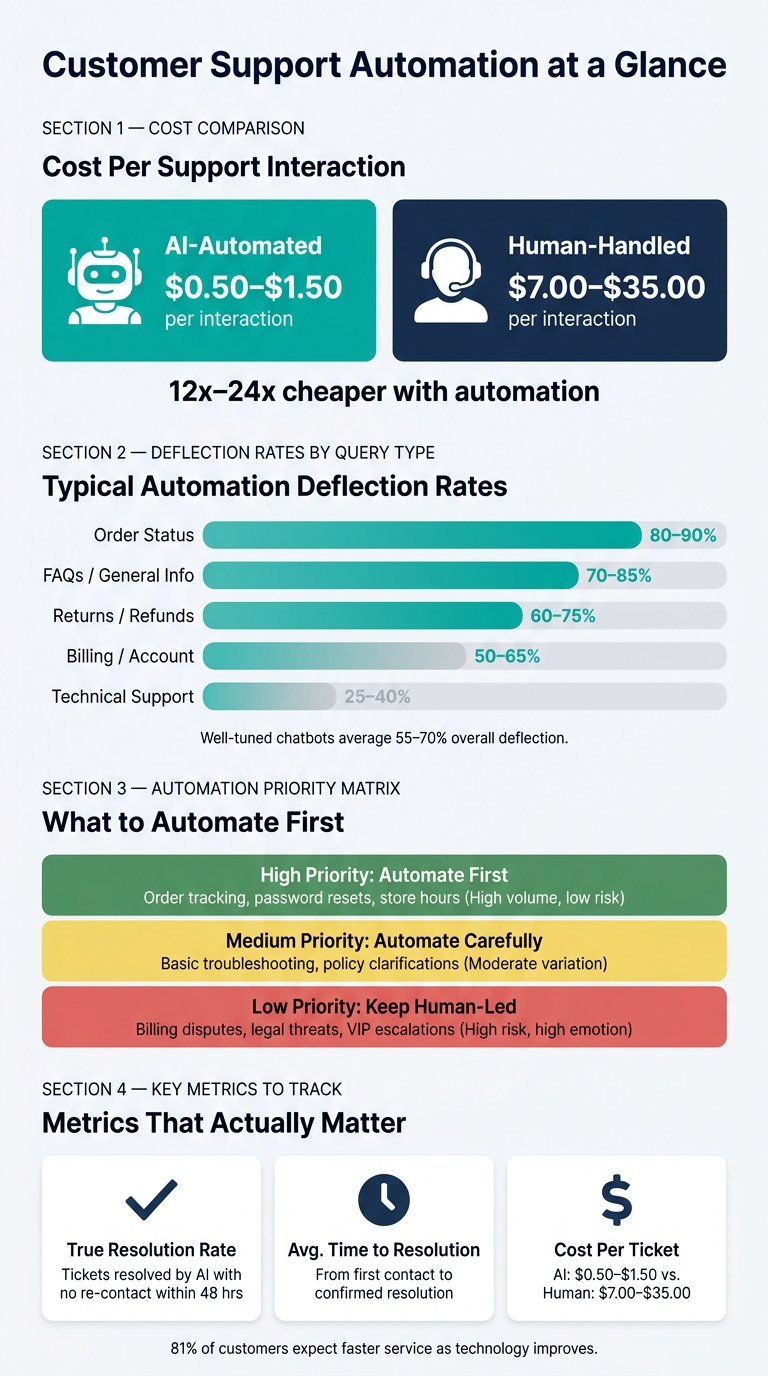
| Priority | Criteria | Examples |
|---|---|---|
| High - automate first | High volume, consistent, low risk | Order tracking, password resets, store hours |
| Medium - automate carefully | Moderate volume, some variation | Basic troubleshooting, policy clarifications |
| Low - keep human-led | High risk, high emotion, complex judgment | Billing disputes, legal threats, VIP escalations |
This ranking shows what to automate first. After that, you can decide the best way to automate each task. For risky tickets, use keyword triggers like "lawyer", "legal," or "complaint" so they go straight to a human.
Once you have your shortlist, the next move is matching each use case to the right type of automation.
2. Choose the Right Automation Use Cases
With your ranked list in hand, turn each task into a clear workflow. Repetitive questions can go to self-service. Incoming tickets can go through routing. Edge cases should move to a human. A simple way to think about this is in three layers: self-service for FAQs and routine answers, augmentation for agent assist, and orchestration for routing and triage [3]. From there, assign each task to self-service, agent assist, or routing.
Automate FAQs, Self-Service, and Routine Answers
A knowledge-base chatbot tied to approved content can handle repeat questions about order status, returns, billing, FAQs, and basic troubleshooting. This setup also works well for multilingual support, especially when the same approved answers need to be used across more than one language.
Retrieval-based chatbots routinely achieve 55–70% deflection rates on well-tuned knowledge bases [3]:
| Query Type | Automation Potential | Typical Deflection Rate |
|---|---|---|
| Order Status | 85–95% | 80–90% |
| FAQs / General Info | 60–80% | 70–85% |
| Returns / Refunds | 60–80% | 60–75% |
| Billing / Account | 50–65% | 50–65% |
| Technical Support | Low | 25–40% |
Automate Ticket Classification and Routing
Once a ticket enters your system, automation can tag it by topic or urgency and send it to the right queue right away. That cuts out manual triage and helps teams respond faster. Speed matters here, but there’s a catch: sensitive or complicated tickets should go to a person at once.
Define What Must Stay Human
If an error could create legal, financial, or trust risk, keep that work with a person. Legal, fraud, medical, financial, VIP, and complex technical issues all need human handling [2]. The same applies to technical problems that don’t have a repeatable answer.
Every flow should include a clear handoff path so customers can reach a person fast. Once the use case is clear, the next step is picking the tools that fit it.
3. Set Up Your Support Automation Stack
Once you know what to automate first, the next step is simple: pair each use case with the right tool layer.
A solid support automation stack usually has four parts:
- Conversational AI for first contact
- Ticket automation for escalations
- A knowledge base for approved answers
- Analytics for performance tracking
The goal is straightforward: solve issues faster without adding headcount at the same pace. As your customer base grows, you can add multilingual and omnichannel support. In most cases, high-volume, low-risk work fits best in conversational AI. Higher-risk issues should stay inside help desk workflows.
Core Tool Categories for Customer Support Automation
Each layer has a clear job.
Conversational AI handles live customer interactions and deflects common questions. Ticket automation routes escalations, applies SLAs, and passes the full conversation history to agents. The knowledge base acts as the source of truth for both, storing approved answers and product documentation. Analytics tracks resolution rate, escalation rate, and cost per ticket.
Here’s a simple breakdown of how each part fits into the stack:
| Tool Category | Primary Function | Setup Complexity | Best-Fit Use Case |
|---|---|---|---|
| Conversational AI / Chatbot | Handles real-time conversations and FAQs | Low to Medium | 24/7 first-line support, high-volume routine questions |
| Help Desk / Ticket Automation | Routes, tags, prioritizes, and escalates tickets | Medium to High | Complex issues, multi-step workflows, SLA management |
| Knowledge Base | Stores approved answers for AI and human agents | Low to Medium | Recurring policy and how-to questions |
| Analytics / Reporting | Tracks resolution rate, escalation rate, and cost per ticket | Low to Medium | Performance optimization, leadership reporting |
| Multilingual / Omnichannel | Adds multilingual and omnichannel coverage | Low to Medium | Multilingual expansion, multi-platform touchpoints |
Treat the stack like one connected system, not a pile of separate tools. That means choosing tools that work together without custom work. Your chatbot should pull from the knowledge base. Your help desk should receive escalations with full context. And your analytics should pull data from both.
How ChatSpark Fits into a Growing Support Stack
ChatSpark sits in the conversational AI layer. It answers routine questions using approved content, captures leads, and routes sales-ready conversations to the right person or system. It also supports websites, messaging channels, and multilingual use from one setup.
After the stack is in place, load your approved content, connect your handoffs, and test one channel first.
4. Build, Test, and Roll Out Your Automation
Next, turn approved content into usable flows, test handoffs, and launch one channel first. Clean content and a tight pilot help small teams handle more volume without adding agents.
Prepare Knowledge Sources and Conversation Flows
Start by cleaning up outdated or conflicting content. Automation is only as good as the source material behind it. Pull everything into your knowledge base, then review it for contradictions and missing pieces.
Typical prep tasks:
| Configuration Task | Key Objective |
|---|---|
| Knowledge Consolidation | Centralize all documentation |
| Contradiction Audit | Remove outdated or conflicting content |
| Gap Filling | Create articles for common cases |
| Escalation Rule Design | Define human-only topics and triggers |
| Persona/Tone Setup | Align AI responses with brand identity |
When you write answers, keep them short and direct in U.S. English: one question, one clear answer. Match the tone your team already uses with customers so replies feel familiar, not stiff or out of place.
Tag content with doc_type, audience, risk_level, and last_updated. That gives the system a better shot at pulling the right answer and sending risky cases to a person when needed. Once the content is cleaned up, build your first flow around a single high-volume use case. After that, pilot the flow in one channel before you expand.
Pilot One Channel and Test Human Handoffs
Choose one high-volume, low-risk use case and run a controlled pilot before adding more channels. Have support agents test the bot as if they were customers. Look for wrong answers, dead ends, and any point where a live-agent path is missing.
Set escalation rules for low-confidence or high-risk requests. And make sure handoffs carry over the full conversation context, so agents can jump in without making customers repeat themselves.
Track escalation rate and resolution rate during the pilot. Use that test run to set your baseline for speed, resolution, and escalation rates.
5. Measure Results and Improve Over Time
Use the pilot baseline to check whether automation is actually cutting response time and cost as volume grows.
Track Speed, Resolution, and Cost Impact
Start with the metrics that show whether automation is helping customers, not just touching tickets:
| KPI | What It Measures | Why It Matters |
|---|---|---|
| True Resolution Rate | Tickets resolved by AI with no re-contact within 48 hours | Better sign of actual outcomes than simple deflection |
| Average Time to Resolution | Time from first contact to confirmed resolution | Shows whether automation is speeding up the support cycle |
| Cost Per Ticket | Average cost to resolve one support request | AI-automated interactions cost about $0.50–$1.50 vs. $7.00–$35.00 for human-handled tickets [4][1] |
Deflection tells you how many tickets the bot touched. Resolution tells you how many it solved. That gap matters.
Teams that focus too much on deflection can end up putting up roadblocks instead of helping people. A bot that replies fast but sends customers in circles isn't doing its job.
AI-automated interactions are roughly 12x to 24x cheaper per interaction [1], so even modest coverage can cut costs in a meaningful way.
Review Logs, Refine Content, and Expand Gradually
When a KPI drops, the logs usually tell the story. Review conversation logs on a set schedule and look for wrong answers, dead ends, and avoidable escalations.
When you find a weak spot, fix the source article first. Then update the workflow. Small content edits can have a big effect on resolution rates.
Expand only when current workflows stay stable.
FAQs
How do I know if a support task is safe to automate?
A task is usually a good fit for automation when it shows up all the time, isn’t too hard, and follows clear rules. Think of the kind of work that has a predictable input and a predictable output.
Good examples include:
- Password resets
- Order status updates
- FAQs
On the other hand, some tasks should stay with people. If a situation calls for empathy, judgment, or the ability to handle curveballs, a human should take the lead. That includes sensitive cases like legal or fraud complaints, billing disputes, and complex troubleshooting.
What should I automate first if my team is small?
Start with high-volume, low-complexity work if you want quick wins. Look at your last 90 days of support data and find the most common repeat request, like order status checks, password resets, or return policy questions.
Then tackle the work in stages. Begin with AI chatbots and self-service knowledge bases to take care of routine requests. Once that’s working well, move to agent response suggestions. After that, step into more complex workflow orchestration.
How long should a support automation pilot run?
There’s no one required timeline, but it helps to set clear checkpoints at 30 days and 90 days. A pilot is a controlled test. You use it to check your assumptions, spot weak points, and tighten your systems before a full rollout.
The first 90 days matter most for tracking metrics and making adjustments. Set aside 8 to 12 hours per week to refine responses and update your knowledge base.