Struggling with too many support tickets? AI can help. By automating repetitive tasks like password resets and order updates, you can cut down ticket volumes and free up your team for more complex issues. Here’s how:
- 73% of customers prefer self-service, but only 14% succeed with current tools. AI bridges this gap with smarter chatbots, intent recognition, and better knowledge bases.
- Analyze your ticket data to identify high-volume, repetitive issues. Focus on tasks like FAQs, order tracking, and simple account updates for automation.
- Set clear escalation rules for complex cases to ensure seamless handoffs to human agents.
- Use AI to improve self-service portals by organizing content and guiding users to the right solutions.
- Track metrics like resolution rates and deflection rates to measure success and refine your AI system.
Example: Unity saved $1.3M by automating 8,000 tickets in January 2026. Tools like ChatSpark start at $19/month, making AI-powered automation accessible for businesses of any size.
AI isn’t here to replace humans - it handles routine tasks so your team can focus on what matters most.
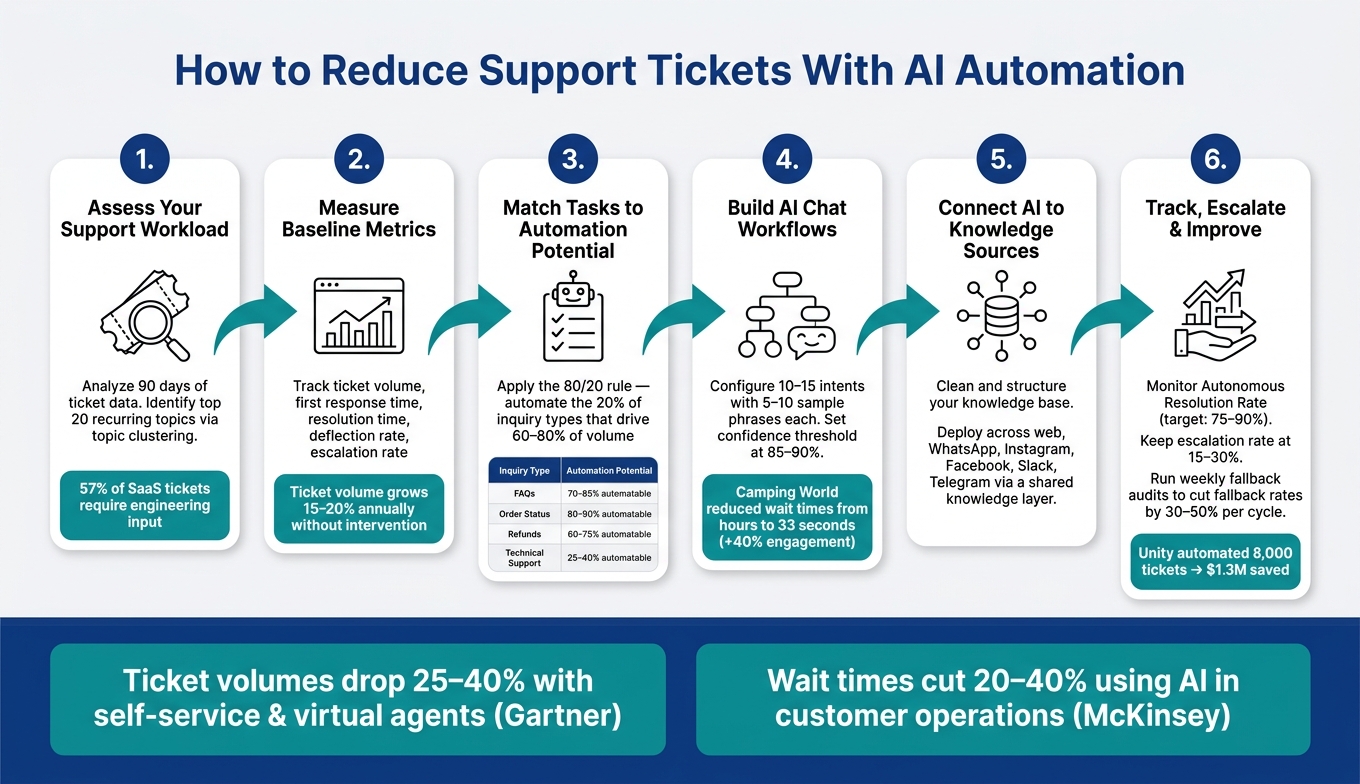
How to Reduce Support Tickets With AI: 6-Step Automation Framework
Assessing Your Current Support Workload
Before diving into automation, it’s crucial to take a hard look at your support queue. Pinpointing the issues that eat up the most time and money ensures you focus on the right problems. Otherwise, you risk automating tasks that don’t really move the needle.
Finding Repetitive and High-Volume Issues
Start by analyzing the last 90 days of ticket data. Group requests by topic to uncover patterns - like recurring questions, high-traffic channels, or issues that keep popping up after being "resolved." This process, known as topic clustering, highlights the repetitive tasks that drain your team’s bandwidth.
For SaaS businesses, sorting tickets into three categories can be particularly helpful:
- Questions that could be answered with documentation
- Issues needing code-level investigation
- Problems tied to specific account data
Here’s a surprising stat: 57% of SaaS support tickets require engineering input to resolve, with each escalation consuming 20 to 45 minutes of developer time [4]. Knowing where your tickets fall helps you zero in on areas where automation could save the most time.
Next, check your help center for your top 20 support topics. If customers can’t easily find relevant articles, they’ll end up submitting tickets instead. A simple search gap analysis - where you test if your help center surfaces the right information - can reveal documentation gaps before you even think about training an AI system [3].
Once you’ve identified patterns and problem areas, it’s time to measure your current performance.
Measuring Your Baseline Support Metrics
With customer issues mapped out, the next step is to measure how your team handles them. These metrics will serve as your "before" snapshot, making it easier to track improvements after automation.
| Metric | What It Measures |
|---|---|
| Ticket volume | Total number of incoming requests (daily, weekly, or monthly) |
| First response time | How quickly agents acknowledge a new ticket |
| Resolution time | The time it takes to close a ticket from the moment it’s opened |
| Deflection rate | Percentage of users who find answers without submitting a ticket |
| Escalation rate | Percentage of tickets passed to senior staff or engineering teams |
One key metric to watch is true deflection. This isn’t just about help center page views - it’s about users who start filling out a ticket form but stop after reading a suggested article. Tracking this gives you a much clearer picture of how effective your self-service tools really are [3].
Keep in mind, support ticket volume tends to grow 15–20% annually [2]. That means the baseline you measure today could look very different a year from now if no changes are made. Capturing these numbers now not only sets a starting point but also makes it easier to prove the return on investment once AI-powered automation is in place.
Matching Support Tasks to AI Automation
Once you've completed your baseline analysis, the next step is to identify which high-volume tasks are suitable for AI automation. Automating the wrong tasks can backfire, leading to customer frustration instead of improved service. The key is to focus on tasks that are repetitive and straightforward.
Sorting Support Requests by Automation Potential
To determine which tasks are good candidates for automation, look at three factors: frequency, predictability, and the level of judgment required. Tasks that occur often, follow a clear pattern, and don’t require much critical thinking are ideal for automation. Examples include:
- Password resets
- Checking order statuses
- Questions about return policies
- Simple account updates
A helpful way to prioritize these tasks is by applying the 80/20 rule. Focus on the 20% of inquiry types that make up the majority (60–80%) of your total ticket volume. Once identified, rank these tasks by how easily they can be automated.
| Query Type | Automation Potential | Typical Resolution Time |
|---|---|---|
| FAQs / General Info | 70–85% | Under 5 seconds |
| Order Status | 80–90% | Under 10 seconds |
| Refunds / Returns | 60–75% | Under 2 minutes |
| Technical Support | 25–40% | Varies (often needs human) |
| Billing Disputes | Low | Escalate to human |
For each type of query, assign a complexity score from 1 to 5. Tasks with scores of 1–2 are the best candidates for automation, while those scoring 4–5 usually require human involvement. These higher-complexity tasks often involve sensitive information, multi-step processes, or nuanced judgment.
Once you’ve prioritized tasks, it’s essential to set clear boundaries for when human agents should step in.
Setting Escalation Rules for Complex Issues
AI performs best when it knows its limits. Create escalation rules to ensure that complex issues are quickly routed to human agents. Triggers for escalation might include:
- Detecting frustration or anger in a customer’s tone
- Requests involving legal or financial disputes
- AI confidence scores dropping below a set threshold (commonly 90%)
For a smoother transition, consider running the AI in a "shadow mode" for 2–4 weeks before going live. In this phase, the AI drafts responses but doesn’t send them directly to customers. Instead, human agents review the drafts, allowing teams to catch errors, fine-tune escalation triggers, and build trust in the system.
This approach has proven effective. For example, in January 2026, Unity implemented AI agents alongside their knowledge base. They automated responses for 8,000 tickets, resulting in $1.3 million in operational savings (Source: ChatSpark Blog, 2026).
Building AI Chat Workflows and Self-Service Options
Once you've pinpointed your automation priorities, the next step is to design AI workflows that streamline customer interactions. This involves setting up chatbots that can accurately understand customer intents and guide them toward resolving their issues independently. The goal is to create a seamless self-service experience that reduces the need for human intervention.
Configuring AI Chatbots for Intent Detection
At the heart of any effective AI chatbot is intent detection. This is the skill that allows the bot to interpret what customers are asking and match their queries to predefined intents. By doing so, the chatbot can retrieve the correct response from your knowledge base.
Here’s how to get started:
- Identify 10–15 customer intents based on the most common ticket categories.
- For each intent, create 5–10 sample phrases that customers might use. For example, "Where's my order?" and "Can you track my package?" could both map to the order status lookup intent.
- Build a decision tree that triggers the appropriate response when the bot’s confidence level is 85–90%. If the bot detects an order status lookup, it should authenticate the user, fetch the order details, and provide the information - all without involving a human agent.
- If the confidence level falls below the threshold, the query should automatically escalate to a human agent, following your predefined escalation rules.
By ensuring your chatbot excels at intent detection, you set the foundation for a smoother self-service experience.
Improving Self-Service Portals with AI
A self-service portal powered by AI starts with a well-structured knowledge base. Organizing the content by customer search behavior makes it easier for AI to guide users to the right information. Here’s an example of how to categorize your knowledge base:
| Knowledge Base Category | Example Topics to Include |
|---|---|
| Product Overview | Features, target audience, comparisons with competitors |
| Pricing & Plans | Subscription tiers, billing options, refund policies |
| Onboarding | Setup guides, required credentials, first steps |
| Technical/How-To | Login issues, password resets, integrations |
| Troubleshooting | Error codes, syncing problems, system crashes |
| Billing & Account | Payment methods, cancelation processes, account updates |
Once your knowledge base is structured, AI can use natural language processing to surface the most relevant article based on a customer’s query. This eliminates the need for customers to navigate menus or perform manual searches. Instead, they’re guided directly to a resolution, reducing frustration and preventing unnecessary ticket submissions.
The impact of combining strong intent detection with an AI-driven knowledge base is clear. For instance, in November 2025, Camping World introduced a virtual assistant called "Arvee." The results? Average customer wait times dropped from hours to just 33 seconds, and customer engagement increased by 40% [1]. This success highlights the power of pairing accurate intent detection with a robust, searchable knowledge base. Together, they create a self-service system that truly works.
Connecting AI to Knowledge Sources and Support Systems
Linking AI to Knowledge Bases and Data Sources
For a chatbot to deliver reliable responses, it needs access to well-maintained, approved content - not just its internal memory. Relying solely on memory can lead to outdated or inconsistent answers. Instead, think of your AI as an orchestration layer that pulls information from trusted sources.
Start by connecting your AI to your most important content: public help center articles, product documentation, FAQ pages, refund policies, and internal troubleshooting guides. But don’t just connect content as-is - clean it up first. Remove duplicate articles, standardize headings, and make sure each article focuses on a single issue or task. Clean, well-organized content makes it easier for AI to match customer questions to the right answers. Once your core knowledge base is ready, set up topic-based routing rules so the AI knows where to search first based on the type of question. For example, billing-related questions should pull from billing FAQs or refund policies before falling back to general support content. If the AI’s confidence in an answer drops below a certain threshold, it should surface the top relevant articles or escalate the query.
Content governance is also crucial. High-risk topics like pricing or account-access policies need frequent reviews and updates, while general how-to content can follow a slower update schedule. Make sure the AI’s retrieval index refreshes automatically whenever the source content changes to keep responses accurate.
When it comes to ticketing, the AI should only create a ticket if it can’t resolve an issue on its own. When it does escalate, it should provide agents with a full conversation summary, the identified issue category, customer details, and any troubleshooting steps already taken. This ensures agents have all the context they need, reducing back-and-forth and speeding up resolutions.
Once your AI is connected to reliable sources, you can extend its capabilities across all your support channels.
Deploying AI Across Multiple Support Channels
A centralized knowledge layer ensures consistent customer support, no matter the channel. Customers often choose the most convenient channel at the moment, so it’s essential to provide the same quality of support across your website, WhatsApp, Instagram, Facebook, and other platforms. The secret? A shared knowledge layer - a single source of approved content, routing rules, and escalation processes that powers every channel.
ChatSpark’s Pro plan enables omnichannel deployment, integrating web chat, WhatsApp, Instagram, Facebook, Slack, and Telegram. All these channels pull from the same knowledge base and business logic, ensuring customers get the same answers and next steps, no matter where they reach out. Without this consistency, you risk eroding customer trust with conflicting information.
However, each platform has its own quirks. Social channels, for example, require shorter, publicly appropriate responses and stricter moderation. Messaging apps like WhatsApp can use quick-reply buttons and rich media, which are great for guided troubleshooting. Meanwhile, authenticated web chat allows for more detailed, account-specific actions like checking orders or managing subscriptions. Before rolling out your AI across all platforms, test its ability to handle identity verification and agent handoffs on each channel individually. What works on your website might not translate seamlessly to a messaging app, so adjustments may be necessary to fit the unique constraints of each platform.
Tracking Performance and Improving AI Over Time
To streamline your support operations, it’s essential to continuously monitor and refine your AI’s performance. Once the AI is deployed, the real challenge begins: evaluating how well it solves real-world problems. This ongoing assessment builds on your baseline metrics and drives improvements over time.
Key Metrics to Measure Automation Success
Metrics need to be analyzed together to get a clear picture of your AI’s effectiveness. For instance, a high containment rate (conversations resolved without escalation) might seem impressive - until you realize users are stuck in frustrating loops rather than having their issues resolved.
A more reliable measure is the Autonomous Resolution Rate, which tracks the percentage of issues the AI resolves completely, without human involvement. This metric provides a clearer view of performance compared to simple deflection rates, which only measure how many users avoided opening a ticket - even if they left unhappy. High-performing AI systems typically achieve a 75–90% resolution rate for repetitive tasks [5].
Here’s a quick reference for healthy performance benchmarks:
| Metric | Healthy Range | Warning Sign |
|---|---|---|
| Resolution Rate (FCR) | 65–90% | Below 40% [5] |
| CSAT | Above 80% | Below 60% [5] |
| Escalation Rate | 15–30% | Above 40% [5] |
| Fallback Rate | Below 10% | Above 20% [5] |
Pay close attention to your fallback rate, which measures how often the AI fails to provide a relevant response. This metric can signal customer satisfaction issues weeks before they show up in CSAT scores, giving you a head start to address gaps in your knowledge base [5].
Deflection is another important metric, and it comes in two forms:
- Explicit Deflection: When users confirm that the AI’s response resolved their issue.
- Implicit Deflection: When users read an article or solution and don’t open a ticket within 48 hours [6].
Although implicit deflection is often overlooked, it offers a deeper understanding of how effective your self-service options are.
By closely monitoring these metrics, you can identify opportunities to improve both your AI models and your knowledge base.
Updating AI Models and Knowledge Content
Real-world conversation data is one of the best tools for improving your AI. Start by analyzing 90 days of support history to identify the 20% of ticket categories that account for 80% of your volume. These categories represent the best opportunities for automation, focusing on repetitive tasks and gaps in self-service.
From this analysis, create a "golden dataset": a collection of 100–200 real customer questions paired with verified correct answers. This dataset acts as a benchmark for testing every AI model update before deployment, helping you catch potential regressions early.
For ongoing improvements, conduct weekly fallback audits. Export logs, review the top 10 unhandled topics, and update your knowledge base accordingly. Research suggests that this approach can reduce fallback rates by 30–50% per cycle [5]. Similarly, set aside 30 minutes each week to review escalated cases where the AI failed to meet its confidence threshold. This process helps identify patterns that require new content or adjustments to routing rules.
Encourage your support agents to flag instances where AI responses fall short. Their feedback can quickly pinpoint knowledge gaps, making it easier to address them. Over time, this feedback loop - combined with regular updates to your knowledge base - ensures your AI stays accurate and aligned with evolving products, policies, and customer needs.
Setting Limits for Complex or Sensitive Cases
Continuing from the established escalation rules, this section outlines when human intervention becomes critical. Even the most advanced AI systems have boundaries, and recognizing these limits helps maintain customer trust.
Identifying Cases That Need a Human Agent
Not all support requests are suitable for automation without losing quality. High-stakes issues - like permanent account deletions, large financial transactions, or critical service cancellations - require human confirmation to ensure accuracy and accountability [7].
In addition to high-stakes transactions, certain scenarios should automatically trigger a handoff to a human agent. The table below highlights common situations and their corresponding escalation priorities:
| Category | Trigger Keywords | Escalation Target | Priority |
|---|---|---|---|
| Legal/Compliance | lawsuit, GDPR, hacked, breach | Compliance / Security | Immediate |
| Revenue/Sales | pricing, quote, upgrade, demo | Account Executive | High |
| Retention | cancel, too expensive, switching | Success Manager | High |
| Emotional/Frustration | useless, agent, human, ridiculous | Support Lead | Medium |
For cases involving legal, fraud, or high-impact personal matters, human agents should always take over [7].
These guidelines align with the previously discussed escalation rules, ensuring AI handles only what it is equipped to manage effectively.
Balancing Automation with Human Support
To maintain an effective balance between automation and human involvement, a structured operational framework is essential. A Three-Tier Framework can help streamline this process:
- Tier 1: Fully automated responses for routine FAQs.
- Tier 2: AI manages initial triage, but humans oversee more complex issues.
- Tier 3: High-stakes cases are directly assigned to human agents [7].
A practical benchmark for Tier 1 automation is to focus only on topics where human agents previously sent AI-drafted responses without changes during an assisted phase. If agents frequently edited or rewrote AI suggestions, that topic isn't ready for full automation [7].
Another safeguard is the AI's confidence score. When the confidence level drops below 60%, the system should proactively connect the customer with a human agent rather than risk providing an unreliable response. As Devashish Mamgain, CEO of Kommunicate, explains:
"If your [escalation] rate is 0%, you aren't providing perfect service; you are likely trapping users in 'bot hell.'" [8]
A healthy escalation rate - typically between 15% and 30% - indicates that the AI is making informed decisions about its own limitations, rather than leaving customers stuck in frustrating loops.
Conclusion: Building a Leaner, More Efficient Support Operation
Simplify your support process by automating repetitive tasks, allowing your team to focus on critical, decision-heavy work. Here’s a clear path to get started: review ticket volumes, spot recurring issues, match tasks with automation opportunities, create chat workflows, integrate AI into your knowledge base, track performance, and set clear escalation boundaries.
When done right, the impact is undeniable. Gartner reports that companies using self-service tools and virtual agents have seen ticket volumes drop by 25–40%. Similarly, McKinsey highlights that businesses leveraging AI in customer operations can cut wait times by 20–40% while lowering costs - without compromising satisfaction. The outcome? Faster resolutions for customers and fewer routine tasks for your team.
Tools like ChatSpark make this process manageable for entrepreneurs and businesses of any size. ChatSpark enables AI-driven support across platforms like your website, WhatsApp, Instagram, Facebook, Slack, and Telegram. It handles routine inquiries, starting at just $19/month, making it a fit for small businesses and scalable for larger enterprises.
The smartest way to begin is by keeping it simple: choose two or three common ticket types, automate those first, and track metrics like deflection rates and customer satisfaction. Once you see the results, expand gradually. This step-by-step approach minimizes risk and provides real data to guide your strategy.
AI isn’t here to replace humans - it’s here to amplify their efforts. Let AI tackle repetitive tasks while your team focuses on complex and sensitive cases. The result? A faster, more consistent, and scalable support operation.
FAQs
What’s the fastest way to pick which tickets to automate first?
Take a close look at your support data to pinpoint the 20% of topics responsible for 60–80% of your ticket volume. Once identified, assign each topic a complexity score ranging from 1 to 5. The goal? Zero in on high-frequency, low-complexity issues - these are the ones that are both common and easy to resolve.
Examples of such issues include:
- Password resets
- Order status updates
- Simple billing questions
By automating these straightforward tasks, you can achieve quick wins, cutting down the workload for your support team while improving response times for customers.
How do I prevent customers from getting stuck in “bot loops”?
To prevent customers from feeling trapped in endless bot interactions, it's crucial to establish clear paths for escalation. Set up triggers that route more complicated issues - like billing disputes or legal matters - straight to human agents. Incorporating tools like sentiment analysis can help detect signs of frustration or repeated unsuccessful attempts, prompting timely escalation. Always offer an easy "escape hatch" by allowing customers to request a human agent at any time with simple phrases like "speak to a person."
What data does an AI support bot need to resolve issues correctly?
A reliable AI support bot thrives on a well-organized knowledge base. This should include FAQs, product catalogs, support documents, and records of past ticket resolutions. With tools like Retrieval-Augmented Generation (RAG), the bot can pull up-to-date, company-specific details to address customer inquiries accurately.
To enhance its effectiveness, integration with CRM or helpdesk systems is crucial. This allows the bot to access real-time customer data, such as purchase history or account details, ensuring responses are not only accurate but also personalized.
For troubleshooting, the bot must be equipped with comprehensive documentation. This includes error codes, diagnostic details, and clear, step-by-step instructions. Such resources enable the bot to provide targeted and precise solutions to technical issues.