If your customers switch from chat to email to phone, they expect you to remember the conversation. Most teams still don’t. In non-unified setups, 56% of customers say they have to explain their issue again when they move between channels.
Here’s the short version: I’d use conversational AI to connect web chat, email, SMS, social messages, and voice into one support flow. That means:
- one shared view of the customer
- the same answers across channels
- faster routing to the right agent
- less repeat work for both customers and support teams
- lower cost per conversation
- better retention and CSAT
The business case is clear. Companies with strong omnichannel support keep 89% of customers, while weak engagement keeps 33%. And when context moves with the customer, support gets smoother, agent research time can drop by 23%, and order-tracking flows can cut handle time by 25%–40%.
What matters most is not putting a bot on every channel. It’s building one connected system that can:
- answer common questions
- track orders and appointments
- route by intent and urgency
- keep conversation history across channels
- hand off to agents with a short summary
- support people in more than one language
If I were summarizing the article in one line, it would be this: conversational AI turns disconnected support channels into one continuous customer conversation.
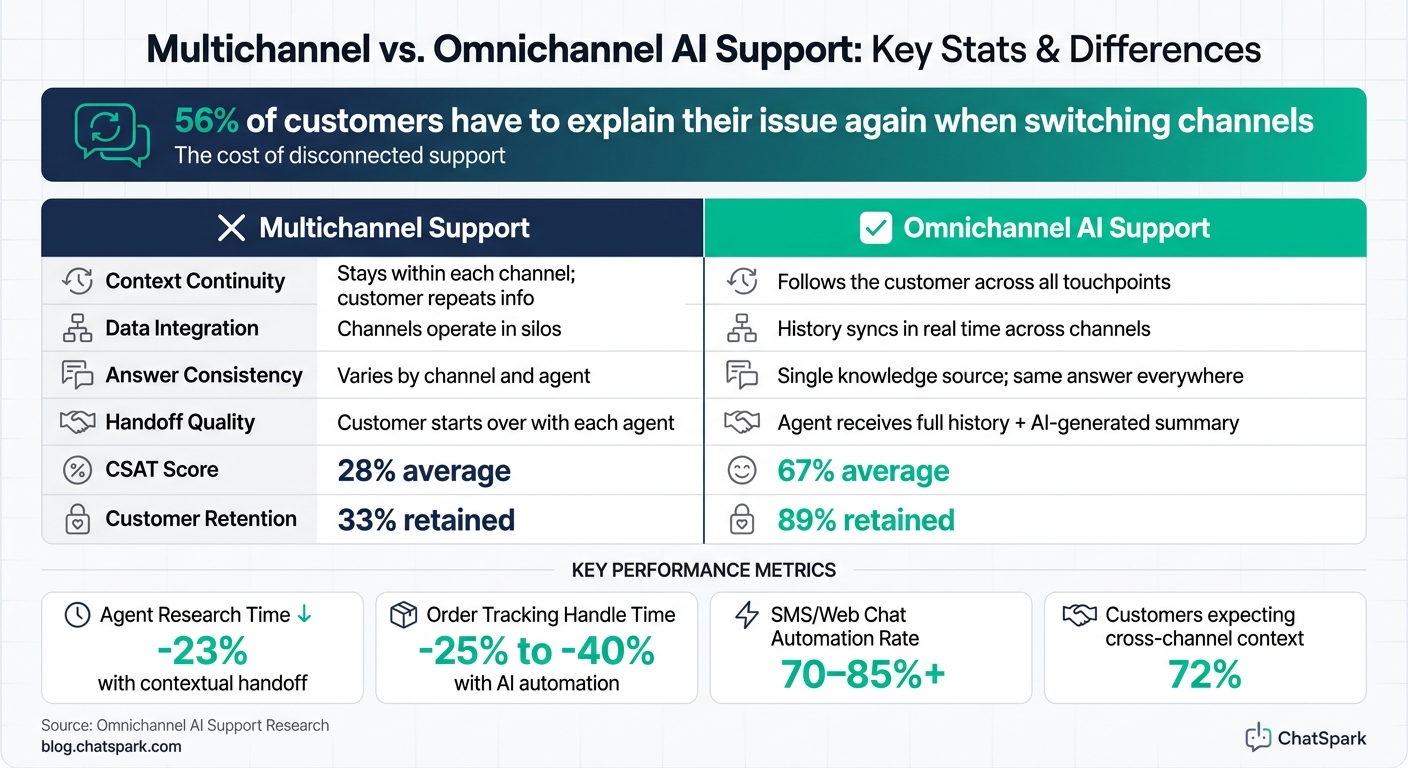
Multichannel vs. Omnichannel AI Support: Key Stats & Differences
What conversational AI does across web chat, email, SMS, social, and voice
Conversational AI figures out intent, answers questions, starts actions, and passes tougher cases to the right agent - so customers get help faster without having to start from scratch. The job stays the same across channels: solve simple issues fast, then route the rest with full context.
What changes is how it works in each place. Web chat can step in early for quick questions. Email works better for detailed follow-up. SMS stays short and to the point for status updates. Social often shifts issues into DMs for triage. Voice can gather details on the spot when the issue is urgent.
Multichannel vs. omnichannel support
Most companies already support customers in more than one channel. The snag is that those channels often work like separate islands. If someone emails about a billing issue and then calls later, they shouldn't have to explain the whole thing again. That's multichannel support: you have coverage, but not connection.
Omnichannel support works differently. A customer's history, context, and intent move with them from one channel to the next. When they call, the agent already sees the earlier email. The AI can turn that past exchange into a short two- or three-sentence summary, so nobody has to go in circles.
| Feature | Multichannel Support | Omnichannel AI Support |
|---|---|---|
| Context Continuity | Stays within each channel; customer repeats info | Follows the customer across all touchpoints |
| Data Integration | Channels operate in silos | History syncs in real time across channels |
| Answer Consistency | Varies by channel and agent | Single knowledge source; same answer everywhere |
| Handoff Quality | Customer starts over with each agent | Agent receives full history and AI-generated summary |
The business impact is hard to ignore. Omnichannel support lifts CSAT scores to 67%, while disconnected multichannel setups average just 28% [4][1].
That only works when teams use the same tools, the same data, and the same rules.
The main tools businesses use
Three tools handle most of the heavy lifting in an omnichannel AI setup. AI chatbots take care of self-service on web chat and messaging apps. They answer FAQs, check order status, and solve simple requests without bringing in a person.
Virtual assistants handle more involved back-and-forth conversations across voice and messaging channels. They can walk customers through jobs like returns or account changes without losing the thread halfway through.
Then there are agent-assist tools, which help behind the scenes. They give agents real-time suggestions, pull up the right knowledge base articles, and sum up past conversations so agents can reply faster and with fewer mistakes across chat, email, and voice.
Why consistency matters for customer experience
Customers expect the same answer no matter where they reach out. If each channel uses its own knowledge base, mismatched answers are almost guaranteed - and trust can slip fast.
A single source of truth solves that problem. Every channel - web chat, SMS, social DM, and phone - pulls from the same policies and product data. So if a customer asks about a refund on WhatsApp, they get the same accurate answer as someone who calls.
That matters because it cuts repeat work, speeds up replies, and makes handoffs smoother. The next section breaks down the core capabilities behind that: automated answers, routing, handoff, and context retention.
Core capabilities that make conversational AI useful in omnichannel support
Four capabilities make omnichannel support work: automated answers, smart routing, context retention, and multilingual support. Together, they turn separate channels into one connected support system. That connection matters most when you look at what happens across routing, conversation history, and language.
Automated answers, routing, and handoff to agents
Conversational AI handles the common requests that clog support queues fast - order status checks, appointment confirmations, and return policy questions - without pulling in a human agent. A simple example: AI can confirm appointments by SMS or send order status updates in web chat.
When a request goes beyond automation, NLU and sentiment analysis step in. They detect intent and urgency, then send the conversation to an agent with the right skills and current availability. Before the agent joins, they get a summary of the issue and the steps already taken. That can cut agent research time by 23% [2][5] and reduce delays that happen when context gets lost between channels.
Context retention and multilingual support
Context retention keeps customers from having to repeat themselves. The AI connects conversations through identifiers like an email address or phone number, tying each interaction to a single customer timeline. That gives agents access to the full history before the conversation even starts.
For U.S. businesses that serve people in more than one language, multilingual support helps keep answers consistent and reduces friction across every channel. The AI detects the customer’s language and responds across chat, email, SMS, social DMs, and voice. The result is a support experience that stays consistent no matter where the customer reaches out.
Channel-by-channel capability overview
Each channel behaves a little differently, but the core functions stay the same. The table below shows each channel’s role and how automation levels change by channel [2].
| Capability | Web Chat | SMS / WhatsApp | Social Messaging | Voice | |
|---|---|---|---|---|---|
| FAQ Automation | High (real-time) | Medium (auto-reply) | High (instant) | High (DMs) | Medium (IVR/AI) |
| Order Tracking | Yes (widget) | Yes (link/text) | Yes (proactive) | Yes (DMs) | Yes (live transcription) |
| Context Retention | Full session history | Threaded history | Persistent history | Cross-platform sync | Live transcription |
| Escalation Style | Live agent transfer | Ticket creation | Callback scheduling | Agent inbox routing | Human transfer |
| Multilingual | Real-time translation | Translated replies | Native-language SMS | Auto-detected DMs | Real-time speech translation |
| Automation Rate | 70–85% | 40–60% | 80%+ | 70%+ | 30–50% |
Automation rates are highest in SMS and web chat, and lowest in voice. Those differences shape how teams use each channel in practice.
High-impact use cases and the business results they improve
Once automation, routing, and context retention are set up, the biggest gains usually come from high-volume workflows. That’s where teams feel the pressure first, and where better systems can move the numbers fastest.
FAQ automation and order tracking
The clearest early wins are FAQ automation and order tracking. They’re usually the simplest workflows to automate, and they’re easy to measure without much guesswork. The same basic setup also works for proactive updates and escalation.
Order tracking pushes self-service beyond static help pages and into live status checks. That matters because customers don’t just want answers - they want the current answer. Real-time tracking can cut AHT by 25–40% and improve FCR by 15–20% [2][5].
Proactive updates and human escalation
Conversational AI can send proactive notifications through SMS or messaging apps, which cuts down on inbound follow-up. Instead of making people come to you for an update, the update comes to them.
Replies stay in the same thread, which keeps the exchange simple. And if the conversation needs to move to a human agent, the handoff keeps the earlier context in place. That’s a big deal when customers switch channels or continue a thread later. In fact, 72% of customers expect agents to have that context across channels [3].
Use cases mapped to outcomes
The table below shows which business result each use case affects most directly.
| Use Case | Primary Outcome | Key Metric Impacted |
|---|---|---|
| FAQ Automation | Reduced repetitive workload | Backlog and cost per contact |
| Order Tracking | Instant self-service resolution | First-Contact Resolution (FCR) |
| Proactive Updates | Reduces inbound contacts | Total Ticket Volume |
| Smart Routing | Faster expert matching | Average Handle Time (AHT) |
| Contextual Handoff | Faster agent resolution | CSAT & Agent Productivity |
| Agent-Assist | Faster in-conversation responses | Lower handle time (47% faster) [3] |
How to implement, measure, and scale conversational AI across channels
What an omnichannel setup needs
Once automation is doing its job, the next move is tying the systems behind it together. An omnichannel setup needs more than a chatbot on every app. It needs a connected AI layer, a shared knowledge base, CRM and help desk integration, and unified customer records so a person's email, phone number, and social handles all point to one profile. That way, context stays steady across channels [2].
This matters for a simple reason: customers don't think in channels. They think in problems. If someone starts with email, follows up by text, and later sends a message on social, the system should still know who they are and what already happened.
Routing matters too. Intent- and sentiment-based routing helps move harder cases to the right team faster [2]. So instead of sending every issue down the same path, the system can sort by what the customer needs and how urgent the situation feels.
The KPIs that show whether it is working
After deployment, measure whether automation is cutting friction or just moving it somewhere else. The best KPIs show both team efficiency and customer results.
| KPI | What It Measures | Why It Matters |
|---|---|---|
| First Response Time | Time from customer message to first AI or agent reply | Directly tied to customer satisfaction |
| Containment Rate | Percentage of conversations resolved without a human agent | Signals automation effectiveness and cost savings |
| Resolution Time | Time it takes to fully resolve an issue | Lower resolution times usually mean a smoother support experience |
| CSAT Score | Customer satisfaction rating after the interaction | Reflects overall experience quality |
| Cost per Conversation | Cost to handle each support interaction | Helps show ROI and operational efficiency |
| Agent Productivity | Conversations handled per agent per hour | Shows whether routing is improving team output |
| Escalation Rate | Percentage of conversations transferred to a human agent | Identifies where automation falls short and where channels need tuning |
Don't read these numbers in isolation. They tell the full story when viewed together.
For example, high containment with low CSAT is a red flag. It often means the AI is ending conversations before customers feel helped. On the flip side, faster first response time looks good, but if resolution time stays high, the handoff or routing process may still be weak.
Tracking response time, containment, and CSAT side by side helps confirm whether support quality is staying steady across every channel.
Conclusion: What businesses should take away
The goal isn't just more automation. It's steady support across every channel.
Conversational AI works best as a connected system. It should pull from the same knowledge sources, keep customer context intact, and improve routing and escalation over time.
The payoff can be big. Companies with strong omnichannel strategies retain an average of 89% of their customers, compared to just 33% for those with weak engagement [1]. A smart place to begin is with your highest-volume channels. Then connect your data and expand from there.
FAQs
How does conversational AI keep context across channels?
Conversational AI keeps context across channels with a central intelligence layer that ties each touchpoint into one customer journey.
It connects interactions to a single, persistent customer profile through identity resolution. So details like conversation history, sentiment, and issue status stay available from one channel to the next. That means the AI - or a human agent - can pick up right where the last interaction left off.
Which support channels should we automate first?
Start with the two support channels that already get the most customer activity. Don’t try to launch on every platform at once. Focus first on the three channels your audience uses most.
Put your attention on channels that deal with common, repeat requests like order status, returns, and password resets. Then roll out to more channels over time as you collect cross-channel analytics and build a single view of each customer.
How do we measure ROI from omnichannel AI support?
Measure ROI by tracking your starting point and the changes that happen over time in key metrics like response times, CSAT, and first-contact resolution in one central dashboard.
Also look at lower support costs from automating routine questions, higher agent output from less context-switching, and gains in customer retention and lifetime value that come from smooth cross-channel journeys.