If your support queue keeps growing, conversational AI can cut wait times, lower cost per contact, and keep agents focused on harder cases.
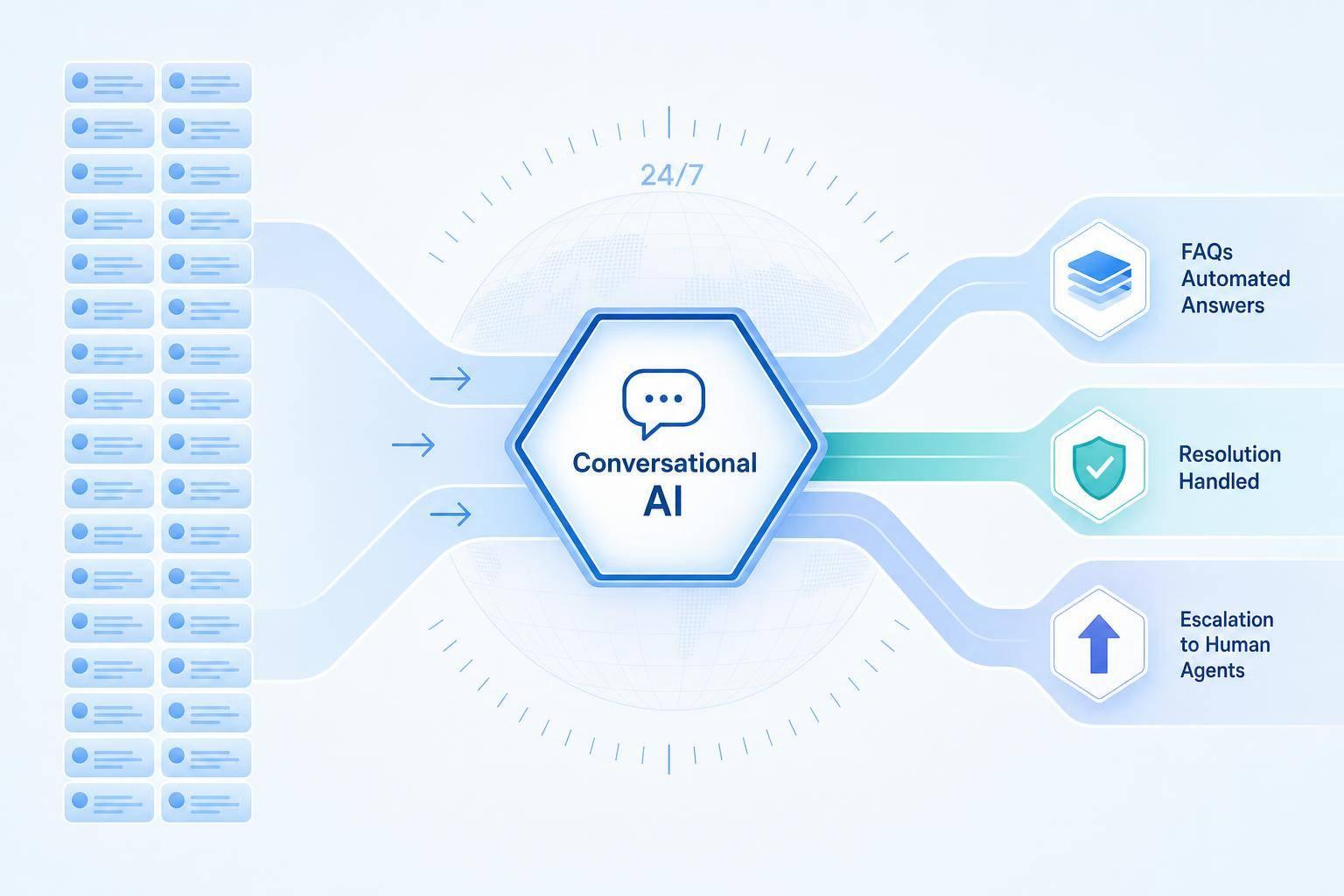
I’d sum it up like this: when support volume gets too high, AI helps in four main ways. It handles repeat questions, sorts incoming requests, passes tough issues to the right person, and gives customers help 24/7 across channels and languages. That matters when email replies average 7 hours, 4 minutes, assisted support can cost about $13.50 per contact, and phone calls can run $17+ per call.
Here’s the short version:
- AI handles simple requests first like order status, password resets, billing questions, and returns
- AI triages tickets by intent, urgency, and account context before an agent steps in
- AI cuts repeat work by giving the same policy-based answer across chat, email, and social
- AI routes hard cases like billing disputes, privacy requests, and VIP issues to a human
- AI works after hours when about 35% of requests come in outside business hours
- AI supports multilingual service with one knowledge base across channels
- AI helps teams measure results through containment, first-response time, handle time, and backlog age
The core idea is simple: use AI for low-risk, high-volume work, and send high-risk or high-value cases to people.
That’s how I’d handle more support demand without adding headcount at the same pace.
High-Volume Support Tasks Conversational AI Can Automate First
Not every support request needs a person. Some interactions eat up agent time fast and clog the queue. They’re also the easiest place to start with automation because the pattern is simple and the answer is usually clear.
Answering FAQs and Repetitive Requests at Scale
These tasks work well for automation because they tie right into back-end systems. A conversational AI can verify a customer, pull live order details, and share shipping dates, carrier info, and delay updates without an agent stepping in.
Billing requests follow the same path. The AI can pull account details, show recent invoices, and guide the customer through changing a payment method, with charges shown in U.S. dollars.
The big win here is scale. One AI can manage many conversations at the same time. During busy periods, that gap matters. It helps stop queues from piling up, which lets teams handle more volume without adding headcount at the same rate.
Using Intent Detection to Triage Tickets Before an Agent Gets Involved
Once routine requests are handled, conversational AI can sort what’s left. Intent detection looks at the message and figures out the customer’s goal, urgency, and next step: self-service, routing, or escalation.
Messages about payment failures, outages, and cancellations should move up the line, especially when the customer sounds frustrated. Routine questions can stay automated. That keeps urgent tickets from getting lost in the queue.
Cutting Repeat Work for Support Teams
After triage, automation still saves agents a lot of repeat work. Instead of rewriting the same return policy answer all day, they can spend time on issues that call for judgment, like:
- complex billing disputes
- policy exceptions
- emotionally sensitive conversations
Automation also helps keep policy responses consistent. When conversational AI handles routine replies, each customer gets the same accurate, policy-aligned answer no matter the time of day or channel. Personal details can still be added through dynamic content from CRM records, such as mentioning a specific order or noting a customer’s loyalty status. But the policy itself stays uniform and compliant.
It also keeps answers aligned across channels and shifts.
Examples include order tracking, password resets, billing questions, and return requests.
How AI Routes Complex Issues to the Right Human Agent
When to Automate vs. Route vs. Escalate: AI Support Decision Guide
After routine requests are automated, the next step is routing the issues AI can't finish. That's what keeps unresolved cases from piling up in the main queue.
Intent-Based Routing and Escalation Rules
AI detects intent first, then routes the case based on intent, account value, status, and history. So the same message can go to different teams depending on who the customer is and what's already happened on the account.
For example:
- High-value billing disputes go to finance
- Technical errors go to specialists
- Spanish-language cases from U.S.-based customers go to bilingual agents
That matters because routing isn't just about the topic. It's also about risk, revenue, and customer context.
Passing Conversation Context So Customers Do Not Repeat Themselves
When a handoff happens, the system should pass over the transcript, intent, and other key details. A solid handoff package usually includes the chat transcript or a plain-language summary, the detected intent, extracted entities like order IDs or invoice numbers, the customer's CRM profile, and the steps already attempted.
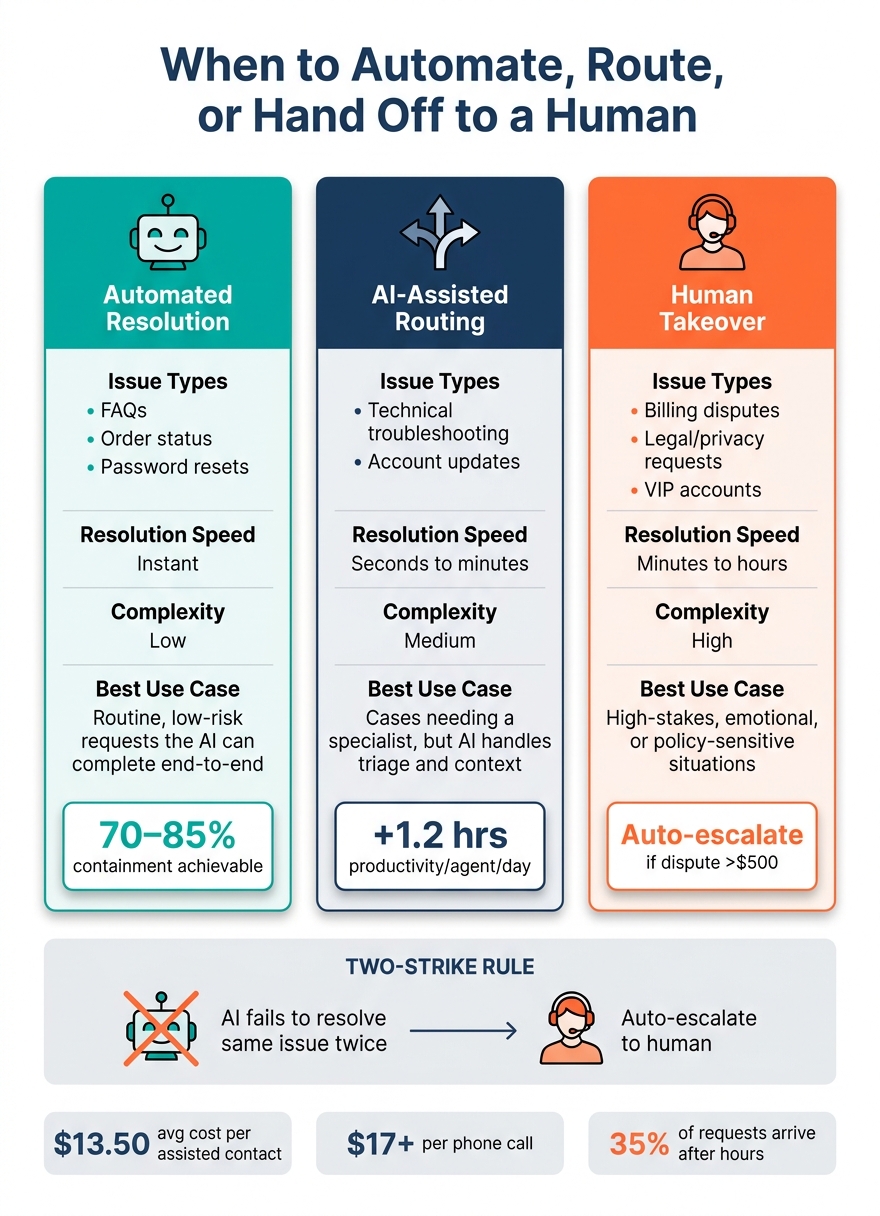
When agents get a handoff summary instead of a long raw transcript, they can skip the awkward restart and move straight to fixing the problem. AI-powered classification and automatic routing can add 1.2 hours of productivity per day per agent in the contact center.[1]
The message shown to the customer during the handoff should be clear too. They should know what's happening, where the case is going, and what comes next.
When to Automate, Route, or Hand Off to a Human
The decision usually comes down to complexity, risk, customer importance, and whether the issue touches policy or regulation. Here's how that breaks down:
| Issue Type | Resolution Method | Speed | Complexity | Best Use Case |
|---|---|---|---|---|
| FAQs, order status, password resets | Automated resolution | Instant | Low | Routine, low-risk requests the AI can complete end-to-end |
| Technical troubleshooting, account updates | AI-assisted routing | Seconds to minutes | Medium | Cases needing a specialist, but AI handles triage and context |
| Billing disputes, legal/privacy requests, VIP accounts | Human takeover | Minutes to hours | High | High-stakes, emotional, or policy-sensitive situations |
Many teams use a two-strike rule: if the AI fails to resolve the same issue twice, it escalates on its own. For high-risk categories like disputes over $500, data privacy requests, or accounts flagged as high churn risk, the case goes straight to a human no matter how confident the AI seems.[2]
Use routing rules to send complex, risky, or high-value cases to the right person on the first pass, so unresolved work doesn't jam the queue.
How 24/7 Multilingual and Omnichannel Support Cuts Wait Times
After routing, the next choke point is coverage: after-hours demand, language needs, and messages coming in from different channels.
Always-On Support for After-Hours and Peak Demand
About 35% of customer requests come in outside normal business hours. Without automation, those requests usually sit in a queue until the next morning. Conversational AI changes that by giving customers an immediate first reply at any hour. It can also handle routine questions on the spot, so agents come back to a backlog that's shorter and easier to sort through.
The same thing happens during spikes in demand. Promotions, product launches, billing deadlines, outages, and holiday shopping can send inquiry volume up fast. AI can handle common questions like:
- order status
- outage updates
- return policies
That takes pressure off human agents, who can spend their time on cases that call for judgment. It also helps companies avoid the cost and staffing strain of 24/7 human coverage.
Multilingual Service With a Consistent Brand Voice
In the United States, more than 1 in 5 residents speak a language other than English at home [3]. On top of that, 76% of online shoppers prefer to buy when information is available in their native language, and 40% say they will never buy from a site that isn't in their language [3][4]. For support teams, that can affect response speed, trust, and conversion in a direct way.
Multilingual AI lets businesses reply in a customer's preferred language without hiring separate teams for each one. ChatSpark trains once on approved English content and then replies in the customer's native language on its own. When language detection is paired with a controlled knowledge base, the AI pulls from verified content instead of making up unapproved answers. That helps keep policy wording accurate and brand tone steady across markets.
For regulated content like billing, legal, or healthcare, human review before launch is a must. Even a small wording change can create compliance risk. This setup also eases queue pressure because it handles more requests without adding language-specific staffing.
One Automation Layer Across Website, Messaging, and Social Channels
Running separate workflows for website chat, WhatsApp, Instagram, Facebook, Telegram, and Slack creates duplicate work and makes it easier to miss messages. Omnichannel AI fixes that by using one shared automation layer across those channels, with a single knowledge base acting as the source of truth.
A shared conversation history keeps support steady when customers switch channels mid-conversation. ChatSpark supports website chat, Instagram, Facebook, WhatsApp, Telegram, and Slack in one system, so teams don't need separate scripts for each platform. The payoff is simple: fewer duplicate workflows, fewer missed messages, and faster first replies across every touchpoint.
Once coverage is steady across channels and languages, the next step is measuring whether wait times and backlog are actually going down.
How to Measure Results and Roll Out Conversational AI
Metrics That Show Whether Support Volume Is Under Control
The main goal isn't just to answer more chats. It's to see whether conversational AI is cutting volume, shortening wait times, and shrinking backlog.
Once automation and routing are live, look at what happens to queues, response times, and older open tickets. Four metrics matter most: containment rate, first-response time, average handle time, and backlog age.
| Metric | What It Measures | AI Impact |
|---|---|---|
| Containment Rate | Percentage of conversations fully resolved by AI without agent involvement | Handles FAQs, password resets, and status checks end to end - fewer inbound tickets |
| First-Response Time (FRT) | Time from customer message to first reply | AI replies in under 5 seconds, 24/7 [6] - higher CSAT, fewer abandonments |
| Average Handle Time (AHT) | Agent time spent per interaction | AI pre-collects intent and account details before handoff - more cases resolved per agent per day |
| Backlog Age | Open tickets older than a defined SLA window, such as 24–48 hours | AI auto-resolves simple tickets and triages the rest - fewer SLA breaches |
There's one catch with containment: don't look at raw containment alone. Track contained resolution. A case should count only if it stays closed for 24–48 hours.
That matters because a bot can appear to "resolve" a case that comes right back into the queue a few hours later. If you're not careful, the metric can look better than the customer experience feels.
Mature AI deployments handling transactional requests like order status or account lookups can reach 70–85% containment [5]. More conversational support tasks usually fall in the 50–65% range [5]. Before AI, most teams begin at 0–10% [7].
A Practical Rollout Plan for Support Teams
Once you have a baseline, roll AI out in stages. That gives the team room to measure each intent before opening the floodgates.
Start with the 10–20 highest-volume, lowest-complexity intents from the last 60–90 days of tickets [5][8]. In plain English, begin with the stuff that repeats all day and doesn't need much judgment.
A good first wave often includes things like:
- Order status
- Password resets
- Basic account lookups
- Simple policy or FAQ requests
Launch on one channel first, usually website chat. Label it clearly as an AI assistant, and make the handoff to a human easy. If people feel trapped in the bot, they'll let you know fast.
When containment and CSAT hold steady for those intents, move to intent detection and triage. At that stage, the AI can classify incoming conversations, collect key details like order IDs or device types, and send the case to the right queue before an agent steps in.
From there, you can layer in multilingual support and more channels like WhatsApp, Facebook Messenger, or SMS using the same automation logic and knowledge base.
When you're picking an AI system, three things tend to matter most:
- No-code or low-code setup so support managers - not only engineers - can update flows
- Native integrations with your CRM or help desk so context passes cleanly between AI and agents
- Real-time dashboards that show containment rate, FRT, AHT, and backlog trends
Conclusion: Scaling Support Without Scaling Headcount at the Same Rate
ROI shows up in fewer human-handled tickets, lower cost per resolution, and fewer overtime spikes.
For U.S. decision-makers who need to justify the spend, the math is pretty direct: multiply tickets avoided by the average cost per agent-handled contact, add avoided overtime or headcount, and compare that total with the platform cost.
With the right metrics and rollout sequence, businesses can absorb spikes without adding agents at the same pace. That means lower cost, shorter queues, and support that grows without matching headcount growth.
FAQs
How do I know which support requests to automate first?
Review the last 90 days of your support data to spot repeat, high-volume requests. A good place to start is the 20% of inquiry categories that drive 60% to 80% of total ticket volume.
The best early use cases are simple, predictable requests. Think password resets, order tracking, return policies, and basic FAQs.
Start with low-complexity issues that don't need careful judgment or a human touch in tense moments. Once that’s working well, you can branch out over time.
When should AI hand a customer over to a human agent?
AI should hand off a conversation to a human agent when it can’t solve the problem well enough, or when the moment calls for human empathy and judgment.
Common triggers include low confidence - often below 40% to 75%, depending on how complex the issue is - plus direct customer requests, negative sentiment, repeated failed attempts, and high-stakes cases like legal matters, billing disputes, or security concerns.
How long does it take to see ROI from conversational AI?
Businesses can start seeing ROI fast, often within the first 30 days, especially when they begin with high-volume inquiries.
The bigger payoff usually comes over 6 to 12 months. As the AI learns from more interactions, containment and resolution rates tend to climb, which leads to stronger results over time.