I’d start a chatbot-to-agent upgrade with one read-only task: checking order status. The goal isn’t a better-sounding reply. It’s a result your system can verify - or a handoff when the agent can’t finish safely.
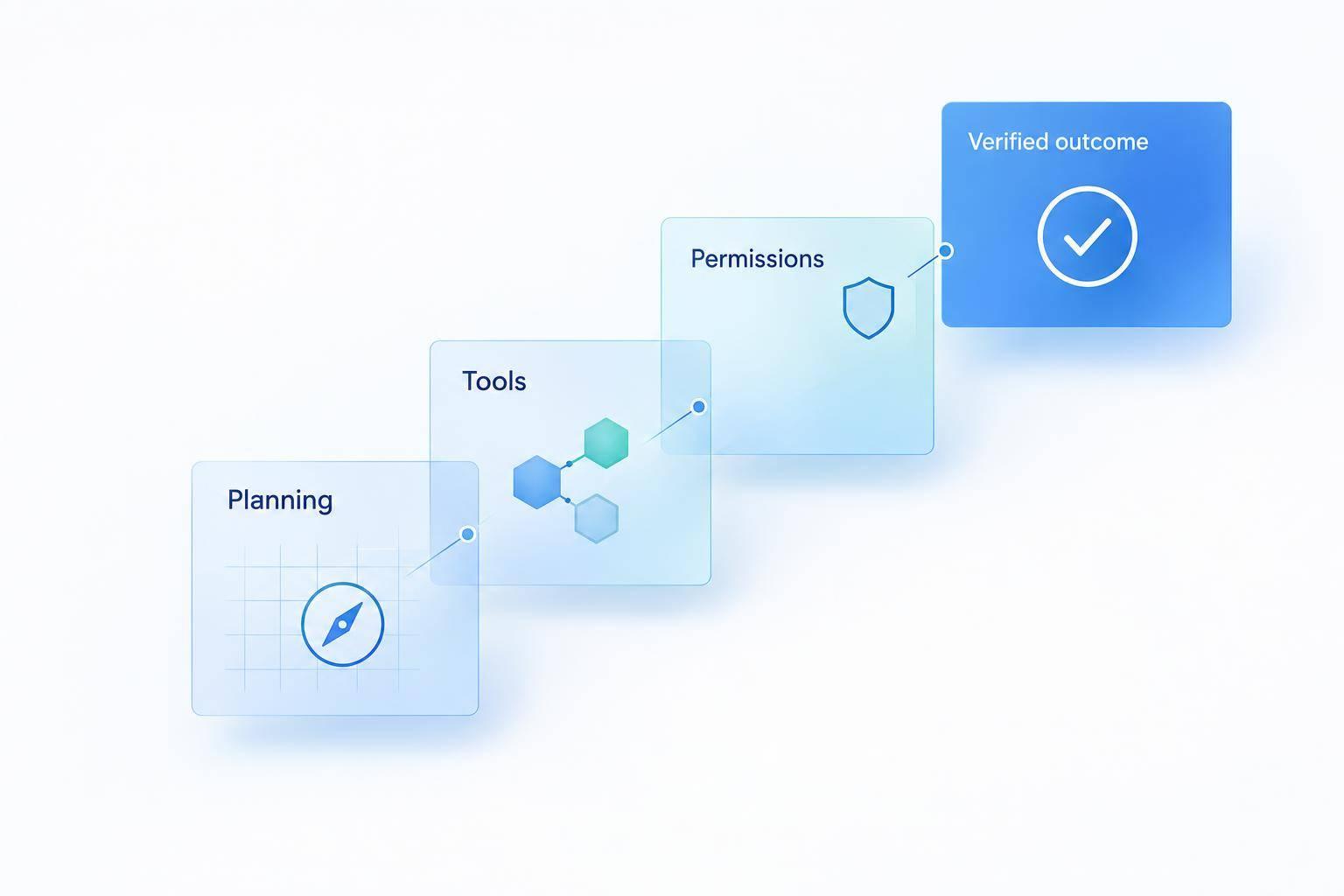
Here’s the plan I’d follow:
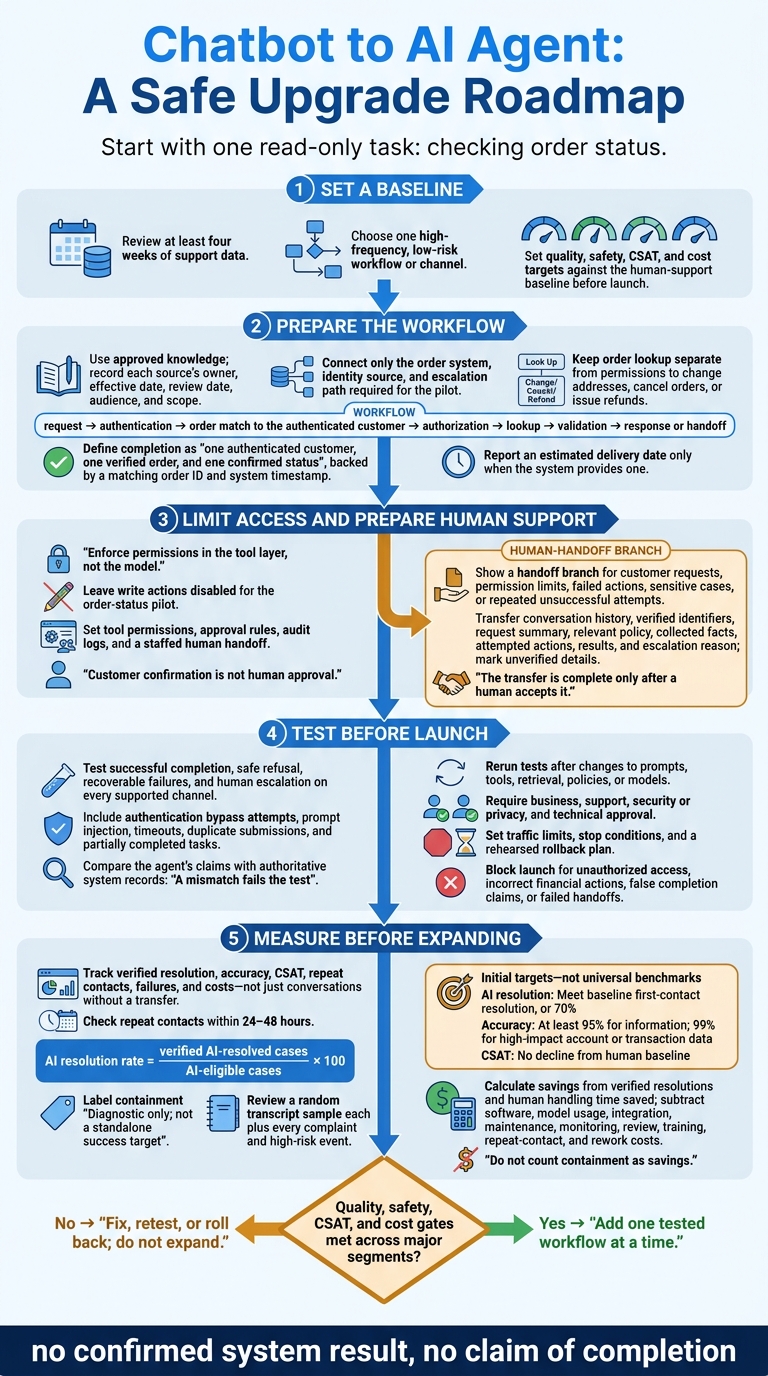
- Set a baseline: Review at least four weeks of support data and choose a low-risk task.
- Prepare the workflow: Use approved knowledge, connect only the required systems, and check customer identity before accessing records.
- Limit access: Set tool permissions, approval rules, logs, and a staffed human handoff.
- Test before launch: Check answers, system results, failures, and recovery on every supported channel. Set a rollback plan.
- Measure before expanding: Track verified resolution, accuracy, CSAT, repeat contacts, and costs - not just conversations without a transfer.
My rule: no confirmed system result, no claim of completion. I’d add the next workflow only after the pilot meets its quality, safety, and cost targets.
Chatbot to AI Agent: A Safe Upgrade Roadmap
2. Prepare Knowledge and Connect Support Systems
Once you’ve selected the pilot, prepare the approved content it will use.
Organize Approved Content and Brand Rules
Gather current order-status help articles, shipping policies, and lookup instructions for ChatSpark’s knowledge retrieval. Record each source’s owner, effective date, review date, audience, and scope. Resolve policy conflicts before indexing, and keep internal instructions separate from customer-facing answers. Require a content review whenever relevant policies change.
Set tone and format rules, but let policy - not writing style - determine eligibility and deadlines. Specify U.S. spelling, month-day-year dates, and clearly labeled time zones. Check that retrieval selects the correct shipping policy for the customer’s product and region. Support staff should also be able to inspect the approved source behind each answer.[3][4]
With the content ready, connect only the systems the pilot needs.
Connect Only the Systems Your Pilot Needs
For the order-status pilot, identify the order system, identity source, and escalation path. Document each integration’s inputs, authentication, response fields, timeouts, rate limits, and success signal. Define exactly what each integration does before enabling it. Keep order lookup separate from permissions to change addresses, cancel orders, or issue refunds.[6][7]
Check support for each channel separately. Before enabling lookup on a channel, test identity verification, conversation continuity, attachment handling, and transfer to a human. If a channel can’t safely verify the customer’s identity, move the lookup to a secure channel instead of requesting sensitive information there.
Next, map the path from the customer’s request to verified completion.
Map the Workflow From Request to Confirmation
Document the full path: request → authentication → order match to the authenticated customer → authorization → lookup → validation → response or handoff.
Define completion as one authenticated customer, one verified order, and one confirmed status, backed by a matching order ID and system timestamp. Report an estimated delivery date only when the system provides one.
Set clear paths for missing records, stale or conflicting data, and timeouts. Log the request, decision, action, result, timestamp, and system identity so staff can reconstruct incidents without storing unnecessary sensitive data.[5]
3. Set Permissions and Human Handoff Rules
Once the workflow is defined, set clear limits on what the agent can do, who approves sensitive actions, and when humans take over. The agent may complete only tasks it has permission to finish.
Set Access Limits and Approval Requirements
Enforce permissions in the tool layer, not the model. For the order-status pilot, leave write actions disabled. Before adding a task, assess its data sensitivity, business impact, reversibility, and fraud exposure. Use a permissions table to assign access and accountability. Block any tool that hasn't been approved.[8][9]
| Task | Required data | Allowed action | Identity verification | Approval gate | Owner |
|---|---|---|---|---|---|
| Check order status | Order number, customer identifier, fulfillment status | Read order and shipment records | Match two approved identifiers | None for standard requests | Support operations |
| Update shipping address | Order record, fulfillment state, new address | Edit address only before shipment cutoff | Step-up verification using account or order details | Human approval if the order is high value or already packed | Fulfillment support |
| Issue refund or credit | Order, payment, refund history, policy eligibility | Create refund request within approved limit | Strong account verification | Automatic only below a defined limit; human approval above it or for exceptions | Billing team |
| Change payment method | Account profile and payment-token metadata | Initiate secure payment-update flow; never handle raw card data | Step-up authentication | Human review for unusual activity or repeated failures | Payments team |
| Change identity information or account ownership | Account status, identity records, and security information | Submit a review request only | Strong identity verification | Human approval required | Account security |
Set per-transaction and rolling per-customer limits before enabling sensitive tools. Customer confirmation is not human approval. Before execution, show the exact record, change, amount, and expected result. Then require the execution layer to recheck authorization and tie approval to that specific action through a single-use approval ID that expires.[8][11][12]
Define Failure Responses and Audit Logs
Set fixed fallback rules. Ask only for missing information needed to proceed, and stop when records conflict. If systems are unavailable, offer a retry or human handoff. Send policy exceptions to the policy owner, suspected fraud to Account Security, and urgent safety matters through a priority human route.[8][10]
Treat uncertain results as pending. Check the status before retrying so the agent doesn't duplicate charges, refunds, or credits. Never report completion without confirmation from the authoritative system.[8][10]
Log identity-check outcomes, the policy version, tool arguments, authorization decisions, approval IDs, system results, and escalation reasons. Store logs outside the agent's control, limit access, and set retention rules. Redact secrets and personal data that isn't needed. Set alerts for repeated denials, cross-customer access attempts, and unusual transaction volumes.[9][11]
When the agent can't finish safely, pass the case to a human with the full context.
Give Human Support the Full Handoff Context
Keep a human-support option available. Transfer when the customer asks or when permission limits, failed actions, sensitive cases, or repeated unsuccessful attempts prevent resolution.[1]
Give the receiving team the conversation history, verified identifiers, request summary, relevant policy, collected facts, attempted actions, results, and escalation reason. Clearly mark unverified details so support can continue without treating them as confirmed facts.[1]
Assign an accountable queue, priority, and acceptance deadline, plus a fallback queue or callback route. Show customers whether they're queued or assigned. The transfer is complete only after a human accepts it.[1]
4. Test Answers, Actions, and Recovery
Once permissions and handoff rules are set, test the AI agent in controlled conditions before it takes any live action.
Test Common Requests and Edge Cases
Build a test matrix for each workflow before allowing live actions. Record the expected answer, identity checks, permitted tools, required approvals, system changes, customer notification, and log entry. Use preview or sandbox tools to test successful completion, safe refusal, failures the agent can recover from, and escalation to a human.[8][2]
Cover incomplete requests, misspellings, unclear wording, policy exceptions, repeat contacts, and third-party requests.[13]
Include prompt injection, hidden instructions in uploads or retrieved documents, and attempts to bypass authentication or approval rules. Check whether these attempts lead to tool use without permission or data disclosure. Also test timeouts, duplicate submissions, and partially completed tasks. Rerun the test set after any change to prompts, tools, retrieval, policies, or models.[15][16][8]
Check System Results on Each Channel
Test the same workflow on every channel the pilot will use.
Compare what the agent says it did with the actual record. For refunds, check the refund ID, amount, currency, status, and timestamp. For account updates, compare the records before and after the change. For tickets, verify the queue, priority, and transcript. A mismatch fails the test, even if the reply sounds correct.[13][8]
Run controlled live tests with test accounts and known records on each deployed channel. Start with low-risk, read-only requests, then test writes that can be reversed. Check profile matching, conversation history, attachments, notifications, and handoffs. Repeat the tests with interruptions, duplicate messages, delayed webhooks, and channel switching. Passing on one channel does not validate another.
Create a Launch and Rollback Checklist
Use the test results to decide whether the pilot is ready to launch.
Require documented approval from the business owner, support lead, security or privacy reviewer, and technical owner. Before launch, confirm that knowledge sources are current, logs exist, recovery has been tested, and handoffs reach a staffed queue.
Assign one launch owner, set traffic limits and stop conditions, and rehearse disabling write actions or routing all traffic to human support. Block launch if tests reveal access without permission, incorrect financial actions, false claims of completion, or failed handoffs. Preserve logs and reconcile affected records before restarting.[14][2][8]
5. Launch, Measure, and Expand the Pilot
After launch, focus on live performance rather than test results. Limit the pilot to one high-frequency, low-risk workflow or channel. Each week, review a random sample of workflow transcripts large enough to spot recurring issues, plus every complaint and high-risk event. Log each defect with an owner, severity, fix, and retest result. Track transcript evidence, not just summary metrics.[19][1][22]
Measure Resolution Separately From Containment
A closed conversation doesn’t mean the problem was solved. Verify the requested outcome through system records or customer confirmation, and check for repeat contacts within 24–48 hours. Calculate resolution by dividing verified AI-resolved cases by cases the AI was allowed to handle. Exclude test chats, duplicates, spam, unsupported intents, and cases sent straight to a human before the agent could act. Report those exclusions separately. Before launch, give each metric an owner and set targets against the human-support baseline.[17][18][20]
| Metric | Definition and calculation | Initial target | Review schedule | Corrective action |
|---|---|---|---|---|
| AI resolution rate | Verified AI-resolved cases ÷ AI-eligible cases × 100 | Meet baseline first-contact resolution, or 70% | Weekly | Improve instructions, retrieval, workflow logic, or eligibility rules |
| Containment rate | Conversations without human involvement ÷ AI conversations × 100 | Diagnostic only; not a standalone success target | Daily dashboard, weekly review | Investigate unresolved exits |
| Accuracy | Correct answers or actions ÷ audited cases × 100 | At least 95% for information; 99% for high-impact account or transaction data | Weekly audit | Fix sources, tool mapping, validation, or guardrails |
| First-response time | Time to first meaningful response | Meet or improve channel baseline | Daily | Optimize latency, routing, prompts, or system calls |
| Time to resolution | Time from request to verified completion | Meet or improve human baseline | Weekly | Remove unnecessary turns and workflow delays |
| Escalation rate | Human transfers ÷ AI-handled cases × 100 | Set by task complexity; investigate increases | Weekly | Improve coverage or escalate earlier when risk is high |
| Failure rate | Failed, incorrect, duplicate, timed-out, or policy-violating actions ÷ attempted actions × 100 | Zero actions without permission or irreversible failures; very low ceiling for reversible failures | Daily alerts, weekly review | Disable workflow, review logs, and require relaunch approval |
| CSAT | Positive responses ÷ survey responses × 100, or average 1–5 score | No decline from human baseline | Weekly; monthly trend review | Review negative transcripts, tone, wait times, and handoffs |
These targets are starting gates, not benchmarks that fit every pilot.[19][1][21]
Compare Results and Calculate ROI
Once you’ve verified resolution, compare the pilot with human-only handling over the same period. Match AI and human cases by intent, complexity, channel, language, and customer segment. Report CSAT separately for AI-resolved, escalated, and human-only cases. Check weak segments even when the overall average improves.[19][1][21]
Calculate net savings in USD using verified AI-resolved cases × human handling time saved per case × fully loaded labor cost per minute. Then subtract software, model usage, integration, maintenance, monitoring, review, and training costs. Deduct repeat-contact and rework costs, too. State whether the savings represent reduced spending, avoided hiring, or freed staff capacity. Do not count containment as savings.[19][1][23]
Conclusion: Expand Only Tested Workflows
Use the pilot results to decide whether a workflow is ready to expand. Add one workflow at a time, and only when quality, safety, CSAT, and cost meet the pre-launch gates across major segments. Keep sensitive decisions under human control. Treat rollback as a normal safety step - not a sign that the automation project failed.[18][19][1]
FAQs
How do I know my chatbot is ready for an AI agent upgrade?
Your chatbot is ready for an AI agent upgrade when support tasks involve multiple steps, independent decisions, or coordination across CRM and billing systems.
Start by reviewing 90 to 120 days of support tickets to find high-volume, repetitive tasks. Bring your documentation into a structured knowledge base and confirm that your systems support real-time API access. Set baseline metrics, such as cost per ticket, and check compliance with applicable standards, such as SOC 2, or regulations, such as HIPAA.
Can I use an AI agent with legacy support systems?
Yes, AI agents can connect to legacy support systems, including CRMs, help desks, e-commerce platforms, and internal databases, through available APIs or connectors.
Start by mapping your workflows. Then check that the agent has the read and write permissions it needs to check order status, update account details, or complete other tasks. Keep data handling secure, and set clear triggers for handing complex or high-stakes interactions to a human.
How long should I run my AI agent pilot?
Timing depends on how complex your business is. Start with one to two weeks in shadow mode: the AI drafts responses for internal review but doesn’t send them to customers.
In month two, launch a live pilot with 10%–20% of customer traffic. Set aside 8–12 hours each week to fine-tune responses and review transcripts for quality and safety.
In month three, expand to other channels and intents once your metrics stay stable.