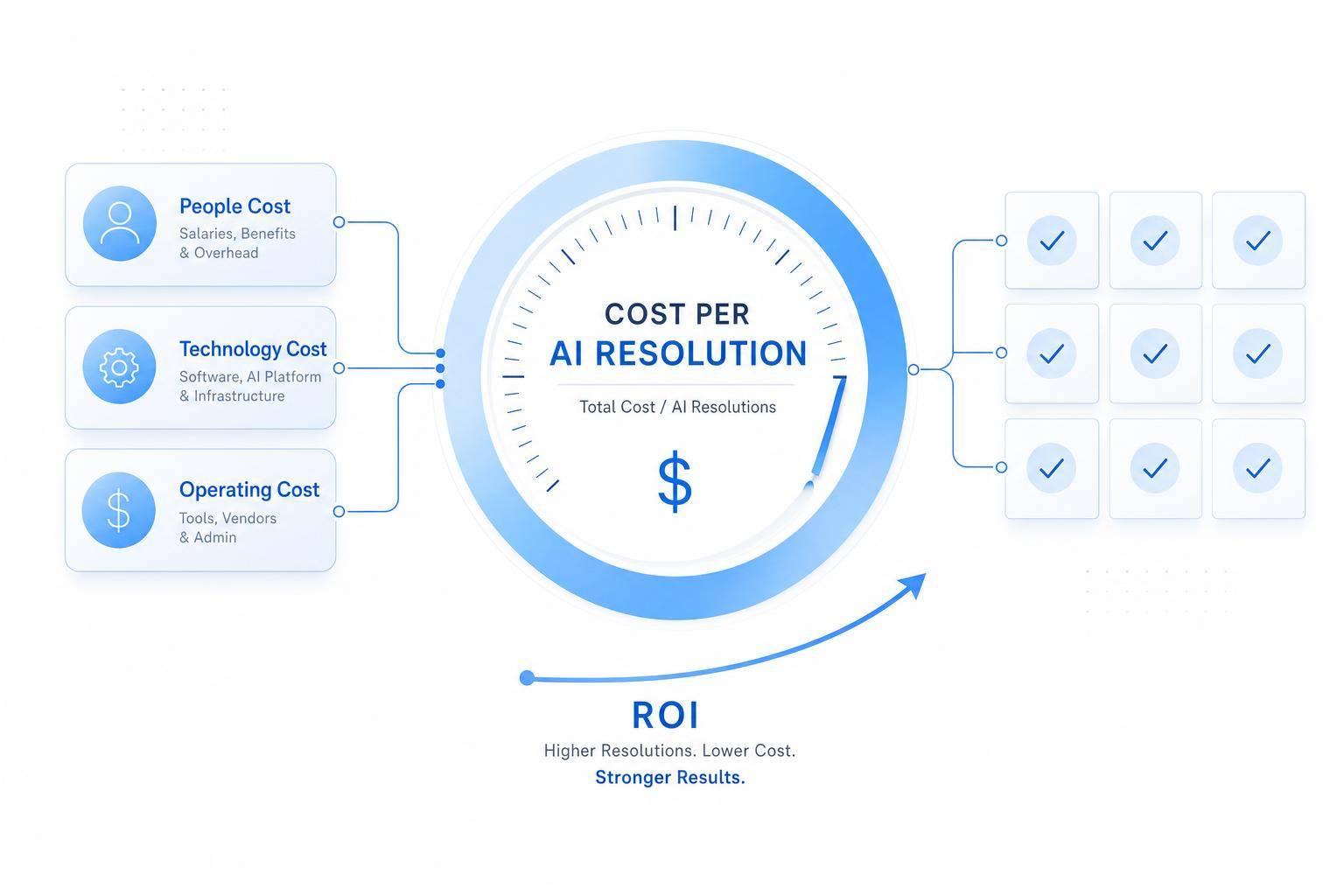
If you want to show AI support ROI, start with one number: cost per AI resolution. I calculate it by dividing total AI support cost by the number of verified AI-resolved cases in the same time period.
That matters because cost per contact can hide waste. Four chats about one billing problem may look cheap on paper, but it is still just one resolution. A resolution-based view shows what you actually pay to fix customer issues.
Here’s the short version:
- I count all AI program costs in one time window: AI-powered customer service platform, usage, setup spread over time, training, QA, upkeep, and agent transfer cost.
- I count only verified AI resolutions: cases the AI finished, with no agent join and no fast reopen.
- I compare that result to human cost per resolution.
- Then I turn the gap into ROI with direct savings, handle-time savings, and deflection savings.
- I back up the math with containment rate, AI resolution rate, CSAT, first response time, and resolution time.
A simple example from the article makes the point fast: if an AI support program costs $6,500.00 in August 2026 and resolves 3,250 issues on its own, the cost per AI resolution is $2.00.
Use this flow:
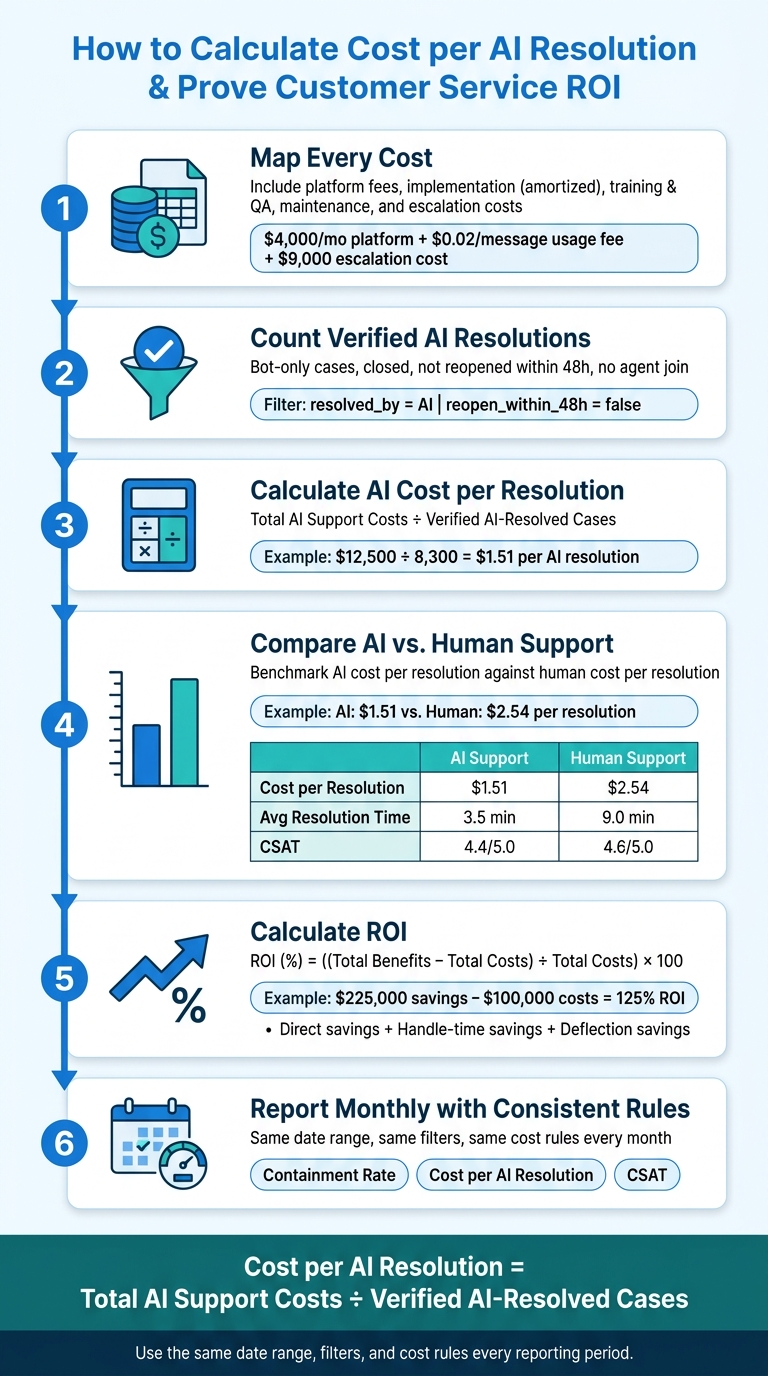
- Map every cost
- Count verified AI resolutions
- Calculate AI cost per resolution
- Compare AI vs. human support
- Turn the savings into ROI
- Report it each month with the same rules
Here’s the fastest way to think about the numbers:
| Metric | What I look at | Why it matters |
|---|---|---|
| Cost per AI resolution | Total AI cost ÷ verified AI resolutions | Shows unit cost to solve issues with AI |
| Containment rate | AI-resolved cases ÷ AI-started conversations | Shows how much work stays out of the queue |
| Escalation rate | AI-started conversations sent to agents | Shows extra labor cost AI still creates |
| Human cost per resolution | Human support cost ÷ agent-resolved cases | Gives the benchmark for savings |
| ROI | (Benefits − Costs) ÷ Costs × 100 | Turns support data into finance language |
The main rule is simple: use the same date range, the same filters, and the same cost rules every month. That is how I keep the math clean and make the ROI case easy to defend.
How to Calculate Cost per AI Resolution & Prove Customer Service ROI
Step 1: Map every cost in your AI support program
Use one reporting window for every cost and volume input. That can be a month or a quarter. The key is consistency. If you want an accurate cost per AI resolution, every number needs to come from the same time frame.
Once that window is locked in, map every cost tied to your verified AI-resolved cases.
Include platform, setup, training, maintenance, and escalation costs
Your total should include five main cost buckets:
- Platform costs: ChatSpark subscription, usage fees, and add-ons. For example, a mid-sized U.S. SaaS company might pay $4,000.00 per month plus $0.02 per AI message. At 150,000 messages, that adds $3,000.00 in usage fees.
- Implementation: Initial configuration, CRM or ticketing integrations like Salesforce or Zendesk, SSO, and workflow builds. Teams often track these as implementation costs in the first quarter.
- Knowledge base training and QA: Labor spent curating FAQs, writing intents, labeling data, and testing flows. For example, 40 hours a month at $50.00 per hour adds $2,000.00.
- Ongoing maintenance and optimization: Monthly tuning, content updates, performance monitoring, A/B testing, and integration maintenance. For example, 20 hours at $60.00 per hour adds $1,200.00.
- Escalation to human agents: The cost of AI-initiated cases that transfer to support agents, including handle time, supervision, and tooling. For example, 3,000 escalated cases a month at 6 minutes each and a $30.00 hourly fully loaded rate adds $9,000.00.
Escalation costs are easy to miss because they often sit inside general support spend. That’s why it helps to tag AI-to-agent transfers separately in ChatSpark analytics, pull agent handle time from your ticketing system, and calculate that cost on its own. Otherwise, it gets buried.
Spread one-time costs across the period you measure
Setup and implementation are paid upfront, but the value shows up over many months. If you load the full amount into a single month, that month will look way more expensive than it should.
Instead, amortize one-time costs across a reasonable reporting horizon. If your ChatSpark implementation cost was $120,000.00 and you expect to use it for 24 months, allocate $5,000.00 per month. If you report quarterly, that same cost spread across 8 quarters is $15,000.00 per quarter.
Write the amortization assumption in your spreadsheet. That way, stakeholders can see exactly how you got the number.
Use a simple cost-tracking sheet with consistent time periods
Use one row per cost category, and make sure every row uses the same reporting period.
| Cost Category | Description | Reporting Period Amount (USD) | Cost Type | Owner | Source System | Notes/Assumptions |
|---|---|---|---|---|---|---|
| Platform subscription | ChatSpark flat monthly fee | $4,000.00 | Recurring | Director of Support | ChatSpark Billing | Monthly fee |
| Usage fees | $0.02/message × 150,000 | $3,000.00 | Recurring | Director of Support | ChatSpark Analytics | August usage period |
| Implementation (amortized) | $120,000 setup ÷ 24 months | $5,000.00 | One-time (amortized) | IT Operations | ERP | 24-month amortization window |
| Knowledge base training & QA | 40 hrs × $50.00/hr | $2,000.00 | Recurring | Support Operations | Payroll | Internal labor |
| Ongoing optimization | 20 hrs × $60.00/hr | $1,200.00 | Recurring | Automation Owner | Payroll | Monthly tuning and monitoring |
| Escalated agent cost | 3,000 cases × 6 min × $30.00/hr | $9,000.00 | Recurring | Support Operations | Zendesk + Payroll | Fully loaded agent rate |
| Total | $24,200.00 |
One common mistake is mixing a mid-month billing cycle with calendar-month ticket data. That throws off the math fast. Pull ChatSpark usage exports for the same window as your ticketing system export, using MM/DD/YYYY date filters.
If the AI was not live for the full period - for example, it launched on August 10 - only count conversations and costs from that date forward. Then note that partial period in your assumptions column.
With total cost mapped out, the next step is to divide it by verified AI resolutions.
Step 2: Calculate cost per AI resolution and compare it to human support
Now take the same reporting period from Step 1 and divide total AI support cost by verified AI-resolved cases.
Apply the core formula using verified AI-resolved cases
Here’s the formula:
Cost per AI resolution = Total AI support costs ÷ Number of successfully resolved AI-handled cases
Stick to verified AI-resolved cases only. That means bot-only cases that were closed and not reopened within your chosen window.
In ChatSpark analytics, use these filters:
resolved_by = AIreopen_within_48h = false
In your ticketing system, keep only records where:
- Agent joined = No
- Status = Closed
A simple example makes this clear. If total AI support costs are $12,500.00 and verified AI-resolved cases are 8,300, then:
$12,500.00 ÷ 8,300 ≈ $1.51 per AI resolution
That number is your baseline. Save the date, cost total, and case count each month. Use the same method every time so your numbers line up period to period.
Calculate AI resolution rate, containment rate, and human cost per resolution
Cost per resolution tells part of the story. These three metrics fill in the rest.
AI resolution rate shows the share of AI-routed conversations that AI finished on its own. If 20,000 cases were routed to ChatSpark and 13,400 were verified AI-resolved, the math is:
13,400 ÷ 20,000 = 67%
Containment rate tracks conversations that never needed a human at all. If ChatSpark handled 24,000 total AI conversations and 16,800 were bot-only with no agent involvement, then:
16,800 ÷ 24,000 = 70%
This is the metric that connects AI performance to staffing. If containment goes up, pressure on the support team usually goes down too.
Human cost per resolution gives you the comparison point. Add agent salaries, benefits, software licenses, management overhead, and training for that same period. Then divide by human-resolved cases.
Say you have a team of 25 agents working 160 hours each at $22.00 per hour base pay, plus a 30% uplift for benefits and overhead, and $5,000.00 in training costs. Total human support costs for the month come to $119,400.00. If agents closed 47,000 tickets, the math is:
$119,400.00 ÷ 47,000 ≈ $2.54
That difference between $1.51 and $2.54 is your savings signal. It also sets up your ROI and savings claims.
Compare AI and human support in a summary table
Put both sets of numbers side by side so the tradeoff is easy to see. [3][4]
| Metric | AI Support | Human Support |
|---|---|---|
| Cost per resolution | $1.51 | $2.54 |
| Resolution rate | 67% | 92% |
| Average resolution time | 3.5 minutes | 9.0 minutes |
| Escalation rate | 28% | 8% |
| CSAT (post-interaction) | 4.4 / 5.0 | 4.6 / 5.0 |
Human resolution is higher because agents deal with more complex cases. But the small CSAT gap and the faster AI resolution time help make the savings case. [3][4]
Carry these figures into the ROI step.
Step 3: Turn cost per resolution into customer service ROI
Once you have your cost per resolution numbers, the next move is simple: translate them into the language finance teams and execs use. That means ROI.
Stick to the same reporting period and the same verified-case filters from Step 2. If you change the time window or mix in a different case set, your ROI math won’t line up with your cost base.
Use standard ROI and savings formulas
Use this formula:
ROI (%) = ((Total benefits − Total costs) ÷ Total costs) × 100 [2][5][6][8]
Here, total benefits should include direct savings, handle-time savings, and deflection savings. Total costs should include platform subscription, usage fees, implementation and integration spend, internal project time, training and tuning, ongoing maintenance, and human escalation handling during the same period.
Here’s a clean example. If human cost per resolution is $6.00, AI cost per resolution is $1.50, and AI resolves 50,000 verified AI-resolved cases per quarter, direct savings are $225,000. If program cost is $100,000, ROI is 125%.
Use these formulas for the other benefit streams:
- Labor savings from reduced handle time on assisted cases: Avoided handling time value = Deflected or AI-assisted tickets × Average handle time reduction × Fully loaded agent hourly cost [7][9][10][1]
- Cost avoidance from deflected contacts: Human cost per resolution × Number of contacts fully deflected by AI
A quick example makes this easier to see. If AI triage cuts average handle time from 10 minutes to 7 minutes per case, the fully loaded hourly agent cost is $35.00, and there are 40,000 agent-handled cases in a month, labor savings come to about $70,000.00 in labor capacity freed that month. If AI also drives 20,000 successful self-service resolutions that would otherwise reach the queue, and human cost per resolution is $7.50, cost avoidance is $150,000.00 in that period.
Track the KPIs that support the ROI case
Don’t look at cost per resolution by itself. Track it alongside containment, CSAT, FRT, and ART.
First response time (FRT) and average resolution time (ART) matter because faster FRT can cut repeat contacts and help retention. CSAT helps show that automation is keeping service quality in good shape instead of dragging it down. It also helps to track after-hours coverage so you can show the value of 24/7 cost avoidance.
For non-financial KPIs, pair each one with a business assumption. That gives leadership a straight line from an operating metric to business impact. For example, a 10-point CSAT gain correlates with an estimated 3% drop in monthly churn. You don’t need a perfect revenue model here. A reasonable scenario is enough to make the case.
Build a KPI reference table for dashboards and spreadsheets
Use these KPI definitions in dashboards and spreadsheets so operations, analytics, and finance are all working from the same playbook.
| KPI Name | Definition | Formula | Data Source | Why It Matters for ROI |
|---|---|---|---|---|
| Cost per AI resolution | Total AI program cost ÷ AI-resolved cases | Total AI program costs ÷ AI-resolved cases | Finance, procurement, AI analytics | Core input for direct savings and ROI calculation |
| Human cost per resolution | Unit cost of an agent-handled resolution | Total fully loaded labor cost ÷ Agent-resolved cases | Finance, payroll, WFM | Benchmark for AI vs. human cost comparison |
| Deflection rate | Share of contacts resolved before reaching an agent | Deflected contacts ÷ Total potential contacts | Web analytics, historical ticket volume, AI analytics | Drives cost avoidance savings |
| Containment rate | AI-resolved cases ÷ AI-started conversations | AI-resolved cases ÷ All AI-started conversations | AI analytics, ticketing system | Direct lever on staffing pressure and savings |
| First response time (FRT) | Average time from customer request to first response | Sum of response times ÷ Total contacts | Support platform, AI analytics | Faster FRT reduces repeat contacts and improves retention |
| Average resolution time (ART) | Average time to resolution | Sum of resolution times ÷ Total resolved cases | Ticketing system, AI analytics | Shorter ART reduces staffing needs and raises CSAT |
| CSAT | Post-interaction satisfaction score | Survey responses averaged on a 1–5 or 1–10 scale | Survey tool, CRM | Validates that AI maintains experience quality |
| Agent productivity | Resolutions per agent hour or cases per FTE per month | Total agent-resolved cases ÷ FTE count | WFM, ticketing system | Shows AI is freeing agents for higher-value work |
| After-hours coverage rate | Percentage of total contacts resolved outside standard business hours | After-hours resolved contacts ÷ Total contacts | AI analytics, ticketing system | Quantifies staffing cost avoidance from 24/7 AI coverage |
Keep all cost metrics in USD, time metrics in minutes or seconds, and rates as percentages. Those fields will feed directly into the monthly stakeholder summary in Step 4.
Step 4: Present the business case with ChatSpark data and next actions
Use ChatSpark analytics, integrations, and channel data to support the case
After you calculate ROI, put the numbers into a monthly view that stakeholders can scan in seconds.
ChatSpark Pro and Enterprise plans include automated monthly ROI emails that go out in the first week of each month. Those reports use a $30.00/hour fully loaded agent rate and assume 10 minutes saved per automated resolution [11].
For omnichannel teams, ChatSpark also reports conversation volume, resolution counts, escalations, and CSAT across your website and major messaging channels. That matters because channel-level splits make it easy to see where containment is strongest and where escalation is highest.
From there, send the data where your team already works. You can use ChatSpark's native exports or API to push data into a Google Sheet, an Excel workbook, or a BI tool like Tableau or Power BI.
A simple setup works best:
- Raw ChatSpark exports tab
- Metrics tab with cost per resolution and containment formulas
- Executive summary tab with charts
Create a monthly stakeholder summary with before-and-after metrics
Once the data is in Sheets or your BI tool, turn it into a one-page summary.
Show before-and-after results for the core KPIs, using the same verified-case filters and cost inputs from Steps 1–3. Keep the math consistent. If the inputs change from month to month, the story gets muddy fast.
Be explicit with annualized numbers. If a figure is extrapolated, label it as projected. For example:
"Projected annual savings: $240,000.00, assuming consistent volume and performance."
Add a short Assumptions and Methodology note that explains your cost inputs, case filters, and any figures marked as projected instead of measured. That small note does a lot of work. It keeps the summary honest and stops executives from treating modeled scenarios like locked-in results.
Conclusion: Which numbers to track first and how to improve them
Use the monthly review to decide what needs attention next. Start with three actions:
- Identify high-escalation intents. Pull ChatSpark escalation data by intent, then adjust conversation flows, training data, or escalation rules for the top offenders.
- Check CSAT by channel. Flag any channel where AI-handled CSAT lags agent-handled CSAT by more than 0.3 points, and review those flows first.
- Set quarterly targets. Use containment rate, cost per AI resolution, and CSAT as your three headline targets. Track progress in ChatSpark analytics and update the stakeholder summary each month.
AI resolution rates often improve fast with weekly review and retraining, so this optimization loop is where the long-term ROI case starts to take shape.
FAQs
What counts as a verified AI resolution?
A verified AI resolution happens when AI solves a customer inquiry without any human agent involved.
The main signs are high task completion and net ticket deflection. In plain English, that means the customer gets what they came for without dropping off, asking for escalation, or opening another ticket within 24 hours.
Which costs should I include in AI support ROI?
Include all AI program costs, then compare them with the savings it creates. That means more than just the monthly fee.
Count platform and rollout costs, such as:
- Subscription or license fees
- Setup and configuration
- Integrations
- Maintenance
- Feature add-ons
- Overage charges
You should also include human escalation costs and your agents’ loaded costs so the cost-per-resolution comparison reflects what you actually spend. In plain terms, loaded cost means salary plus benefits, payroll taxes, overhead, and tools.
How often should I report cost per AI resolution?
Use monthly automated reports to track platform performance and back up your investment case. During the first 30 days after implementation, check dashboards every week so you can spot patterns as they start to show up.
Once performance levels out, switch to a monthly review rhythm. Then add a quarterly review for a broader audit of support trends, knowledge base alignment, and overall ROI.