AI customer service agents are no longer optional - they're a necessity. Here's why:
- Faster Response Times: Customers expect answers in seconds, but human agents take 4–8 minutes. AI can respond instantly, improving satisfaction.
- 24/7 Availability: With 30–50% of website traffic happening outside business hours, AI ensures round-the-clock support without added staffing costs.
- Cost Savings: AI reduces the cost per interaction dramatically (e.g., $8 for humans vs. $0.50–$2 for AI). Businesses save up to 60% on customer service expenses.
- High Efficiency: AI resolves up to 80% of repetitive tasks (like password resets) in seconds, freeing human agents for complex issues.
- Scalability: AI handles unlimited queries simultaneously, unlike human agents who manage 50–80 tickets daily.
- Employee Retention: Reduces burnout and turnover by automating repetitive tasks, cutting annual attrition rates (currently 30–45%).
Companies like RTR Vehicles have already seen results, saving $15,000 monthly by using AI agents with a 92% resolution rate. Tools like ChatSpark make implementation simple, offering multilingual support, integrations with platforms like Shopify and Zendesk, and plans starting at $19/month. AI isn't replacing humans - it's enhancing customer service while cutting costs and meeting modern expectations.
Customer Service Problems Businesses Face Today
The gap between what customers expect and what businesses can deliver is costing companies both revenue and loyalty. These challenges show up in various ways, from slow response times to inefficiencies in how support operates.
Customers Expect Instant Support Around the Clock
Modern customers want answers in seconds. But traditional, human-led support often takes 4 to 8 minutes to respond [1][3]. That kind of wait time leads to frustration and missed opportunities. Things get even trickier outside regular business hours - up to 50% of website traffic happens during these times, leaving many customers without the help they need [1].
High Costs and Limited Resources
Running a customer support center isn't cheap. A single phone call handled by a human agent can cost anywhere from $8.00 to $15.00, while email responses range from $5.00 to $12.00 each [3][6]. Multiply that by thousands of support tickets a month, and the expenses quickly pile up.
Beyond direct support costs, there are overhead expenses. For every 10 agents, companies often need 3 to 4 additional employees for roles like management, quality assurance, and training [3]. High turnover makes things worse - replacing just one agent can cost between $10,000 and $15,000 due to recruiting and training expenses.
Employee Burnout and Staff Turnover
Annual turnover rates in contact centers are staggeringly high, ranging from 30% to 45% [3]. The repetitive nature of tier-1 tasks, like resetting passwords or checking order statuses, takes a toll on employee morale. This monotony leads to burnout, dissatisfaction, and ultimately, attrition [1][2].
"The future of contact centers does not hinge on smarter machines alone. It hinges on whether we design those machines to protect the humans who still do the hardest part of the work." – Mark Speare, Chief Customer Success Officer, B2BROKER [7]
When experienced employees leave, they take with them the knowledge and skills needed to handle complex or unusual customer issues. This loss disrupts service quality and adds stress to the remaining team. These challenges highlight the pressing need for smarter, AI-driven solutions to ease the strain on both employees and businesses. Following a complete guide to AI customer support implementation can help ensure a smooth transition.
How AI Customer Service Agents Solve These Problems
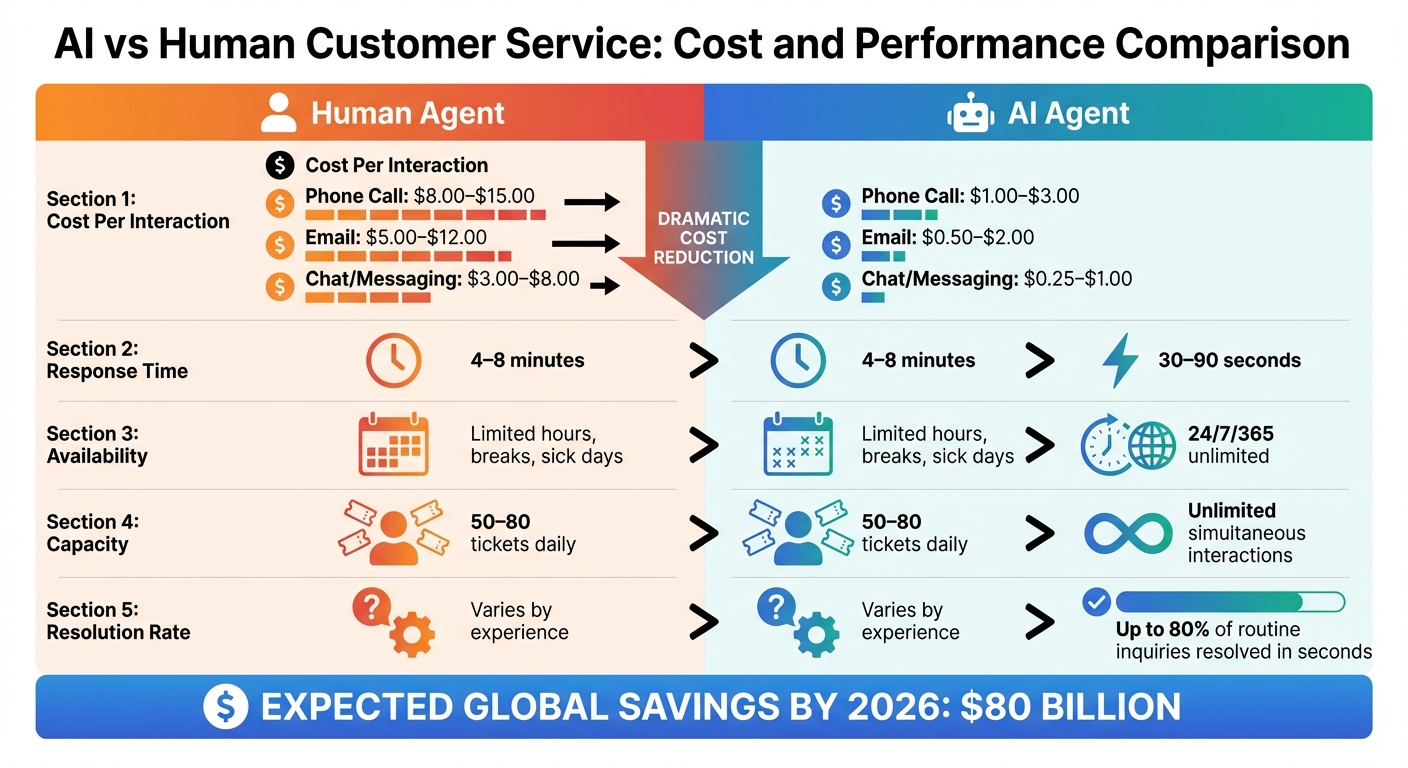
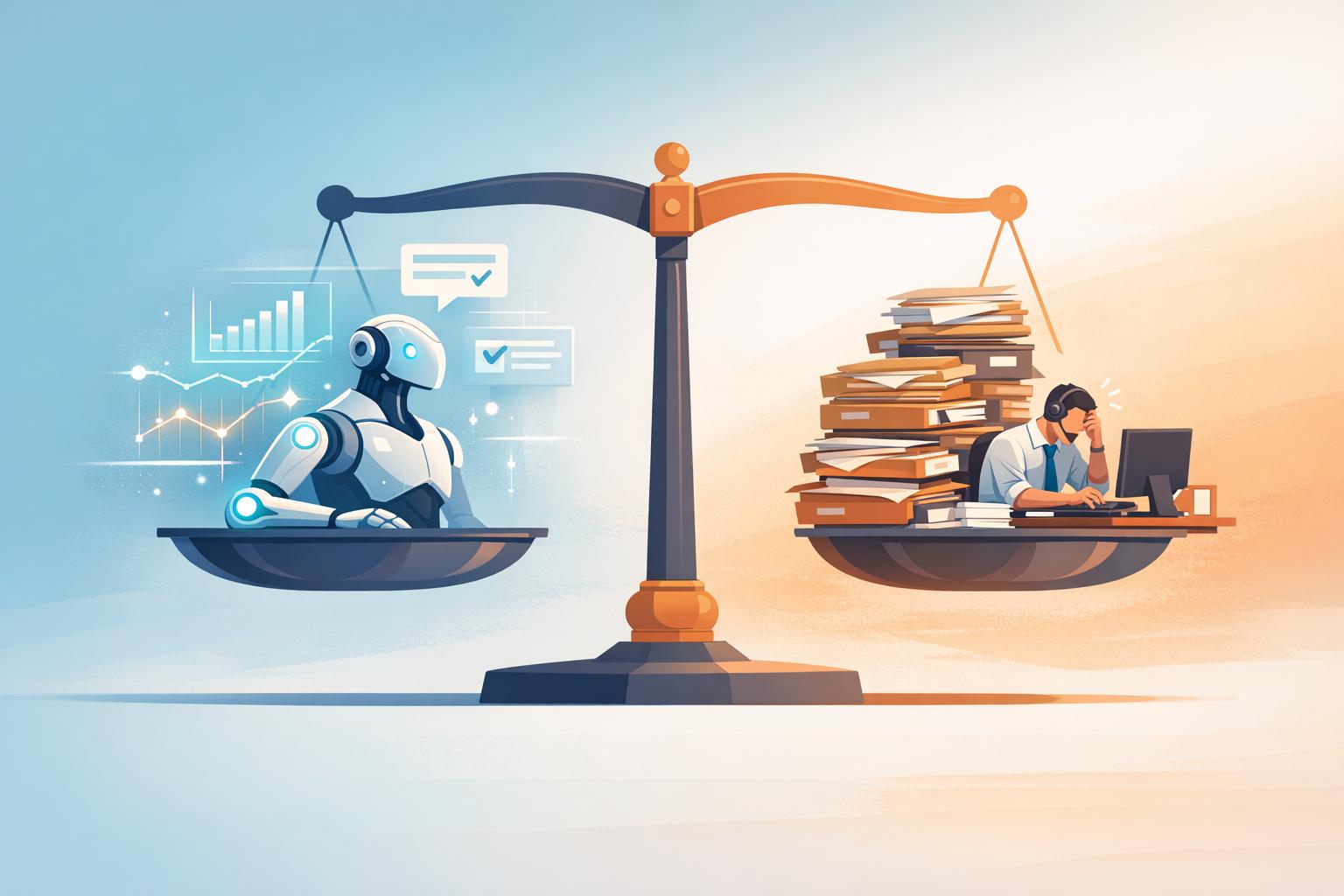
AI vs Human Customer Service: Cost and Performance Comparison 2026
AI customer service agents tackle the challenges of traditional support systems by offering a streamlined, effective alternative.
These agents address resource-heavy issues with fast, efficient, and cost-conscious solutions. They’re built to manage thousands of interactions at once, ensuring quick responses that help foster customer trust and loyalty.
Always Available and Scalable
AI agents operate 24/7 without the limitations of breaks, sick days, or shift changes. While human agents must handle tickets one at a time, AI can manage an unlimited number of interactions simultaneously [2][6]. As businesses grow, traditional support models require hiring more staff, but AI solutions can handle increased volumes without the need for additional personnel [6]. Many AI pricing models also allow businesses to manage these spikes in inquiries without a proportional rise in costs, making growth more predictable and affordable. This scalability not only keeps service levels high but also cuts operational expenses significantly.
Reducing Costs Through Automation
AI agents deliver a massive cost advantage over human support. For example, the cost per phone call drops from $8–$15 to $1–$3 with AI voice agents, while email support costs fall from $5–$12 to $0.50–$2. Chat and messaging interactions see a similar reduction, from $3–$8 to just $0.25–$1 [6]. AI agents can resolve up to 80% of inquiries in just 30–90 seconds, compared to the 4–8 minutes it typically takes human agents [6][5][3]. Automation also helps minimize expenses tied to employee turnover, which often costs $10,000–$15,000 per replacement. By 2026, global contact center operating costs are expected to drop by $80 billion thanks to AI solutions [6][3].
Consistent and Personalized Responses
AI agents ensure consistent, branded communication across platforms like websites, Instagram, Facebook, WhatsApp, Telegram, and Slack. Unlike older rule-based bots vs AI chatbots, they maintain context throughout conversations, reducing the risk of miscommunication. Well-configured AI agents achieve a 51% first-contact resolution rate [2], providing customers with quick and effective solutions. This consistency lowers the need for follow-up inquiries, boosting efficiency. The industry is also shifting toward a hybrid model, where AI manages 60–70% of routine tasks, leaving human agents to handle more complex or sensitive issues [3]. In fact, nearly 90% of customer experience leaders predict that by 2026, 80% of customer issues will be resolved without human involvement [5].
ChatSpark Features for Better Customer Service
ChatSpark builds on the strengths of AI agents, offering tools designed to streamline customer service while maintaining cost efficiency.
With ChatSpark, businesses can automate customer interactions while ensuring consistent, branded support across multiple platforms.
Multi-Platform Support and Integrations
ChatSpark connects seamlessly with six major platforms: websites, Instagram, Facebook Messenger, WhatsApp, Telegram, and Slack [8]. By using a unified knowledge base, businesses can ensure consistent responses across all channels, avoiding the confusion caused by fragmented communication.
But ChatSpark goes beyond simple messaging. It offers over 140 AI-driven actions that integrate with 40 third-party platforms [8]. This means your AI agent can handle tasks like checking Shopify order statuses, scheduling appointments via Calendly, or generating Zendesk support tickets - all during the conversation. For example, a global construction products company resolved 10,754 messages in just four months, achieving a 98% resolution rate and saving $47,880 on a $4,000 investment [8].
These integrations are the backbone of ChatSpark’s ability to support localized and branded customer service.
95+ Languages and Custom Branding
ChatSpark can detect and respond in more than 95 languages with an impressive 99.9% accuracy from the very first interaction [12]. Training the AI is typically done in English, but it can respond in a customer’s native language by understanding context rather than relying on basic translation. It also automatically adjusts to local norms, such as date formats and regional conventions, without requiring additional setup.
This capability makes it easier for businesses to meet the expectations of a diverse, global customer base.
On top of that, ChatSpark allows you to customize the chat widget to reflect your brand’s identity. You can tweak colors, avatars, and tone to align perfectly with your company’s personality [9].
"ChatSpark has been managing two of our largest product lines over the past year. It currently handles an average of 1,831 chats per month without any human intervention... we've realized measurable savings of $119,225." – Lorri G., Customer Service & Technical Support Manager [8]
Pricing Plans for Every Business Size
ChatSpark offers flexible pricing options, making its tools accessible to businesses of all sizes.
There are four pricing tiers to choose from, each designed to scale with your needs. The Basic plan, starting at $19/month, is ideal for solo entrepreneurs, providing 100 messages per month and access to analytics [11]. The Plus plan, priced at $59/month, includes multi-channel deployment and 250 messages. For $129/month, the Pro plan offers 2,000 messages, access to all AI actions, and unbranded widgets [11]. For large enterprises, custom pricing is available, which includes unlimited AI actions, a dedicated account manager, and tailored service agreements [10].
| Plan | Price | Monthly Messages | Key Features |
|---|---|---|---|
| Basic | $19 | 100 | 1 agent, analytics |
| Plus | $59 | 250 | Multi-channel deployment |
| Pro | $129 | 2,000 | 140+ AI actions, unbranded widgets |
| Enterprise | Custom | Custom | Unlimited actions, dedicated manager |
Every plan includes multilingual support and customization options, with response times of under two seconds [8].
Benefits and Trends in AI Customer Service
These operational and financial gains highlight why AI continues to transform customer support in 2026.
Improved Efficiency and Return on Investment
The cost difference between AI and human customer service is stark. AI interactions typically cost between $0.50 and $2.00, compared to $8.00 to $15.00 for human support [3][2]. For businesses managing thousands of interactions monthly, the savings are substantial.
Take NIB Health Insurance as an example. By introducing AI-powered digital assistants, they slashed customer service costs by 60%, reduced direct calls to human agents by 15%, and achieved total savings of $22 million [14]. Similarly, ServiceNow leveraged AI agents to boost productivity, cutting the time needed for complex case handling by 52%, resulting in $325 million in annualized value [14].
Other companies, like AssemblyAI, have seen dramatic efficiency gains. Their response times dropped from 15 minutes to just 23 seconds - a 97% improvement - while maintaining a 50% automated resolution rate [14]. By avoiding the need for 10 human agent roles, they also reduced management and support overhead equivalent to 3–4 full-time positions [3].
Looking ahead, AI customer service agents are expected to generate $80 billion in global contact center savings by 2026 [3]. The most effective companies are adopting a hybrid model where AI manages 60% to 70% of interactions, escalating more complex issues to human agents. This approach balances cost efficiency with high customer satisfaction [3].
But it’s not just about cost and speed - AI in customer service is evolving in ways that reshape how businesses connect with their customers.
What's Happening in AI Customer Service in 2026
AI is shifting from reactive to proactive support. Predictive issue resolution is now commonplace, with AI monitoring data like shipping and product updates to resolve issues - such as delivery delays - before customers even reach out [4]. This "anticipate and solve" approach is redefining customer expectations.
For phone support, voice-first automation has become the standard. AI voice agents now handle interruptions and complex spoken queries with ease, eliminating the frustrations of outdated phone trees [1][4]. The line between sales and support is also blurring. AI agents now manage the entire customer lifecycle, identifying upsell opportunities during support interactions by analyzing real-time context [4][1].
"We are advancing toward a world where 100 percent of customer interactions involve AI in some form." – Tom Eggemeier, CEO, Zendesk [13]
Another major development is industry-specific AI specialization. AI agents are being equipped with pre-configured knowledge and compliance standards tailored to industries like healthcare (HIPAA), finance (SEC/FINRA), and automotive [4]. Every interaction is analyzed to deliver insights into product issues, marketing effectiveness, and pricing strategies [4].
AI isn’t just a tool for support anymore - it’s a cornerstone of how businesses engage with their customers.
How to Implement ChatSpark in Your Business
Getting ChatSpark up and running is a breeze - it takes less than 5 minutes to get started [15]. The platform is built for speed, so you can quickly begin automating customer interactions without needing advanced technical skills or a long onboarding process.
Fast Setup and Knowledge Base Connection
Start by choosing a plan from the pricing page. If you're unsure, there's even a free tier to test things out [15]. Once you've created an account, head to the AI Agents sidebar to set up your first agent. From there, you can connect your knowledge base by uploading your FAQs or common support topics. You can do this through website URLs, file uploads, or even by pasting text directly [15].
ChatSpark's AI Engine is designed to deliver impressive results, achieving resolution rates above 80% when properly trained [15]. It uses Retrieval-Augmented Generation (RAG) to pull accurate information from your sources, which helps keep hallucination rates below 3%. For comparison, rates without RAG can range from 15% to 20% [16]. Before launching, make sure to use the preview feature in your dashboard to test common questions and iron out any potential issues [15]. This quick setup is all about getting you running efficiently.
Customize to Match Your Brand
Once your knowledge base is connected, it’s time to make the AI agent feel like an extension of your brand.
Your agent should reflect your company’s personality, not come across as just another generic bot. Use the Agent Personality field to define its role, tone, and boundaries - think of it like writing a job description for a new team member [9]. For example, you might write: "You’re a friendly sales representative - professional yet approachable. Don’t discuss competitors or make pricing promises beyond our published rates."
Visuals matter, too. Give your agent a public-facing name, upload a 1:1 aspect ratio avatar, and set your primary brand color [9]. You can also create a custom welcome message and up to five suggested prompts - clickable buttons that guide users toward specific actions like "Check my order status" or "Schedule a demo" [9]. To keep things running smoothly, review your conversation history regularly. Identify the most common questions and turn those into suggested prompts to make the user experience even better [9].
ChatSpark also supports over 100 languages, ensuring your brand’s voice stays consistent no matter where your customers are [9].
Track Performance and Improve Results
After your agent is set up and aligned with your brand, the next step is monitoring and refining its performance.
"The agent will be at its worst on day one and should improve every week for the next three months." – John V. Akgul, Founder & CEO, PxlPeak [16]
Start with a gradual rollout. Initially, route 10% to 20% of your traffic to the AI, monitor its performance for a week, and then slowly increase to 50% and eventually 100% [16]. This phased approach minimizes risks and ensures a smooth transition for your customers.
Keep an eye on key metrics to evaluate success. Aim for a deflection rate of 40% to 70%, which measures how many tickets are resolved without human intervention [16]. To maintain accuracy, keep your hallucination rate below 2% by manually reviewing at least 50 random AI responses weekly [17]. If you're on a Pro or Enterprise plan, you can integrate Google Analytics 4 by entering your GA4 Measurement ID in the agent settings. This allows you to track events like session starts, suggested prompt clicks, and lead capture conversions [9].
Dedicate 2–8 hours each month to reviewing conversation logs. Look for areas where the AI struggles or escalates issues, and update your knowledge base to fill those gaps. This could mean adding details about new products, policy updates, or seasonal FAQs [16][17]. Run A/B tests to experiment with different response formats, tones, and lengths to see what works best for improving resolution rates [17]. Regular updates and testing are what turn a basic AI system into a high-performing one [17].
Conclusion
Customer expectations are changing fast. By 2026, 67% of customers will expect an immediate response when they message a business [19]. If one company delivers instant, accurate AI support, customers won’t stick around for 20-minute hold times from another [4].
AI-powered customer service isn’t just about speed - it’s also about savings. It's estimated to drive $80 billion in global cost reductions by 2026. Companies using AI agents are already reporting 40–60% lower costs in their customer service operations [3][18]. On top of that, switching to AI-driven support can boost customer conversion rates by 2–3 times [19].
But this isn’t about replacing humans. AI can manage 60–70% of routine inquiries instantly, freeing up human agents to handle more complex, empathy-driven cases [3]. It’s about giving your team the tools they need to focus on what they do best.
ChatSpark makes adopting AI customer service simple. With support for over 95 languages, fast setup, and plans starting at just $19 per month, it’s designed to grow with your business. Whether you’re a solo entrepreneur or managing a large enterprise, ChatSpark helps you deliver consistent, branded support across every channel.
The question isn’t whether to adopt AI - it’s how soon you can get started. Your customers are already expecting it, and with measurable ROI in just months, the time to act is now.
FAQs
How do I know which support questions my AI agent should handle?
Automate tasks that are repetitive, straightforward, and follow clear rules - like checking account balances, tracking order statuses, or handling basic troubleshooting. These types of inquiries don’t usually require human involvement, making them perfect for AI. For more complex or sensitive issues, it’s best to route them to human agents who can provide the necessary care and expertise.
To keep your system running smoothly, regularly update and refine your AI’s knowledge base and workflows. This ensures it continues to perform accurately and meets customer expectations effectively.
What should I do when the AI agent can’t answer correctly?
If the AI agent gives an incorrect or incomplete response, it's crucial to escalate the issue to a human agent. This step ensures the customer's concern is properly addressed and helps maintain their satisfaction. To keep the process smooth, make sure your team is well-prepared to manage these escalations effectively.
How can I measure ROI after launching an AI agent?
To gauge ROI effectively, consider factors like cost savings from reduced reliance on human support, quicker ticket resolutions, and improved customer retention. Here's a striking comparison: AI resolutions typically cost between $0.99 and $2.00, while human support can range from $6 to $12 per resolution.
Moreover, businesses often experience a $3.50 return for every $1 invested in AI support. Over time, these returns tend to grow as efficiency ramps up and customer satisfaction continues to rise.