Want to handle rising customer support demands without hiring more agents? AI makes it possible. It can automate repetitive inquiries, improve response times, and reduce costs - all while letting your team focus on complex issues. For example, Trilogy automated 60% of its support volume in just 12 weeks, freeing up agents for high-value tasks.
Here’s how you can do it:
- Audit your support operations: Identify repetitive tasks and inefficiencies.
- Focus on high-impact tasks: Automate FAQs, routing, and after-hours support.
- Deploy AI strategically: Start with your busiest channels, like website chat.
- Integrate with tools: Connect AI to your CRM and helpdesk to save agent time.
- Measure and refine: Track metrics like resolution rate and response time to improve performance.
AI can cut costs, boost efficiency, and enhance customer satisfaction - all without expanding your team. Start small, test results, and grow your AI capabilities over time.
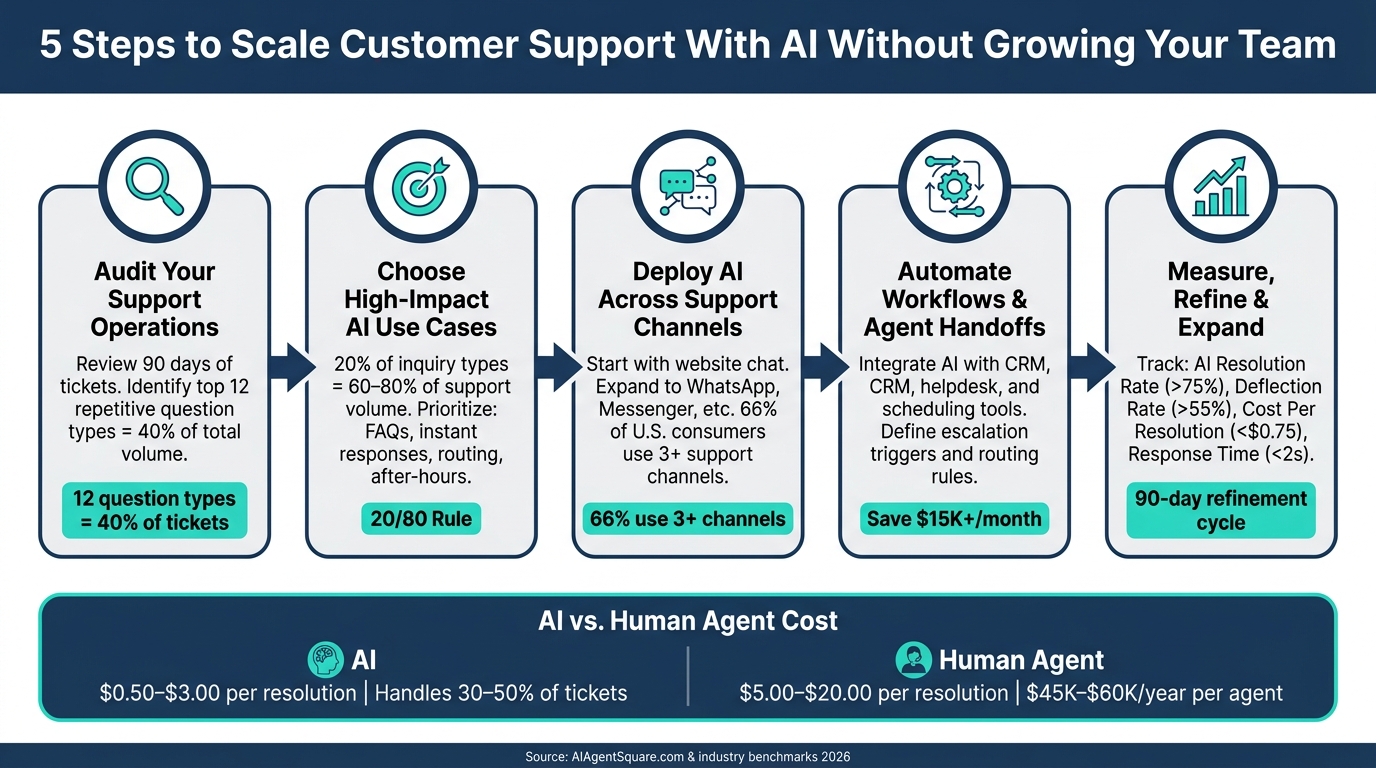
5 Steps to Scale Customer Support With AI (Without Hiring More Agents)
Step 1: Audit Your Current Support Operations
Before diving into AI for your support workflow, it’s crucial to understand where things stand right now. Think of this audit as your roadmap - it helps avoid costly mistakes and ensures you’re moving in the right direction.
Analyze Support Volume and Ticket Types
Start by reviewing the past 90 days of support tickets. Group them by topic, complexity, and resolution method. Patterns will emerge quickly. Research from over 150 support teams shows that 12 common question types - like order status, password resets, and shipping updates - can make up 40% of total ticket volume [2]. That’s a huge portion of your team’s time spent on repetitive, predictable issues.
Here’s a quick rule of thumb: if a new agent can learn to handle a question in less than 10 minutes, it’s a great candidate for automation [1].
| Support Tier | Automation Level | Typical Cost per Resolution |
|---|---|---|
| Tier 1: Routine | Full AI Automation | $0.10–$0.50 [2] |
| Tier 2: Complex | AI-Assisted (Copilot) | $2.00–$5.00 [2] |
| Tier 3: High-Stakes | Human Required | $8.00–$15.00 [2] |
Once you’ve identified the common ticket patterns, the next step is to dig into inefficiencies in your processes.
Find Weak Points in Current Workflows
With ticket trends in hand, evaluate how your team handles them. Use metrics like First Response Time, First Contact Resolution, Escalation Rate, and Average Handle Time to pinpoint where things break down.
| Metric | Key Inefficiencies |
|---|---|
| First Response Time | Indicates a need for 24/7 support or better triage systems. |
| First Contact Resolution | Suggests gaps in your knowledge base or overly complex workflows. |
| Escalation Rate | Highlights areas where training or better documentation is needed. |
| Average Handle Time | Shows how much time is wasted on repetitive manual tasks. |
These metrics don’t just reveal inefficiencies - they also serve as your before benchmarks. When you introduce AI, you’ll use these numbers to measure ROI and track performance improvements. For instance, traditional email support can take over 12 hours to respond, while AI can cut that to under 1 minute. In the right areas, AI can reduce average handle time by 20–40%.
- Define your "no-touch" zones - issues like billing disputes or legal complaints that should always stay with human agents. Identifying these boundaries upfront ensures you avoid missteps when automation goes live.
This audit lays the foundation for implementing AI strategically, helping you improve efficiency without increasing headcount.
Step 2: Choose the Right AI Use Cases for Customer Support
Once you've completed your audit, it's time to identify where AI can make the biggest difference. Remember, not every task is a good fit for automation, and over-automating can lead to problems.
Start With High-Impact Use Cases
A good starting point is the 20/80 rule: about 20% of inquiry types often account for 60–80% of your support volume. These repetitive, high-frequency tasks are ideal candidates for automation.
Here are four areas to prioritize:
- FAQ automation: Many support tickets are repetitive questions. Automating FAQs can reduce incoming tickets by 20–50%.
- Instant responses: AI can slash first-response times from minutes to under 10 seconds, keeping customers happy.
- Intelligent routing: AI can analyze intent and route tickets to the right team without delay.
- After-hours self-service: Instead of generic auto-replies, AI can provide real answers regardless of time zones.
When deciding which tasks to automate, evaluate them based on their level of standardization, risk, and sensitivity. Tasks that are highly standardized, low-risk, and not emotionally charged are the best fit for AI. However, even as you streamline operations, remember to leave room for human agents to handle more complex or nuanced situations.
Balance Automation With Customer Expectations
The key is to strike a balance. Use AI to handle routine, straightforward tasks but rely on human agents for more complex or sensitive issues. Situations involving customer frustration, financial disputes, high-value accounts, or compliance concerns require the empathy and judgment that only a person can provide.
Think of AI as the first layer of support. It can gather context, answer simple questions, and route cases efficiently. But for conversations requiring nuance or careful judgment, human agents should take over.
To make AI interactions feel more personal, leverage customer data. For example, greet customers by name, refer to their recent orders, and adjust the tone to suit the situation. Establish clear tone and voice guidelines to ensure AI responses align with your brand. And don’t forget to regularly review AI transcripts - this helps fine-tune responses and ensures they maintain a personal touch.
Step 3: Deploy AI Across Your Support Channels
Once you've pinpointed the most impactful AI use cases, the next step is to integrate AI into the platforms where your customers already engage. In other words, focus on the channels your audience actively uses - not just your website.
Set Up Conversational AI on Key Platforms
Start small and scale gradually. Begin with your highest-traffic channel, which is often your website chat. After that, expand to one messaging platform your customers frequently use, like WhatsApp or Facebook Messenger. According to Microsoft's Global State of Customer Service report, 66% of U.S. consumers rely on at least three different support channels, so covering multiple touchpoints is essential. However, launching on all platforms at once can lead to inconsistency and make troubleshooting more difficult.
Focusing on website chat first allows you to test and refine your system. Once your workflows are running smoothly and your metrics show positive results, you can roll out the same AI setup to additional platforms. Tools like ChatSpark simplify this process by enabling deployment across channels such as WhatsApp, Instagram, Facebook, Telegram, Slack, and websites - all from a single platform. This means you won't have to rebuild your conversation flows or knowledge base for each new channel.
Configure AI to Match Your Brand and Customers
Start by creating a brand blueprint for your AI. This should include the AI’s name, role, tone, and a list of topics it should avoid handling independently (e.g., billing disputes, legal claims, or account security issues). This guide serves as the foundation for configuring your AI across all channels.
Tailor the tone for each platform: keep it brief and to the point on WhatsApp, more structured for email, and conversational on chat. However, the overall brand voice - whether casual and approachable or formal and concise - should remain consistent everywhere. To ensure accuracy, link your AI to a centralized knowledge base. This way, when policies or information change, you only need to update one source, and all channels will reflect the updates instantly.
If you serve Spanish-speaking customers in the U.S. or other multilingual audiences, pay special attention to language support. While ChatSpark can handle over 85 languages, translation alone isn’t enough. Your knowledge base content must be localized, not just translated word-for-word. For sensitive topics like billing or exceptions to policies, it’s better to route non-English conversations to bilingual agents rather than relying solely on automated translation.
Set Up Escalation Rules for Complex Issues
Even the most advanced AI has limits. What sets a smooth customer experience apart is how well the transition to a human agent is handled. Define escalation triggers before deployment, not after. Common triggers include multiple failed attempts to understand a request, detecting negative sentiment, specific keywords like "lawyer", "fraud", "cancel", or "manager", and any inquiries involving payment disputes or account security.
When escalating, the AI should transfer the full conversation transcript, the customer’s account details, the detected intent, and the reason for escalation to the human agent. This avoids one of the biggest frustrations customers face with AI support: having to repeat themselves. Additionally, offer customers a clear option to request human assistance at any time. This transparency fosters trust and reduces frustration, even when the AI can’t resolve the issue.
Step 4: Automate Key Workflows and Agent Handoffs
Now that your AI is active across channels with escalation rules in place, it’s time to take things up a notch. Your AI shouldn’t just respond to customers - it should take action. The key here is integrating it with the tools your team already uses, so repetitive tasks are handled automatically.
Connect AI to Your Existing Tools
Tasks like logging conversations, updating records, or booking appointments can eat up a lot of an agent’s time. By linking your AI to tools like your CRM, helpdesk, or scheduling platforms, you can streamline these processes. For example, if a customer asks about their order status, the AI can pull the information directly from your CRM. After the chat ends, it can automatically log the interaction, tag the issue, and update the customer’s record - no manual input required.
ChatSpark's Pro plan ($129/month) makes this integration process easier by supporting platforms like Zapier, Freshchat, Square, and Calendly. This means your AI can connect to hundreds of apps without needing custom coding. Take Illinois Tool Works (ITW) as an example: in March 2026, they used ChatSpark to manage two major product lines and handled an average of 1,831 chats per month without human involvement. This saved them $119,225 while reducing workload for their team. By automating these tasks, you not only save time but also amplify the efficiency gains from earlier steps.
Define Clear Handoff Rules
Once your AI is integrated and data flows seamlessly, the next focus should be on routing customer interactions correctly. Instead of relying on broad, catch-all rules, create precise routing logic. The table below offers a simple framework you can adapt for your team:
| Routing Category | Primary Keywords | Escalation Target | Priority |
|---|---|---|---|
| Sales/Revenue | pricing, quote, upgrade, demo | Account Executive | High |
| Retention | cancel, too expensive, switching | Success Manager | High |
| Legal/Compliance | lawsuit, GDPR, hacked, breach | Compliance/Security | Immediate |
| Technical | integration, bug, API, outage | Technical Support | Medium/High |
| General/Frustration | useless, agent, human, manager | Support Lead | Medium |
When a handoff occurs, make sure agents receive all the necessary context upfront. This prevents customers from having to repeat themselves, improving their overall experience. For example, RTR Vehicles implemented a structured automation system between 2025 and 2026. By leveraging AI agents to handle 92% of support tickets - including inquiries about order tracking and product compatibility - they reduced their support team from four full-time employees to just one part-time worker, saving $15,000 per month.
The goal isn’t to automate everything. It’s about ensuring the right issues get to the right people quickly, letting your team focus on tasks that genuinely require a human touch.
Step 5: Measure, Refine, and Expand AI Support
Making sure your AI continues to perform well - and gets better over time - is critical. This step is where teams can either maximize their results or miss out on potential benefits.
Track the Right Performance Metrics
It’s essential to focus on metrics that directly improve customer experience and operational efficiency.
"Measure the wrong things, and you'll optimize for the wrong outcomes. Measure the right things, and the business improvements follow naturally." - AIAgentSquare.com [3]
Here’s a breakdown of key metrics, along with industry benchmarks and high-performance targets for 2026:
| Metric | 2026 Industry Average | High Performer Target |
|---|---|---|
| AI Resolution Rate | 63% | >75% [3] |
| Deflection Rate | 42% | >55% [3] |
| Time to First Response | 8 seconds | <2 seconds [3] |
| Cost Per Resolution | $1.87 | <$0.75 [3] |
| KB Hit Rate | 72% | >85% [3] |
| Escalation Rate | 31% | <20% [3] |
| Human Override Rate | 12% | <8% [3] |
Some of these metrics are especially worth digging into. For example, Cost-Per-Resolution is calculated by dividing your monthly AI platform cost by the number of AI-resolved tickets. This metric provides a clear view of your AI's ROI. AI resolutions typically cost between $0.50 and $3.00, compared to the $5.00–$20.00 range for human agents [3]. Another key metric, KB Hit Rate, reflects how often your AI pulls the correct information from your knowledge base. If it drops below 72%, it’s a sign your knowledge base might need updates to keep up with customer needs.
Use these metrics to identify areas for improvement and fine-tune your AI’s performance.
Improve AI Using Analytics and Feedback
Your AI’s conversation data is a goldmine of insights that often goes underutilized. Each failed response or escalation pinpoints a gap that can be addressed.
A practical way to tackle this is by implementing a 90-day refinement cycle. Start by collecting baseline data in the first month, focusing on conversations where the AI struggled. During the next two months, use this data to update your documentation and retrain the AI. This approach worked well for Tink, a European open banking company. When they launched an AI assistant in early 2024, they managed to cut their Average Handling Time by 39% in just three months by refining the AI based on real-world conversation data.
To stay on top of issues, conduct weekly knowledge audits. Review reports on "Top Unanswered Questions" and fallback patterns to identify gaps. This gives you a prioritized list of areas to address. Additionally, configure your AI to auto-resolve queries only when its confidence score is 90% or higher. Anything below this threshold should be routed to a human, helping you maintain a hallucination rate below the 2% target.
Once your AI’s performance stabilizes, you can begin expanding its role.
Grow AI Capabilities Over Time
Scaling your AI’s responsibilities gradually is the best way to minimize risks and build trust in the system. A phased rollout ensures smoother transitions and allows your team to monitor results closely.
Start by routing 10–20% of incoming traffic through the AI while keeping a close eye on performance. Once the AI demonstrates strong resolution rates and low escalation rates, you can increase its workload to 50%, and eventually move to full deployment. Before making any major changes, consider running the AI in shadow mode for two to four weeks. In this mode, agents can review the AI’s draft responses without impacting live customer interactions. This provides valuable insights into its performance without risking customer satisfaction.
To track progress, maintain a golden dataset of 100–200 verified customer inquiries. Use this dataset to test updates and measure performance over time. As your AI proves effective with simpler tasks, you can confidently assign it more complex responsibilities like troubleshooting, managing multi-step workflows, or even proactive customer outreach - all without starting from scratch each time.
Conclusion: Building a Scalable Customer Support Operation With AI
Scaling customer support without increasing headcount is no longer just an idea - it’s achievable today. This guide’s five-step framework offers a clear path forward: review your operations, identify the best AI use cases, implement solutions across key channels, automate workflows and handoffs, and continuously measure and refine. Each step builds on the last, creating a cycle of ongoing improvement. This approach not only makes operations more efficient but also delivers measurable financial returns.
The numbers speak for themselves: U.S. support agents typically cost $18–$30 per hour, including benefits. Adding just two or three agents means an additional $45,000–$60,000 per year per person in salary and overhead. On the other hand, AI can handle 30–50% of repetitive ticket volume for a fraction of that cost.
But the benefits go beyond cost. AI enhances the customer experience by providing instant, 24/7 responses, consistent answers sourced directly from your knowledge base, and more time for human agents to tackle complex, high-empathy cases. The best strategies use AI as the first point of contact while reserving human expertise for situations where it’s needed most - improving both customer satisfaction and team morale.
Start small. Review 90 days of support data to identify your top 10 repetitive question types. Choose one or two key channels, like website chat, and test a solution like ChatSpark. ChatSpark offers quick deployment, no-code setup, seamless integration with help desks and CRMs, and real-time analytics - allowing you to launch a pilot in days, not months.
Track key metrics like deflection rate, first-response time, cost per ticket, and CSAT. If you see costs drop while customer satisfaction remains steady or improves, that’s your green light to expand AI coverage to more topics, channels, and even complex workflows. The potential is vast - and you can achieve it without growing your team.
FAQs
How do I know which tickets AI should handle first?
Analyzing 90 days of support data can reveal patterns that help categorize inquiries by topic, complexity, and resolution method. This breakdown is crucial for optimizing efficiency and ensuring customer satisfaction.
For example, tasks like password resets or order tracking tend to be high in volume but relatively straightforward. These are ideal for AI to handle. By focusing AI on these low-complexity, repetitive tasks, human agents can concentrate on more nuanced or sensitive issues that require a personal touch.
AI-powered ticketing systems equipped with natural language processing (NLP) take this a step further. They can evaluate incoming tickets for intent, urgency, and even sentiment. This means critical or emotionally charged tickets - like complaints or complex technical issues - can be flagged and routed to human agents right away. This approach ensures that customers with pressing concerns get the attention they need promptly, while the AI efficiently manages routine inquiries.
What should never be automated in customer support?
Tasks that involve human judgment, empathy, or emotional intelligence shouldn’t be entirely automated. Automation shines when dealing with repetitive, straightforward tasks like updating orders or resetting passwords. However, for more complicated situations - think billing disputes, cancellations, or emotionally charged concerns - or when a customer is upset or explicitly asks for a human, it’s crucial that systems quickly transfer them to a live agent for appropriate assistance.
How can I prove AI support ROI in 30–90 days?
To demonstrate the return on investment (ROI) of AI support within 30–90 days, connect its performance directly to measurable business results. Begin by analyzing 90 days of ticket data to pinpoint tasks that are well-suited for automation - examples include order tracking or password resets.
Use this formula to calculate ROI:
ROI = (Total Benefits - Total Costs) / Total Costs x 100
When crunching the numbers, include all relevant expenses, such as platform fees, setup costs, and labor. Focus on key metrics like cost savings per ticket, agent hours saved, and revenue generated to clearly showcase the impact AI is having on your business.