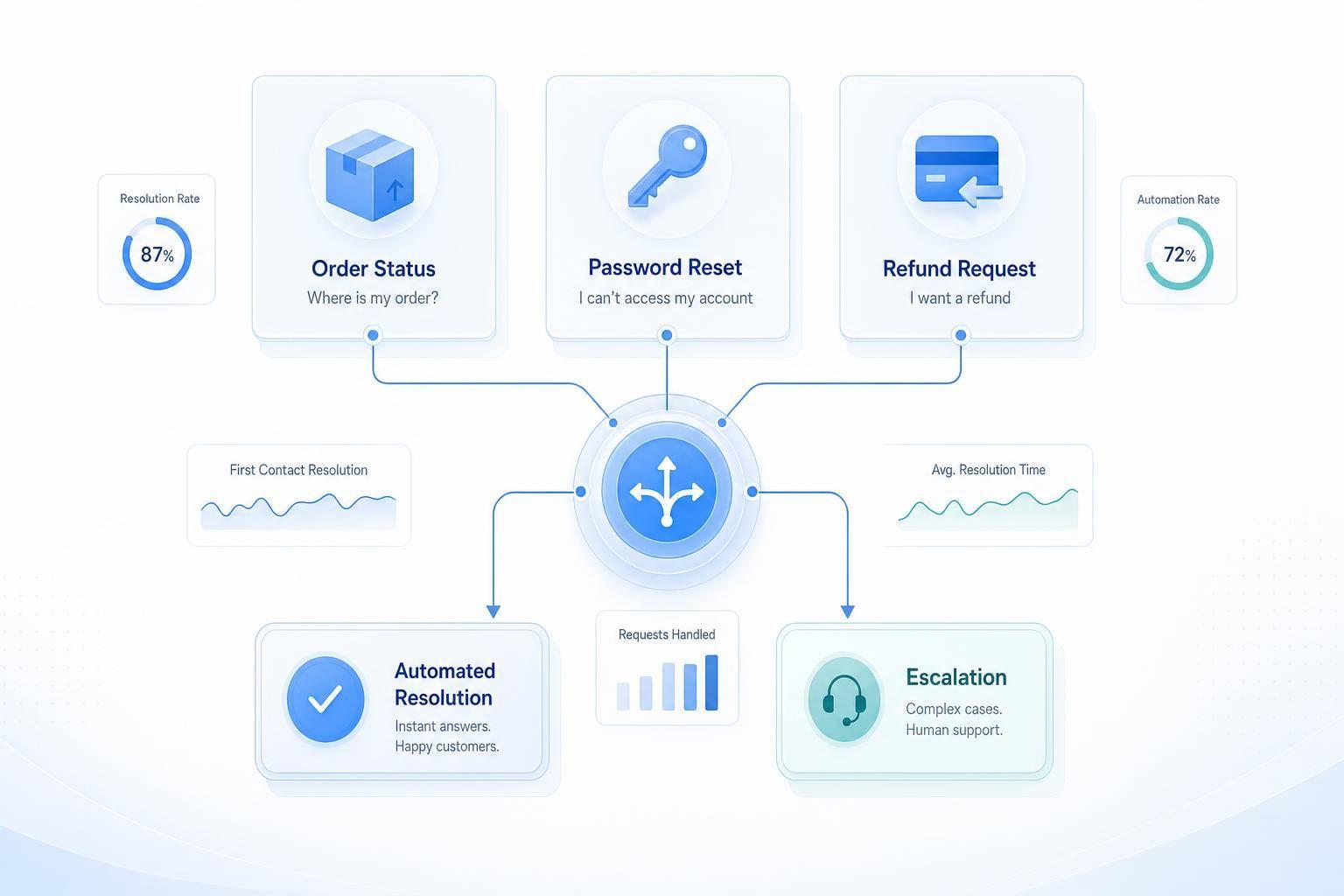
If you want to cut support volume fast, start with repeat requests that follow fixed rules. I’d focus first on order status, password resets, appointment changes, billing lookups, refund checks, and FAQ replies.
Here’s the short version:
- AI works best on high-volume, low-risk requests
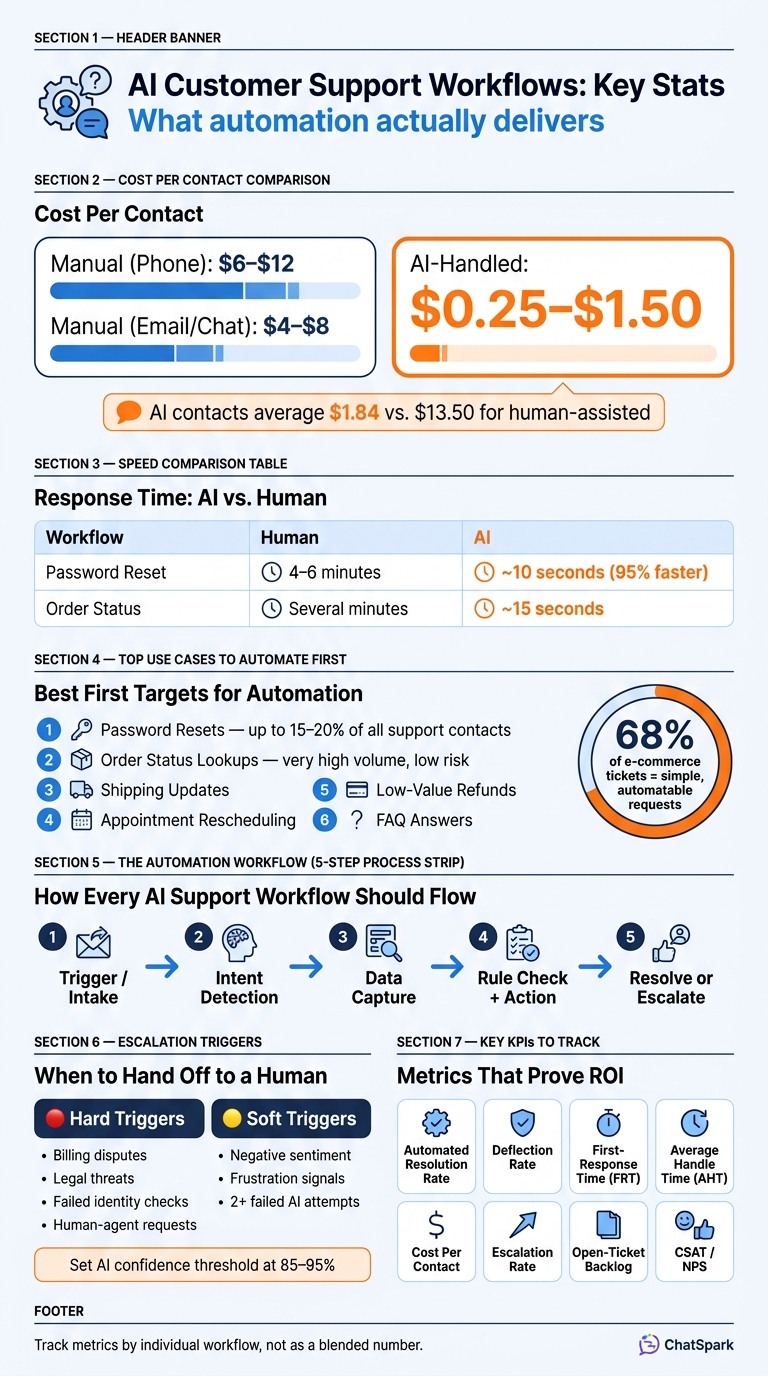
- Teams often cut cost per contact from $5–$15 to around $0.50–$2.00
- Good first targets include:
- Order status
- Password resets
- Shipping updates
- Appointment rescheduling
- Basic refunds
- FAQ answers
- The workflow should do more than chat. It should:
- detect intent
- ask for missing details
- check or update the right system
- reply with the result
- send the case to a person when needed
- Common handoff triggers include:
- failed identity checks
- billing disputes
- legal or privacy issues
- low AI confidence
- repeated failed attempts
- I’d track results by workflow using:
- resolution rate
- deflection rate
- first-response time
- handle time
- cost per contact
- escalation rate
- CSAT/NPS
A few numbers stand out. Password resets can make up 15–20% of support contacts, and in some e-commerce teams, 68% of tickets fall into simple request types like order status, returns, and resets. That’s why these workflows are often the first place to start.
If I were building this, I’d review the last 90 days of tickets, rank use cases by volume, risk, and rule clarity, connect tools like help desk, billing, and scheduling apps, then tune each flow based on weekly failure patterns and handoff data.
AI vs. Manual Customer Support: Cost, Speed & ROI Comparison
How to Choose and Map the Repetitive Workflows You Should Automate
Start with the last 90 days of tickets and transcripts. Review 200 to 500 recent tickets, then tag each one by category, complexity, and resolution time. After that, count how often each issue shows up.
That simple exercise does two things at once. It shows which requests keep coming back, and it shows which ones tend to get solved the same way every time. Once you rank those repeat issues, a messy ticket backlog starts to look like a clear build order.
From there, map each workflow across five parts: trigger, triage, action, resolution, and escalation point.
Rank Use Cases by Volume, Risk, and Resolution Rules
High volume alone doesn't make something a good fit for automation. Before you build anything, run each use case through three filters.
The first is volume: how often does the request appear?
The second is risk: what happens if the bot gets it wrong? If the answer is store hours, the stakes are low. If the action involves a disputed charge, that's a different story.
The third is resolution rules: does the request follow a clear rule with a fixed outcome? Password resets do. The flow is simple: verify identity, then send the link. Refunds under a set dollar amount can also follow a fixed approval rule. Those are good early targets. Open-ended complaints usually aren't.
| Use Case | Volume | Risk Level | Fixed Resolution Rule? | Action |
|---|---|---|---|---|
| Password reset | Very high | Low | Yes (identity check → send link) | Build now |
| Order status lookup | Very high | Low | Yes (order number → fetch data) | Build now |
| Low-value refund | High | Medium | Yes (eligibility check → issue credit) | Build now |
| Billing dispute | Medium | High | No (case-by-case) | Escalate |
| Suspected fraud | Low | Very high | No | Human only |
Give each request type a complexity score from 1 to 5. The best first builds are the high-frequency requests that score a 1 or 2. That's the low-hanging fruit: common, simple, and rule-based.
Define the Inputs, Actions, and Escalation Point for Each Workflow
After you've ranked your use cases, map each workflow around three parts: what the bot needs to collect, what system it needs to query or update, and when a human needs to take over.
For a shipment status check, the bot needs the order number, email address, and ZIP code. Then it queries your order management API in read-only mode and returns the tracking result.
For appointment booking, the bot collects the customer's preferred date and time in Month DD, YYYY and 12-hour format - for example, August 5, 2026 at 2:00 PM - then writes that booking into your scheduling system.
For a low-value refund, the bot collects the order ID and the reason, checks eligibility against a fixed rule, and issues the credit through your billing system.
Escalation design matters just as much as the happy path. Use two kinds of triggers:
- Hard triggers: billing disputes, legal threats, human-agent requests, or failed identity checks. These should route at once, with the full transcript.
- Soft triggers: frustration, negative sentiment, or two failed AI attempts. These should also move to a person.
Set your AI's confidence threshold between 85–95%. If the model falls below that range, it should hand off instead of guessing.[1]
It also helps to group workflows by system access before you connect anything. Informational requests only need a knowledge base. Lookup requests need read-only access to order or shipping systems. Transactional requests - like refunds, plan changes, or rescheduling - need write access, plus guardrails.
In ChatSpark, this workflow map sets the bot's data access, action rules, and handoff points. Those access levels also show which workflows are ready to build first.
How to Build a Support Workflow in ChatSpark Step by Step
Use the workflow map from the previous section to set up each step in ChatSpark. The flow should follow the same path every time: intake → intent check → data capture → rule check → action → handoff → logging. Build it in the same order the customer moves through the request.
Set Up Conversation Flows and Knowledge Sources
Start with a clear opening prompt and intent detection. ChatSpark should pick up common support requests right away - phrases like "reset my password", "where's my order", "I need to reschedule", or "can I get a refund" - and then move straight to the next question or action.
If the request is missing details, the assistant should use follow-up prompts to gather them. That keeps the workflow moving and cuts down on bad assumptions.
Connect your approved FAQs, saved replies, SOPs, and policy docs so every answer pulls from the same place. Keep each article focused on one topic, and write it in plain US English.
Once your knowledge source is ready, connect the tools that actually carry out the request.
Connect Support, Billing, and Scheduling Systems
After ChatSpark identifies the intent and pulls the right information, connect the systems that let it do something with that request. It shouldn't just answer. It should read, update, or create records when needed.
- Freshchat: create or update tickets on its own
- Zapier: trigger follow-up tasks after a workflow finishes
- Square: check charges and payment status
- Calendly: book or reschedule appointments inside the chat
Manual vs. AI-Powered Workflow Handling: A Side-by-Side Comparison
Some support tasks shrink from minutes to seconds once the workflow is set up. A password reset that takes a human agent 4–6 minutes can be finished by ChatSpark in under 10 seconds - about 95% faster.[2] Order-status checks show the same shift, going from several minutes of manual work to about 15 seconds with AI.[2] The pattern is pretty simple: fewer human steps, faster resolution, and less time spent on routine lookups.
| Workflow Type | Required Inputs | Human Steps | Response Time | Escalation Point | Business Impact |
|---|---|---|---|---|---|
| Password Reset (Manual) | Email, verification details | Multiple manual steps | Several minutes | Manual ticket creation | High-friction, repetitive work |
| Password Reset (AI) | Email address | 0 human steps | About 10 seconds | Confidence below threshold | 24/7 resolution, no queue |
| Order Status (Manual) | Order number | Several lookup steps | Several minutes | Manual lookup required | High-volume support work |
| Order Status (AI) | Order number | 0 human steps | About 15 seconds | API failure | Faster answers, fewer tickets |
The cost gap is just as sharp. AI-handled interactions usually cost $0.25–$1.50 per contact, while phone support runs $6–$12 and email or live chat lands around $4–$8.[3] If your team handles hundreds of tickets each day, that difference stacks up fast.
The same workflow structure works for scheduling, billing questions, and refund requests. Collect only the data needed, apply the rule, and send anything disputed, sensitive, or outside policy to a human agent with the full conversation history attached. After each finished or escalated workflow, log the customer intent, collected inputs, action taken, resolution status, and whether a human agent stepped in so the team can review what happened and tune the workflow over time.
How to Add Routing, Multilingual Support, and Human Handoffs
Once intake and resolution are in place, routing decides who gets each request, when it moves up the chain, and what context goes with it. The easiest way to set this up is to start with routing, then carry that same logic into language handling and human handoff.
Route Tickets by Intent, Priority, and Agent Skill
Start with intent, then layer in priority and agent skill.[4][14]
Set up 3 to 5 core intent categories like billing, technical support, account access, refunds, and general FAQ. Then map each one to the right queue or team.[10][11] That keeps traffic from piling up in one general inbox.
Some cases need to skip the line. If a message is flagged as "system down" or "considering canceling," it should go straight to a high-priority queue and land with a senior agent.[11][13] Waiting in a standard queue in that kind of case is asking for trouble.
Add skill-based assignment for billing, product, and VIP cases.[12][14] For example:
- Billing disputes go to finance-trained agents
- Technical bugs go to product support
- Enterprise accounts route to a dedicated VIP queue
ChatSpark can pull account tier from the CRM during the conversation and apply the right routing rule on the spot. No manual triage. No back-and-forth behind the scenes.
When a handoff happens, pass along the full working context: intent, account details, a short summary, and every action already taken, including lookups run, articles sent, and steps completed.[5][7][9] That cuts handle time and saves customers from repeating the same story twice.
Once the system picks the right queue, use that same workflow in the customer’s language.
Run Multilingual Automation Without Losing Consistency
Language should change the reply, not the routing rule.
ChatSpark supports 85+ languages, but formatting should still follow U.S. locale rules for currency, dates, and times, such as $49.99, 07/30/2026, and 3:30 PM.[6][8] In plain terms, the words can change, but the format rules stay put.
Keep language separate from locale formatting. Your canonical knowledge base should stay in English (en-US) as the source of truth, with the translation layer handling language conversion. If language detection is uncertain, ask the customer to pick a language instead of guessing. That small pause can prevent a messy exchange later.
Some cases need human review right away. Route refunds above threshold, legal complaints, privacy requests, and payment disputes to trained agents.[6][8] Translation mistakes in compliance-related messages can cause serious problems, so these cases need an extra checkpoint.
Routing and Virtual Agent Configurations Compared
Use the lightest configuration that still fits the request type and risk level.
| Configuration Type | Channels | Languages | Integrations | Risk Level | Best-Fit Use Case |
|---|---|---|---|---|---|
| Single-Language FAQ | Web chat, email | 1 (English, en-US) | Knowledge base | Low | Deflecting common questions for small businesses and local services |
| Multilingual Order Tracking | Website, WhatsApp, mobile app | 85+ (e.g., en, es, fr) | Order management, shipping APIs, CRM | Medium | High-volume "Where is my order?" requests for global e-commerce brands |
| Transactional Virtual Agent | Omnichannel (web, mobile, voice) | 85+ with stricter guardrails | Billing, CRM, identity, scheduling (for example, Stripe, Calendly, Zendesk) | High | Automating refunds, plan changes, and appointment scheduling for SaaS and fintech teams |
Use the simplest configuration that still matches the request’s risk and integration needs.[6][11][12]
How to Measure Results and Improve Your Workflows Over Time
Once routing and handoffs are live, look at each workflow on its own. That's how you spot where automation is saving time, and where it's falling apart.
The KPIs That Show Real Support ROI
Track metrics by workflow, not as one blended support number. A password reset flow and a billing dispute flow do not carry the same level of risk. If you mash them together, you lose the story in the data.
A solid starting set includes automated resolution rate, deflection rate, first-response time (FRT), average handle time (AHT), cost per contact, escalation rate, open-ticket backlog, and CSAT/NPS. AI-handled contacts average about $1.84 per contact, compared with $13.50 for human-assisted contacts.[19][23]
| KPI | Definition | Data Source | Reporting Cadence | Why It Matters |
|---|---|---|---|---|
| Automated Resolution Rate | % of contacts fully resolved by AI with no human intervention | Chatbot/virtual agent analytics; help desk "no agent touch" tags | Weekly for tuning, monthly for strategy | Shows how much repetitive work is actually being taken off agents |
| Deflection Rate | % of customers who get an answer via AI or self-service and do not create a ticket | Bot session logs vs. ticket creation data | Weekly | Direct signal of lower ticket volume and lower cost per contact |
| First-Response Time (FRT) | Time from customer inquiry to first reply | Help desk timestamps; bot platform logs | Daily/weekly | AI should make first replies almost instant |
| Average Handle Time (AHT) | Average total time from ticket creation to resolution | Help desk reporting; workflow logs | Weekly/monthly | AI-assisted agents often see lower AHT because context is collected up front[19][20][21] |
| Cost per Contact | Total support operating cost ÷ number of contacts handled | Finance data + ticket volume reports | Monthly/quarterly | Main ROI metric; shows whether automation cuts the marginal cost of each conversation |
| Open-Ticket Backlog | Change in open ticket volume and aging after automation rollout | Help desk queue reports; ticket-aging dashboards | Weekly/monthly | Shows whether automation is shrinking work in progress instead of just moving it elsewhere |
| Escalation Rate | % of AI conversations transferred to a human agent | Bot platform; routing logs | Weekly | A high escalation rate in a low-risk workflow usually points to missing intents or broken integrations |
| CSAT / NPS | Customer satisfaction or loyalty scores post-interaction | Post-chat surveys; help desk ratings | Monthly | Makes sure cost savings are not coming at the expense of the customer experience |
One more thing: use recontact-adjusted deflection, not raw deflection. If a contact appears to close in the bot but leads to a follow-up call, the workload and cost are still there.[22][24]
Those metrics tell you where to look next.
How to Review Failures, Fix Gaps, and Expand Automation Carefully
Use the numbers to find the workflows that fail most often. Then fix those first.
A lot of teams make the same mistake: they treat AI workflows as done the moment they go live. But performance shifts over time as products change, policies change, and customers start using different language. The good news is that a simple weekly review can catch most of it. Look at the top escalations by workflow, sample conversation transcripts, and watch for patterns.
Three failure types matter most:
- Missed intents show up in fallback replies such as "I'm not sure I understand." That usually means there are gaps in the intent library.
- Agent-corrected AI replies happen when agents override or fix what the bot said. That's a clear sign the knowledge source needs work.
- High escalation in one workflow often means an integration is failing or the resolution rules do not cover enough edge cases.[15][16][17][18]
When you spot a pattern, make one change, ship it, and watch the KPI for two to four weeks before changing anything else. That approach is slower on paper, but it usually works better. Big overhauls can muddy the signal. Small tests make it easier to see what helped and what didn't.
A simple review rhythm works well:
- Review weekly for volume and escalations
- Review monthly for AHT, cost per contact, CSAT, and backlog
- Review quarterly for expansion decisions
Once a workflow reaches a steady automated resolution rate and CSAT stays flat, that's your cue to expand automation to the next use case - not before.
FAQs
How do I choose which support requests to automate first?
Look at the last 90 days of support tickets and find the requests that show up again and again but don’t take much judgment to handle. In a lot of teams, about 20% of issue categories account for 60% to 80% of total ticket volume.
Start with predictable, well-documented tasks such as:
- Order status updates
- Password resets
- Return policy questions
- FAQs
Keep requests that call for empathy, judgment, or policy exceptions with human agents.
When should an AI workflow hand a case to a human agent?
AI workflows should hand things over to a human agent when a case goes beyond what the assistant can handle or when human judgment is needed.
Common triggers include:
- The customer asks to speak with a person
- The AI’s confidence score drops below 70% to 95%
- The system picks up frustration or negative sentiment
- The issue involves legal, security, billing, or VIP accounts
When that handoff happens, the AI should pass along the full conversation history and a short summary so the agent can step in without making the customer repeat everything.
How long does it take to see ROI from AI support automation?
Businesses often start seeing positive ROI from AI customer support automation within 2 to 4 months.
If your team handles a lot of support volume - more than 2,000 support interactions per month - the payback period can be much shorter. In many cases, it lands in just 30 to 45 days.
Some gains show up almost right away. For example, companies may see a 20% to 30% drop in routine tickets during the first week. The full setup usually takes about 90 days to dial in.