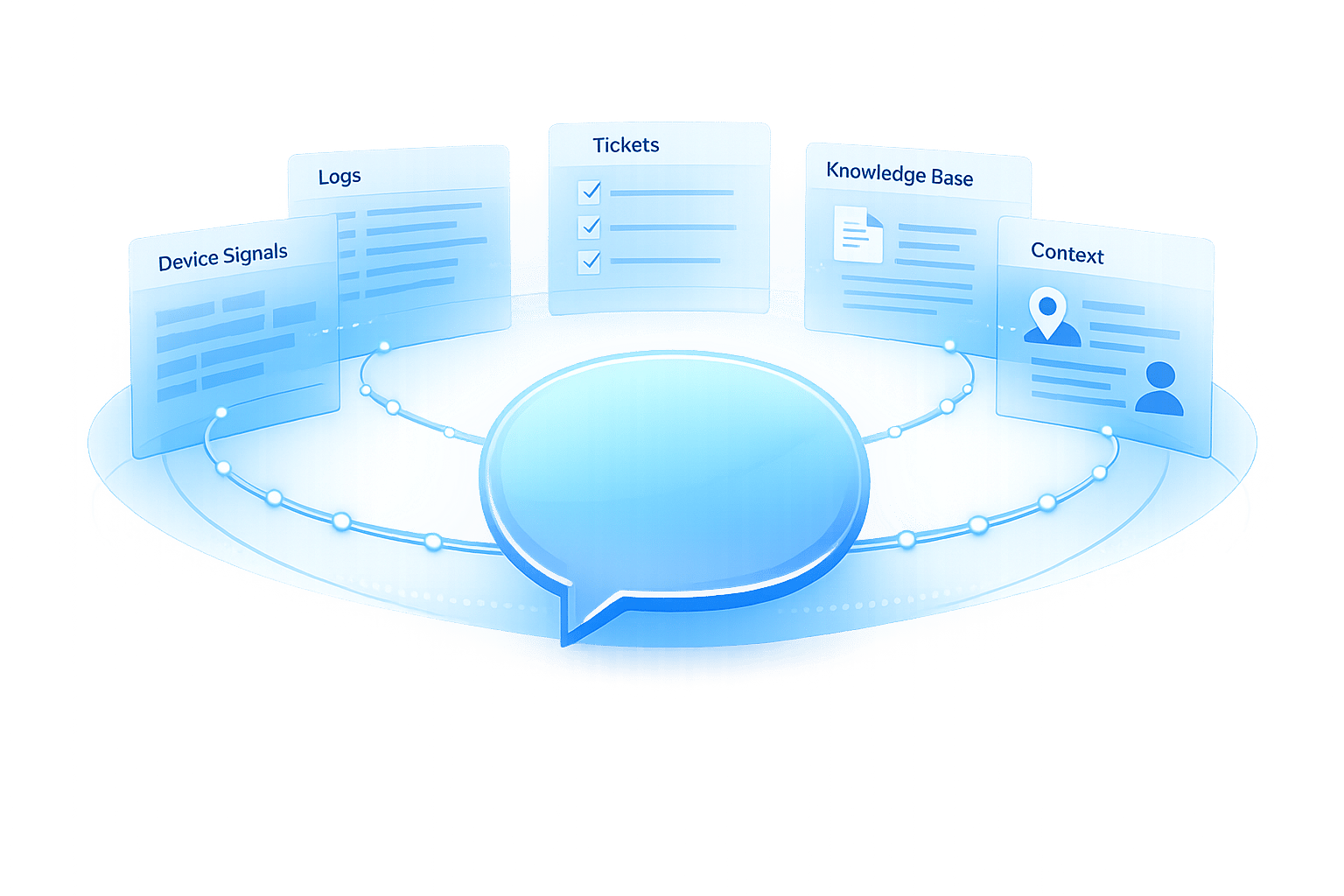
Real-time data processing is transforming customer support by enabling faster, more accurate, and context-aware AI responses. Unlike older batch systems that rely on delayed updates, real-time systems process data as it’s generated, ensuring every customer interaction reflects the latest information. Here’s what makes it essential:
- Speed: AI chatbots with real-time capabilities improve response times by up to 70%.
- Proactive Support: Detect issues like frustration or cart abandonment and act before customers need to reach out.
- Accuracy: Pull live data from CRMs, inventory systems, or order tracking to ensure up-to-date answers.
- Customer Engagement: Personalize interactions in the moment to automate customer support without losing quality, increasing satisfaction and loyalty.
Technologies like Apache Kafka, Apache Flink, and in-memory computing power these systems, while AI models leverage live data for dynamic responses. Businesses using tools like ChatSpark report significant cost savings, faster resolutions, and higher customer satisfaction. Real-time processing isn’t just a feature - it’s becoming a necessity for modern customer support implementation.
How Real-Time Data Processing Optimizes AI for Customer Support
Real-time data processing turns AI into a dynamic tool that adjusts to customer needs on the fly. By pulling live data from CRMs, inventory systems, payment gateways, and order tracking platforms, AI can provide responses that reflect the most up-to-date information available [2].
With access to live context - like a customer’s recent activity or a payment issue - AI delivers solutions that are both timely and relevant [7]. The result? Faster responses, smoother problem resolution, and stronger customer engagement.
Faster Response Times
Speed isn't just a luxury; it’s a key factor in driving business success. For instance, every 100 milliseconds of delay can cost Amazon 1% in sales, and even a one-second lag can slash conversions by up to 7% [4]. Real-time data processing eliminates these delays by allowing AI to retrieve and process information almost instantly [1].
Companies leveraging AI chatbots with real-time capabilities have seen response times improve by as much as 70% [3]. Picture this: a customer asks about their order, and the AI immediately pulls live tracking details, warehouse updates, and delivery estimates - all while the conversation is ongoing [2]. On top of that, the system can prioritize urgent issues, moving time-sensitive queries to the front of the line based on real-time analysis [1].
Better Issue Resolution
Accurate solutions require current information. Real-time processing gives AI the ability to understand not only what a customer is asking but also the context behind the question. For example, if a user is stuck on a pricing page or browsing a specific product, the AI can use this insight to provide more targeted assistance [7].
This level of contextual awareness allows for proactive problem-solving. If the system detects issues like a failed payment or low stock, it can address these problems before the customer even realizes there’s an issue [1]. Sentiment analysis adds another layer, identifying frustration or urgency in a customer’s tone and escalating the issue to a human agent with full context in hand [3]. Statistics back this up: 88% of consumers are more likely to make a purchase when interactions feel personalized in real time [7]. On the flip side, 85% of users will abandon a chatbot that fails to resolve their issue [3]. This approach not only solves problems but also builds trust and loyalty.
Increased Customer Engagement
Real-time analysis allows AI to personalize interactions on the spot. Instead of relying solely on historical data, the system tailors responses based on what the customer is doing right now [1]. For instance, if someone abandons their shopping cart, the AI can step in with helpful suggestions or even offer a limited-time discount. Similarly, if a customer hesitates at a pricing page, the system can provide details about payment plans or alternative options [7].
When customers feel seen and understood, they’re more likely to stay engaged and return for future interactions. Over time, the AI learns from these interactions, improving its understanding of customer behavior and preferences with each exchange [1]. This ongoing refinement keeps customers coming back while enhancing the overall experience.
Technologies That Power Real-Time Data Processing for Customer Support AI
Every quick AI response relies on a sophisticated combination of technologies that work together to process and deliver data in real time. These systems are the backbone of real-time customer support, ensuring AI agents always have up-to-the-minute information.
Streaming Data Platforms
Streaming data platforms are at the heart of real-time AI operations. Tools like Apache Kafka, Amazon MSK, and Amazon Kinesis Data Streams capture events such as page views, cart updates, and chat messages as they happen[1]. Unlike batch processing, which operates on a delay, these platforms create a continuous data flow that AI can access immediately. For instance, Amazon utilizes Apache Kafka to track transaction data and customer interactions in real time. This allows them to detect issues like payment failures or delivery delays, while also enabling personalized product recommendations during live sessions[1]. Additionally, these platforms act as buffers, collecting high-speed event streams from websites, mobile apps, and IoT devices, and making them available for further processing[11].
Low-Latency Processing Engines
Once data is streaming, it needs to be processed quickly. Low-latency engines like Apache Flink and Apache Spark Structured Streaming analyze raw data and turn it into actionable insights in milliseconds[8]. For example, in August 2025, DraftKings adopted Apache Spark's Real-Time Mode (RTM) to enhance their fraud detection systems. Under the leadership of Senior Lead Software Engineer Maria Marinova, the system updated their online feature store from Kafka streams in under 200 milliseconds, enabling seamless integration of machine learning models for both training and live inference[8].
"In live sports betting, fraud detection demands extreme velocity. The introduction of Real-Time Mode together with the transformWithState API in Spark Structured Streaming has been a game changer for us."
- Maria Marinova, Sr. Lead Software Engineer, DraftKings[8]
This setup allowed DraftKings to process events up to 92% faster than traditional methods, ensuring response times stayed within the 200-millisecond threshold critical for conversational AI and other real-time applications[8][10]. With such rapid processing, AI systems can provide accurate, real-time assistance.
AI Models for Real-Time Support
Large Language Models (LLMs) like GPT-4 are particularly effective in real-time customer support due to their extensive pre-training on diverse datasets. These models often use Retrieval-Augmented Generation (RAG) to incorporate real-time context. RAG works by converting a user query into a vector, which is then used to search a vector database (e.g., Pinecone, Weaviate, or Milvus) for the most relevant information - such as customer profiles, order details, or policy updates. This context is added to the model's prompt at runtime, making it more dynamic and responsive than traditional fine-tuning methods[9].
In November 2025, Droptica implemented a real-time RAG system for an AI-powered document chatbot. The system managed 10,000–15,000 data chunks and achieved a 99.8% webhook success rate, ensuring content updates were reflected in the AI's knowledge base within 30 seconds[5]. For scenarios requiring ultra-low latency - like fraud detection with response times under 10 milliseconds - models can be converted to lightweight formats such as TensorFlow Lite or ONNX Runtime. These lightweight models can be embedded directly into stream processing systems, eliminating network delays and further speeding up response times[11].
How to Implement Real-Time Data Processing with ChatSpark
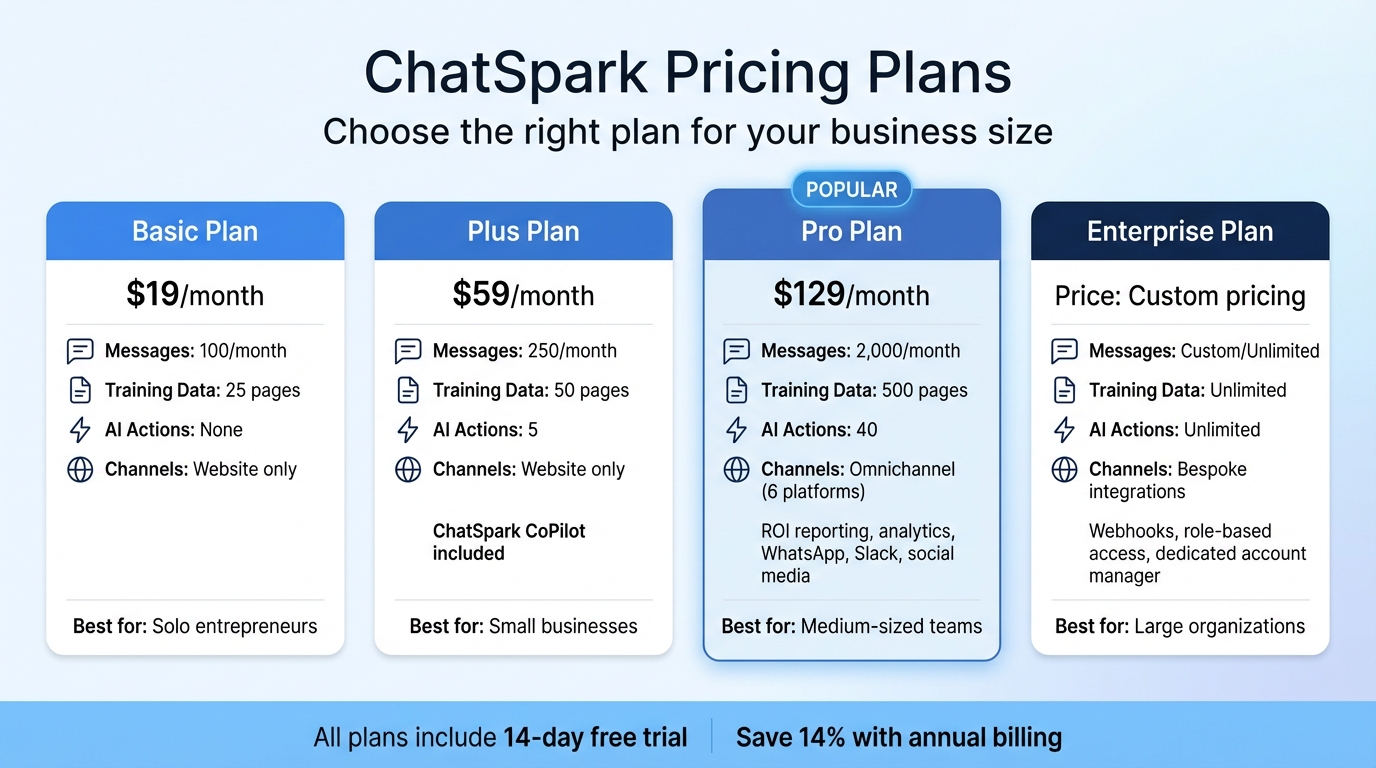
ChatSpark Pricing Plans Comparison for Real-Time AI Customer Support
ChatSpark's AI engine works in four quick steps to process inquiries in real time: it receives a question, searches knowledge bases, determines the appropriate action, and delivers an answer - all in under 2 seconds [12].
Omnichannel Integration for Real-Time Data
ChatSpark supports six major communication platforms - websites, WhatsApp, Instagram, Facebook, Telegram, and Slack - allowing businesses to handle interactions across multiple channels seamlessly [12]. Each AI agent focuses on a single channel, enabling companies to deploy multiple agents under one account. For instance, a retail company could use one agent on its website for product-related questions and another on WhatsApp for order tracking, both using the same real-time knowledge base.
Additionally, ChatSpark's AI Actions feature integrates with over 140 actions across 40+ platforms [17,20]. This functionality allows businesses to perform tasks like checking Shopify order statuses, scheduling appointments via Calendly, or creating Zendesk tickets - all during live conversations. For example, between late 2025 and early 2026, a construction company using ChatSpark managed 10,754 messages with a 98% resolution rate, generated 153 leads, and saved 66 agent days in just four months [17,18].
By combining smooth channel integration with up-to-date information access, ChatSpark ensures businesses can deliver fast, efficient support.
AI-Powered Knowledge Retrieval
Setting up ChatSpark’s real-time knowledge retrieval takes about 5 minutes [12]. Businesses can upload content in various formats, including website URLs, PDFs, DOC/DOCX files, CSV spreadsheets, PowerPoint presentations, or plain text. The platform automatically extracts and indexes this information, making it instantly searchable. It supports responses in over 95 languages without requiring extra configuration.
ChatSpark also uses a Human-in-the-Loop engine to improve its knowledge base over time by analyzing real conversations [14]. When the AI encounters a question it can’t confidently answer, it flags the interaction and drafts a response for human review.
"ChatSpark has been managing two of our largest product lines over the past year. It currently handles an average of 1,831 chats per month without any human intervention. Since implementing it on our website, we've realized measurable savings of $119,225."
- Lorri G., Customer Service & Technical Support Manager, ITW [17,20]
This dynamic knowledge system ensures customers receive accurate and timely assistance.
Pricing Plans for Businesses of All Sizes
ChatSpark offers four pricing tiers, making it accessible for businesses of various sizes:
- Basic plan ($19/month): Includes 100 messages per month and 25 pages of training data, perfect for solo entrepreneurs experimenting with AI support on a single website.
- Plus plan ($59/month): Provides 250 messages, 50 pages of training data, 5 AI Actions, and access to ChatSpark CoPilot, a browser extension for using AI-powered knowledge retrieval in tools like Gmail and Salesforce.
- Pro plan ($129/month): Designed for medium-sized teams, this plan allows 2,000 messages per month, 500 pages of training data, 40 AI Actions, and omnichannel deployment across platforms like WhatsApp, Slack, and social media. It also includes ROI reporting and analytics.
- Enterprise plan: Tailored for large organizations, this plan offers custom message limits, unlimited AI Actions, webhooks, role-based access controls, and dedicated account management.
All plans come with a 14-day free trial, and businesses can save 14% with annual billing.
| Plan | Monthly Price | Messages/Month | Training Data | AI Actions | Deployment Channels |
|---|---|---|---|---|---|
| Basic | $19 | 100 | 25 pages | None | Website only |
| Plus | $59 | 250 | 50 pages | 5 | Website only |
| Pro | $129 | 2,000 | 500 pages | 40 | Omnichannel (6 apps) |
| Enterprise | Custom | Custom | Unlimited | Unlimited | Bespoke integrations |
Challenges and Best Practices for Real-Time Data Processing
Real-time data processing offers immense advantages, but it also comes with technical challenges that can affect implementation and performance. Recognizing these challenges - and tackling them effectively - enables businesses to create fast, dependable, and compliant customer support systems.
Managing Data Volume and Scalability
Handling large volumes of data from multiple sources while keeping response times low is no small feat. Systems need to scale either horizontally or vertically as event streams grow, which demands thoughtful infrastructure design [15][1].
One effective approach is adopting a streaming-first architecture. Instead of relying on batch processing, businesses can shift to continuous, event-driven models using tools like Apache Kafka or Kinesis [15][4]. Pairing this with in-memory computing - utilizing RAM-based storage solutions like Redis or Valkey - helps cut down on disk I/O, achieving sub-second response times [15][1]. For companies serving global audiences, edge computing is another game-changer. By processing data closer to its source, edge computing can reduce cloud latency and bandwidth usage by 70–250ms [15][16].
Tackling these scalability challenges lays the groundwork for reducing latency effectively.
Reducing Latency
Traditional multi-step integrations and batch ETL pipelines can slow down data delivery [4][6]. And in today's fast-paced digital environment, even a one-second delay can slash conversion rates by as much as 7%, while 53% of mobile users abandon sites that take more than three seconds to load [4].
Several strategies can help combat latency:
- Response streaming: Instead of waiting for a complete response, send tokens to users as they’re generated. This can boost perceived performance by 50–70% [16].
- Semantic caching: Store responses for similar queries, avoiding costly model inference and delivering answers in around 50ms instead of over 2,000ms [16].
- Parallelized workflows: Execute independent tasks - such as retrieving user data, order history, and support articles - simultaneously rather than sequentially [16].
"Real-time AI isn't just about 'fast models' - it's about ensuring the right data gets to the right place instantly." - Michael Cargian, AI Evangelist, SingleStore [6]
Reducing latency doesn’t just improve performance; it also ensures businesses can meet stringent compliance requirements.
Data Privacy and Compliance
Processing customer data in real time while adhering to regulations like GDPR and CCPA requires meticulous planning. In 2025, the global average cost of a data breach hit $4.88 million - a 10% rise from the previous year [18]. Beyond financial penalties, privacy violations can severely damage customer trust.
To address these concerns, businesses should integrate privacy measures at every stage of the AI lifecycle - from data collection to deployment [19][20]. Key practices include:
- Data minimization: Collect only the data you absolutely need, and encrypt it both at rest and in transit [17][20].
- Automated data deletion: Establish strict retention policies to ensure data is deleted when no longer necessary [17][20].
- Anonymization and pseudonymization: Protect personal identities in training datasets and real-time logs [17][18][20].
- Privacy Impact Assessments: Conduct these evaluations before launching new AI systems to identify potential risks early [19][20].
"The most valuable currency in today's digital economy isn't cryptocurrency or even traditional money - it's data. And with that value comes the responsibility to protect it." - World Economic Forum [20]
Incorporating encryption and data minimization practices into real-time processing pipelines from the start helps businesses maintain compliance without compromising on speed [17][20]. By addressing these challenges head-on, companies can unlock the full potential of real-time data processing for AI-driven customer support.
How to Measure the Success of Real-Time AI Customer Support
To truly understand the impact of real-time AI in customer support, businesses need to track metrics that highlight both operational efficiency and customer satisfaction. These metrics offer a clear picture of how real-time data processing enhances support outcomes.
Key Metrics to Track
Measuring success means looking at multiple dimensions. Metrics can be grouped into four main categories:
- Business Impact: Includes ROI, cost savings, and lead conversion rates.
- Conversation Quality: Tracks resolution rates and escalation rates to assess how effectively real-time insights improve support.
- Engagement: Monitors metrics like interaction volume and containment rates (how often AI resolves issues without escalation).
- Technical Performance: Focuses on latency and AI accuracy [24].
Some specific metrics deserve special attention. For example, First Response Time (FRT) indicates how quickly customers are engaged, while the Resolution Rate, ideally between 60–90%, shows how often AI resolves issues without human intervention [26]. On the other hand, the Fallback Rate, which measures how often AI escalates issues it can't handle, should remain below 5% [24].
Customer satisfaction is equally important. Metrics like Customer Satisfaction Score (CSAT), Net Promoter Score (NPS), and Customer Effort Score (CES) gauge how well users feel supported and how easy the process was. Considering that 81% of customers try to solve problems on their own before reaching out to support [21], a high self-service rate is a strong indicator that your AI is meeting expectations.
Real-world examples highlight the tangible benefits of tracking these metrics. In 2024, Klarna's AI assistant managed 2.3 million conversations in its first month, handling two-thirds of all customer chats. This reduced resolution time from 11 minutes to under 2 minutes and delivered the equivalent workload of 700 full-time agents [27]. Similarly, NIB Health Insurance's AI assistant "nibby" has processed over 4 million queries since 2021, achieving a 60% automation rate and saving an estimated $22 million [27]. These examples demonstrate how properly measured real-time AI can deliver measurable results.
Using Dashboards for Insights
After defining metrics, dashboards become the tool for turning data into actionable insights. The best dashboards are purpose-built:
- Executive dashboards: Focus on high-level metrics like ROI and CSAT.
- Operational dashboards: Monitor real-time metrics such as interaction volume and staffing needs.
- Quality dashboards: Highlight areas for improvement, like training gaps and fallback patterns [24].
Real-time dashboards provide instant visibility into active chat flows, agent availability, and system performance, enabling teams to adapt immediately rather than waiting for end-of-month reports [25].
Set up threshold alerts to notify teams when wait times exceed service level agreements (SLAs) or when sentiment scores drop [25]. Keep an eye on "negative successes", where customers complete tasks only after multiple failed attempts or after resorting to "rage-typing" to get a human agent [23]. Use an "Unanswered Questions" dashboard to quickly identify and address knowledge gaps [22]. Tools like session analytics or heatmaps can also help pinpoint where users drop off in conversation flows [21][23].
"That's the real automation win – when bots handle the repetitive so humans can do the remarkable"
- Maya Rodriguez, CX Director at StellarCommerce [23]
Conclusion
Real-time data processing is reshaping customer support by delivering fast, context-aware responses that feel more human and trustworthy. Unlike traditional, static chatbots, modern systems tap into live data streams - like CRM updates, inventory levels, and order statuses - to create meaningful and efficient interactions.
A great example comes from a global construction products leader that implemented ChatSpark between October 2025 and February 2026. During this time, the system handled 10,754 messages with a 98% resolution rate, saving an impressive $47,880 and over 66 days of agent time[12][13].
These numbers highlight how ChatSpark is making a real impact in practical settings. Lorri G., a Customer Service & Technical Support Manager, praised ChatSpark for its reliable and autonomous performance, which led to notable cost savings[12].
Looking ahead, customer support is becoming smarter and more predictive. AI technology now examines real-time behavior patterns to predict customer needs before they even voice them. This shift enables personalized customer interactions that adjust to each person’s unique communication style and preferences[2]. It's a move from simply solving problems to anticipating them - an exciting step forward in customer experience.
For businesses ready to take advantage of this evolution, ChatSpark offers a powerful solution. Its AI engine executes over 140 actions across 40+ platforms, delivering responses in under two seconds. With plans starting at $19 per month, it’s accessible and effective[12][13]. As customer support transitions from reactive to predictive, ChatSpark leads the charge. Scripted interactions are a thing of the past - intelligent, real-time conversations now define the way brands connect with their customers[28].
FAQs
What data sources should my support AI connect to in real time?
To provide accurate and timely responses, your support AI needs access to a variety of data sources. These might include websites, organizational files (such as PDFs, CSVs, or Word documents), and live data streams like product inventories or support tickets. By integrating these sources, the AI can stay up-to-date with the latest information, allowing it to deliver more personalized and real-time support.
How do I keep real-time AI fast during traffic spikes?
To keep your AI delivering quick, real-time responses during traffic surges, it's important to have the right strategies in place. One effective approach is autoscaling your infrastructure, which automatically adjusts resources based on demand. This ensures your system can handle spikes without slowing down.
Another key factor is optimizing response latency. This can be achieved by enhancing your infrastructure, simplifying data processing workflows, and cutting down on model inference time.
You can also improve efficiency by using techniques like managing conversation complexity - keeping interactions straightforward - and enabling streaming responses, which allows partial responses to be sent while the AI continues processing. Together, these strategies help maintain smooth and responsive interactions, even during the busiest times.
How can I use real-time customer data while staying GDPR/CCPA compliant?
When working with real-time customer data, it's essential to prioritize privacy and adhere to GDPR and CCPA standards. Here's how you can ensure compliance:
- Build a Privacy-First Framework: Start by embedding privacy into your processes. Collect data only when you have a lawful basis, such as explicit consent or legitimate interest.
- Adopt Privacy by Design: Integrate privacy considerations at every stage of data handling, from collection to storage and processing.
- Limit Data Collection: Gather only the information you absolutely need. Avoid collecting excessive or unnecessary data.
- Provide Transparency: Offer clear, easy-to-understand notices explaining how and why data is collected. For sensitive data, ensure you obtain explicit consent.
- Empower Customers: Allow users to access, correct, or delete their personal information as required by GDPR and CCPA.
- Secure Data: Protect all data storage and transfers with robust security measures to maintain customer trust and regulatory compliance.
By following these steps, you can handle customer data responsibly while respecting their privacy and staying within legal boundaries.