Overwhelmed with customer support tickets? AI automation can help. By automating repetitive tasks like password resets and order tracking, you can reduce support volume, cut costs, and improve response times. Here's how:
- AI handles routine inquiries 24/7: Tools like ChatSpark resolve up to 80% of common issues in seconds.
- Save money: AI resolves tickets for $0.50–$2.00 compared to $15.56 for human agents.
- Boost productivity: Free up agents to focus on complex problems, increasing efficiency by 14%.
- Proactive solutions: Send automated updates and guides to prevent repetitive questions.
This guide breaks down six steps to implement AI automation - from analyzing ticket data to deploying chatbots across platforms. You’ll also learn how to track performance and continuously improve your system. Let’s dive in.
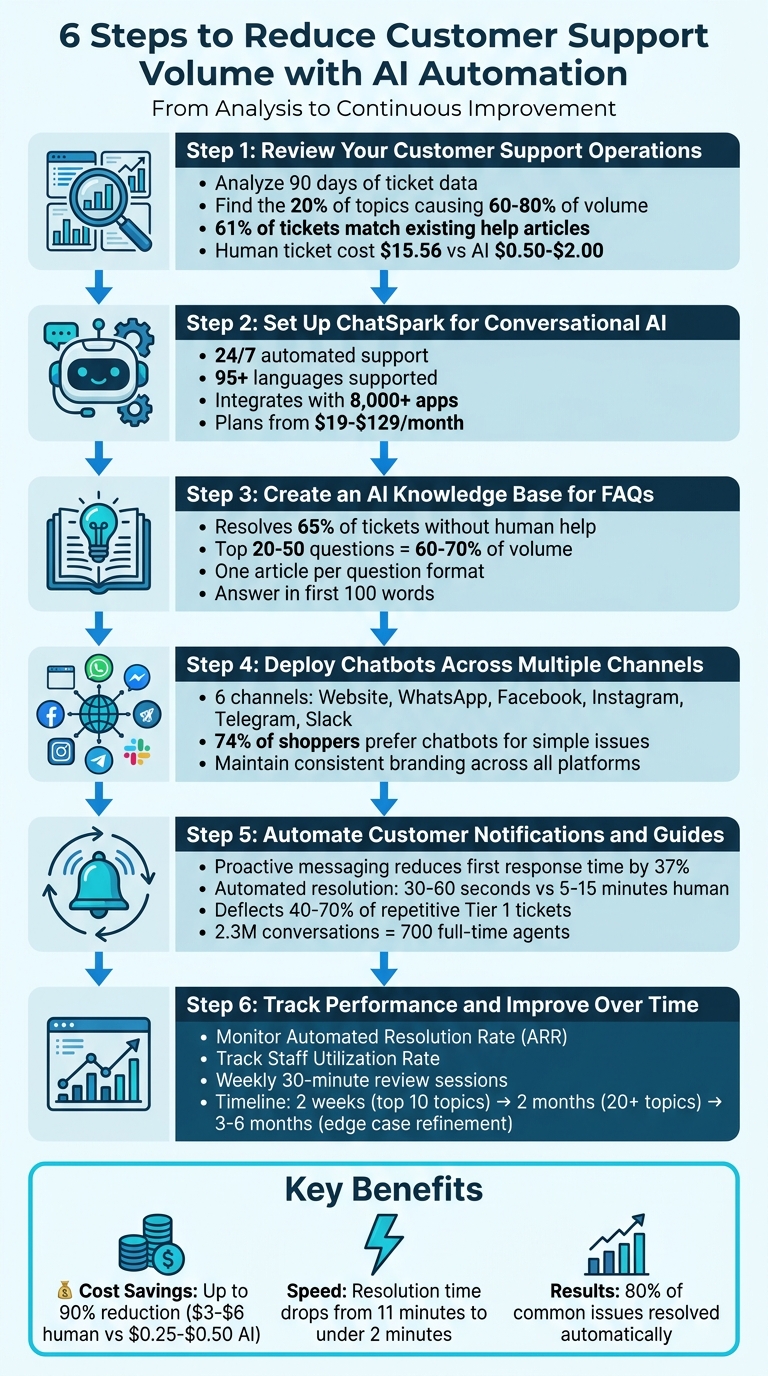
6 Steps to Reduce Customer Support Volume with AI Automation
Step 1: Review Your Customer Support Operations
Start by analyzing 90 days of data from your CRM or helpdesk system to uncover patterns in customer support activity [6]. Export information like ticket categories, resolution times, customer communication channels, and escalation rates.
Find Common Customer Questions
Focus on the 20% of inquiry topics that account for 60–80% of your ticket volume [6]. Categorize tickets by topics such as billing, order status, password resets, or returns, and assign each a complexity score from 1 to 5. Tickets with high frequency and low complexity (scores of 1 or 2) are prime candidates for AI automation.
For instance, "Where Is My Order" inquiries are often ideal for automation, with an automation potential of 85–95% [3]. Similarly, straightforward issues like password resets and account access can be efficiently handled by AI. One mid-size SaaS company discovered that 61% of its support tickets were identical to content already covered in 23 existing help articles [1]. This highlights a common issue: customers repeatedly ask questions that already have documented solutions.
Review Current Support Metrics
Determine your Cost Per Ticket (CPT) by dividing your monthly support expenses (including salaries, benefits, software, and overhead) by the total number of tickets resolved [4]. On average, a human-handled ticket in North America costs around $15.56, whereas AI can resolve tickets for just $0.50–$2.00 [7].
Monitor key metrics like First Response Time (FRT) and Average Handle Time (AHT). While human agents typically need 4–8 minutes to resolve routine tickets [1], AI can provide responses in mere seconds. Also, measure your First Contact Resolution (FCR) rate, aiming to surpass 75% with the help of automation [3]. Finally, analyze escalation triggers to understand why tier-1 tickets are escalated to tier-2. This information will guide you in designing AI workflows that ensure smooth and effective handoffs [6].
"The goal isn't zero tickets. It's zero wasted tickets - the ones where a human spends 6 minutes typing an answer that a bot could deliver in 6 seconds." - BotHero Team [1]
Step 2: Set Up ChatSpark for Conversational AI
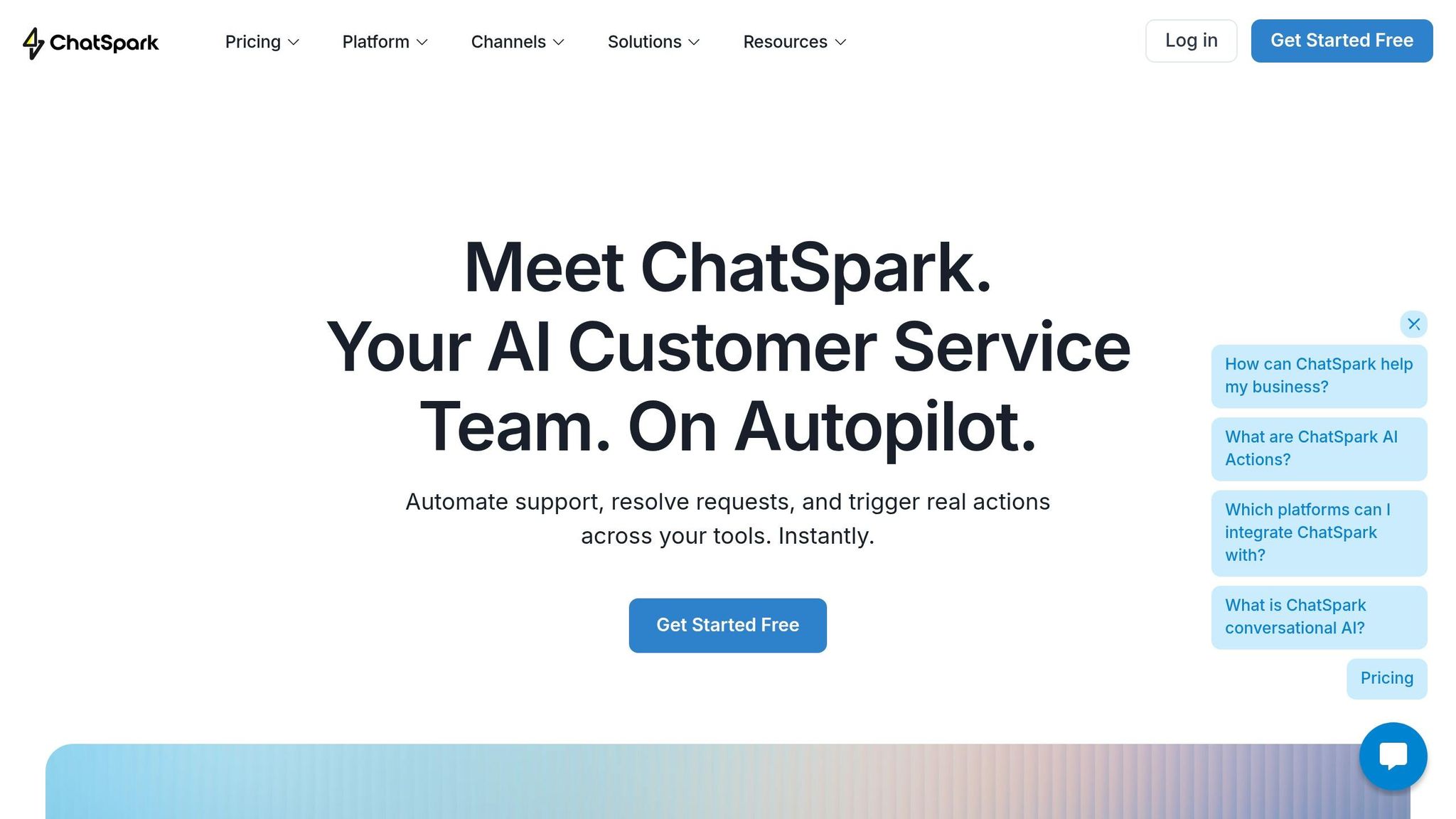
Once you've pinpointed which customer inquiries can be automated, it's time to deploy ChatSpark. This platform seamlessly connects to your existing customer communication channels and starts handling queries right away - no coding skills required.
ChatSpark Features and Benefits
ChatSpark offers round-the-clock automated support across multiple platforms, responding to customer questions in just seconds. With support for 95+ languages and automatic detection, it ensures your international customers receive assistance in their preferred language without any extra effort on your part.
The platform is designed to pull information from a variety of sources, including website URLs, PDFs, CSV files, Google Docs, and even YouTube transcripts. This allows your AI agent to reference product documentation, help guides, and training materials simultaneously when answering customer questions. ChatSpark also integrates with over 8,000 apps via Zapier and has direct connections to tools like Shopify, Salesforce, Zendesk, and Calendly. This means it can handle tasks like checking order statuses, updating tickets, or scheduling appointments - all without human intervention.
Once you're ready to get started, choose whether live chat or an AI chatbot fits your business's messaging volume and channel needs.
Choose the Right ChatSpark Plan
ChatSpark offers several pricing tiers to match different business needs:
- The Basic plan ($19/month) is ideal for small businesses managing up to 100 conversations monthly through their website.
- The Plus plan ($59/month) adds ChatSpark CoPilot and 5 AI Actions, allowing up to 250 messages per month - perfect for businesses starting to implement automation workflows.
- The Pro plan ($129/month) supports omnichannel communication across platforms like WhatsApp, Instagram, Facebook Messenger, Telegram, and Slack. It includes 2,000 monthly messages, 40 AI Actions, GA4 integration, and unbranded (white-label) widgets, making it a great choice for businesses with more complex needs.
- For companies with higher demands, the Enterprise plan offers custom message volumes, unlimited AI Actions, and dedicated account management.
| Feature | Basic ($19) | Plus ($59) | Pro ($129) |
|---|---|---|---|
| Messages/Month | 100 | 250 | 2,000 |
| Training Pages | 25 | 50 | 500 |
| AI Actions | None | 5 | 40 |
| Channels | Website only | Website only | WhatsApp, IG, FB, Slack, Telegram |
| Branding | ChatSpark Branded | ChatSpark Branded | Unbranded (White-label) |
| Analytics | Basic | Advanced | GA4 Integration & ROI Reports |
Step 3: Create an AI Knowledge Base for FAQs
After reviewing your support operations and setting up ChatSpark, the next step is to build a structured AI knowledge base. This is essential for delivering accurate, automated responses. Research shows that a well-organized AI knowledge base can resolve about 65% of support tickets without human assistance - but only if it’s set up properly [8].
Categorize Frequent Questions
Start by analyzing your support data to identify recurring questions. Typically, the top 20–50 most common queries make up 60–70% of your support volume [8]. Group these questions into key categories like Product Overview, Pricing, and Onboarding, ensuring each category addresses specific customer needs.
For each category, create one article per question instead of combining multiple topics. This approach ensures ChatSpark retrieves concise, accurate answers rather than overwhelming users with lengthy responses.
| Knowledge Base Category | Example Topics to Include |
|---|---|
| Product Overview | Target audience, main features, competitive advantages |
| Pricing & Plans | Subscription tiers, billing cycles, discounts, refund policies |
| Onboarding | Setup steps, required credentials, first-week guidance |
| Technical/How-To | Login issues, password resets, integrations, basic operations |
| Troubleshooting | Fixing error messages, loading problems, syncing failures |
| Billing & Account | Updating payment methods, cancellation steps, refund requests |
Use question-based titles that reflect how customers phrase their queries. For instance, instead of "Account Settings", use "How do I reset my password?" This makes it easier for ChatSpark to match natural language searches. Additionally, include the direct answer within the first 100 words of each article. This ensures the AI can quickly extract the most relevant information [9].
A well-structured knowledge base not only improves response accuracy but also lays the groundwork for regular updates.
Keep Your Knowledge Base Current
An outdated knowledge base can do more harm than good. To avoid this, regularly update your content:
- Review zero-result searches weekly to identify gaps.
- Audit top-performing articles monthly to ensure relevance.
- Update articles immediately after product or policy changes.
ChatSpark also tracks unsatisfactory responses, helping you pinpoint areas that need improvement. Every quarter, conduct a full audit by comparing current support ticket trends to your existing content [9]. This ensures your knowledge base stays aligned with customer needs.
When you update your knowledge base, ChatSpark automatically syncs the changes across all platforms - whether it’s your website, WhatsApp, Instagram, Facebook Messenger, Telegram, or Slack. This guarantees consistent, accurate answers no matter where your customers reach out.
Step 4: Deploy Chatbots Across Multiple Channels
Once your AI knowledge base is structured and ready, the next move is to expand ChatSpark's presence by rolling it out on the platforms your customers use most. ChatSpark allows deployment across six key channels: your website, WhatsApp Business, Facebook Messenger, Instagram DMs, Telegram, and Slack [10]. This multi-platform strategy is essential because 74% of shoppers prefer chatbots for handling straightforward issues, and they expect to connect with you on their platform of choice.
Add ChatSpark to Your Main Customer Channels
Begin by integrating ChatSpark into your primary customer touchpoints. For many businesses, this means starting with your website and social media accounts. Adding ChatSpark to your website is simple - just paste the provided code snippet into your site's HTML to get the chatbot widget up and running. For platforms like Facebook and Instagram, link ChatSpark to your managed Pages and accounts. This lets it manage direct messages, respond to mentions in stories, and handle product inquiries from posts.
If your audience is heavily mobile-focused or relies on messaging apps, consider connecting ChatSpark to a WhatsApp Business API account (personal numbers aren’t compatible). WhatsApp works particularly well for tasks like order updates and quick support questions. For B2B businesses or internal teams, integrating ChatSpark with Slack can streamline support in shared channels or via Slack Connect.
To ensure the best results, create separate AI agents for each platform, even if they share the same training data. This tailored approach helps meet the specific demands of each channel. Keep in mind that omnichannel deployment is available with the Pro Plan ($129/month), while the Basic and Plus plans are limited to website-only integration.
Maintain Consistent Branding and Voice
Consistency is key when providing support across multiple platforms. ChatSpark’s Directives feature allows you to define your AI’s role (e.g., “senior support representative”), its goals, and its communication style. This ensures that every response aligns with your brand’s tone - whether that’s casual and friendly or formal and professional.
You can also customize the chatbot’s appearance. Upload your logo, choose a custom avatar, and adjust interface colors to match your brand identity. Use the creativity slider to fine-tune the balance between engaging, personalized responses and the predictability required for professional communication. As Sam Ogborn, Founder of Autonomy, puts it:
"I want it to sound professional and predictable. So I've put it a little bit here in the middle [of the creativity scale], so each customer will still get a unique response, but it'll still sound professional."
Transparency is essential - always let customers know they’re interacting with an AI to build trust and set clear expectations [2]. ChatSpark’s unified dashboard also keeps conversation histories intact as customers switch between platforms, ensuring that any handoff to a human agent includes full context for a seamless experience.
With ChatSpark active across your primary channels, you’re now ready to take support automation to the next level by implementing notifications and guides in the upcoming step.
Step 5: Automate Customer Notifications and Guides
With your ChatSpark integration in place, taking the next step to automate notifications and guides can make a huge difference in streamlining your support operations. The goal isn’t just to answer questions faster - it’s to prevent them from being asked at all. By proactively sending customers the information they need, you can reduce repetitive inquiries and free up your team to tackle more complex issues. ChatSpark allows you to automate both transactional updates and step-by-step guides, turning potential support tickets into opportunities for self-service.
Send Proactive Messages to Prevent Questions
Start by pinpointing the questions your team answers over and over again. These often include things like order status updates, password resets, shipping delays, and billing notifications. Automating real-time updates across channels - whether it’s your website, WhatsApp Business, or Facebook Messenger - ensures customers get answers before they even ask.
For example, if a shipment is delayed, instead of sending a generic tracking link, you could send a message like, "Your order is delayed 2 days due to carrier volume." This approach directly addresses the customer’s concern with specific, actionable information. Automated resolutions like these typically take just 30–60 seconds, compared to the 5–15 minutes it might take a human agent to respond [5]. Proactive messaging can also reduce first response times by 37%, leading to happier customers.
But it doesn’t stop at transactional updates. Use ChatSpark to send preemptive FAQs during times of high traffic. If you’re gearing up for a new product launch or a big sale, push out answers to common questions about shipping, returns, or product details before your inbox starts overflowing. A major retailer, for instance, introduced an AI assistant that handled a staggering 2.3 million conversations within its first month. This was equivalent to the workload of 700 full-time agents, cutting repeat inquiries by 25% and reducing resolution times from 11 minutes to under 2 minutes.
Create Guides for Multi-Step Processes
While proactive messages are great for addressing routine updates, detailed guides are essential for helping customers navigate more complex tasks. Some issues can’t be solved with a one-sentence response - they need a step-by-step walkthrough. ChatSpark shines in these scenarios, guiding customers through tasks like troubleshooting, setting up accounts, or processing refunds. Automating these processes can deflect 40–70% of repetitive Tier 1 tickets, significantly lightening the load on your support team.
To make these guides effective, break down complicated tasks into simple, easy-to-follow steps. For example, if a customer needs to reset their account settings, ChatSpark can walk them through each action - checking their email, clicking the verification link, and updating their password - all without needing a human agent. Add visual aids like screenshots and clear headings to make the instructions even easier to follow. As IBM puts it:
"AI should enhance, not replace, human support. It's best used for routine tasks, while complex, emotional or sensitive cases use human interaction" [11].
To decide which guides to prioritize, review your ticket history. Analyze the last 500 tickets to identify the top 5–8 categories that account for 60–70% of your support volume, and focus on creating automated guides for those scenarios [11]. For instance, ITW implemented ChatSpark to manage two major product lines, handling an average of 1,831 chats per month without human intervention. This effort saved them $119,225 over a year. Automating both notifications and guides not only cuts down on support volume but also speeds up customer resolutions.
Step 6: Track Performance and Improve Over Time
Launching ChatSpark is just the beginning. The real benefits come from consistently monitoring its performance and making adjustments based on what the data tells you. Keeping an eye on the right metrics helps ensure automation is reducing support volume while keeping customers happy. By analyzing these insights regularly, you can fine-tune ChatSpark to perform better every week.
Monitor Key AI Performance Metrics
Once ChatSpark is up and running, it’s time to measure how well it’s easing the workload on your support team. Just as integrating ChatSpark across multiple channels boosted responsiveness, tracking performance ensures it continues to deliver results.
Focus on metrics that highlight both efficiency and customer satisfaction. Automated Resolution Rate (ARR) is a key indicator, showing the percentage of inquiries ChatSpark resolves entirely without human help [7]. This metric reveals how much of the repetitive workload is being offloaded from your team. Another important measure is the Staff Utilization Rate, which indicates how your human agents are spending their time [7]. Ideally, they should be focusing more on complex, high-value tasks rather than repetitive questions.
One common mistake businesses make is prioritizing deflection rate - the number of tickets avoided - without checking if those customers’ issues were actually resolved. A better approach is to emphasize resolution rate over deflection rate. Poor deflection often leads to frustrated customers who end up reaching out again [7][3]. And don’t forget to include a “talk to a human” option in your chatbot. Customers should never feel stuck in an endless bot loop [12].
Update AI Responses Using Customer Feedback
Metrics provide valuable insights, but they’re not enough on their own. Direct feedback from both customers and support agents is crucial for refining ChatSpark’s performance. Use simple rating buttons to gather daily feedback. When agents flag a response as unhelpful, ask them to include a quick note explaining why. Was the response too formal? Off-topic? Inaccurate? These notes are a treasure trove for improving ChatSpark’s responses.
Set aside 30 minutes each week to review conversations where ChatSpark didn’t meet expectations. Use these reviews to create new knowledge base entries that address any gaps [1]. Sentiment analysis can also help - compare AI-generated Customer Satisfaction (CSAT) scores with those from human agents. If AI scores fall more than five points below human scores, it’s a sign to adjust automation thresholds [3][11].
Improvements often follow a predictable timeline. In the first two weeks, focus on automating responses to your top 10 topics. By the first two months, expand to 20 or more topics and refine handoff rules. Between months three and six, conduct weekly reviews of edge cases to fine-tune performance [1].
With these strategies in place, your team will be ready to achieve the kind of success highlighted in upcoming case studies.
Success Stories: Reducing Support Volume with ChatSpark
ChatSpark helps businesses cut down on support inquiries and improve customer satisfaction through smart AI-driven automation. These real-world examples show how automated solutions can transform customer support, making operations smoother and more efficient.
Case Study: E-Commerce Business During Peak Season
The holiday rush often overwhelms e-commerce support teams with repetitive questions about shipping, returns, and order tracking. For retailers and entrepreneurs, November and December bring a surge in customer inquiries. ChatSpark steps in to handle these repetitive tasks by automating responses to common questions like order statuses, delivery timelines, and product availability.
By deploying ChatSpark on websites and social platforms, businesses ensure quick responses to customers while freeing up human agents to tackle more complex issues. Straightforward queries, like tracking orders, are managed by the AI, while refund requests or technical concerns are escalated to support staff. This ensures customers get accurate and timely help, even during the busiest times of the year.
Example: SaaS Company Onboarding Support
For SaaS companies, repetitive onboarding questions can slow down customer activation. Queries like "Where can I find my API key?" or "How do I integrate with third-party tools?" can take up a lot of a support team’s time - especially when onboarding new users at scale. ChatSpark's AI-powered knowledge base, available 24/7, simplifies the onboarding process. A typical 90-day investment of around $3,180 often proves worthwhile, as it allows teams to focus on more advanced customer needs.
With ChatSpark, new users get instant help with account setup, integration guides, and feature tutorials. This not only speeds up the activation process but also ensures users feel supported from the start.
From handling the holiday shopping frenzy to simplifying SaaS onboarding, these examples highlight ChatSpark's ability to make customer support more efficient across different industries.
Conclusion
Cutting down support volume doesn’t mean sacrificing service quality. With ChatSpark’s AI automation, you can efficiently handle repetitive questions while allowing your team to focus on more complex challenges. The six-step plan in this guide - from analyzing your support operations to tracking performance - lays out a clear path for transforming your customer service approach. The results? A more streamlined system with measurable benefits.
ChatSpark delivers impressive cost savings: basic inquiries that typically cost $3.00 to $6.00 when managed by human agents can be reduced to just $0.25–$0.50 with AI, saving up to 90% on costs[1]. Many businesses are already seeing major reductions in ticket volume and resolving thousands of queries each month without requiring human intervention.
But the journey doesn’t stop with initial savings. Regularly reviewing unresolved query logs and updating your AI responses based on customer input ensures your system continues to improve. This ongoing refinement helps maintain high customer satisfaction while making your AI smarter over time.
ChatSpark provides flexible solutions for businesses of all sizes. Whether you’re gearing up for a busy holiday season in e-commerce or streamlining onboarding for a SaaS platform, ChatSpark adjusts to meet your needs. With pricing starting at $19/month for solo entrepreneurs and scalable options for larger enterprises, it’s a solution that grows with your business.
Start small, track your results, and expand on what works. By following the six-step approach and adapting to changing customer expectations, you’ll achieve lower support volume, faster response times, and higher customer satisfaction in no time.
FAQs
Which tickets should I automate first?
Start by automating tickets that are repetitive, straightforward, and eat up a lot of your agents' time. Think about tasks like password resets, processing refunds, answering FAQs, and handling account recovery requests. These types of inquiries are perfect for AI automation because they’re predictable and don’t require much nuance. By automating these, you’ll not only cut down on support volume but also free up your agents to focus on more complex, high-value issues. This approach can streamline operations and make a real difference in your team's efficiency.
How do I keep AI answers accurate over time?
To keep AI performing well over time, it's essential to focus on regular updates and thoughtful management. This means consistently refreshing training data, keeping a close eye on performance metrics, and fine-tuning algorithms as needed. Human oversight plays a big role here - it ensures that the AI stays aligned with customer needs and helps minimize mistakes.
Creating a feedback loop is another key step. By analyzing customer interactions, you can identify areas for improvement and make adjustments to the system. But it's not just about the technology. The people and organizational culture behind the AI are just as important. Success depends on how well teams handle change and integrate tools like Generative AI, which can boost both automation and accuracy.
When should the bot hand off to a human?
When dealing with complex issues, emotionally charged situations, or questions that the bot can't handle effectively, it's time to transfer to a human. While AI excels at managing routine tasks, human agents are irreplaceable when personalized support is needed for challenges beyond the bot's capacity. Well-designed workflows ensure these handoffs happen only when necessary, striking the perfect balance between efficiency and maintaining a personal connection in customer service.