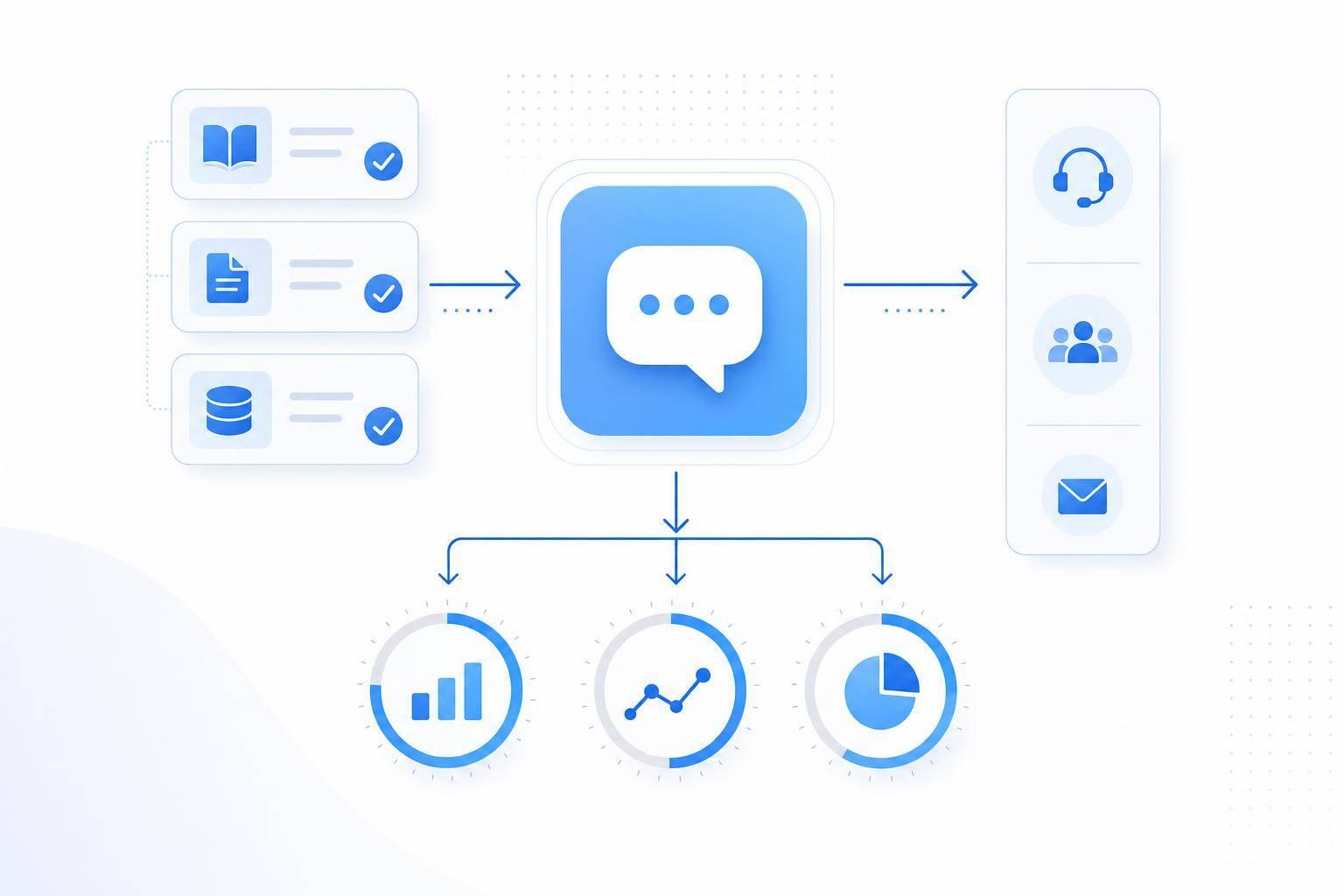
If your AI can’t answer common support questions with the right, up-to-date info, your team pays for it in more handoffs, more repeat contacts, and more time spent hunting for answers.
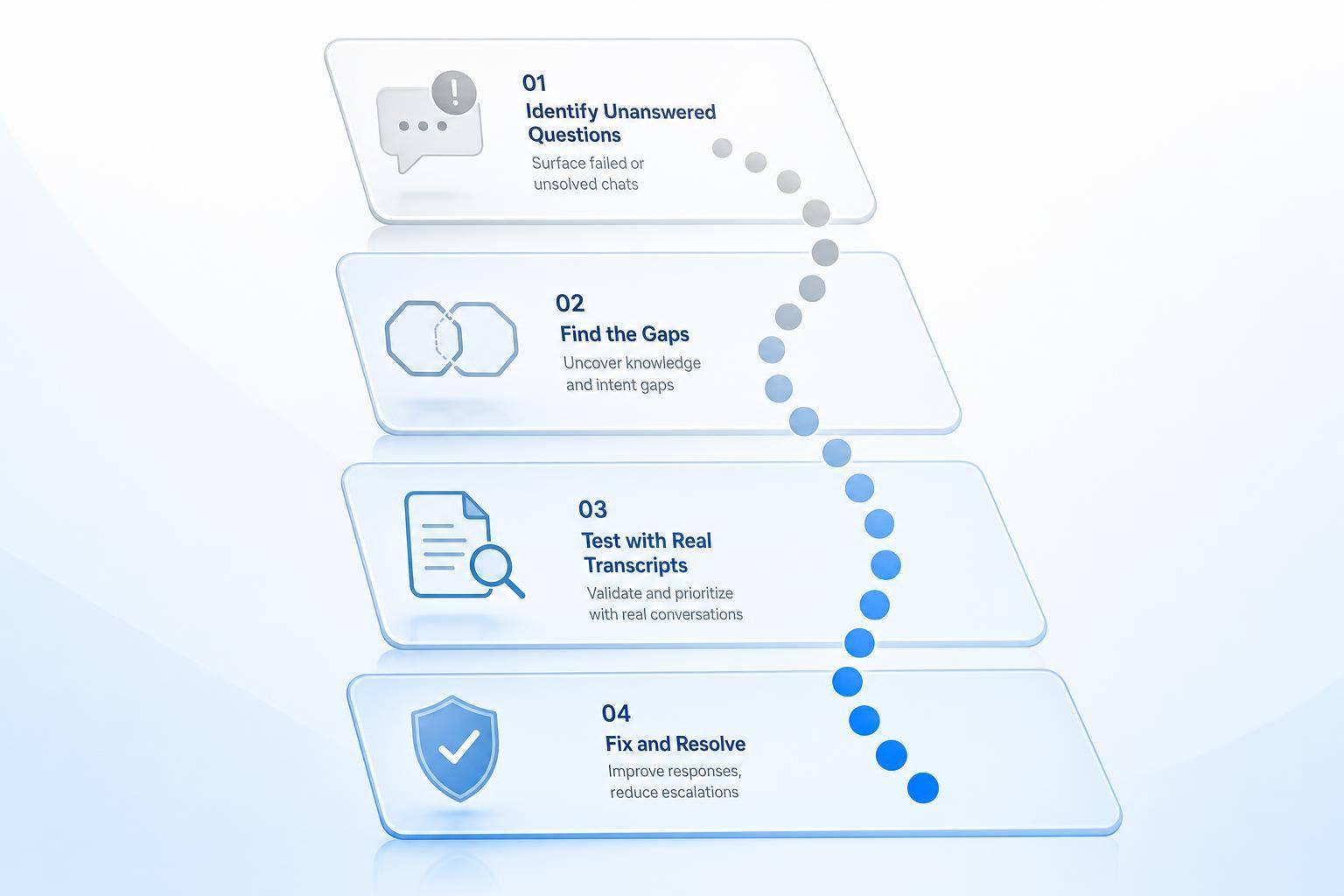
I’d define knowledge coverage in a simple way: it’s the percent of customer questions your AI can answer correctly from approved content. And if I want to improve it, I’d focus on four things first:
- Find gaps by reviewing the last 60–90 days of chats, tickets, and escalations
- Group issues by customer intent, not by team or queue
- Fix missing, old, and conflicting content, especially for edge cases and Spanish support
- Track results with accuracy, containment, repeat-contact rate, unresolved volume, and time to resolution
This article also clears up a common mix-up: coverage, accuracy, and containment are not the same thing.
- Coverage = the answer exists and the AI can get to it
- Accuracy = the answer is right and current
- Containment = the case gets solved without a human handoff
If I saw fallback replies on common questions, mixed answers to the same issue, or customers coming back within 72 hours for the same problem, I’d treat that as a sign the content needs work.
The core idea is simple: more content alone does not fix coverage. Better structure, cleaner wording, and regular testing do. A practical review loop - weekly, monthly, and quarterly - helps keep answers useful as products and policies change.
What AI customer service knowledge coverage means
AI Knowledge Coverage vs. Accuracy vs. Containment: Key Differences Explained
Knowledge coverage is the share of customer questions the AI can answer correctly using approved content. Put simply, it’s not enough to have a knowledge base sitting there. What matters is whether the AI can find the right answer and use it in a live support chat.
That gap is easy to miss. A company can have lots of help docs and still leave the AI guessing. That’s why this matters when you audit content and patch holes.
What counts as covered knowledge
Covered knowledge should cover the full range of customer intent, not just the questions that show up most often.
| Knowledge Category | Examples of Covered Content |
|---|---|
| Product Overview | Features, target audience, use cases |
| Pricing & Plans | Subscription tiers, billing cycles, refund rules |
| Onboarding | Setup guides, required credentials, first steps |
| Technical/How-To | Login issues, password resets, integrations |
| Troubleshooting | Error codes, syncing problems, system crashes, partial refund failures |
| Billing & Account | Payment methods, cancellation processes, account updates, multi-account access |
If whole categories are missing, content is out of date, or docs rely on internal jargon, answer quality drops. Retrieval drops too. The AI may have something to pull from, but not the wording or detail it needs to help the customer in the moment.
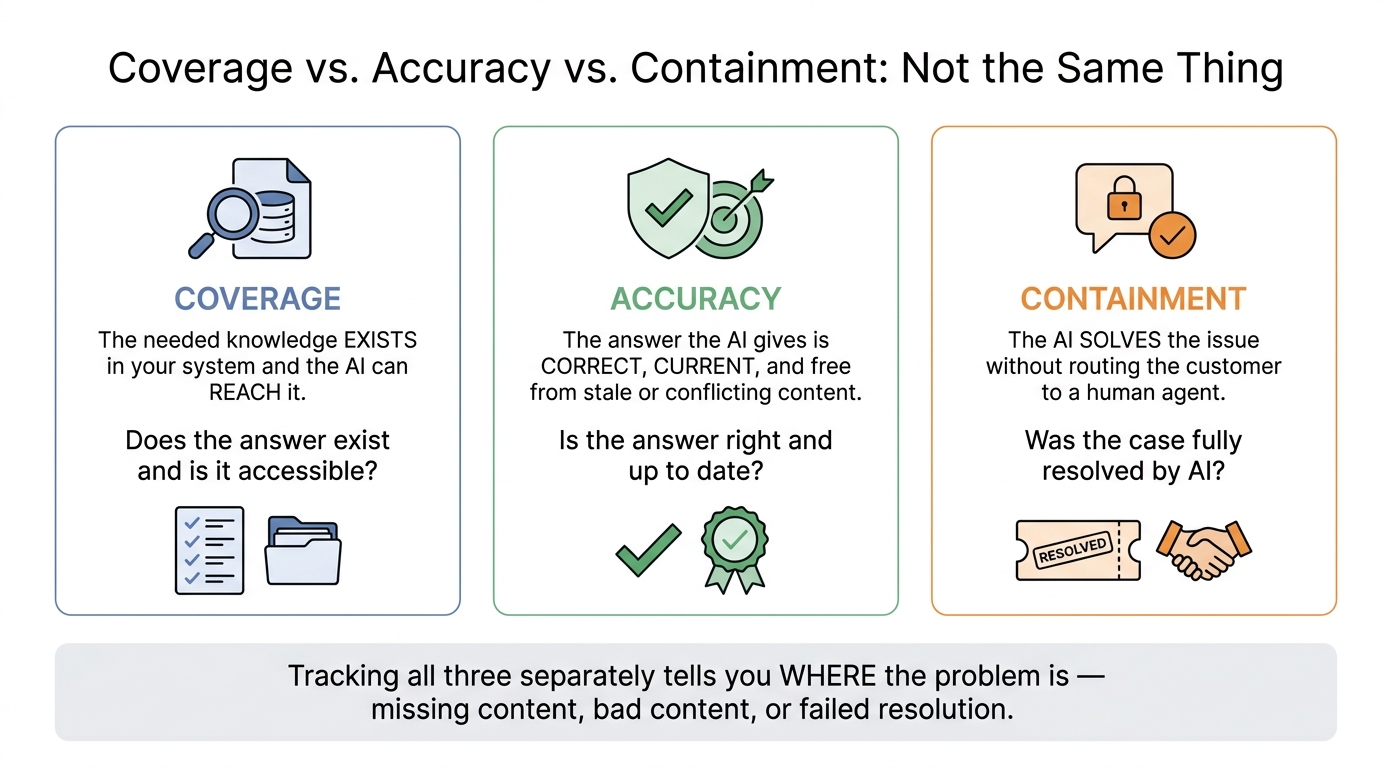
Coverage vs. accuracy vs. containment
These terms are connected, but they don’t mean the same thing.
- Coverage means the needed knowledge exists in your system and the AI can reach it.
- Accuracy means the answer the AI gives is correct, current, and not pulled from stale or conflicting content.
- Containment means the AI solves the issue without sending the customer to a human agent.
You want to track each one on its own. If you lump them together, it gets hard to see what’s broken. Is the issue missing content? Bad content? Or is the AI failing to resolve the case even when the answer is there?
That distinction tells you where to look next when you review misses, fix content, and track improvement.
Next, look for signs of strong and weak coverage in real support interactions.
Signs of strong and weak coverage in support operations
Once you've defined coverage, the next job is seeing it in actual customer chats.
This is where coverage stops being a theory and starts showing its hand. You can spot it in how the AI deals with paraphrases, product-specific questions, edge cases, and fallback situations - without sending the chat to a human.
What strong coverage looks like
Strong coverage means the AI gives the same correct answer even when customers phrase the question in different ways. It also holds up across product-specific questions and common exceptions, with fewer escalations around the same topic.
In plain English: the AI doesn't get thrown off just because the customer asks the same thing a little differently.
What weak coverage looks like
Weak coverage tends to show up fast. You'll see fallback replies, fuzzy answers, and the same kinds of handoffs happening again and again.
One of the clearest red flags is conflicting source content, like two refund policies that lead to different answers [1].
| Symptom | Likely Root Cause |
|---|---|
| Fallback replies on common questions | Missing or incomplete knowledge articles |
| Inconsistent answers to the same question | Conflicting source content |
| Repeated handoffs on the same topic | Missing or incomplete coverage for that topic |
| Weak performance in non-English chats | Multilingual customer support gaps |
| Correct on common cases, wrong on exceptions | Incomplete knowledge for exceptions |
These patterns tell you where to look next: missing content, conflicting content, exception handling, or language gaps.
How to audit and fix coverage gaps
Once you know what weak coverage looks like, the next step is to fix it in a steady, repeatable way.
Audit gaps using real conversations and existing content
Start with what customers are already telling you. Review the last 60–90 days of chats, tickets, and escalations, then compare those issues with your help center, FAQs, macros, and SOPs. Group everything by customer intent - like refund requests, subscription changes, or shipping address updates - instead of by queue or product team. That makes the weak spots a lot easier to see.
For each intent, check three things: Does a clear answer exist? Is it current? Does it conflict with anything else? If the answer to any of those is no, you've found a gap.
Then turn those gaps into a fix list based on volume, friction, and business impact.
| Audit Signal | Likely Cause | Next Step |
|---|---|---|
| Unresolved or reopened chats | Missing content or unclear instructions | Cluster by intent; draft or revise the missing article [9][11][15] |
| Low-confidence answers | Ambiguous phrasing or conflicting source content | Simplify structure, remove duplicates, standardize terminology [8][10][13] |
| Repeated escalations on the same topic | Edge cases or policy exceptions not documented | Add workflow-specific steps and exception handling [14][15] |
| Zero-result help center searches | No content exists for that customer phrasing | Create a new article using the customer's own wording [3][9][12] |
| Search results that get no clicks | Content exists but doesn't match what customers need | Rewrite the article title, summary, or answer structure [3][12][15] |
Put your energy into topics that are high-volume, low-containment, and high-friction first. That's usually where you'll get the biggest lift.
Fix coverage in FAQs, workflows, and edge cases
After you spot the gaps, fill them in where the AI actually looks. That means the content it retrieves, not the content you hope it will piece together.
High-volume topics like shipping delays, refund eligibility, and payment failures should go first. And don't stop at the main path. You also need the edge cases. For example, it's not enough to answer How do I update my shipping address? You also need answers for What if my order is already in transit? and What if I entered the wrong ZIP code? [15]
Keep articles tight and intent-specific. Subscription changes, order edits, and verification steps should each have their own article with:
- numbered steps
- clear preconditions, such as order status must show Processing
- direct outcomes, such as confirmation emails, refunds, or credits
When all of that gets buried inside one long policy page, the AI has a harder time pulling the right answer [6][15].
Multilingual support belongs here too. For U.S. companies that serve Spanish-speaking customers through chat or email, missing Spanish content is a real coverage problem. Translate and adjust your highest-volume Tier 1 content first. Use the same glossary for plan names, policy labels, and verification steps so the AI can match customer wording across languages without drifting into mixed terms [2][4][5][7].
Structure content so AI can retrieve the right answer
Fixing the gaps is only part of the job. Structure decides whether the AI can find the answer at all.
Titles matter more than people think. Headings like How to change your shipping address or Refund policy for subscription renewals tend to work better than vague labels like Account help because they line up with how customers ask questions [8][10][13].
Each article should stick to one intent. If you combine refunds, shipping, and payment failures on one page, retrieval gets messy. The AI is more likely to return a partial answer - or the wrong one entirely [8][10][13].
Write in plain U.S. English. Keep sentences short. Use the same term every time. If one article says promo code and another says discount code, the AI may treat them like separate ideas instead of two names for the same thing.
Use step-by-step formatting with numbered instructions when the task has a sequence. Add direct labels for plan-specific variations so the AI doesn't have to guess which part applies. And make ownership clear: each content domain should have a named owner and a review schedule so policy updates don't create conflicts between internal docs and the public help center [8][10]
How to measure and maintain coverage improvements
After you fix coverage gaps, the next step is simple: check whether those fixes changed the outcome. If accuracy, containment, and repeat contacts don't improve, the extra content didn't do its job.
The point isn't to publish more. The point is to help people get to a correct answer and move on.
Metrics that show real coverage improvement
Track a small group of metrics that show both coverage and results. These should map back to the same intent types you found in unresolved chats: missing content, conflicting content, edge cases, and language gaps.
| Metric | What it shows | How to use it to prioritize fixes |
|---|---|---|
| Answer accuracy | Whether AI responses are correct, complete, and actually solve the problem | Focus content updates on high-volume topics that fall below your accuracy benchmark [26] |
| AI containment rate | How often AI fully resolves issues without a human handoff | Use low containment to rank which intents need review first [20][23][25] |
| Unresolved-chat volume | Where customers abandon without resolution or escalation | Review transcripts to find confusing answers and missing steps [18][22][24] |
| Repeat-contact rate | Whether AI answers prevent customers from coming back with the same issue | Deepen coverage for topics with high repeat contacts within 72 hours [26][27] |
| Time to resolution (TTR) | How quickly issues are fully resolved end-to-end | Simplify flows for high-TTR topics so customers reach answers faster |
Don't read these numbers in isolation. They tell the story when you look at them together.
For example, a rising containment rate might look good at first glance. But if repeat-contact rate is going up at the same time, that's a red flag. It often means the AI is ending chats without fixing the issue. [21][24]
Report avoided escalations in dollar terms alongside accuracy and containment trends. That makes the impact easier to see, especially when you're asking where the next round of work should go.
Test, monitor, and repeat on a regular schedule
Build a test set from 100–500 real customer questions. Include common intents, key workflows, edge cases, and seasonal spikes. Then, after each major content update, run the whole set through your AI and score every answer as correct, partial, or incorrect. Compare the results with the last run to see what improved and what still needs work. [16][17][19]
Use the same intents from your audit as the baseline for every test run. If you change the baseline every time, you're moving the goalposts.
A steady review rhythm works well:
- Weekly, review headline metrics like containment, unresolved volume, and TTR. Then choose one to three high-impact topics to fix.
- Monthly, run the full test set, review repeat-contact and TTR trends, and confirm that automation gains are showing up in customer experience.
- Quarterly, rebuild or expand the test set to reflect new products, policy changes, and seasonal patterns.
Use real conversations as the source of truth. Fix content first. Expand automation only where accuracy is strong enough to support it. Then run the loop again.
FAQs
How do I measure coverage accurately?
Measure coverage in two ways: knowledge checks and live results.
Start with Knowledge Coverage. This is the share of customer questions the AI can answer with confidence using your knowledge base. If you’re above 80%, you’re in a strong spot.
Then check how that holds up in practice. Look at:
- Knowledge Base Hit Rate
- Hallucination Rate
- Human Override Rate
- self-service ratio
- true deflection
- intent-specific escalation rates
- ticket-volume changes
It also helps to use a golden dataset of 100–200 inquiries. That gives you a steady benchmark for testing. On top of that, review unresolved or low-confidence chats every week so you can spot gaps before they turn into bigger support issues.
What is a good knowledge coverage target?
In AI customer service, knowledge coverage is the share of customer questions an AI system can answer with confidence based on its training data. A coverage rate above 80% is generally seen as strong.
To get there and keep it there, put your focus on high-volume, low-complexity questions first. Then review your help center content and unanswered questions on a regular basis to spot gaps and fill them before they turn into bigger support issues.
How often should I audit AI support content?
Audit on a tiered schedule.
Review no-solution logs, escalations, and fallback rates weekly so you can spot gaps right away. Check overall knowledge base health monthly, then shift to quarterly reviews once the content is well established.
And when a product release ships or a policy changes, update help content right away. That keeps answers accurate and cuts down on outdated information.