AI is transforming customer support from a cost-heavy operation into a value-driven function. Businesses are cutting costs, saving time, and improving customer satisfaction by automating repetitive tasks like FAQs, billing inquiries, and order updates. For example, companies using tools like ChatSpark have reported savings of over $100,000 annually by automating thousands of interactions.
Key takeaways:
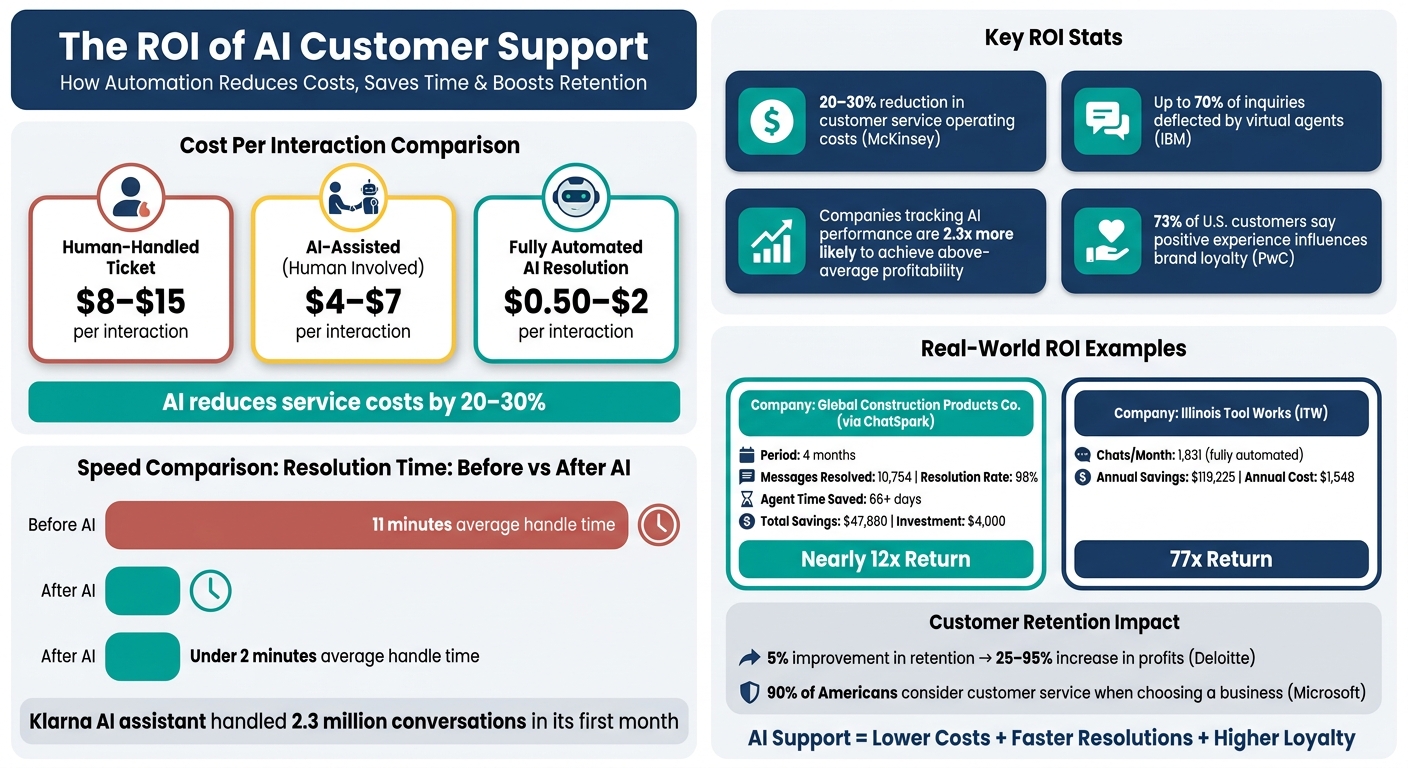
- Cost Savings: AI reduces service costs by 20–30%, with automated resolutions costing as little as $0.50–$2 per interaction compared to $8–$15 for human-handled tickets.
- Time Efficiency: AI slashes resolution times, with some businesses reducing average handling time from 11 minutes to under 2 minutes.
- Customer Retention: Faster, 24/7 support boosts satisfaction and loyalty, directly impacting revenue.
- Proven ROI: Companies tracking AI performance are 2.3x more likely to scale their efforts and achieve above-average profitability. This success often depends on a complete implementation strategy that includes strong documentation and optimization.
AI vs Human Customer Support: Cost, Speed & ROI Breakdown
Key Drivers of ROI in AI Customer Support
Building on the ROI framework discussed earlier, certain operational factors amplify the value businesses gain from AI-powered customer support. The return on investment (ROI) in this area is largely driven by reduced interaction costs, quicker resolutions, and scalable operations. Let’s break down these key drivers to see how AI reshapes efficiency.
Reducing Operational Costs
Automating repetitive "Tier 1" requests - like order status updates, password resets, shipping inquiries, and billing FAQs - offers immediate savings. These high-volume, straightforward queries are costly when handled manually. According to McKinsey, AI and automation can reduce customer service operating costs by 20–30%, while IBM reports that virtual agents have deflected up to 70% of inquiries.
Consider the cost of a single full-time support agent: salaries alone often exceed $40,000 annually, not including benefits, training, or overhead. AI offsets these expenses while also consolidating tools - like routing systems, FAQ search, and basic workflow software - into one platform, reducing the need for multiple licenses. These cost savings pave the way for faster service delivery and operational improvements.
Saving Time for Teams and Customers
AI significantly cuts resolution times. For example, Klarna introduced an AI assistant in February 2024 that managed 2.3 million conversations in its first month, slashing average resolution time from 11 minutes to under 2 minutes. Similarly, between July and October 2025, a global construction products company used ChatSpark to handle 10,754 messages, achieving a 98% resolution rate and saving over 66 days of agent time.[5]
Salesforce research shows that 66% of service professionals say AI helps reduce average handle time.[5] By triaging issues, pre-filling customer data, and suggesting responses, AI enables agents to resolve complex problems faster and handle more cases per shift. These efficiency gains not only reduce labor costs but also enhance customer experiences, which can directly impact retention.
Improving Customer Satisfaction and Retention
Quicker, more efficient support enhances customer loyalty. PwC found that 73% of U.S. customers say a positive experience influences their brand loyalty, while a Microsoft survey revealed that 90% of Americans consider customer service when deciding whether to do business with a company. This makes satisfaction a direct driver of revenue.
AI plays a crucial role by offering 24/7 availability and consistent responses. Whether it’s a customer in Seattle reaching out late on a Sunday night or someone in New York contacting support on a weekday morning, they’ll receive accurate, timely assistance without waiting on hold or encountering conflicting information. For subscription-based or repeat-purchase businesses, Deloitte found that improving customer experience can boost retention rates by 5% and increase profits by 25–95%. This makes AI-enabled support one of the most impactful investments a business can make in today’s competitive landscape.
Metrics to Measure ROI in AI Customer Support
Numbers speak louder than words when it comes to proving the value of AI in customer support. By tracking specific metrics, you can clearly demonstrate how AI saves time and money while improving operational efficiency. Without these measurements, understanding the true return on your investment becomes a guessing game.
Core KPIs to Track
Below are key metrics that highlight the performance of AI-driven customer support:
| Metric | What It Measures | Why It Matters |
|---|---|---|
| AI Resolution Rate | Percentage of chats resolved without human involvement | A critical indicator of cost reduction [6][7] |
| Net Ticket Deflection | AI interactions that don’t result in follow-up tickets within 24 hours | Helps identify unresolved issues that lead to repeat contacts [7] |
| Cost Savings | Dollar value saved through automated resolutions | Directly ties to financial benefits [8] |
| Total Time Saved | Time freed by comparing human resolution times (~10-12 min) to AI (~2 min) | Highlights increased team efficiency [8][6] |
| Knowledge Coverage | Percentage of questions the AI can confidently address | Reflects the maturity and completeness of your AI system [8] |
| Lead Capture | Number of contacts collected via AI interactions | Links customer support efforts to potential revenue growth [8] |
A particularly noteworthy metric is Net Ticket Deflection. Unlike basic deflection rates, this metric accounts for customers who leave but later return with unresolved issues. It ensures you’re looking at the full picture of customer satisfaction and resolution rates [7].
When calculating cost savings, it’s important to factor in the full cost of a human agent - not just their salary. Include benefits, overhead, and tools, which typically increase the cost to 1.5–2× the base salary. For instance, a $40,000/year agent may actually cost $60,000–$80,000 annually. Using these "loaded costs" gives a much clearer view of the financial impact of AI [4].
Using Analytics to Improve Over Time
Tracking these metrics isn’t just about measuring success - it’s about driving continuous improvement. Tools like ChatSpark’s real-time dashboard can help. Their platform tracks over 15 metrics, including AI Resolution Rate, Time Saved, and Cost Savings. Pro and Enterprise users even receive automated monthly ROI reports via email [6].
One valuable feature is the "Top Unanswered Questions" report, which should be reviewed weekly. This report identifies gaps in your AI’s knowledge base, providing a clear roadmap for training and updates. A Knowledge Coverage rate of 80% or higher signals that your AI is effectively handling most customer inquiries [8].
How to Calculate the ROI of AI Customer Support
Tracking the right metrics is just the start. The real challenge? Running the numbers to see how AI customer support impacts your bottom line. Here’s a straightforward three-step process to measure its financial benefits.
Step 1: Establish Baseline Performance Metrics
Before introducing AI, you need a clear picture of your current support performance. Start by figuring out your Cost Per Ticket (CPT). Take your total monthly support costs - including salaries, benefits, software, and overhead - and divide that by the number of tickets resolved each month.
Also, document key metrics like average handle time, customer satisfaction scores, and ticket volume. These benchmarks will help you measure the impact of AI. For reference, the average cost of a human-handled ticket in North America is $15, so if your CPT is close to that, you’ve got a solid starting point [9].
Step 2: Calculate Cost Savings and Time Gains
AI interactions don’t all save money equally. To estimate savings, use a three-tier cost model [10]:
| Interaction Type | Cost Range |
|---|---|
| Fully human resolution | $8.00–$15.00 |
| AI-assisted (human involved) | $4.00–$7.00 |
| Fully automated AI resolution | $0.50–$2.00 |
Focus on fully automated resolutions when calculating cost avoidance. Multiply the number of chats deflected by AI by the average human handle time to determine how many agent-hours you’ve freed up for more strategic tasks [10].
When calculating labor costs, factor in overhead. Use a multiplier of 1.25x–1.4x of the base wage to include payroll taxes, benefits, and other expenses. For example, a $20/hour support rep actually costs around $25–$28/hour.
Once you’ve estimated savings, you’re ready to compare them to your AI investment.
Step 3: Compare Savings Against Total Investment
To find your net ROI, subtract the total cost of implementing AI - platform fees, setup, and maintenance - from the savings it generates [1].
Here’s an example: A global construction products company used ChatSpark over four months (July–October 2025). The AI resolved 10,754 messages with a 98% resolution rate, saving over 66 days of agent time and delivering $47,880 in total savings. The initial investment? Just $4,000 [2]. That’s a return few traditional support tools can match.
For a larger-scale example, Illinois Tool Works (ITW) reported in March 2026 that their ChatSpark system handled 1,831 chats per month without human involvement. This resulted in $119,225 in annual savings. Considering ChatSpark Pro costs only $1,548/year, the ROI practically speaks for itself [5][7].
How to Implement AI Customer Support with ChatSpark
To make the most of AI's potential, it's essential to have a clear strategy: focus on high-volume tasks, customize ChatSpark to fit your business, and keep a close eye on its performance.
Identifying High-Impact Use Cases
Start by targeting repetitive, high-volume queries that are ideal for automation - think order updates, FAQs, return requests, and billing questions.
| Query Type | Automation Potential | Typical Deflection Rate |
|---|---|---|
| Order Status | 85–95% | 80–90% |
| FAQs / Information | 60–80% | 70–85% |
| Returns / Refunds | 60–80% | 60–75% |
| Billing / Account | 50–65% | 50–65% |
| Technical Support | Low | 25–40% |
To pinpoint these opportunities, review three to six months of support ticket data and identify the most common types of queries. Complex issues like technical troubleshooting often require human expertise due to their lower deflection rates. A great example is HelloSugar, a salon chain that automated its most frequent customer queries in November 2025. By doing so, it deflected 66% of all inquiries, saved $14,000 monthly, and expanded from 81 to 160 locations without adding support staff [2][3]. Use these insights to configure ChatSpark for maximum efficiency.
Configure and Tailor ChatSpark
Once you’ve identified the key use cases, train ChatSpark using your business-specific resources - like product pages, help documents, FAQs, and policies. The Pro plan allows training with up to 500 pages of content and integrates with six channels, including your website, WhatsApp, Instagram, Facebook, Telegram, and Slack. This makes it an excellent choice for businesses with an omnichannel strategy.
Another critical step is adjusting the AI's tone to align with your brand. For example, a casual direct-to-consumer brand will need a different tone than a formal B2B software company. ChatSpark allows you to fine-tune the tone so responses feel natural and on-brand. Additionally, integrations with tools like Zapier, Freshchat, Square, and Calendly streamline workflows, enabling automated handoffs and bookings.
Tracking Performance and Scaling Over Time
After configuring ChatSpark, ongoing monitoring is crucial to ensure it's working effectively and to identify opportunities for growth. Focus on a few critical metrics each week: deflection rate, resolution rate, average handle time, and CSAT scores. These metrics help measure cost savings, response efficiency, and overall customer satisfaction. They also highlight areas where the AI may need more training or where escalations are happening too often.
ChatSpark’s analytics can help spot these gaps, offering insights into where improvements are needed. As your deflection rate improves and your team’s workload lightens, you might consider expanding. This could involve adding more communication channels, increasing your message volume tier, or deploying ChatSpark to new products or customer segments. Growth is most effective when driven by data rather than guesswork.
Conclusion: What AI-Powered Customer Support Delivers
AI-powered customer support offers clear, measurable benefits - helping businesses save money, respond to customers faster, and build stronger, lasting relationships.
The financial upside is undeniable. Studies indicate that AI can cut service costs by 20–40% while improving customer satisfaction by 10–20%. For example, a U.S. support team managing 20,000 tickets monthly at $4 per ticket could save $32,000 each month - or $384,000 annually - by automating just 40% of those interactions. When compared to the typical costs of implementing AI tools, the return on investment adds up fast.
But the value extends beyond cost savings. AI also supports revenue growth over time. Even a small reduction in annual customer churn can lead to significant recurring revenue gains for mid-sized businesses. That’s why AI in customer support should be seen as a growth driver, not just a tool for cutting expenses.
To ensure these benefits are realized, tracking key metrics is essential. Regularly monitoring factors like deflection rate, cost per contact, average handle time, and customer satisfaction (CSAT) provides a clear picture of AI’s impact. Comparing these metrics to pre-AI benchmarks helps refine strategies. A quarterly review cycle works well for identifying successes, spotting challenges, and uncovering new opportunities for improvement.
The best results come from a hybrid approach - using AI to handle routine inquiries while reserving human agents for more complex issues. This balance ensures efficiency without sacrificing the quality of the customer experience.
FAQs
How long until AI support pays for itself?
Most ChatSpark AI support systems deliver a return on investment (ROI) within 4 to 6 months. Some businesses might see results sooner, but it's essential to factor in the implementation costs, which generally range from 1.5 to 2 times the license fee. If the ROI period appears to be under eight months, it's worth double-checking the accuracy of setup costs and deflection rate estimates. By carefully monitoring key metrics and fine-tuning workflows, businesses can unlock substantial long-term savings, especially as interaction volumes grow.
What issues should I automate first?
Start by automating straightforward, frequently asked questions that have clear, structured answers. These include tasks like checking order statuses, resetting passwords, answering return policy queries, or providing store hours. These types of inquiries often account for 60%-80% of support requests. Addressing them through automation not only cuts costs but also frees up your team to handle more complex, nuanced interactions that require human insight and empathy.
How do I keep AI answers accurate over time?
A well-organized knowledge base should always serve as your primary source of truth. By leveraging Retrieval-Augmented Generation (RAG), you can ensure that AI responses are grounded in verified resources like PDFs, website URLs, and internal manuals. This approach helps maintain accuracy and reliability in the information provided.
Keep It Updated and Focused
To ensure your knowledge base remains effective, it’s crucial to audit and update the data regularly. Articles should be concise and structured around answering specific questions. This keeps the information easy to navigate and relevant for users.
Human Oversight for Better AI Performance
Incorporating a human-in-the-loop learning system plays a key role in refining AI outputs. For queries that are either too complex or touch on emotionally sensitive topics, it's essential to route them to human agents. This ensures that users receive thoughtful and accurate responses, especially in situations requiring empathy or nuanced understanding.