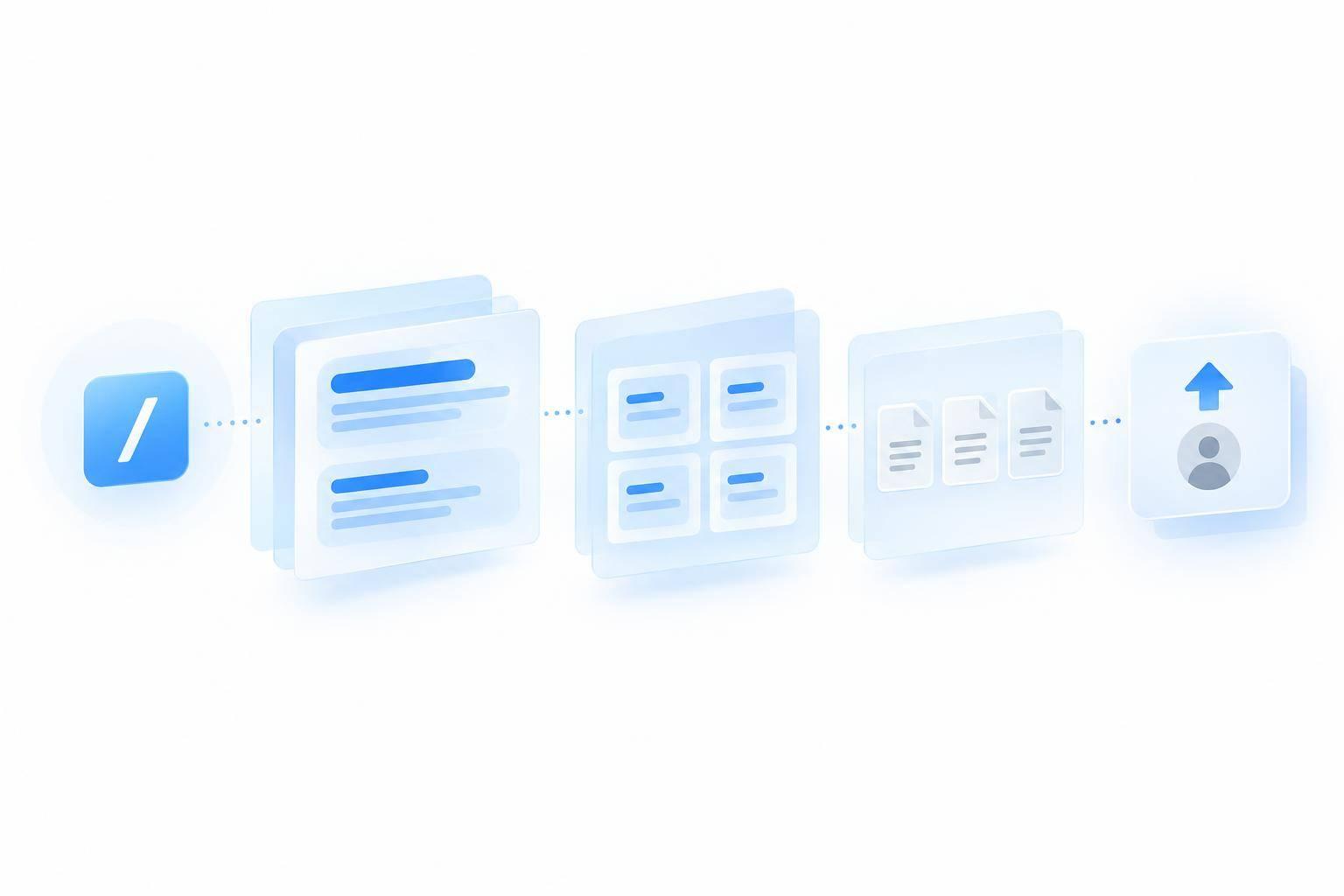
I’d start with 3–5 approved FAQs, connect Discord’s /ask command to ChatSpark, and send unanswered questions to a private staff channel. That gives players help with installation, account access, and gameplay - without asking the AI to guess.
Here’s the setup I’d use:
- Connect the command: Require a question, verify incoming requests, and keep replies within Discord’s 2,000-character limit.
- Set answer rules: Cite approved sources, keep account details private, and hand off after two failed clarification attempts.
- Test before launch: Aim for at least 95% accuracy on approved-answer tests, 100% successful test handoffs, and zero critical privacy or account-security failures.
- Check results and costs: Track confirmed resolutions, response times, repeat contacts, and monthly costs in U.S. dollars. Update the docs when repeat questions reveal gaps.
My rule: start small, and <u>expand access only after answer and handoff checks pass</u>.
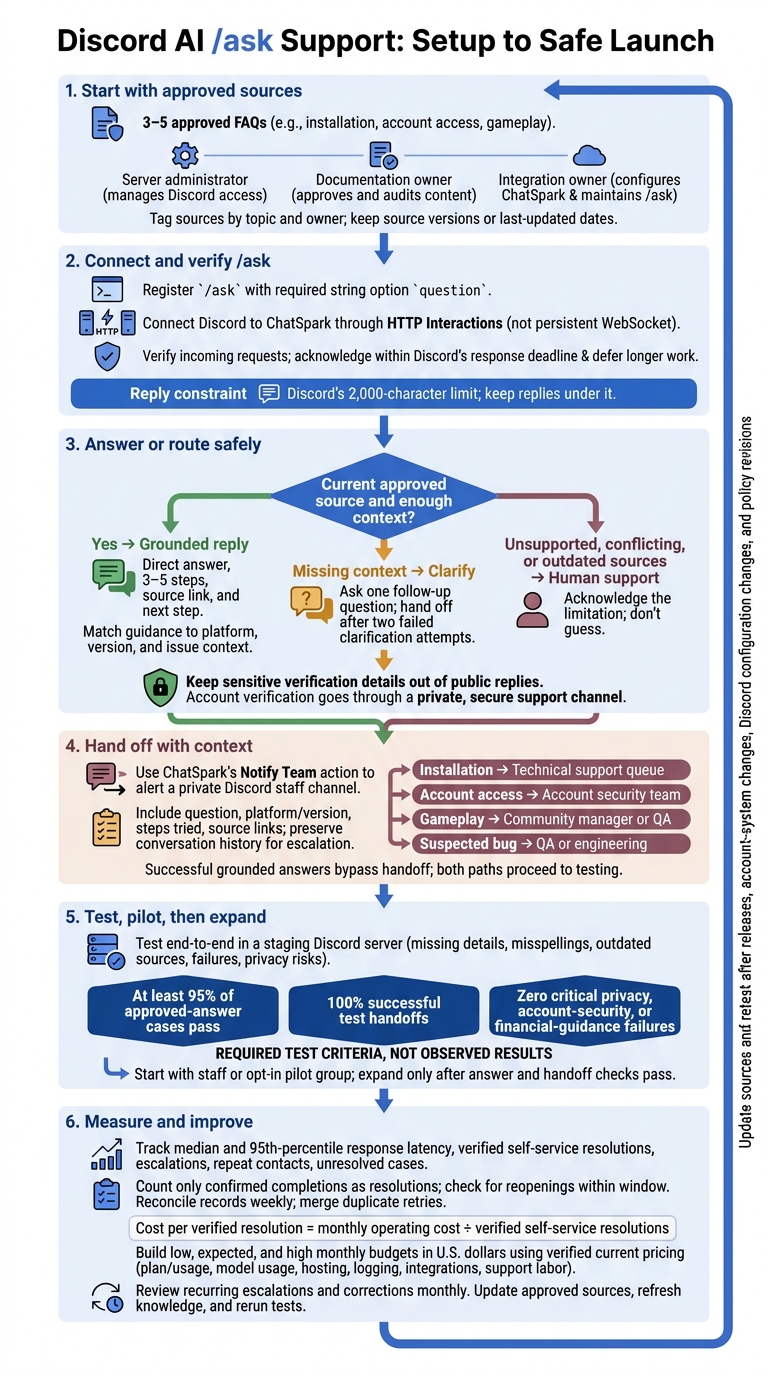
Discord AI /ask Support: Setup to Safe Launch
1. Prepare Game Documentation and Set Up /ask
Start with the approved source material that will power /ask.
Assign three owners to keep documentation current and player answers grounded: the server administrator manages Discord access, the documentation owner approves and audits support content, and the integration owner configures ChatSpark and maintains /ask.
Add Approved Game Documentation to ChatSpark
Import approved, up-to-date support documentation and FAQs. Tag each source by topic and owner so updates are easy to audit. Set answer rules that keep responses tied to approved sources and clearly flag missing information.
Register /ask With a Required Question Field
Create the Discord application in the Developer Portal. Record the Application ID and Public Key from the General Information tab.
In ChatSpark, use the Register Slash Command button to register /ask. Add a required string option named question so players can describe the exact issue they need help with.
When creating the invite URL, use the bot and applications.commands scopes. Grant only the permissions your flow needs, such as Send Messages, Read Message History, and Create Public Threads if you use public threads. Leave Message Content Intent off unless the agent needs to read raw message content. [1][2]
Once the command exists, connect it to the endpoint that will answer player questions.
Connect the Command Handler to ChatSpark
Connect Discord to ChatSpark through HTTP Interactions so each /ask request gets an answer from approved sources.
Select the Discord agent type, then use the Bot Token, Application ID, and Public Key to connect ChatSpark securely. Paste ChatSpark’s Interactions Endpoint URL into Discord’s General Information settings and verify that the Public Key matches exactly. Use HTTP Interactions instead of a persistent WebSocket.
The handler should verify each interaction, send the question to ChatSpark, and return an answer grounded in the approved documentation. Acknowledge slash commands within Discord’s response deadline, and defer longer work when needed. Keep replies under Discord’s 2,000-character limit. [1][2]
2. Answer Player Questions and Send Unresolved Issues to Staff
Once /ask is connected, set the reply format and rules for sending unresolved issues to staff.
Every /ask reply should include: a direct answer, 3–5 steps, a source link, and a next step.
Help With Installation Errors and Account Access
Match installation advice to the player’s platform, OS, game version, and error code. Pull 3–5 steps from the matching guide. For account access, link to the approved account-linking, reset, or verification guide.
Keep sensitive verification details out of public replies. Use prewritten secure-response templates to send players to a private, secure support channel.
Explain Gameplay Mechanics With Current Sources
Use approved rules, guides, and patch notes that match the player’s platform, version, and mode. Explain whether the rule applies now or comes from a past patch, and link to the source.
Ask one follow-up question if context is missing; hand off after two failed attempts. If sources conflict, are outdated, or don’t document the mechanic, say so. Don’t guess.
Hand Off Cases That Need Human Support
Set up ChatSpark’s Notify Team action to alert a private Discord staff channel when a case needs staff help. [1] Include the player’s question, platform and version details, steps already tried, and source links so they don’t have to repeat themselves.
Use the same handoff process for each issue type.
| Issue | Information to collect | Automated response | Escalation trigger | Escalation destination |
|---|---|---|---|---|
| Installation error | Platform, OS, game version, error code | 3–5 steps from the matching guide and a source link | Steps fail or the code isn’t in the docs | Technical support queue |
| Account access | Account email or ID, collected through a private, secure support channel | Approved reset, linking, or verification route | Failed identity check or lockout | Account security team |
| Gameplay mechanic | Game mode, platform, version | Current rule or patch-note link | Conflicting sources or undocumented behavior | Community manager or QA |
| Suspected bug | Game version, mode, steps to reproduce | Known-issue guidance | New bug or unresolved behavior | QA or engineering |
3. Test, Launch, and Measure Results
Check the Support Flow Before Launch
Before players use /ask, make sure answers arrive promptly, cite approved sources, and reach staff when needed. Test the entire flow in a staging Discord server, from command invocation to staff handoff.
Use versioned test cases from support history. Include misspellings, missing details, outdated sources, and questions your documentation doesn’t cover. For each test, record the expected answer, approved source, source version or last-updated date, actual response, and pass/fail result.
| Area | Check | Pass criteria | Owner |
|---|---|---|---|
| Configuration | Invite scopes, command visibility, and permissions | Required installation scopes are present; only approved servers, channels, roles, and users can invoke /ask |
Discord developer |
| Configuration | Required question field and input limits | Empty, oversized, and malformed requests receive clear validation messages | Bot developer |
| Configuration | Deferred responses and request verification | Deferred acknowledgment and final reply both arrive; HTTP deployments validate X-Signature-Ed25519 and X-Signature-Timestamp headers and handle PING [3][4] |
Bot developer |
| Knowledge quality | Installation, account, and gameplay questions | At least 95% of approved-answer cases pass; source references match current approved sources | Knowledge manager |
| Knowledge quality | Unsupported, conflicting, or outdated information | Responses acknowledge the limitation and trigger the correct fallback | Support lead |
| Safety | Sensitive data, injection attempts, and abuse | No secrets or private account data appear; abuse is blocked or rate-limited | Security lead |
| Escalation | Private confirmation and staff delivery | Every test handoff reaches staff with context, identifiers, timestamp, attempted answer, sources, and a direct ticket or moderation link | Support lead |
| Escalation | Timeouts, rate limits, service failures, and duplicate events | API, integration, and Discord failures produce a helpful fallback and do not silently discard the request | Operations owner |
| Maintenance | Logging, alerts, source changes, and rollback | Failures are traceable; updated sources pass regression tests; a named owner can restrict or disable /ask |
Operations owner |
Start with staff or an opt-in pilot group. Require zero critical privacy, account-security, or financial-guidance failures and 100% successful test handoffs before expanding. Review pilot transcripts to confirm that response times and costs are acceptable.
After the pilot, check logs for repeat failures, gaps in documentation, and slow handoffs.
Track Resolutions, Costs, and Documentation Gaps
Track how many routine questions get resolved in Discord without staff help. Assign a case ID in the handler, then pass it into ChatSpark metadata and staff tickets where supported.
Combine available ChatSpark analytics with handler logs and ticket outcomes. Available fields depend on your setup. Reconcile records weekly and merge duplicate retries.
Track median and 95th-percentile response latency, verified self-service resolutions, escalations, repeat contacts, and unresolved cases by question category. Count only confirmed completions as resolutions, and check for reopenings within a defined window. To calculate staff minutes saved, compare similar cases and subtract review and follow-up time.
Build low, expected, and high monthly budgets in U.S. dollars using verified current pricing. Before publishing an estimate, confirm the applicable ChatSpark plan, current usage limits, overage rates, and Discord integration access. Include separately billed model usage, hosting, logging, integrations, and support labor.
Use those three budget scenarios to assess whether self-service reduces ticket load cost-effectively. Calculate cost per verified resolution = monthly operating cost ÷ verified self-service resolutions. State which costs you include so monthly comparisons remain meaningful.
Review recurring escalations and staff corrections monthly. Update the approved source - not just the answer instructions. Record the source owner and effective date, refresh the knowledge configuration, and rerun affected tests.
Repeat this process after game releases, account-system changes, Discord configuration changes, and policy revisions. Keep source revisions, test results, and deployment dates in the same log.
Conclusion: Start With Approved Sources and Human Backup
Start with 3–5 high-volume FAQs from approved documentation. Verify the bot connection, then check that /ask replies cite approved article titles and URLs.
Before launch, test installation, account access, and gameplay questions in a staging Discord server. Follow a no-guess rule: when details are missing, ask for clarification or route the question to human support.
Open access to more users only after accuracy and handoff checks pass. Set a hard stop: after two failed clarification attempts, escalate to staff with the full conversation history.
FAQs
How do I stop players from abusing /ask?
Limit /ask answers to approved game FAQs and docs, and decline requests those sources don’t support. Route uncertain or out-of-scope questions to a human. After two failed clarification attempts, escalate instead of guessing.
Hand off immediately when a case involves legal issues, fraud or security, disputes, hacked accounts, or angry or negative sentiment. Use canned responses for high-stakes prompts, limit the bot’s permissions, and never expose its bot token.
Can /ask support players in multiple languages?
Yes. ChatSpark’s AI agent can automatically detect and respond in 100+ languages, so your Discord /ask command can help players in their own language.
Keep your en-US knowledge base as the authoritative source, and let the translation layer generate replies in each player’s language. If language detection is uncertain, ask the player to select a language to avoid incorrect answers.
How long should I keep player support logs?
Set retention timelines based on your internal data policies. Keep support logs - including prompts, retrieved passages, and model outputs - to audit quality, trace errors, and improve your knowledge base. Review these logs weekly to spot documentation gaps and tag missed intents.
Redact sensitive data, such as passwords or payment details, before storing logs. Never retain raw financial information.