AI is transforming customer support by automating repetitive tasks, improving response times, and reducing costs. This guide explains how to implement AI-powered customer support using tools like ChatSpark, ensuring efficiency and better customer experiences. Here's what you'll learn:
- What AI customer support is: It uses conversational AI, intent recognition, and knowledge retrieval to handle queries in real time.
- Benefits for businesses: Faster responses, 24/7 availability, reduced costs, and improved customer satisfaction.
- Key steps for implementation:
- Identify tasks suitable for automation (e.g., FAQs, password resets).
- Build a structured and clean knowledge base.
- Train the AI with historical data and test thoroughly.
- Deploy across multiple channels like websites and social media.
- Governance and compliance: Set escalation rules, ensure data privacy, and monitor performance metrics to maintain quality.
AI doesn't replace human agents but works alongside them, handling simple queries while escalating complex issues through a hybrid approach. By following this guide, businesses can streamline operations and enhance customer support effectively.
AI Customer Support Implementation: Step-by-Step Process Guide
Planning Your Automation Strategy
Taking the time to plan your AI support strategy upfront can save you from costly setbacks later. Even dedicating a few days to this process can shave weeks off deployment time. A key part of this planning is identifying the types of support queries that are ideal for automation.
Identifying Automation Opportunities
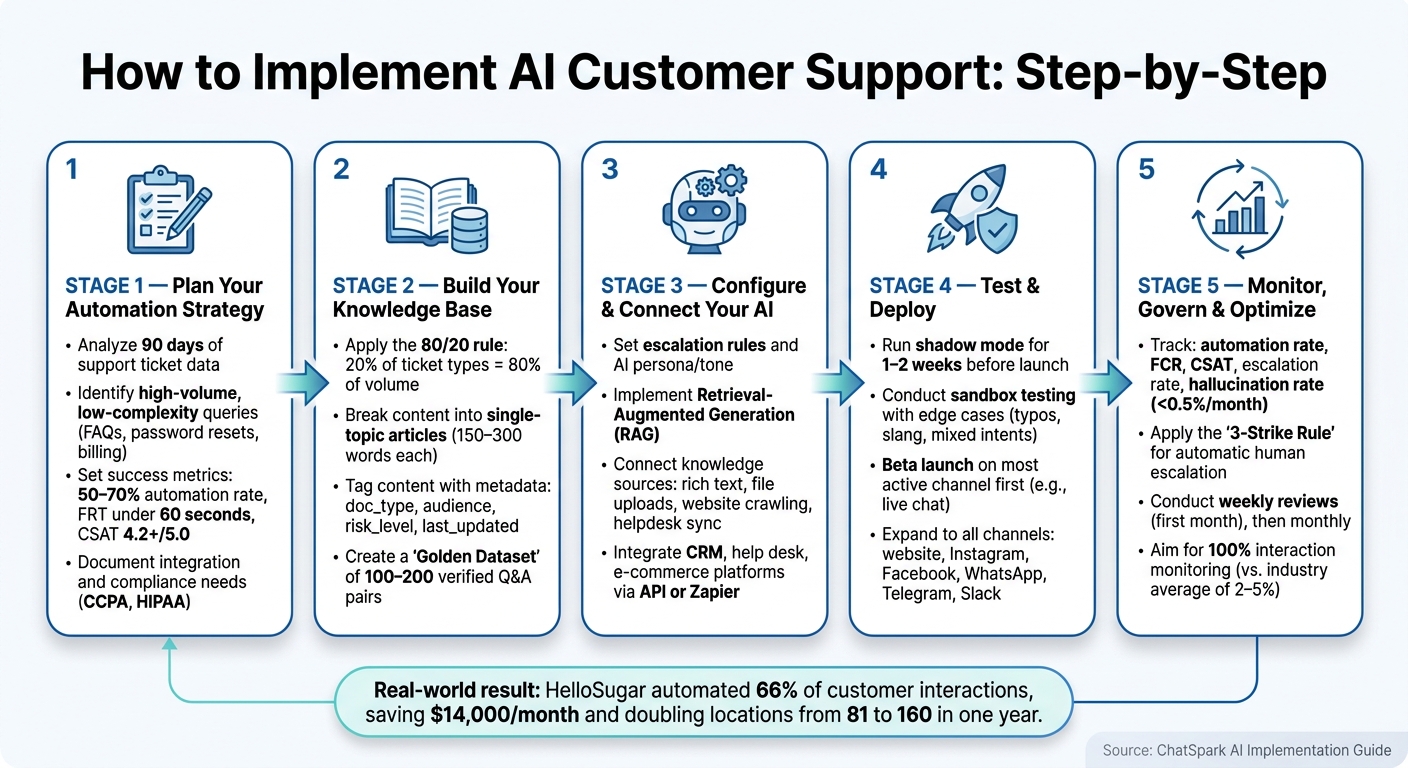
Start by diving into your existing support data. Analyze ticket logs from the past 90 days to pinpoint recurring, straightforward queries. These are prime candidates for automation.
Some common examples of high-volume, low-complexity queries include:
- Order status updates
- Return policy questions
- Password resets
- Billing inquiries
- Appointment scheduling
These tasks don’t require complex decision-making - they just need quick and accurate responses. Research shows that employees spend about 40% of their workday on repetitive tasks, and AI can boost customer care productivity by 30–45%.
The results from real-world applications are compelling. Take HelloSugar, a salon chain, for instance. They discovered that a significant portion of their inbound queries were simple FAQs. By automating these with an AI assistant, they managed to handle 66% of all customer interactions without human involvement. This saved them $14,000 per month and allowed the business to expand from 81 to 160 locations in just one year.
Defining Success Metrics
Once you’ve determined what to automate, the next step is to establish how you’ll measure success. Setting clear goals will help you evaluate the effectiveness of your automation efforts.
Consider focusing on metrics that directly impact your business outcomes:
| Metric | What It Measures | Target |
|---|---|---|
| Automation rate | Percentage of tickets resolved without human intervention | 50–70% of Tier 1 inquiries |
| First response time (FRT) | Time taken to provide the first reply to a query | Under 60 seconds |
| CSAT score | Customer satisfaction rating after interactions | 4.2+ out of 5.0 |
| Monthly cost savings | Reduction in labor costs for support | $10,000–$20,000/month |
Before launching, establish benchmarks to serve as a reference point. This allows you to compare performance after 30 and 90 days of operation.
With these targets in place, it’s also essential to follow a complete guide to AI customer support implementation to ensure a seamless rollout.
Documenting Integration and Compliance Needs
AI systems don’t operate in a vacuum - they need to integrate with the tools your team already relies on. Create a list of all platforms used in your support operations, such as your CRM, help desk, e-commerce systems, and internal databases.
Compatibility is key. Your AI assistant should be able to access live data - like order statuses or account details - to provide accurate answers. Without proper planning for these connections, deployment delays are inevitable.
On the compliance front, U.S. businesses must adhere to data privacy laws like CCPA (California Consumer Privacy Act) and, for industries like healthcare, HIPAA regulations. Ensure that customer data handled by your AI is stored securely, establish a clear data retention policy, and confirm that vendor agreements align with these requirements. Documenting all of this upfront makes it much easier to design workflows that meet compliance standards from the get-go, rather than scrambling to fix issues later.
Building Your Knowledge and Data Foundation
Once your automation strategy is in place, the next step is to establish a solid knowledge and data foundation for your AI. A well-prepared knowledge base ensures your AI operates effectively. Before configuring your AI, take the time to clean and organize your support content. This groundwork helps avoid future issues and keeps things running smoothly.
Auditing and Structuring Support Content
Start by exporting 90 days of support data. This will help you identify recurring topics and high-volume inquiries. The 80/20 rule often applies here - about 20% of ticket categories usually account for 80% of the total volume. These high-priority areas deserve your immediate attention.
Once you’ve pinpointed the key topics, restructure your content for better AI performance. Long, multi-topic documents can confuse AI systems, so break them down into single-topic articles. Each article should address just one question, ideally between 150–300 words. Use clear subheadings and begin each piece with a direct answer to the user’s question.
Consistency is also critical. For example, if you refer to the same interface as both "Dashboard" and "Home Screen", your AI might struggle to retrieve the right content. Pick one term and stick to it throughout your documentation.
"If the source is unclear, the answer will wander." – Typewise [1]
Before linking any content to your AI, do a final clean-up. Remove outdated pricing information, eliminate internal jargon, and strip out any unnecessary marketing language. The goal is to make your content as clear and actionable as possible for users.
Tagging and Categorizing Knowledge for AI
Efficient tagging is key to organizing your knowledge base. Structure your content using a Category → Subcategory → Article format that mirrors your ticket routing system. For example, if your routing logic includes a "Billing" intent, your knowledge base should have a corresponding "Billing" category.
Each article should include metadata to make it easier for the AI to retrieve relevant information. At a minimum, tag content with its product area, intended audience, plan tier (if applicable), and a "last-verified" date. Here’s a quick guide to useful metadata fields:
| Metadata Field | Purpose | Example Value |
|---|---|---|
doc_type |
Identifies the content format | troubleshooting_guide, policy, faq |
audience |
Defines who the content is for | admin, end_user, internal_agent |
risk_level |
Determines escalation triggers | high (requires human review) |
last_updated |
Tracks content freshness | 2026-05-20 |
Flag content older than 90 days for manual review. High-traffic articles should be reviewed monthly, while the rest of the knowledge base should undergo quarterly audits. This regular maintenance prevents "knowledge decay", which can lead to outdated or inaccurate AI responses over time.
Sensitive content, such as legal, security, or contract-related information, should be explicitly tagged with a high risk level. This ensures such queries are routed to a human agent rather than handled automatically.
"A state-of-the-art AI agent with a mediocre KB will give mediocre answers. A mid-tier agent with an excellent KB will give excellent answers." – Agentmelt [2]
Once your knowledge base is optimized and tagged, you can use historical data to further train your AI.
Using Historical Data for AI Training
Your organization’s resolved support tickets are a goldmine of information. These past interactions capture real customer language, edge cases, and insights that might not be reflected in formal documentation - often referred to as "tribal knowledge."
Export 90 days of closed tickets and chat transcripts, ensuring you scrub them of any personal identifiable information (PII) like names, emails, phone numbers, and account details. Afterward, sort them by topic and assign a complexity score (1–5) to each. This step is crucial for maintaining compliance and data hygiene.
From this data, create a "Golden Dataset" of 100–200 verified Q&A pairs. These will serve as benchmarks for testing your AI. Align this training process with your documented integration needs.
Before going live, run your AI in shadow mode for 1–2 weeks. During this phase, compare its responses to historical resolutions. This approach highlights any gaps in your knowledge base without exposing real customers to potential errors. It’s a safe way to identify areas that need improvement before full deployment.
Step-by-Step Setup with ChatSpark
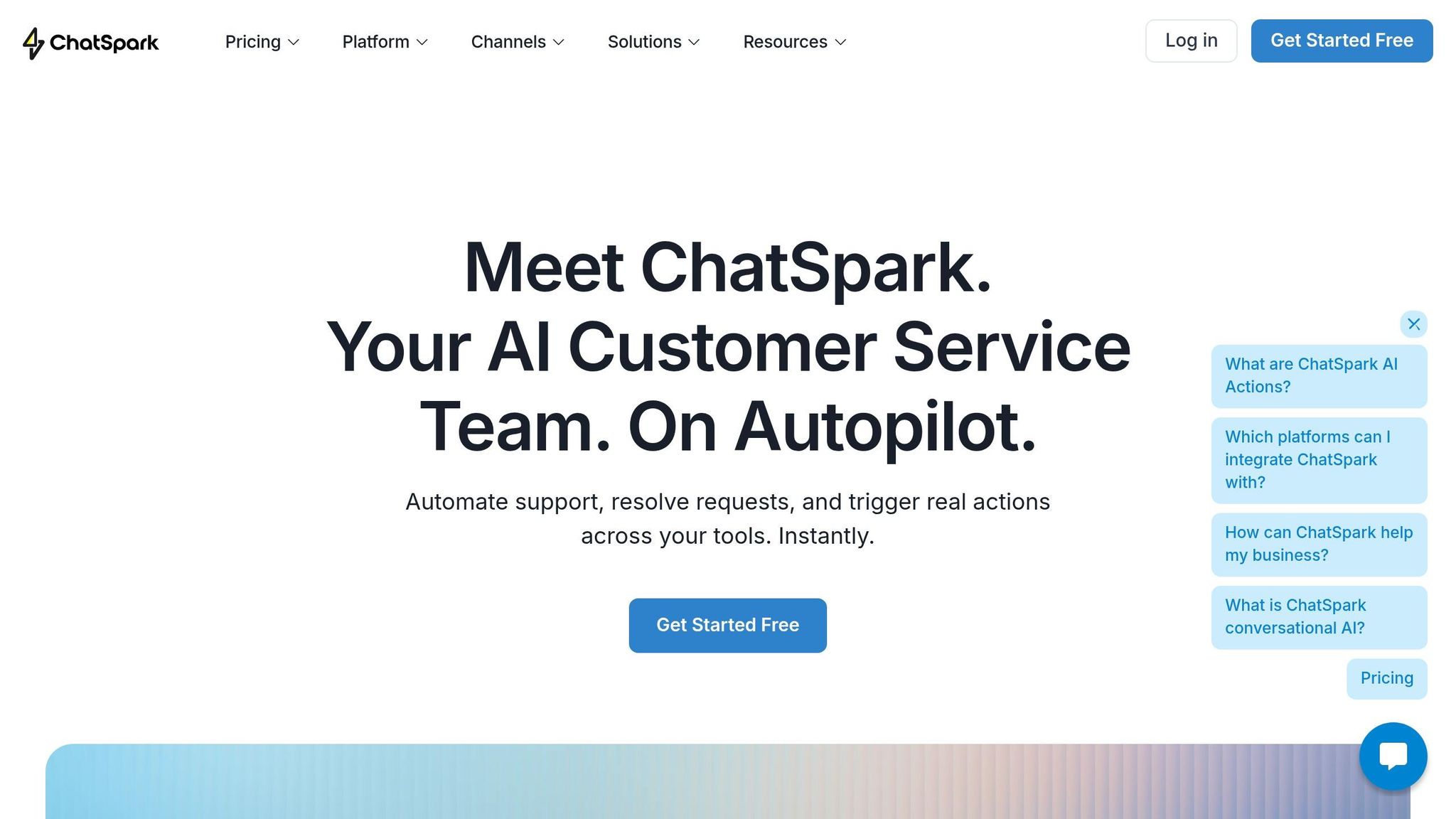
With your knowledge base cleaned, organized, and tested, you're now ready to move into the build phase. This stage focuses on configuring and launching ChatSpark by following three main steps: setting up your AI assistant, connecting your data sources, and deploying it across multiple channels.
Configuring Your AI Assistant
Take the time to carefully configure your AI assistant, as this step involves key decisions about how it will behave and interact with users.
| Configuration Task | Time Investment | Key Objective |
|---|---|---|
| Knowledge Consolidation | 8–12 hours | Centralize all documentation |
| Contradiction Audit | 6–10 hours | Remove outdated or conflicting content |
| Gap Filling | 8–15 hours | Create 30–50 articles for common cases |
| Escalation Rule Design | 2–4 hours | Define "no-touch" zones and triggers |
| Persona/Tone Setup | 1–2 hours | Align AI responses with brand identity |
Start by defining escalation rules and your AI’s persona. Escalation rules are essential for handling sensitive topics like billing disputes, legal matters, or account changes. These rules ensure the AI knows when to hand off issues to human agents. For the persona, decide whether your assistant should sound formal and precise or more casual and friendly, depending on your brand’s voice. A mismatch here can erode customer trust.
Next, implement Retrieval-Augmented Generation (RAG) to ensure your AI provides accurate, reliable answers. RAG anchors the assistant’s responses to your actual knowledge base, such as FAQs and policies, instead of generating potentially misleading answers. This step is critical for maintaining credibility and accuracy [3].
Once your assistant’s behavior is set, it’s time to integrate your content.
Connecting Knowledge Sources and Platforms
With your AI’s behavior configured, the next step is feeding it structured content. ChatSpark offers four main methods to integrate knowledge into your assistant, each suited to different needs [4]:
- Rich Text Editor: Quickly add Q&A pairs or policy updates by pasting them directly.
- File Uploads: Import documents like manuals, product catalogs, or onboarding guides in formats like PDF, CSV, or Word.
- Website Crawling: Automatically pull FAQs and product pages by directing ChatSpark to specific URLs.
- Helpdesk Sync: Use APIs to connect platforms like Zendesk or Salesforce, importing resolved tickets and past interactions.
Additionally, ChatSpark integrates with Zapier to automate tasks like updating CRM records or sending follow-up emails after resolving a chat.
For more advanced workflows, the Pro plan ($129/month) includes integrations with tools like Freshchat, Square, and Calendly, which are ideal for teams managing scheduling or payments. If you’re just starting, the Basic ($19/month) and Plus ($59/month) plans focus on website-only functionality.
Deploying Across Multiple Channels
To maximize efficiency, deploy your AI assistant across multiple channels. ChatSpark supports six key channels: your website, Instagram, Facebook, WhatsApp, Telegram, and Slack. Omnichannel deployment is available on the Pro plan and higher.
Start with your most active channel - often live chat - and validate the AI’s performance there before expanding to other platforms.
| Channel | Use Cases | Metrics |
|---|---|---|
| Web / Live Chat | FAQs, billing, troubleshooting, appointments | First Response Time, CSAT |
| Social Media | Quick responses, brand engagement | Containment, Response Time |
| Messaging Apps | Status updates, proactive alerts | Deflection Rate, Opt-outs |
| Internal Tools | Ticket routing, team knowledge access | Resolution Rate, SLA Hit Rate |
Each channel has its own conversational norms, so adjust your conversation flows accordingly. While your knowledge base stays consistent, tailoring the tone and approach for each platform ensures a smoother and more effective user experience.
Testing and Optimizing Your AI Setup
Once ChatSpark is live across your selected platforms, the next step is making sure it performs as expected before rolling it out on a larger scale.
Running Controlled Tests
Start by running tests in a sandbox environment that mirrors your live setup. Use non-real customer data, and have your team - support agents, product managers, and QA staff - interact with the assistant as though they were actual customers. Focus on testing common scenarios like order status inquiries, password resets, and billing questions. Don’t stop there - test edge cases too, such as handling typos, slang, ambiguous questions, or mixed intents (e.g., upgrading a plan while canceling another). Log all interactions to identify issues like incorrect responses or missed escalation opportunities.
When confident in its basic performance, move to a limited beta launch. Restrict ChatSpark to certain site visitors or specific channels during business hours. Be transparent with users, letting them know they’re interacting with an AI. Review transcripts of low-rated interactions daily and continue the beta until critical metrics - like customer satisfaction (CSAT) and first-contact resolution (FCR) - meet or exceed the performance of your human-only support team. Once testing confirms strong results, shift focus to tracking performance metrics.
Tracking Key Performance Metrics
After validating the beta, use ChatSpark’s analytics dashboard to monitor its effectiveness. Key metrics to track include:
- Automation rate: The percentage of conversations resolved without human involvement.
- First response time: How quickly the assistant responds.
- FCR and CSAT: Indicators of how well and how satisfyingly issues are resolved.
- Escalation rate: The frequency of unresolved issues requiring human intervention.
- Post-chat survey feedback: Direct insights from users.
Break these metrics down by channel, issue type, or time of day, as performance may vary depending on the situation. Intent-level analytics can also highlight areas needing improvement by tracking topics with high failure rates or low CSAT scores.
Refining the AI Over Time
Once you’ve established baseline metrics, focus on ongoing improvements to keep ChatSpark aligned with customer needs. Refinement is key to ensuring the assistant evolves effectively.
In the first few weeks post-launch, conduct weekly reviews to analyze low-CSAT interactions, escalation trends, and new questions ChatSpark might not yet handle well. As performance stabilizes, shift to monthly reviews.
When refining intents, use real customer language from transcripts - such as abbreviations, regional expressions, or informal money terms like “$200” or “two hundred bucks.” Authentic phrasing makes for better training data. Additionally, update the knowledge base promptly whenever there are changes to pricing, policies, or product features. Outdated information is a frequent source of poor CSAT ratings.
Expand automation step by step. Start with straightforward, high-volume topics like FAQs or order tracking. Once these processes run smoothly, move on to tasks like appointment scheduling or simple plan adjustments. Save more complex or sensitive workflows - like billing disputes or cancellations - for later stages. Test these thoroughly and implement safeguards to ensure accuracy. Research from McKinsey shows that organizations using a phased approach to AI in customer service reduced contact center volumes by 20–40%, highlighting the efficiency gains possible with careful planning over time.
Governance and Risk Management
Once your AI setup and testing are in place, maintaining strong governance ensures that AI-powered agents remain reliable over time. This isn’t just about fixing issues as they arise - it’s about creating an ongoing framework to prevent errors, safeguard data, and address customer needs consistently as your business expands.
Setting Escalation Rules and Guardrails
Clear escalation rules are a must to determine when human intervention is needed. These systems are usually triggered in five key situations: when a customer specifically requests a human, the AI’s confidence score falls below a safe threshold, negative sentiment is detected, the issue is too complex (like legal disputes or billing problems), or the AI repeatedly fails to resolve the same query.
A helpful guideline is the "3-Strike Rule": if ChatSpark fails to provide a satisfactory response three times in a row, the conversation should automatically be routed to a human agent [5][6]. Additionally, a Zero-Tolerance Zone should be established - this is a set of keywords that instantly trigger human escalation, regardless of AI confidence. Examples include terms like "lawsuit", "hacked", "data breach", "enterprise pricing," or "cancel subscription" [6].
"If your [escalation] rate is 0%, you aren't providing perfect service; you are likely trapping users in 'bot hell'." - Devashish Mamgain, CEO, Kommunicate [6]
When escalation happens, ensure the transition is seamless by passing along the entire conversation history, a summary of the issue, attempted solutions, and a suggested next step. This allows human agents to step in efficiently without starting from scratch.
Once escalation protocols are in place, the next step is to focus on legal compliance and data privacy safeguards.
Compliance and Data Privacy
By 2026, 25 U.S. states will have enacted AI-specific laws, with 1,561 related bills introduced across 45 states [10]. Federally, the FTC can impose fines of up to $50,120 per violation for failing to disclose AI interactions, while the Colorado AI Act will add penalties of up to $20,000 per incident starting June 30, 2026 [10]. These regulations are becoming top enforcement priorities, making compliance non-negotiable.
A few must-follow practices include:
- Transparency: Always disclose at the start of a conversation that the customer is speaking with an AI. This is required under multiple state laws and international regulations like the EU AI Act [8][10].
- Data Retention: Implement automated deletion schedules for conversation logs, typically set between 6 to 12 months, to comply with data minimization principles [8][9].
- PII Redaction: For payment-related conversations, ensure personally identifiable information (PII) is redacted before the prompt reaches any third-party LLM provider [9].
- Vendor Certification: Confirm that your AI vendor has a SOC 2 Type II certification, which demonstrates consistent enforcement of security controls over a 6–12 month period [7][9].
"If your vendor's architecture diagram shows redaction after the LLM, they are not built for PCI-DSS Level 1." - Syed Anas, Founder, Aivastark [9]
Once compliance measures are in place, ongoing quality checks help ensure your AI remains effective and trustworthy.
Routine Quality Checks
Currently, manual QA reviews cover only 2% to 5% of interactions [13], leaving most AI conversations unchecked. To improve, aim for 100% interaction monitoring. Automated QA tools can evaluate every chat for compliance, accuracy, and tone, while human reviewers fine-tune the system by auditing a representative sample each month [11].
Key metrics to track include:
- Auto-Fail Rate: Keep critical compliance or policy violations below 2% of total interactions [11].
- Hallucination Rate: Aim for less than 0.5% per month [11][12].
- Re-Contact Rate: Monitor the percentage of users who return within 24 hours, as this indicates unresolved issues [12].
When recurring errors are identified, link QA findings directly to your knowledge base and schedule weekly updates to prevent outdated information from degrading responses [12].
"The shift from 2% sampling to 100% monitoring is not a product upgrade; it is a fundamental change in what contact center quality programs can see and act on." - Knowmax [11]
Conclusion: Key Takeaways
Using AI for customer support isn't a one-and-done task - it’s an ongoing cycle of planning, building, testing, and fine-tuning. The companies that see real results treat it as a system that evolves over time, not a tool to set and forget.
It all begins with thoughtful planning. Start by figuring out which tasks are worth automating, set clear goals for success, and ensure compliance requirements are addressed before diving into setup. A strong knowledge base is the backbone of AI performance - well-organized, tagged, and historical data-based content can significantly boost accuracy right from the start.
Once the system is set up, controlled testing is critical. Jumping straight into a full-scale launch is a common misstep. Instead, roll it out in phases and use metrics like containment rates, first-contact resolutions, and customer satisfaction scores to measure its effectiveness. These numbers tell you if your system is truly helping or just functioning.
Governance is what keeps everything running smoothly. Escalation rules, compliance checks, and regular quality reviews are not optional - they’re essential. Without them, even the best-designed system can slowly veer off track.
Ultimately, success boils down to one thing: your customers shouldn’t notice the seams. When AI handles routine inquiries seamlessly, escalates complex issues effortlessly, and maintains accuracy as your business grows, it stops being just a tool for cutting costs. Instead, it becomes a true edge over the competition.
FAQs
How do I choose which support tickets to automate first?
To get started, take a close look at the last 90 days of support data. Your goal is to pinpoint recurring tasks that are high in volume but low in complexity. These are often the types of inquiries that make up the bulk of ticket volume - think password resets, order updates, or common FAQs. Focus on the 20% of tasks that account for 80% of your support workload.
Next, zero in on tasks that are predictable and repetitive, especially those that don’t require much judgment or decision-making. Gather feedback from your team to identify which tasks consume the most time or cause bottlenecks. Once you have a clear picture, start by automating one or two categories that will have the biggest impact on efficiency.
What should I do if the AI gives a wrong answer or gets stuck?
ChatSpark steps in when the AI encounters a tricky situation or provides an incorrect answer. It uses tools like sentiment analysis and confidence thresholds to identify complex questions, low-confidence responses, or signs of customer frustration. When needed, the system escalates the issue to a human agent. To ensure a seamless transition, the agent receives a full transcript along with an AI-generated summary, allowing them to jump in and assist without making the customer re-explain their problem.
How can I use ChatSpark while staying compliant with U.S. privacy laws?
To ensure compliance with U.S. privacy laws while using ChatSpark, it's essential to align your data management practices with PCI standards. Always be transparent by informing customers when they’re interacting with an automated system. Set up escalation triggers for sensitive keywords like "lawyer", "legal", or "complaint" to ensure these interactions are quickly routed to human agents. Additionally, take advantage of ChatSpark's built-in governance tools to safeguard personally identifiable information (PII) and ensure all data handling aligns with regulatory guidelines.