AI customer service platforms are transforming how businesses handle customer support. These tools use advanced technologies like natural language processing (NLP) and machine learning (ML) to automate responses, resolve issues, and improve efficiency. Here's what you need to know:
- Core Benefits: AI operates 24/7, reduces costs by 20–30%, and speeds up response times, with some businesses achieving up to a 92% autonomous resolution rate.
- Key Features to Evaluate: Look for platforms with deep integrations (CRMs, billing systems), omnichannel support, and multilingual capabilities. Platforms with advanced automation can handle 70–92% of interactions without human help.
- Scalability and Security: Ensure the platform can grow with your business, maintains strict data security, and complies with industry regulations like HIPAA or ISO 27001.
- Cost Considerations: Compare pricing models (per-resolution fees, tiered plans, etc.) and calculate ROI by factoring in labor cost savings.
- Testing and Implementation: Pilot the platform with real support tickets to measure performance, focusing on metrics like containment rate and cost-per-resolution.
Choosing the right platform depends on your business goals - whether it's improving human agent productivity or automating the majority of customer interactions. Start small, test thoroughly, and prioritize platforms that integrate seamlessly with your existing tools.
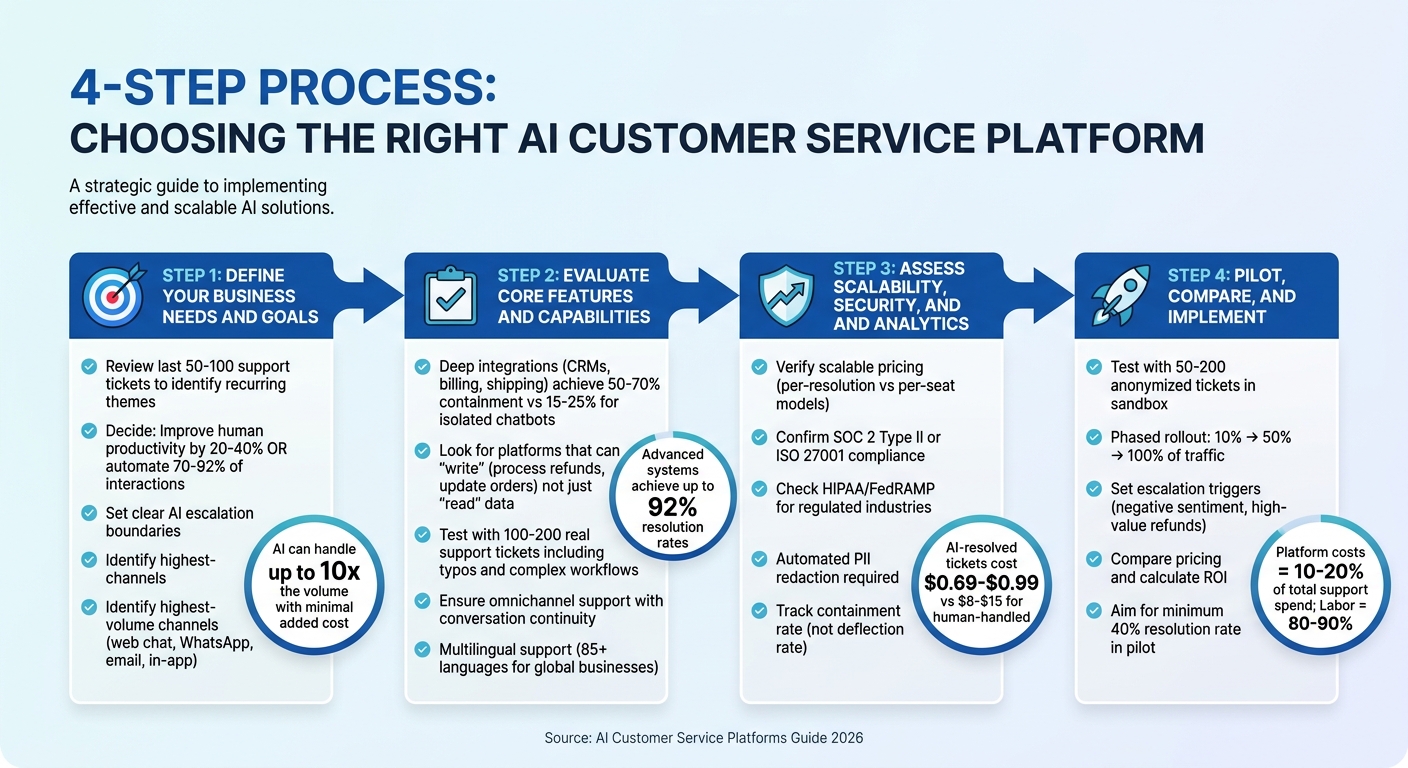
4-Step Process for Choosing an AI Customer Service Platform
Step 1: Define Your Business Needs and Goals
Before diving into the world of AI platforms, it’s crucial to pinpoint your specific support challenges. The landscape has evolved from basic chatbots that deflect tickets to advanced AI agents capable of resolving customer issues from start to finish [3][4]. Your choice will likely hinge on whether your goal is to increase human agent productivity by 20–40% or automate 70–92% of interactions without human involvement [2].
Assess Your Customer Support Challenges
Start by taking a closer look at the challenges your support team faces. Are repetitive questions like order tracking or return inquiries bogging down your team? Are particular issues eating up too much time? A good starting point is to review your last 50–100 support tickets to identify recurring themes [5][6]. If most questions are straightforward and repetitive - like "Where’s my order?" or "How do I reset my password?" - they’re prime candidates for automation.
Traditional support costs often grow in step with revenue, requiring more staff as sales increase. AI can break this cycle by handling up to 10 times the volume with minimal added cost [2][5]. For example, RTR Vehicles managed to resolve 92% of cases autonomously while saving over $15,000 a month in labor costs [2].
Set Clear Automation Priorities
Define what success looks like for your business. Are you aiming to cut response times, reduce costs by 25–50%, or free up human agents to focus on complex issues? Follow a customer service automation checklist to establish clear boundaries for AI escalation by deciding which problems the AI can handle alone (like FAQs and routine inquiries) and which should always go to a human agent (such as legal complaints or sensitive disputes) [5][6].
These boundaries don’t just streamline operations - they can also boost revenue. If growth is a key goal, look for platforms that can suggest products or upgrades during support interactions. Also, remember to factor in the total cost of support. While platform fees are part of the equation, human labor typically accounts for 80–90% of overall support expenses [2].
Identify Key Channels and Use Cases
Think about which communication channels matter most to your customers. For example, e-commerce brands often focus on web chat and WhatsApp for handling order-related queries [2][9], while SaaS companies might prioritize in-app messengers and email for technical support [2][8]. It’s usually smart to start with your highest-volume channel and expand from there [5][6].
Keep in mind that if an AI system relies solely on a static knowledge base, its resolution rates may top out at 50–60%. To achieve higher rates - up to 85–92% - you’ll need deep integrations with tools like CRMs, order management systems, and shipping platforms. These integrations let the AI perform actions such as issuing refunds or updating subscriptions [11][3]. Choosing a platform that aligns with your existing tech stack is critical to avoid data silos and slow API response times [8][7]. With a clear understanding of your business challenges and priorities, you’ll be better equipped to evaluate AI platforms and find the right fit for your needs.
Step 2: Evaluate Core Features and Capabilities
Now that you’ve outlined your needs in Step 1, it’s time to dive into how a platform’s features impact resolution rates. The way a platform’s AI integrates with your systems is a game-changer. Platforms with deep integration can achieve containment rates of 50–70% or more, while isolated chatbots that simply redirect users to help articles only reach 15–25% [3][5].
Conversational AI and Workflow Automation
Not all AI platforms are created equal. Some can only "read" data, like checking an order status, while others can "write" back into your systems. For example, a true AI agent can generate a return label and process a replacement order without human intervention [3]. This distinction explains why platforms with limited capabilities hover around 15–25% resolution rates, while advanced systems can hit rates as high as 92% [2][3][5].
To maximize efficiency, look for platforms with no-code training tools. These tools let your team upload documents, crawl websites, or connect to knowledge bases without needing technical expertise [12][5]. Static content has its limits, so prioritize platforms with deep integrations into CRMs, order management systems, and shipping software. Test the platform with real-world scenarios - use 100–200 actual support tickets that include typos, slang, and multi-step workflows. This will reveal how well it handles complex and ambiguous requests [3]. Beyond automation, ensure the platform supports a variety of channels for seamless customer interaction.
Omnichannel and Multilingual Support
True omnichannel support goes beyond offering multiple contact options like chat, email, and phone. It ensures continuity across channels, so customers don’t have to repeat themselves when switching between them [13][14]. This is crucial, as 68% of global consumers express frustration when they need to restart conversations [13].
If your business operates internationally, multilingual support is a must. Advanced platforms like ChatSpark support over 85 languages and offer contextual translations that account for industry-specific terms and cultural nuances [13]. For voice AI, latency is a key factor - delays over one second can make interactions feel awkward and disconnected [13][7]. These features set the foundation for the next step: system integration.
Integration with Existing Tools
A platform’s value increases exponentially with strong integration capabilities. To ensure a smooth experience, audit all the systems the AI will interact with - such as CRMs, billing platforms, and shipping tools - and confirm the platform supports native integrations with real-time, bidirectional data synchronization [10][15][16].
Look for platforms that allow "POST" or "PATCH" actions, which enable the AI to process refunds, update subscriptions, or modify orders, rather than just "GET" requests that only read data [3]. These capabilities can reduce resolution times by up to 72% [4]. Additionally, ensure the platform supports Single Sign-On (SSO) and robust identity management to securely handle sensitive customer information [10].
"The difference between a platform that deflects tickets and one that resolves them comes down to architecture - specifically, how deeply the AI connects to your systems." - Hannah Owen, Lorikeet [3]
Step 3: Assess Scalability, Security, and Analytics
To ensure your platform continues to deliver value as your business evolves, it’s crucial to evaluate how well it scales, protects sensitive data, and provides actionable insights. These three elements - scalability, security, and analytics - are the backbone of a lasting investment.
Scalability for Growing Businesses
A scalable platform should grow alongside your business without compromising performance or breaking the bank. Check if the pricing model aligns with your growth needs. For instance, platforms that charge based on successful resolutions rather than per-seat fees are often more flexible. Also, verify the platform can handle increasing message volumes as customer engagement expands. Autonomous operation is another must-have; platforms that resolve most issues without human intervention can maintain efficiency even as demand surges.
Take ChatSpark as an example. Its tiered pricing starts with the Basic plan at $19 per month for 100 messages, moves to a Pro plan with 2,000 messages for $129, and offers custom options for enterprise-level needs. This structure lets you start small and scale effortlessly as your business grows.
Once scalability is addressed, the next step is ensuring your data remains secure.
Security and Compliance Features
Security is non-negotiable, especially as your platform scales. Request verified audit reports like SOC 2 Type II or ISO 27001 to confirm robust data protection measures are in place. For industries with strict regulations, such as healthcare or government, ensure the platform complies with standards like HIPAA or FedRAMP. Additionally, data residency options are essential for meeting specific legal requirements.
Automated redaction of Personally Identifiable Information (PII) is another critical feature. The system should automatically identify and mask sensitive details - credit card numbers, social security numbers, etc. - before storing or using them for AI training. Look for platforms with single-tenant architecture to ensure your data stays private and isn’t used to train models for other clients.
As AI evolves, so do security risks. Features like guardrails against vulnerabilities (e.g., prompt injection or unintended operations) are essential. According to Gartner, AI security platforms are becoming increasingly important, consolidating controls for both third-party and custom-built AI services while addressing emerging risks [18].
With security in place, the final piece of the puzzle is understanding how the system performs.
Analytics and Reporting Tools
Analytics should focus on meaningful metrics that directly impact your bottom line. For instance, the containment rate - the percentage of tickets resolved entirely by AI - is far more useful than vague metrics like deflection rate. Cost-per-resolution is another key measure, given that AI-resolved tickets typically cost between $0.69 and $0.99, compared to $8–$15 for human-handled resolutions [17].
Platforms that track unrecognized queries or unresolved issues can help you identify knowledge gaps and refine your AI’s capabilities. Look for tools that provide detailed conversation-level analytics, such as Average Handle Time (AHT), First Response Time (FRT), and Customer Satisfaction (CSAT) specific to AI interactions. Some systems even offer real-time confidence scores for AI responses, flagging uncertain answers so they can be escalated to a human agent when needed.
Step 4: Pilot, Compare, and Implement
Once you've nailed down your requirements, evaluated features, and ensured scalability and security, it's time to put your platform to the test in real-world conditions. This phase is where you find out if a platform can truly perform beyond just looking good on paper.
Run a Pilot Program
Start by reviewing your last 1,000 support tickets to identify the top 5–20 most common inquiry topics. These categories often make up 60–80% of your total ticket volume.
Next, replay 50–200 anonymized tickets in a sandbox environment to test the platform's accuracy. AI agents in 2026 are known for delivering resolutions at a lower cost compared to human agents [20].
If the sandbox results meet expectations, move to a phased rollout. Begin by directing 10% of inbound traffic to the AI system and monitor its performance closely for the first 48 hours. If results remain consistent, gradually scale up to 50%, then 100%. Pay close attention to how the AI handles challenging inputs like typos or informal language. Make sure it escalates unresolved issues to human agents rather than "hallucinating" incorrect answers. AI platforms deployed in 2026 typically have hallucination rates below 1% [20].
"The best AI customer support tool isn't the one that does the most - it's the one that does your specific job reliably." - BotHero Team [6]
From the start, set clear escalation triggers. For example, the AI should hand off cases involving negative sentiment, high-value refund requests, or unresolved issues after two attempts. Plan to spend at least two hours a week reviewing AI conversations and updating its training data to keep performance sharp.
Once your pilot wraps up, it's time to dive into the pricing details.
Compare Pricing and Plans
After testing, compare pricing models to ensure the platform aligns with your budget and support goals. Pricing structures vary widely:
- Per-resolution fees: For example, $0.99 per solved ticket.
- Per-seat/agent fees: Ranging from $29–$115 per month.
- Tiered flat-rate plans: Starting at $19/month and going up to $499/month.
- Custom enterprise contracts: Tailored for larger operations.
For instance, ChatSpark offers plans starting at $19/month for 100 messages (Basic), $59/month for 250 messages (Plus), and $129/month for 2,000 messages (Pro), with custom options for enterprises.
Look beyond the base price to factor in hidden costs. Setup and training can take 15–40 hours, monthly integration maintenance may require 2–4 hours, and some platforms charge overage fees of $0.10–$0.50 per message [6]. Testing tools for a two-week period can help cut first-year costs by up to 62% [6].
To calculate ROI, figure out your current cost per ticket by dividing total monthly labor costs by the number of tickets. If the AI tool's cost per resolution is lower - assuming a conservative 40% resolution rate - it’s likely a worthwhile investment. Keep in mind that platform costs usually account for just 10–20% of total support expenses, with the bulk (80–90%) being labor costs. The most effective tools are those that reduce labor hours or headcount [2].
Tips for Smooth Implementation
Spend about 70% of your planning time aligning with stakeholders, preparing data, and ensuring compliance [22]. Begin with a targeted pilot before rolling out the platform fully [21][22].
Focus on backend integration rather than superficial connections. A good platform should do more than just "read" data - it should also "write" to systems, like processing refunds or updating orders. Look for platforms offering no-code, one-click integrations with your existing CRM or e-commerce tools to avoid costly developer work [6][19].
Train your team on the new system and establish a clear escalation process. Combining AI with human expertise can boost productivity by 14% on average [1]. On mid-tier platforms, it typically takes about 40 hours to reach a 50% autonomous resolution rate [6].
"AI should enhance, not replace, human support. The best results come from combining the speed and data insights of AI with the empathy and critical thinking people can provide." - IBM [1]
Track key metrics during the first month of implementation. Focus on the containment rate - how many tickets the AI resolves fully - rather than vague engagement stats. AI agents usually resolve 50–70% of tickets autonomously, compared to just 15–25% for traditional scripted chatbots [3]. Use confidence scoring features to flag uncertain responses for human review. When paired with automated handoffs, these features can reduce customer complaints by 74% [6].
Conclusion: Choosing the Right AI Customer Service Platform
Selecting an AI customer service platform is all about finding the right fit - a match between the platform's features and your business's unique goals and support needs. The real distinction lies in whether the platform simply deflects tickets or genuinely resolves them. This depends on how well it integrates with your systems and handles real-world customer issues [3].
To start, think about what level of efficiency you're aiming for. Do you need moderate improvements or full-scale conversational AI automation? AI-powered helpdesks can improve human efficiency by 20–40%, while autonomous agents aim to resolve 70–92% of interactions without human intervention [2][7]. Your earlier analysis (Steps 1–3) should guide whether you need tools to assist agents or systems capable of handling tasks entirely on their own. Your decision will also depend on your support volume, budget, and how complex you're willing to let the implementation process be.
It's crucial to choose a platform that integrates smoothly with your CRM, e-commerce, and billing systems to ensure seamless ticket resolution. Focus on the containment rate - how many tickets are resolved from start to finish - rather than metrics that don't directly measure problem-solving [3][7]. The real return on investment comes from cutting down on labor hours or avoiding the need to hire additional staff as your business grows.
As Gabe Campbell from AI Genesis puts it:
"Platform cost is 10-20% of total support spend. Human labor is 80-90%. Only solutions that substantially cut labor costs deliver true value." [2]
Before committing, test the platform with 100–200 real-world tickets and ensure it achieves at least a 40% resolution rate. This kind of trial helps confirm that the platform will deliver a solid ROI [6]. Ultimately, the best platform isn't the one with the flashiest features - it’s the one that reliably addresses your specific challenges while maintaining the level of service your customers expect.
FAQs
What’s the fastest way to estimate ROI before buying?
To estimate the ROI of an AI customer service platform, start by examining a few critical metrics: resolution rates, automation capabilities, and pricing models. Pay close attention to the platform's ability to resolve issues autonomously, as this directly impacts efficiency. Next, calculate potential cost savings by factoring in your current ticket volume and the reduction in manual support costs. Finally, consider how the platform might improve customer satisfaction, which can influence retention and loyalty.
By combining these elements, you can build a straightforward ROI model. Compare your existing support expenses with the anticipated costs and benefits after implementing automation to get a clear picture of the platform's value.
How do I tell if it can actually take actions in my systems?
To determine whether an AI customer service platform can perform actions within your systems, check if it supports integrations like API calls or database queries. These capabilities allow the platform to handle tasks such as processing orders or updating account details. Additionally, platforms that manage multi-step workflows and connect to enterprise systems demonstrate their ability to carry out meaningful operations within your environment.
What security and compliance proof should I ask for?
When selecting an AI customer service platform, it’s essential to verify their security and compliance practices. Look for:
- Data privacy compliance: Ensure the platform adheres to regulations like GDPR or CCPA, demonstrating clear and transparent data handling and consent processes.
- Security certifications: Certifications such as SOC 2 are a good indicator that the platform meets established security standards.
- Vulnerability management and audit logs: Check if they have processes in place to identify and address vulnerabilities and maintain detailed logs to monitor data activity.
These measures are key to safeguarding sensitive customer data and meeting regulatory requirements.