AI-powered agents are transforming how businesses interact with customers. They provide instant, 24/7 support, reduce costs, and improve customer satisfaction. By leveraging advanced technologies like natural language processing and machine learning, these tools can handle up to 80% of routine inquiries, qualify leads, and even boost sales conversions by up to 45%.
Here’s what makes AI chatbots essential for businesses:
- Customer Expectations: 73% of consumers expect chatbots on websites.
- Cost Savings: Businesses save 30%-60% on customer service expenses.
- Speed: Chatbots respond in under 10 seconds, even during off-hours.
- Scalability: They handle thousands of inquiries simultaneously without adding staff.
- Sales Impact: Chatbots increase conversion rates and reduce cart abandonment.
Whether resolving FAQs, automating tasks, or driving sales, AI chatbots are a smart investment for businesses looking to enhance efficiency and customer experience.
Benefits of AI Chatbots for Businesses
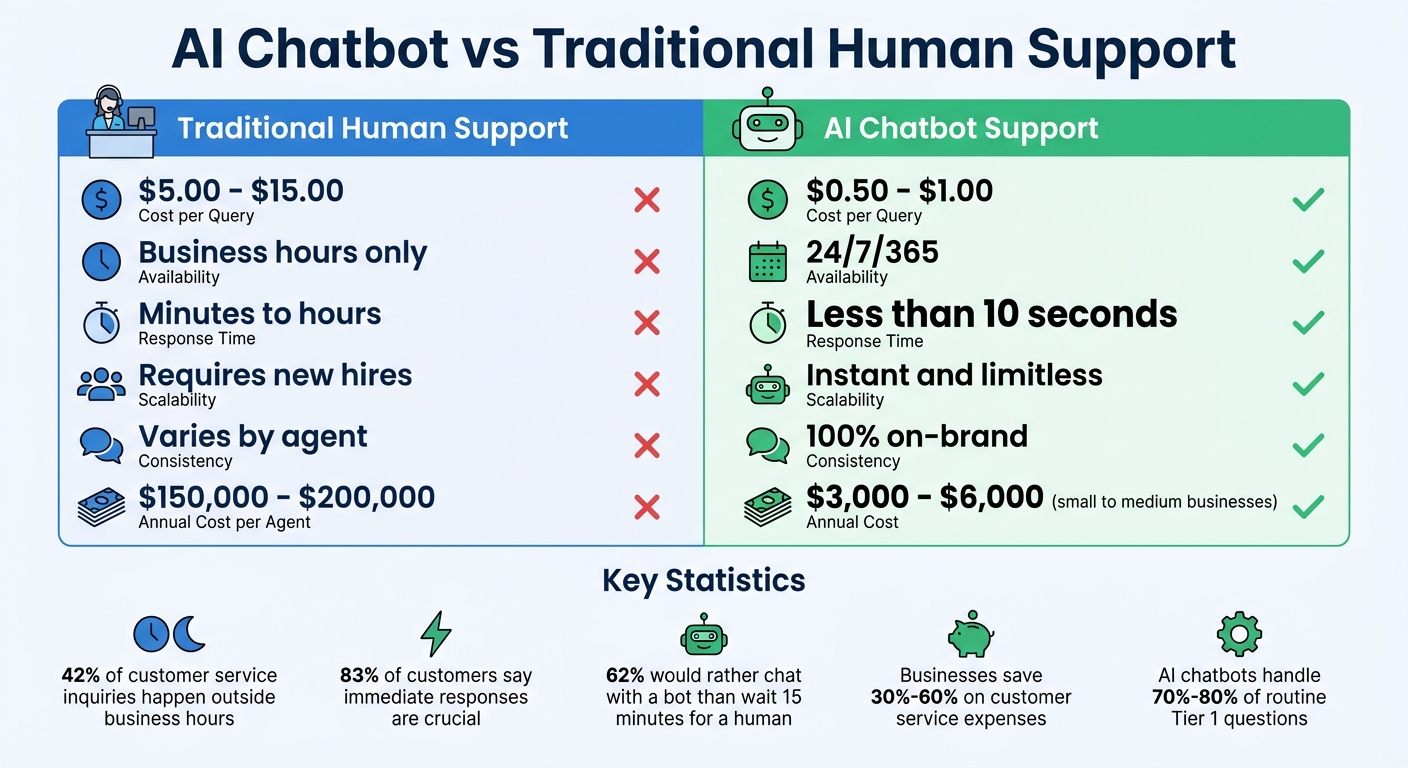
AI Chatbot vs Traditional Support: Cost, Speed, and Scalability Comparison
AI chatbots are changing the way businesses handle customer interactions. They streamline operations, reduce costs, and increase revenue. Companies using chatbots report savings of 30% to 60% on customer service expenses [5]. By by automating repetitive tasks without losing quality, chatbots free up human agents to focus on more complex, high-value issues.
24/7 Customer Support
Did you know that about 42% of customer service inquiries happen outside regular business hours [3]? If your team clocks out at 5:00 PM, you could be leaving nearly half your customers hanging. AI chatbots bridge this gap by responding instantly - usually in under 10 seconds - even during off-hours. This is a big deal, especially since 83% of customers say immediate responses are crucial, and 62% would rather chat with a bot than wait 15 minutes for a human [13, 16].
Take Atomberg, an Indian appliance brand, for example. In November 2025, their AI chatbot on WhatsApp managed over 2,500 daily queries, resolving 86% of warranty and order tracking issues [5]. Compare that to the cost of staffing a 24/7 human team, which can run $150,000 to $200,000 per agent annually. An AI chatbot, on the other hand, costs just $3,000 to $6,000 per year for small to medium-sized businesses. As the team at BuiltABot points out:
42% of customer service inquiries happen outside standard business hours. Yet most companies only provide support Monday through Friday, 9am to 5pm. Every unanswered after-hours inquiry is potential revenue walking out the door [3].
With smart implementation, chatbots can handle 70% to 80% of routine Tier 1 questions as part of a complete AI customer support implementation - like FAQs, order tracking, and password resets - while escalating urgent issues to human agents.
Lower Costs Through Automation
Chatbots don't just make support available around the clock - they also slash operational costs. In 2025, HelloSugar, a salon chain, automated 66% of its customer queries using AI, saving $14,000 a month. This allowed them to double their locations without increasing their support staff [5]. Similarly, NIB Health Insurance saved $22 million by deploying AI-powered assistants, cutting customer service costs by 60% [5].
AI chatbots also scale effortlessly, handling thousands of conversations simultaneously during peak times without requiring extra hires or overtime pay. Plus, they reduce employee burnout by taking over repetitive tasks.
| Metric | Traditional Human Support | AI Chatbot Support |
|---|---|---|
| Cost per Query | $5.00 – $15.00 | $0.50 – $1.00 |
| Availability | Business hours only | 24/7/365 |
| Response Time | Minutes to hours | Less than 10 seconds |
| Scalability | Requires new hires | Instant and limitless |
| Consistency | Varies by agent | 100% on-brand |
Handling High Volume with Consistency
Unlike human agents, who can only manage one conversation at a time, AI chatbots can juggle thousands - ensuring quick, consistent responses even during busy periods. For instance, mCaffeine, a D2C beauty brand, uses AI to handle over 4,000 daily queries across multiple channels. Their bot manages returns, refunds, and product recommendations, all while maintaining a consistent brand voice [5].
These systems also support multiple languages, enabling businesses to serve customers in cities like New York, London, and Tokyo without needing costly "follow-the-sun" teams [9]. LATAM Airlines, for example, used Zendesk’s AI platform during the pandemic to handle a surge in inquiries. They reduced response times by 90% and resolved 80% of customer issues without human involvement [6].
As Amy Velligan, Director of Support at Compass, explains:
We have a lot of specialists who can provide very high-touch service, but that only works if you get directed to the right specialist... It's really about knowing who your customers are when they're contacting support so that you can get them to the right person [6].
This level of scalability not only keeps operations smooth but also boosts customer satisfaction.
Increased Conversions and Lead Capture
AI chatbots aren’t just for support - they’re also powerful sales tools. Businesses using them see a 45% increase in conversion rates and a 25% to 40% boost in qualified leads [1][4]. By instantly qualifying leads using frameworks like BANT (Budget, Authority, Need, Timeline), chatbots help separate serious buyers from casual browsers.
For example, advanced behavioral analytics can track a visitor’s actions, such as lingering on a pricing page or hesitating with their mouse. Based on these signals, the chatbot might send a proactive message like, “I see you’re exploring our Enterprise plan - would you like to compare it with the Professional option?” This kind of real-time engagement reduces friction and captures high-intent leads. Additionally, exit-intent messages can recover some of the 70% of visitors who might otherwise abandon their carts [8].
Lucas Correia, CEO & Founder of BizAI GPT, sums it up well:
AI chatbots for websites aren't optional; they're the difference between chasing leads and having qualified buyers chase you [1].
By integrating with CRM systems, chatbots ensure sales teams receive detailed lead data. Leads qualified by AI often convert 15% to 30% more effectively than unqualified ones [4]. And reaching out within 5 minutes instead of 30 can dramatically improve conversion odds [7].
Data-Driven Insights from Customer Interactions
AI chatbots do more than answer questions - they provide valuable insights. By analyzing conversations, businesses can identify common customer concerns, refine their messaging, and improve documentation.
Advanced analytics tools turn chatbot logs into actionable dashboards. Companies can measure the bot’s impact on metrics like conversion rates, average order value, and customer lifetime value. These insights transform customer support from a cost center into a revenue-generating strategy.
Choosing the Right Chatbot Platform
A simple chatbot widget can resolve about 30–45% of customer queries, but more advanced Retrieval-Augmented Generation (RAG) platforms can handle 60–80% by tapping into your knowledge base effectively [10]. These numbers highlight how essential strong technical capabilities are when choosing a platform.
Must-Have Chatbot Features
Start by ensuring installation compatibility. The top platforms make setup easy with lightweight script tags that work seamlessly across popular platforms like WordPress, Shopify, Squarespace, and frameworks such as React and Next.js [2][12][10]. A lightweight widget - around 35KB - is ideal to maintain fast load times and preserve your Google PageSpeed scores [2]. It should also function smoothly on mobile devices with a 375px screen width, ensuring it doesn’t interfere with content visibility or scrolling [10].
Integration capabilities are just as important. A good platform should connect with CRMs, help desks, e-commerce systems, and communication channels like WhatsApp, Facebook, Instagram, and Slack [11][12][13][14]. Additionally, check if the chatbot can pull data from sources like PDFs, CSVs, website URLs, and internal databases [12][13].
The quality of your knowledge base plays a huge role in the chatbot’s performance. As John V. Akgul, Founder & CEO of PxlPeak, explains:
The resolution rate difference between widget platforms (30–45%) and custom RAG chatbots (60–80%) is entirely driven by knowledge base quality and retrieval precision. [10]
Platforms that allow you to structure your data efficiently and provide high retrieval accuracy are essential. Also, confirm the chatbot is mobile-responsive and supports Shadow DOM if you’re using custom builds - this prevents CSS conflicts with your website’s design [10]. These technical elements are critical for delivering responsive and effective customer support.
Why ChatSpark Works for Businesses
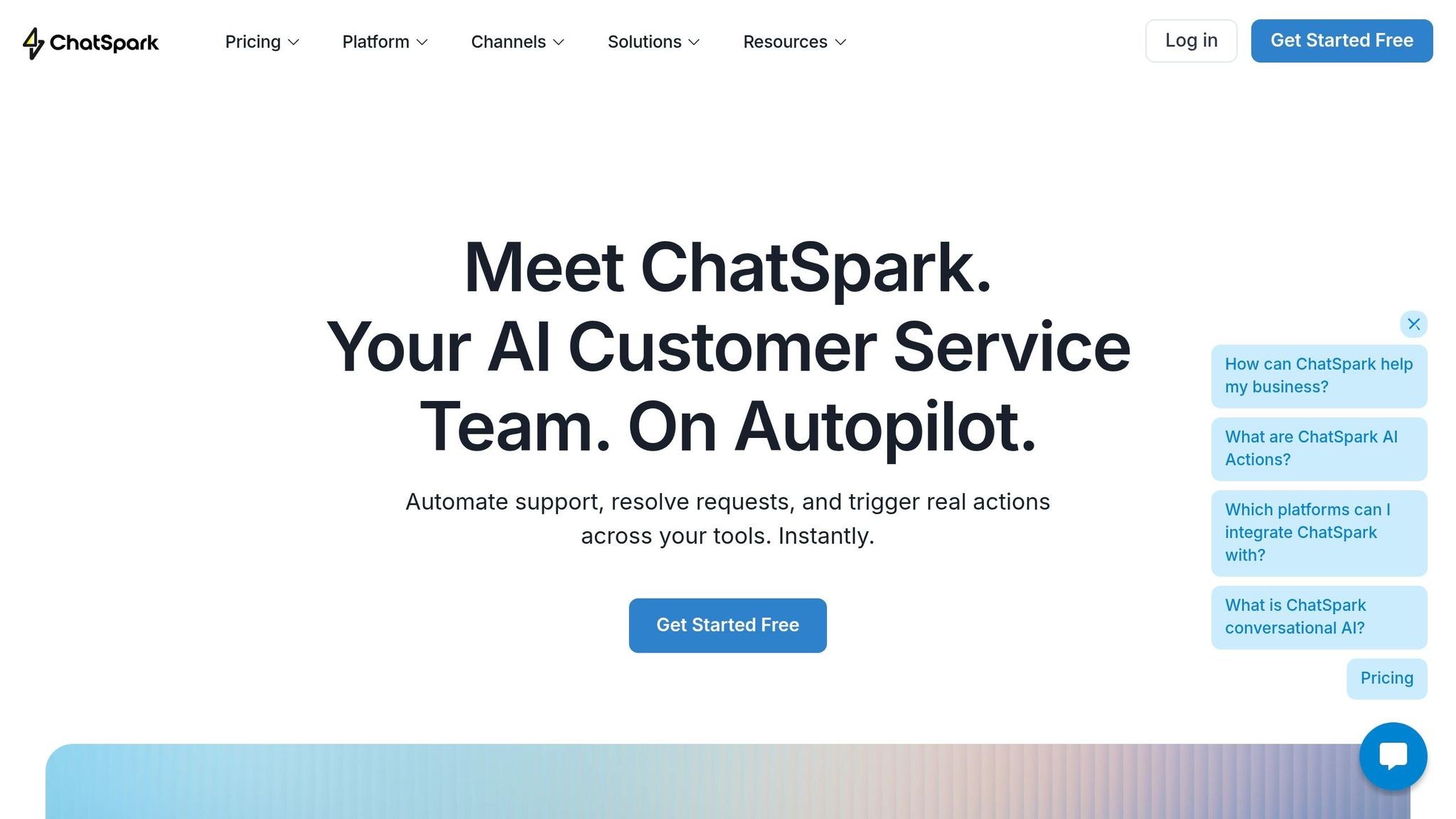
ChatSpark aligns with these must-have features, offering a well-rounded and integrated solution. It supports deployment across various platforms, including websites, Instagram, Facebook, WhatsApp, Telegram, and Slack - all from one dashboard [11]. With 85+ languages and automatic language detection, ChatSpark enables businesses to serve global audiences without needing separate support teams for each region. Plus, it integrates with Google Analytics 4 to track key performance indicators and includes "AI Actions" for tasks like checking order statuses in Shopify or creating support tickets in Zendesk [11].
Installation is simple - just a single script tag or custom triggers [12]. ChatSpark’s design focuses on efficiency and measurable outcomes, ensuring your chatbot delivers real business results. Its pricing is flexible, starting at $19/month for solo entrepreneurs and scaling up to custom enterprise solutions:
| Plan | Monthly Cost | Messages/Mo | AI Agents | Key Features |
|---|---|---|---|---|
| Basic | $19 | 100 | 1 | Basic analytics, website deployment, multiple data sources |
| Plus | $59 | 250 | 1 | 5 AI Actions, ChatSpark CoPilot, REST API, advanced analytics |
| Pro | $129 | 2,000 | 1 | 40 AI Actions, omnichannel, GA4 tracking, unbranded widgets |
| Enterprise | Custom | Custom | Custom | Unlimited AI Actions, SOC2/HIPAA compliance, dedicated account management |
ChatSpark’s pricing is transparent, with no hidden fees. The Pro plan removes ChatSpark branding and unlocks omnichannel capabilities, while the Enterprise tier offers advanced features like SOC2 and HIPAA compliance, along with dedicated account management.
How to Set Up AI Chatbots on Your Website
Setting up a chatbot goes beyond just installing a platform - it requires thoughtful planning before and after deployment. Success hinges on preparation and ongoing adjustments, as highlighted by the Canary Team:
The difference between a chatbot that frustrates users and one that resolves 70%+ of queries isn't the platform. It's the work that happens before and after the script tag. - Canary Team [15]
Here’s a step-by-step guide to ensure your chatbot delivers meaningful results.
Step 1: Identify Where Chatbots Add the Most Value
Start by analyzing your support tickets and chat logs to identify repetitive, Tier 1 queries that can be automated [17]. Use this information to create a list of the top 20 most frequently asked questions - this will serve as the foundation for your chatbot’s training [16]. Additionally, study high-intent pages like pricing, product descriptions, and checkout using analytics. These are often areas where unanswered questions lead to high bounce rates or cart abandonment [2].
Here’s a reference table to align chatbot actions with specific page goals:
| Page Type | Chatbot Goal | Recommended Action |
|---|---|---|
| Homepage | Segment and route users | Ask, "What brought you here today?" with quick reply buttons |
| Pricing Page | Qualify leads & book demos | Perform a needs assessment and recommend plans with calendar integration |
| Product Page | Overcome objections | Provide FAQs, comparison charts, and an "Add to Cart" option |
| Checkout Page | Reduce abandonment | Offer FAQs on shipping/returns and limited-time coupon offers |
| Help Center | Ticket deflection | Match articles or create support tickets automatically |
Define measurable success metrics from the outset, such as reducing support tickets, improving first-response times, or increasing conversions on key pages [16].
Step 2: Install ChatSpark on Your Website
To install ChatSpark, embed a single JavaScript snippet before the closing </body> tag of your website [12]. If you’re using a platform like WordPress, Shopify, Squarespace, or Wix, follow these specific steps:
- WordPress: Use the official plugin.
- Shopify: Paste the script into
theme.liquid. - Squarespace: Navigate to Settings > Advanced > Code Injection.
- Wix: Add the script under Settings > Tracking & Analytics > Custom Code.
Make sure the widget script uses the async attribute so it doesn’t slow down page loading [15]. Customize the chatbot’s design to match your branding and position it in the bottom-right corner of the screen - this is where users naturally look for support. Craft a welcoming message like, “Ask me about our return policy or shipping times,” which can increase engagement by up to 23% [10].
For better functionality, integrate ChatSpark with tools you already use, such as your CRM, help desk, or e-commerce platform. If you use Google Analytics 4, enable tracking to monitor chatbot performance.
Step 3: Create Effective Conversation Flows
Design conversation flows that guide users through quick reply buttons and tailored messaging. For example, someone on your pricing page may need plan recommendations, while a visitor in the help center might require troubleshooting tips.
On high-intent pages, set the chatbot to appear proactively - either after 5–10 seconds or when a user scrolls past 50% of the page. Proactive widgets engage 45% of visitors, making them a powerful tool [17]. Configure a confidence threshold (typically 0.4–0.5) to ensure the bot offers a human handoff or requests follow-up information if it’s unsure of an answer [15]. Keep responses brief and easy to read, using bullet points and concise links when necessary.
Step 4: Train and Test Your Chatbot
Feed your chatbot with data sources like URLs, sitemaps, PDFs, CSVs, and Q&A pairs to ensure it understands your business logic [12]. ChatSpark allows you to upload documents and connect to your knowledge base, enabling it to handle 60–80% of queries compared to only 30–45% for basic bots [10].
Use your top 20 questions as the core training set, and prioritize content based on help center analytics. Test the chatbot with unexpected queries to ensure it handles errors gracefully, offering a human handoff or requesting follow-up details. Since over 60% of web traffic comes from mobile devices, test the chatbot on mobile to ensure it’s user-friendly. Optimize the mobile chat window to cover 85–95% of the screen width with touch-friendly buttons, while keeping navigation visible [17].
Once testing confirms the chatbot’s readiness, you can move to the launch phase.
Step 5: Launch and Monitor Results
After testing, launch your chatbot and use the analytics dashboard to track key metrics like resolution rate, engagement rate, and conversion improvements. For example, shoppers who interact with a chat widget convert at a rate of 12.3%, compared to just 3.1% for those who don’t [15]. Refine your bot’s responses by analyzing unanswered questions and adjusting the knowledge base or confidence thresholds as needed. Businesses that implement modern AI chatbots often see a 52% drop in support tickets within the first month [2].
Regularly review conversation logs to identify recurring issues or points where users drop off. By continuously refining conversation flows and integrating analytics tools like Google Analytics 4, you can better align chatbot engagement with your overall business goals.
Best Practices for Chatbot Performance
To get the most out of an AI chatbot, it's crucial to focus on user experience, seamless human handoffs, and continuous improvement. A chatbot thrives when it can understand users, transition complex issues to humans smoothly, and evolve by learning from real-world data. Consider this: 73% of website bots used by small businesses fail to generate even one qualified lead within their first two months due to poor design [20]. Here's how to avoid falling into that trap.
Designing for Better User Experience
Keep things simple - don’t clutter your site with multiple bots. Stick to one chatbot that can handle different tasks and escalate to a human when needed [18]. Tailor the bot’s behavior to the page a user is on. For example, on a product page, ask specific questions about the product; on the homepage, invite users to share what brought them there [18][21].
Structure conversations to resolve most inquiries in just two exchanges - completion rates drop by 12% with every additional step [20]. Use clickable buttons to guide users instead of making them type, and include visuals like product images or instructions to make interactions more engaging [18][21]. To keep the interface user-friendly, use collapsible menus for detailed info instead of long, scrolling messages that bury previous context [18][19].
Timing is everything. Trigger the chatbot 5–8 seconds after a user lands on a commercial page, or wait 30+ seconds on blog posts to avoid coming across as intrusive [21]. Speed is also key: aim for a first response time of under 1.5 seconds and ensure follow-up responses are delivered within 3 seconds [20]. Interestingly, bots that identify themselves as AI upfront see an 8% higher engagement rate compared to those pretending to be human [20].
When the bot doesn’t understand a query, acknowledge it, offer two related topics as clickable options, and provide an email capture for human follow-up [20]. Make the chat window adjustable for easier viewing of maps or lists, and let users email or save transcripts for future reference [18]. As Google's Conversation Design guidelines emphasize:
Lead with clarity, not cleverness [4].
Next, let’s talk about how to manage human handoffs effectively.
Setting Up Human Handoff
Most users want the option to speak to a human, so plan for a handoff rate of 15%–25% to avoid relying too heavily on the bot [22]. Set triggers for human intervention when users show frustration, repeat themselves, or explicitly ask for help. Ensure the full conversation transcript is passed to the agent to avoid redundant questions [20][21].
Give agents a 10–15 second review period to read the AI summary before connecting them to the customer. This "warm transfer" helps agents resolve issues faster and avoids unnecessary backtracking [22][23]. Escalations should be routed based on urgency and topic. For instance, pricing or demo requests should go to sales with high priority, while technical issues like API bugs should be routed to support teams [22]. If no agents are available, the bot should collect the user’s email and set clear follow-up expectations, such as, "We’ll get back to you by 10:00 AM EST" [22][23][20]. As the BotHero Team puts it:
A chatbot that fights the visitor when they ask for a human isn't saving you staff time - it's costing you revenue [21].
Finally, analytics play a huge role in keeping your chatbot effective over time.
Using Analytics to Improve Over Time
Set up a weekly routine to review performance: analyze key metrics, address knowledge gaps, and test updates [24][25]. Don’t just track how many users the bot deflects to articles - focus on how many problems it actually solves, as this is the real measure of success [24][25].
Pay attention to your "Knowledge Gap Rate", which highlights questions the bot couldn’t answer. Each gap points to content that should be added to your knowledge base [24]. Regularly review 20–50 conversations and rate the bot’s responses as correct, partially correct, or incorrect, aiming for a 90%+ accuracy rate [24]. High drop-off rates often signal a poor first response or confusing flow - 61% of abandoned chats are linked to generic or incorrect answers right at the start [26].
Break down your data by channel, intent (e.g., billing vs. order status), customer type (VIP vs. standard), and time of day to uncover actionable insights [24]. Set alerts for anomalies, such as resolution rates dropping below 50% or escalation rates exceeding 30% [24]. Retrain your bot’s language model whenever product details, policies, or promotions change to maintain accuracy [19].
For instance, Jungle Lodges & Resorts deployed an AI chatbot that handled 3,300 inquiries in 90 days. By analyzing the data, they discovered that 35% of these inquiries came after business hours. The bot managed to resolve 85% of routine questions and converted 25% of leads into bookings by providing instant responses during off-hours [27]. As Dinesh Goel, CEO of Robylon, explains:
A chatbot that handled 10,000 conversations but frustrated 40% of users and resolved only 30% of issues is not a success - it is a liability dressed up in impressive volume stats [24].
Conclusion
AI chatbots have become indispensable for businesses, offering 24/7 support and increasing website conversions by up to 45% [1]. With the ability to respond within five minutes, companies are 100 times more likely to connect with potential customers [28]. Chatbots make this level of responsiveness possible at any time, ensuring businesses stay ahead in customer engagement.
Take ChatSpark, for example - it’s designed to scale support operations without adding to your team size. By automating up to 80% of routine inquiries [28], it frees up your staff to tackle more complex issues. Whether it’s handling FAQs, pricing questions, or lead qualification, ChatSpark lightens the load. Businesses using chatbots report a 52% drop in support tickets for human agents within the first month [2], making them a cost-effective alternative to traditional support teams [13]. To make the most of these benefits, thoughtful implementation and regular updates are key.
Start small: focus on one specific use case, train your chatbot with accurate content, and track its performance weekly. Be sure to set up smooth transitions to human agents for more complicated questions, and use analytics to identify and address knowledge gaps. This aligns with the guide’s main takeaway: smart automation improves customer satisfaction while boosting efficiency. As Frank Sondors, Co-founder & CEO of Salesforge, explains:
We will not see the world where you just kind of have a bunch of agents running but we will see a world where humans will work with AI agents in tandem to maximize output levels and drive down costs [28].
With 89% of businesses now competing primarily on customer experience [28], offering instant, personalized service is no longer optional - it’s expected. ChatSpark makes intelligent support accessible, starting at just $19 per month, with setup taking less than 10 minutes.
FAQs
How do I know if my website is ready for an AI chatbot?
To figure out if your website is ready for an AI chatbot, start by making sure your content is well-organized and easy to navigate. You’ll also need a clear goal for the chatbot - whether it’s answering FAQs, managing customer support, or something else. Focus on high-priority tasks first, train the chatbot using the most relevant pages on your site, and test its responses with actual user questions. This way, you can ensure your site and content are set up to provide smooth, effective interactions.
What data should I use to train my chatbot so it answers accurately?
To make chatbot responses accurate, leverage your website content like FAQs, product descriptions, support documents, policies, and knowledge bases. Break this information into smaller, manageable pieces and store them as numerical vectors in a database. When users ask questions, the chatbot pulls the most relevant pieces to deliver precise answers. By training the bot with your business-specific content, you ensure its responses stay consistent and aligned with your data.
How do I set up a smooth handoff to a human agent?
To make the transition from an AI chatbot to a human agent seamless, here are some key steps:
- Define clear escalation triggers: Use factors like low confidence scores or direct customer requests to determine when a handoff is needed.
- Maintain chat context: Ensure the human agent has access to the full conversation history to avoid customers repeating themselves.
- Route to the appropriate agent: Match customers with agents based on their expertise or the urgency of the issue.
- Communicate with customers: Keep them updated about the handoff process to manage expectations.
- Regularly test and refine: Continuously evaluate the handoff process to enhance both efficiency and customer satisfaction.