Customer service is evolving fast. AI agents are transforming how businesses handle support by delivering faster responses, reducing costs, and improving efficiency. Here’s what you need to know:
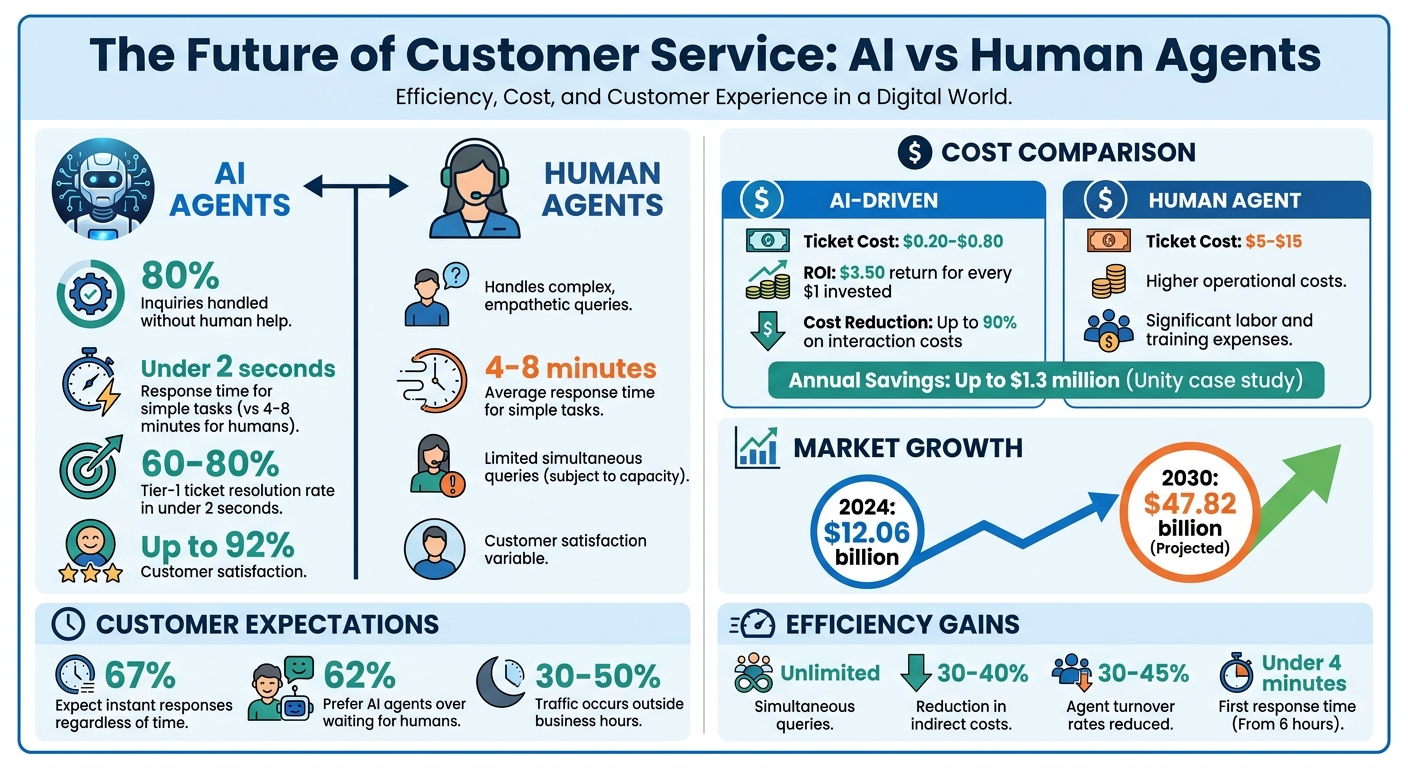
- AI agents handle up to 80% of inquiries without human help, cutting response times to under 2 seconds for simple tasks like refunds or password resets.
- They cost significantly less, with AI-driven tickets priced at $0.20–$0.80 versus $5–$15 for human agents.
- The AI customer service market is booming, growing from $12.06 billion in 2024 to an expected $47.82 billion by 2030.
- Tools like ChatSpark enable businesses to offer 24/7 support across multiple platforms (web, WhatsApp, Instagram, etc.), while also performing tasks like booking appointments or checking order statuses.
- Companies using AI for customer service report higher satisfaction rates (up to 92%) and significant cost savings - up to $1.3 million annually in some cases.
AI agents are not just about faster service - they also reduce human agent burnout by automating repetitive tasks, provide actionable insights from customer data, and allow businesses to scale support without increasing staff. Ready to learn how to implement AI customer support in your business? Read on.
AI Customer Service Statistics: Cost Savings, Response Times, and ROI in 2024-2030
Core Technologies Behind AI Customer Service
AI customer service thrives on three interconnected technologies: conversational AI, omnichannel integration, and knowledge retrieval systems. Each plays a critical role - conversational AI drives the interaction, omnichannel integration ensures a seamless experience across platforms, and knowledge retrieval systems deliver accurate answers in real time.
Conversational AI and Natural Language Processing
At the heart of conversational AI lies Natural Language Processing (NLP), which enables systems to grasp the meaning behind customer queries rather than just matching keywords. For instance, whether a customer says, "I can't log in" or "authentication failing", the system understands both as the same issue[7].
This is achieved through two key components:
- Natural Language Understanding (NLU): Identifies intent, even when phrased differently.
- Natural Language Generation (NLG): Crafts responses that are clear, natural, and consistent with the brand's tone[7].
The most advanced systems go beyond simple responses. They can handle multi-step tasks, like processing refunds or updating account details autonomously[7][3].
These capabilities make AI agents highly efficient, resolving 60% to 80% of tier-1 tickets - such as password resets or billing inquiries - in under two seconds. In contrast, human teams typically take 4 to 8 minutes for the same tasks[6][5]. AI-powered voice systems are equally impressive, conducting speech-to-speech conversations in less than 600 milliseconds[8]. Additionally, improved configurations have reduced hallucination rates from 8% to under 1%[5]. This level of linguistic sophistication ensures smooth, effective customer interactions across all channels.
Omnichannel Integration
Modern customers often interact with businesses across multiple platforms - starting on a website, continuing on WhatsApp, and wrapping up on Instagram. Omnichannel integration ensures these interactions remain seamless, with a unified conversation history spanning platforms like web chat, social media, and messaging apps such as Slack or Telegram[7][8].
This approach eliminates the frustration of repeating information. For example, when documentation updates, the AI agent instantly syncs its knowledge across all channels, ensuring consistent and accurate responses[9]. The shift from isolated multichannel systems to fully connected omnichannel systems has become essential for staying competitive.
| Feature | Multichannel Support | Omnichannel Support |
|---|---|---|
| Channel Connection | Independent silos | Interconnected systems |
| Context Continuity | Stays within each channel | Follows the customer across channels |
| Answer Consistency | Varies by channel/agent | Same quality across platforms |
| Customer Effort | Must repeat info | Seamless transitions |
| Knowledge Source | Separate per channel | Unified knowledge base |
This interconnected system ensures that AI agents deliver a smooth, unified customer experience.
AI Knowledge Retrieval Systems
The effectiveness of AI agents depends heavily on the quality of the information they can access. Knowledge retrieval systems use advanced methods like hybrid retrieval - combining BM25, dense vectors, and reranking - to extract the most relevant answers from documentation[5]. This process, called Retrieval-Augmented Generation (RAG), grounds responses in verified source material, reducing the risk of inaccuracies.
A key technique here is contextual chunking, where large documents are divided into smaller, context-rich sections. For example, if a customer asks about pricing, the AI retrieves the exact section addressing that topic instead of an entire document[5]. By 2026, leading AI systems achieve containment rates of 56% to 80%, meaning they can fully resolve most customer queries without human input[5].
"The old approach forced you to predict every possible question and write a flow for it. The new approach gives the model your knowledge base, your APIs, and a goal. It figures out the flow on its own." - Ryan Whitton[5]
However, success hinges on maintaining a clean, well-organized knowledge base. Outdated or conflicting information can significantly reduce containment rates. Teams must regularly update and structure their content into clear categories like Pricing, Technical Support, and Troubleshooting[5][10].
ChatSpark: 24/7 Automated Customer Support
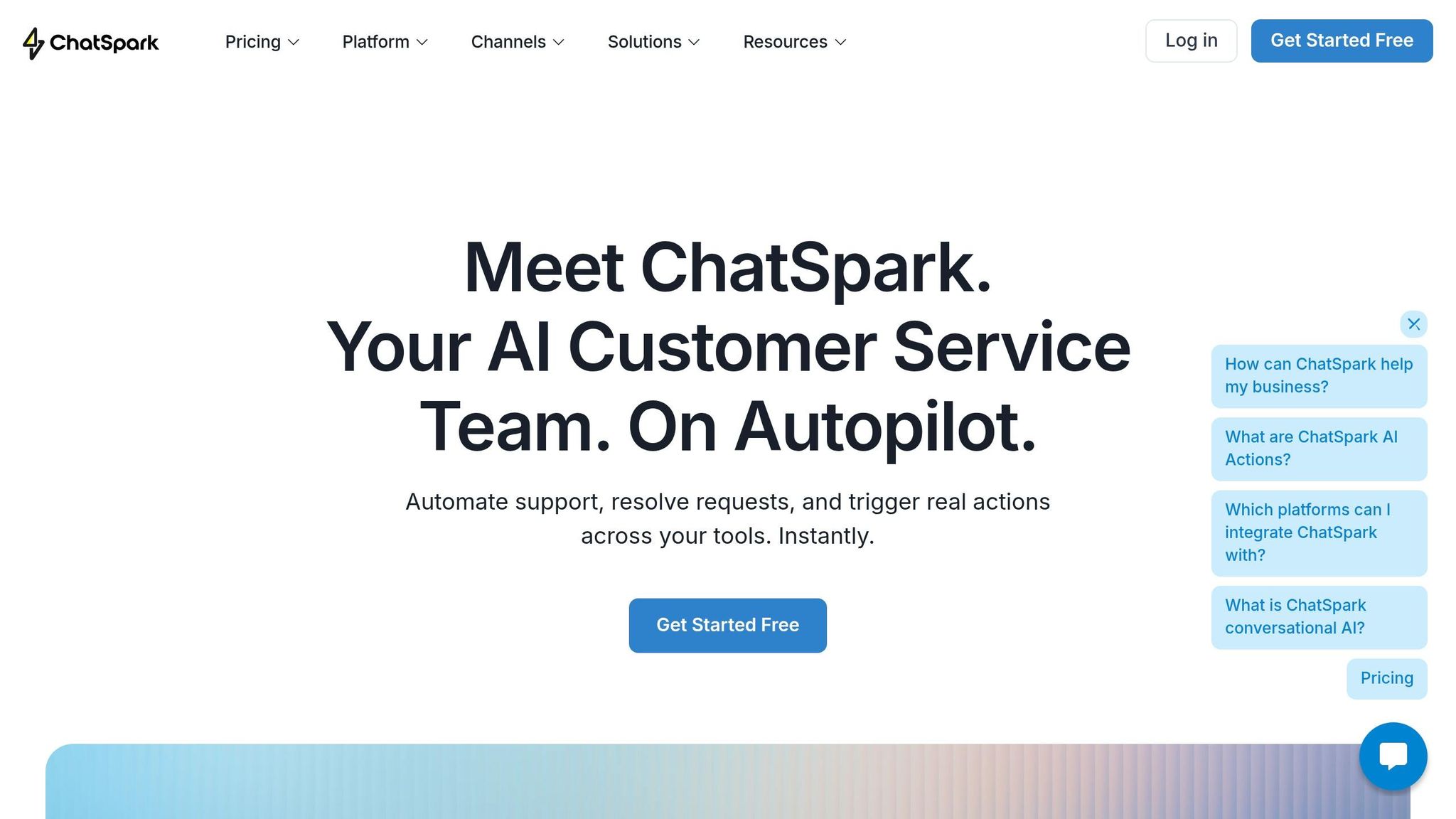
In a world where customers expect instant service, ChatSpark steps in to revolutionize customer support with fast, intelligent responses. Using a 4-step AI engine, it understands intent, retrieves relevant information, and crafts responses in your brand's tone - resolving over 80% of inquiries in less than 2 seconds [11].
But ChatSpark doesn’t stop at answering questions. It handles tasks like checking order statuses, booking appointments, and creating support tickets - all through conversational AI interactions. Plus, a single AI agent can operate seamlessly across six platforms, including your website, WhatsApp, Instagram, Facebook Messenger, Telegram, and Slack, ensuring consistent support no matter where customers reach out.
With automatic language detection, ChatSpark supports over 85 languages right out of the box, allowing customers to communicate in the language they’re most comfortable with. You can also customize the agent to reflect your brand’s identity - everything from its name and avatar to its personality and color scheme. Built-in tools for lead capture make it easy to collect customer contact details, which can be exported as CSV files or integrated directly into CRMs via Zapier.
Here’s a real-world example: From July to October 2025, a global construction products company used ChatSpark for one of its flagship brands. During that time, the AI agent processed 10,754 messages, achieved a 98% resolution rate, and captured 153 new leads. The result? $47,880 in cost savings and over 66 days of agent time saved - all from an initial investment of around $4,000 [11].
ChatSpark Features and Capabilities
ChatSpark is packed with tools to deliver efficient, automated support. Its AI Actions allow the agent to independently complete tasks, such as checking order statuses, without needing human involvement. For teams looking to streamline workflows, ChatSpark CoPilot integrates with tools like Gmail, Salesforce, and Zendesk through a browser extension. This feature suggests replies and surfaces relevant information, helping agents work smarter. The platform excels at handling first-level customer queries, easing the workload while maintaining high accuracy [11].
Setting up ChatSpark is straightforward. Simply upload key resources like FAQ pages or common support topics to train the AI agent. As your knowledge base grows, the agent becomes even more effective - some businesses have seen up to a 98% resolution rate. Integration is seamless, with support for tools like Zapier, Freshchat, Square, and Calendly. For deeper insights, analytics and reporting tools track performance, while Pro and Enterprise plans unlock features like Google Analytics 4 tracking, ROI reports, and a fully white-labeled experience. With flexible pricing plans, ChatSpark adapts to businesses of all sizes.
ChatSpark Pricing Plans
ChatSpark offers four pricing options to cater to businesses at different stages:
| Plan | Monthly Cost | Messages/Month | AI Agents | Training Pages | Key Features |
|---|---|---|---|---|---|
| Basic | $19 | 100 | 1 | 25 | Basic analytics, website deployment, multiple data sources |
| Plus | $59 | 250 | 1 | 50 | 5 AI Actions, ChatSpark CoPilot, REST API, advanced analytics |
| Pro | $129 | 2,000 | 1 | 500 | 40 AI Actions, omnichannel deployment, GA4 tracking, unbranded widgets, ROI reports |
| Enterprise | Custom | Custom | Custom | Custom | Unlimited AI Actions, custom SLAs, dedicated account manager, priority support |
The Basic plan, priced at $19/month, is ideal for solo entrepreneurs exploring AI-powered support. The Plus plan, at $59/month, adds features like ChatSpark CoPilot and enhanced automation. For $129/month, the Pro plan unlocks full omnichannel deployment and advanced tools, including the removal of ChatSpark branding. Larger businesses can opt for the Enterprise plan, which offers tailored solutions, unlimited agents, and dedicated account management.
Every plan includes the core AI engine, detailed analytics, and integration with multiple data sources - making ChatSpark a scalable, efficient solution for businesses aiming to enhance their customer support.
How to Build and Deploy AI Agents for Customer Service
Creating an effective AI agent for customer service takes thoughtful preparation. The key difference between an agent that genuinely helps and one that frustrates users often lies in how well you handle data, design workflows, and monitor performance.
Define Goals and Prepare Your Data
Set clear, specific goals for your AI agent. For instance, decide whether it will handle tasks like checking order statuses, explaining return policies, or troubleshooting common problems. Be just as clear about what it won’t handle, such as payment disputes or sensitive account security matters. According to Tencent Cloud ADP, unclear scope is the reason behind 80% of failed AI agent projects [13].
Before launching, establish measurable success criteria. Track metrics like:
- Deflection rate: Aim for 50–70%.
- First-response accuracy: Target at least 85%.
- Resolution time: Keep it under 5 minutes.
- Escalation rate: Maintain between 20–40%.
- Customer satisfaction: Strive for a score of 4.0/5 or higher [13].
Start by reviewing your existing documentation. Check FAQs, product manuals, and policy documents for outdated details or jargon that could confuse users. Analyze past support tickets to identify common questions and knowledge gaps. Always anonymize personal information before using it to train your AI. With these preparations, you can design conversation flows that prioritize efficiency.
Design Conversation Logic and Connect Knowledge Sources
Once your data is ready, map out how conversations will flow. For straightforward questions, set up direct responses using retrieval-augmented generation (RAG) from your knowledge base. For more complex tasks - like processing returns or troubleshooting - create multi-step interactions that gather all necessary details (e.g., order numbers or issue descriptions) before taking action.
To keep the agent reliable, establish clear boundaries within its system prompt. For example, you might specify, "Do not promise refunds without verification" or "Avoid discussing competitors." Confidence thresholds are another critical safeguard. For instance:
- If confidence is below 0.60, escalate to a human immediately.
- If confidence is between 0.60 and 0.84, flag the response for review.
- If confidence is 0.85 or higher, proceed with the response [10].
Connect the agent to backend tools like your CRM, Shopify, or Stripe through APIs. This allows it to go beyond sharing links and actually perform tasks like checking order statuses or updating account details.
"The knowledge base isn't optional. It's the whole point." - Pxlpeak [14]
Set Up Human Handoffs and Track Performance
Even the most advanced AI agents will encounter situations they can’t resolve. That’s why it’s essential to integrate human support for edge cases. When escalating, the AI should provide the human agent with a complete conversation transcript, a summary of its attempted resolution, relevant customer details, and a suggested next step. This ensures a smooth handoff and prevents customers from repeating themselves.
Regularly review unresolved or poorly rated conversations to identify areas for improvement. Track important performance metrics like:
- True resolution rate: Aim for 60% or higher.
- First response time: Keep it under 5 seconds.
- Escalation rate: Target 20–40%.
- Repeat contact rate: Stay below 15%.
Before fully launching, consider running your AI agent in "shadow mode." In this setup, the agent generates answers alongside human agents without directly interacting with customers. This helps validate its accuracy and readiness.
"A bot that escalates confidently and quickly earns more trust than a bot that tries to handle everything." - Oscom.ai [15]
Benefits of 24/7 AI Customer Service
AI-powered customer service available around the clock is changing the game by tackling key issues like speed, cost, and actionable insights.
Better Customer Satisfaction
Today’s customers want answers immediately - regardless of the hour. In fact, 67% of customers expect instant responses, no matter the time zone [16]. AI agents meet this demand with response times as quick as 1–10 seconds, a stark contrast to the 4–8 minute average for human agents. This speed is especially crucial during off-hours, when 30–50% of website traffic happens outside regular business hours [16]. Businesses that use AI for after-hours support have reported a 92% customer satisfaction rate, highlighting how availability can shape customer perception of a brand [16].
Take Unity, a 3D content platform, as an example. By integrating an AI agent with its knowledge base, Unity managed to deflect 8,000 tickets and save $1.3 million, all while providing immediate answers to customer queries [17]. This blend of speed and accuracy fosters trust and loyalty in ways traditional models struggle to achieve.
The result? Not only happier customers but also reduced operational costs and smarter decision-making.
Lower Costs and Higher Efficiency
AI isn’t just about keeping customers happy - it also slashes costs and boosts efficiency.
By automating routine inquiries, AI dramatically reduces the expense of customer service. Businesses can cut interaction costs by up to 90% and enjoy an average return of $3.50 for every $1 invested in AI customer service [1]. Unlike human agents, who can only handle a limited number of tickets at once, AI systems can manage unlimited simultaneous queries, making them perfect for handling seasonal surges without the need for extra staff.
AI also eliminates hidden costs that often go unnoticed. Missed revenue from unanswered calls, slow responses that hurt conversions, and high turnover expenses all vanish when AI takes over repetitive tasks like password resets or order status updates. These efficiencies can reduce indirect costs by 30–40% [2]. On top of that, automating mundane tasks helps lower burnout rates among human agents, addressing the 30–45% turnover rates common in customer service roles.
Data-Driven Insights for Improvement
AI doesn’t just handle customer queries; it learns from them. By analyzing every conversation, AI uncovers trends in customer behavior, identifies knowledge gaps, and tracks sentiment in real time - something human teams struggle to do at scale [17]. This real-time analysis helps businesses pinpoint recurring issues, flag questions the AI can’t yet answer, and update help articles based on actual customer needs.
Sophisticated AI systems even create feedback loops to improve over time. For instance, they review failed resolutions weekly and recommend updates to response templates or knowledge base entries [10]. This shift from reactive to proactive service allows businesses to anticipate problems - like shipping delays - and address them before customers even complain. Companies using AI chatbots have seen a 67% boost in customer satisfaction, largely because the insights gathered drive smarter decisions throughout the customer journey [1].
Best Practices for Using ChatSpark
To keep your customer support efficient and authentic 24/7, it’s important to make the most out of ChatSpark. By fine-tuning its features and deploying it thoughtfully, you can ensure it fits seamlessly into your customer service strategy.
Configure and Customize Your AI Agents
An AI agent that mirrors your brand’s personality can make a huge difference. Using the ChatSpark dashboard, you can adjust the tone of responses - whether you want them to sound professional, friendly, or something in between. By following your brand guidelines, you can ensure every interaction feels consistent. To prepare your agent for handling customer questions right away, train it with data like FAQs, past customer conversations, and product documentation [18].
But don’t stop there. ChatSpark’s built-in NLP tools can take customization to the next level. For instance, an online store might upload its product catalog and configure the agent to respond to common questions like “What’s your return policy?” or “How long does shipping take?” Over time, feedback loops can help refine these answers, boosting response accuracy by 30–50% [20]. You can also set fallback responses to smoothly redirect users to human support or helpful resources when needed [12].
Once your AI agent is fully customized, expand its presence across all the platforms your customers use.
Deploy Across Multiple Channels
Your customers aren’t just reaching out on your website - they’re messaging on platforms like WhatsApp, Facebook, Instagram, Telegram, and Slack. ChatSpark makes it easy to connect with them wherever they are, thanks to its APIs and plugins. Simply generate platform-specific tokens in the dashboard, map out conversation flows for each channel, and sync data so customers enjoy a smooth experience, even if they switch between platforms [18].
Tailor your agent’s responses for the platform it’s on. For instance, social media users tend to prefer quick, concise replies, while website visitors might expect more detailed explanations. One retail company saw a 40% drop in support tickets after integrating ChatSpark into both their Shopify site and iOS app, creating a unified approach to customer queries [20]. To measure success, track metrics like first response time for your website, deflection rates on WhatsApp, and conversion rates on Facebook and Instagram.
As your customer base grows, you can scale ChatSpark to keep up with increasing demand.
Scale from Basic to Enterprise
Start small and expand as your needs grow. ChatSpark’s Basic plan ($19/month) is perfect for initial use, offering 100 messages and one agent. As your query volume increases, you can move to the Plus plan ($59/month) for 250 messages or the Pro plan ($129/month), which includes 2,000 messages, integrations with tools like Zapier and Freshchat, and unbranded widgets. For businesses with higher demands, the Enterprise plan offers custom message limits, advanced analytics, and CRM integrations with platforms like Salesforce and HubSpot [20].
Begin with a pilot program on one channel, keeping an eye on metrics like resolution rates and cost savings (typically around $5–10 per resolved ticket). Once you have solid ROI data, expand to additional platforms [19]. Enterprise features like auto-escalation rules and custom analytics can reduce the need for human intervention by up to 70%, allowing your team to focus on more complex tasks. Regular reviews and adjustments can help you fine-tune your approach even further [18][20].
Conclusion
AI agents and automation are reshaping the way businesses approach customer service. Companies utilizing AI are seeing impressive results - 128% higher likelihood of achieving strong ROI, with an average return of $3.50 for every $1 invested [4][1]. Embracing this technology now offers businesses a clear edge over competitors.
Customer expectations have evolved significantly. Today, 62% of consumers prefer interacting with an AI-powered agent rather than waiting for a human representative [1]. They also expect seamless support across platforms like WhatsApp, Instagram, and company websites. With AI, companies have slashed first response times from an industry average of 6 hours to just under 4 minutes, meeting the demand for instant, efficient support [1]. This shift highlights how critical fast, automated responses are in boosting customer satisfaction.
Tom Eggemeier, CEO of Zendesk, puts it plainly: "80% of all inquiries will be resolved without the help of a human agent" [3].
ChatSpark taps into these advantages, offering round-the-clock, automated support for businesses of all sizes at an affordable cost. But the key to success lies in a "Knowledge First" strategy - AI is only as effective as the quality of the documentation, FAQs, and data it’s trained on [10][1]. To maintain accuracy and avoid errors, businesses should audit and update their knowledge base weekly [5][1].
The customer service landscape has already changed. Companies that adopt AI-powered solutions today will not only meet rising customer expectations but also improve efficiency and allow their teams to focus on more complex, high-value interactions. Now is the time to make the leap into AI-driven support.
FAQs
How do I know which support issues my AI agent should handle vs. escalate to a human?
To ensure smooth and effective customer support, it's crucial to tailor escalation rules based on the nature of the issue. Here's how it works:
AI agents are perfect for handling routine tasks such as order tracking, processing refunds, and password resets. These straightforward tasks can be resolved quickly and efficiently without human intervention.
However, when situations become more complex - like emotionally sensitive issues or inquiries involving high-value transactions - it's essential to bring in human expertise. By using intent classification and sentiment analysis, these cases can be identified and routed to human agents who are better equipped to handle them.
This approach strikes the right balance: routine tasks are resolved promptly, while more nuanced or critical issues get the attention they deserve, helping maintain customer trust and satisfaction.
What do I need to prepare in my knowledge base to keep AI answers accurate?
To keep AI responses accurate, it's crucial to regularly update your knowledge base with the latest product details, policies, and frequently asked questions (FAQs). Organize this information into clear, easy-to-navigate categories to ensure relevance and accessibility. Additionally, reviewing instances of failed resolutions can highlight areas for improvement, allowing you to refine response templates over time. Reliable AI performance depends on maintaining fresh, well-organized data.
How can I measure ROI and success after launching ChatSpark?
To gauge ROI and overall success, keep an eye on critical metrics such as cost savings, resolution rates, response times, and customer satisfaction. Start by comparing costs before and after implementation to identify savings. Track how efficiently issues are resolved - this includes metrics like deflection rates, which show how often AI handles queries without human intervention. Pay close attention to response times, as AI can greatly enhance speed in addressing customer needs.
Customer feedback and sentiment analysis are equally important. Use these insights to evaluate the quality of interactions and pinpoint areas for improvement. By combining these metrics, you’ll get a clear, measurable understanding of ChatSpark’s performance and the return on your investment.