Conversational AI platforms are transforming how businesses interact with customers. These systems use advanced technologies like Natural Language Processing (NLP) and Machine Learning (ML) to simulate human-like conversations. Unlike traditional bots, they understand intent, handle context, and adapt to diverse inputs like typos or slang, making interactions smoother and more natural.
Key Takeaways:
- What They Do: Automate tasks like FAQs, order tracking, and lead qualification while managing multi-turn conversations across channels.
- Why They Matter: Offer 24/7 support, reduce costs, and improve customer satisfaction by resolving issues faster and more efficiently.
- Core Features: Context-aware NLP, omnichannel integrations (websites, WhatsApp, Slack, etc.), and actionable analytics to optimize performance.
- Business Impact: Save time and money by automating up to 80% of routine inquiries, with companies reporting up to 40% cost savings and improved customer satisfaction rates.
Quick Comparison:
| Feature | Rule-Based Chatbots | Conversational AI Platforms |
|---|---|---|
| Logic | Rule-based vs AI chatbot logic | Intent and context-based |
| Flexibility | Limited to specific phrases | Handles typos, slang, and context |
| Learning | Static, manual updates | Continuously improves |
| User Experience | Structured, rigid | Feels human-like |
Why it works: Conversational AI platforms combine speed, accuracy, and scalability, making them ideal for businesses looking to enhance customer interactions while reducing operational costs. If you're ready to improve efficiency and customer satisfaction, these tools are a game-changer.
Key Features of Modern Conversational AI Platforms
Natural Language Processing and AI Capabilities
Modern conversational AI platforms are designed to understand language with remarkable nuance. They can automatically extract critical information like order numbers or dates, while semantic matching ensures they grasp varied phrasing effortlessly [1][3]. These platforms also excel at managing multi-turn conversations, thanks to advanced context awareness, which makes follow-ups feel seamless and natural [1][2]. Plus, with support for over 85 languages, tools like ChatSpark cater to a global audience without requiring additional setup.
But the real magic happens when these language capabilities are paired with integrations that allow the AI to function across multiple channels seamlessly.
Omnichannel Integrations
The true value of a conversational AI platform lies in its ability to operate across various channels. Leading platforms integrate effortlessly with websites, WhatsApp, Instagram, Facebook, Telegram, and Slack. A shared memory layer ensures that conversations retain context, even when customers switch channels. For instance, if someone starts a chat on your website and later continues on WhatsApp, the AI remembers the entire interaction.
These platforms go beyond answering questions - they can handle tasks like retrieving Shopify order details, issuing Stripe refunds, or booking appointments through Google Calendar. When human assistance is needed, the system provides a full summary of the interaction, ensuring a smooth handoff.
One compelling example is a global construction products company that used ChatSpark between July and October 2025. During this period, the platform managed 10,754 messages, captured 153 new leads, and achieved a 98% resolution rate. This saved over 66 workdays for agents and reduced costs by $47,880 - all from a $4,000 investment, delivering a 1,097% ROI [ChatSpark Blog, 2026].
| Feature | Traditional Multichannel | Modern Omnichannel AI |
|---|---|---|
| Context | Lost when switching channels | Maintained via shared memory layer |
| Customer Effort | Must repeat information | Seamless transition using identity resolution |
| Data Sync | Manual or delayed | Real-time bi-directional CRM sync |
| Task Execution | Informational only | Executes AI-driven actions like refunds or bookings |
| Brand Voice | Often inconsistent | Unified through a single knowledge base |
These integrations not only streamline operations but also pave the way for ongoing improvements through detailed analytics.
Analytics, Reporting, and Optimization
Strong language understanding and integration capabilities are just the beginning - analytics take things to the next level by turning data into actionable insights. The best platforms identify gaps, such as unanswered customer questions or frequently asked topics, allowing businesses to refine their systems [4].
One essential metric is the AI Resolution Rate, which measures how effectively the platform resolves customer issues. A good benchmark is between 70% and 85% [4]. ChatSpark goes a step further, introducing a Health Score that combines resolution rates, answer quality, and knowledge base coverage into a single performance indicator [5].
To keep the system improving, businesses are encouraged to review unanswered queries weekly and add 2–3 new training items. This consistent effort leads to higher resolution rates and better outcomes over time [4].
Business Benefits of Conversational AI Platforms
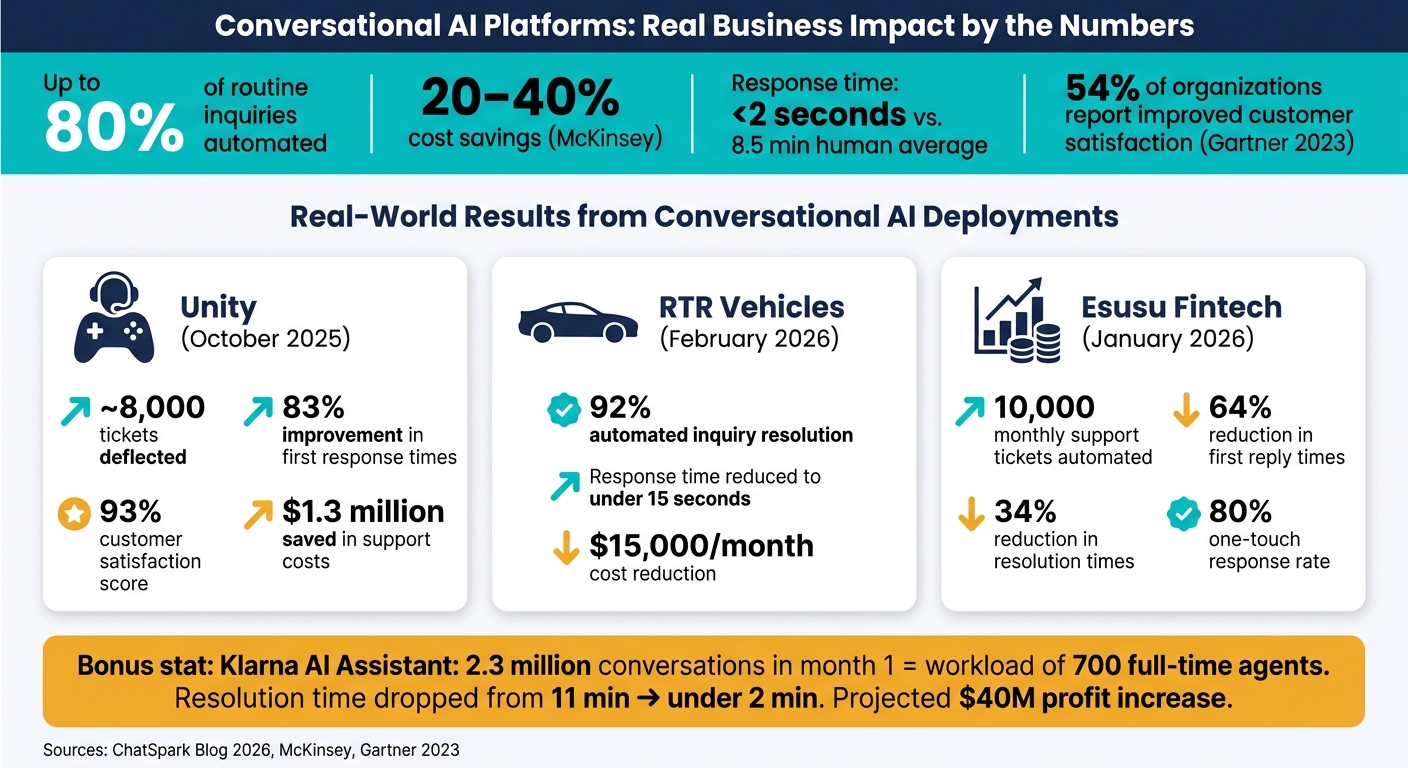
Conversational AI Platforms: Real Business Impact by the Numbers
Faster and More Efficient Customer Support
Conversational AI slashes response times to under 2 seconds, compared to the average wait time of 8.5 minutes for a human agent. These systems can handle thousands of conversations simultaneously without breaking a sweat, even during high-traffic events like product launches, holiday sales, or service outages. This speed not only boosts customer satisfaction but also leads to significant cost savings.
Take Unity, for example. In October 2025, the 3D development platform faced a surge in support tickets and deployed AI to manage the load. The results? Nearly 8,000 tickets deflected, an 83% improvement in first response times, and a 93% customer satisfaction score, all while saving about $1.3 million in support costs.
Cost Reduction and Scalability
By automating up to 80% of predictable inquiries - like order tracking, password resets, or billing questions - AI dramatically changes the cost structure of customer support. This allows human agents to focus on complex, high-value interactions that require empathy and critical thinking.
The financial benefits are clear. In February 2026, RTR Vehicles achieved 92% automated inquiry resolution, reducing response times to under 15 seconds and cutting monthly costs by $15,000.
AI also works 24/7 without needing overtime pay, holiday bonuses, or night-shift premiums. As a result, businesses can scale their support operations without needing to add staff. Plus, with multilingual capabilities covering 85+ languages, companies can enter new markets without hiring regional teams. These efficiencies not only save money but also create a more seamless and proactive customer experience.
Better Customer Experience
Beyond faster responses and cost savings, conversational AI elevates the customer experience by offering context-aware and personalized interactions. This level of service fosters loyalty and trust.
AI systems can pick up on emotional cues like frustration or urgency, adjusting their tone or escalating the issue to a human agent when appropriate. When escalation happens, the AI transfers the full conversation history and a sentiment summary, so customers don’t have to repeat themselves.
The results speak for themselves. In January 2026, fintech startup Esusu automated 10,000 monthly support tickets, cutting first reply times by 64%, reducing resolution times by 34%, and achieving an 80% one-touch response rate - meaning most issues were resolved in a single interaction.
How to Implement a Conversational AI Platform
Assessing Your Business Needs
Before diving into platform options, take a close look at your own data. Start by analyzing 3–6 months of support records. Focus on contact volumes across channels and key metrics like response times and handle times. The aim here is to pinpoint high-volume, low-complexity tasks that take up agent time but don’t require human judgment.
Tasks like tracking order status, resetting passwords, answering billing FAQs, scheduling appointments, or explaining return policies are often the best candidates for automation. Once you’ve identified these tasks, assign dollar values to them. Consider monthly costs tied to agent hours, overtime, and missed after-hours inquiries - this will help you build a solid business case.
For businesses, don’t forget to think about time zone coverage across all four continental U.S. zones, availability during U.S. federal holidays, and whether you’ll need multilingual support (Spanish is often the second most requested language after English).
Once you’ve nailed down your performance goals, use them to evaluate platforms that align with your specific needs.
What to Look for When Choosing a Platform
Not all conversational AI platforms perform equally when put to the test. Instead of relying solely on vendor demos, test the platform’s NLP (natural language processing) capabilities using real transcripts. A system that struggles with typos, slang, or shifts in conversation topics can leave customers feeling frustrated.
Beyond language understanding, here are key features to prioritize:
| Criteria | What to Check |
|---|---|
| NLP/NLU quality | How well it handles real-world transcripts, including slang and typos |
| Omnichannel support | Seamless functionality across web chat, SMS, WhatsApp, Facebook Messenger, email, and voice/IVR |
| Integrations | Built-in connectors for tools like Salesforce, Zendesk, HubSpot, Shopify, or your existing systems |
| Analytics | Insights into metrics like containment rate, escalation reasons, customer satisfaction (CSAT), and cost-per-contact |
| Security & compliance | Certifications such as SOC 2 Type II, PCI-DSS for payments, HIPAA compliance, and PII redaction |
If your business handles sensitive payment or healthcare data, make sure the vendor offers a Business Associate Agreement (BAA) for HIPAA compliance and supports PCI-DSS data masking.
Steps to Deploy and Scale
Once you’ve selected the right platform, take a phased approach to deployment. Avoid launching across all channels and use cases on day one. Instead, start small - focus on a single use case on one channel (web chat is a common starting point) and expand as you validate performance.
Here’s a step-by-step guide to deployment:
-
Prepare Your Knowledge Base
Gather all relevant resources like FAQs, help center articles, policy documents, and several months of chat transcripts. Standardize the content to match U.S. formats - use USD ($), MM/DD/YYYY dates, and ensure policies align with U.S. standards. This initial setup, which might take 20–40 hours, is critical to creating a bot that genuinely helps users rather than frustrating them. -
Design Flows and Set Escalation Rules
Plan out conversation paths for your chosen use case. Include clear fallback options for situations where the bot can’t assist. Define "no-touch" areas, such as billing disputes, fraud reports, legal issues, or account cancellations. In these cases, the bot should immediately hand off to a human agent, passing along the full context of the conversation. -
Pilot, Then Scale
Start with a small portion of your traffic - perhaps 10–20% of web visitors or during off-peak hours - and monitor the bot’s performance. Review failed interactions weekly to identify knowledge gaps. Once the pilot achieves its target metrics, gradually expand to other channels and use cases.
This step-by-step approach ensures a smoother rollout, with focused pilots delivering measurable results and high resolution rates before expanding further.
The Future of Conversational AI in Customer Support
How AI Technology Is Advancing
The days of chatbots blindly following scripts are being left behind. Today’s AI-powered agents, built on large language models and autonomous reasoning, can handle complex tasks like processing refunds, updating CRM records, and rescheduling appointments - all without human intervention.
Take Klarna, for example. In February 2024, they rolled out an AI assistant that managed an impressive 2.3 million conversations in its first month. That’s equivalent to the workload of 700 full-time agents. Fast forward to 2025, and resolution times plummeted from 11 minutes to under two minutes, helping the company anticipate a $40 million profit increase [6].
"Next-generation agentic AI - powered by contextual intelligence - is making it possible to pull from every data source that matters to create experiences that feel effortless and trusted." - Jason Maynard, Chief Technology Officer, Zendesk
These innovations are paving the way for interactions that feel more tailored and intuitive.
Personalization and Context Awareness
Modern AI systems are stepping up their game by tracking real-time signals like shipping delays or abandoned carts, offering solutions before problems even arise. This proactive approach not only streamlines operations but also boosts customer satisfaction.
The secret lies in contextual intelligence. By pulling together purchase history, behavioral data, and company policies, AI systems can create a seamless experience across platforms. Whether a customer moves from Instagram to email to a voice call, the AI keeps the conversation consistent. Sentiment detection adds another layer, allowing the system to identify frustration or urgency. In these cases, it can adjust its tone, reprioritize tickets, or even hand off the case to a human agent when necessary.
As AI continues to evolve, it’s also reshaping how voice and multimodal channels are used in customer support.
Voice and Multimodal Interactions
Voice is quickly becoming a go-to channel for resolving issues. With better speech recognition, customers can now use voice assistants on their phones, smart speakers, or IVR systems to get quick answers - no typing required. Multimodal AI takes it a step further by combining text, voice, and even visual inputs, allowing users to share screenshots or images during their interactions.
The cost savings are hard to ignore. Traditional phone support costs between $8.00 and $15.00 per call. AI-powered voice support, on the other hand, slashes this to just $1.00–$3.00 per interaction, with response times that are nearly instant.
These advancements are reshaping customer support, making it faster, smarter, and more cost-effective.
Conclusion
Conversational AI platforms have evolved into practical tools that allow businesses to handle more customer interactions while keeping costs in check. By combining natural language processing, omnichannel capabilities, and built-in analytics, these platforms help achieve faster resolutions, reduce cost-per-contact, and leave customers feeling valued. These measurable benefits make a strong case for strategic implementation.
The numbers speak for themselves. With $1.3 trillion spent annually on customer service calls, AI-powered platforms can automate up to 80% of routine inquiries. According to McKinsey, companies adopting these tools thoughtfully can achieve 20–40% cost savings and up to 50% self-service containment. A 2023 Gartner survey also revealed that 54% of organizations using chatbots or virtual agents saw measurable improvements in customer satisfaction.
However, success depends on a thoughtful approach. Conversational AI works best when it supports human agents rather than replacing them - automating repetitive tasks while ensuring complex or sensitive issues are escalated with full context. A good first step is to review your support data from the past three to six months. Identify the top 10–20 repetitive request types and estimate their monthly cost. This analysis highlights where automation can make the greatest impact and provides a baseline for tracking results. Engaging key teams - such as support, IT, compliance, and finance - early in the process ensures the rollout stays aligned with business goals and avoids unexpected challenges.
As voice interfaces, multimodal inputs, and personalized experiences continue to develop, companies that approach conversational AI as a long-term investment with ongoing optimization and governance will gain a competitive edge. The tools are ready - now it’s about having the right strategy to harness their potential. A well-executed conversational AI plan drives efficiency and enhances customer satisfaction.
FAQs
Which support requests should I automate first?
Start by targeting the 20% of ticket categories that make up 80% of your support volume. These are typically high-frequency, low-complexity tasks - think password resets, checking order statuses, billing questions, scheduling appointments, or answering FAQs about product details and pricing.
You can also streamline repetitive post-contact tasks, such as ticket summarization and CRM updates, which often consume 15–25% of an agent's time. Automating these areas can free up your team to focus on more complex customer issues.
How do I measure if the AI is working well?
Your ChatSpark analytics dashboard is your go-to tool for measuring performance. Pay attention to these critical metrics to ensure everything runs smoothly:
- AI Resolution Rate: Aim for a range of 70%-85% - this indicates how effectively your AI handles inquiries without human intervention.
- Knowledge Coverage: Strive for at least 70%. This measures how well your AI can address user questions based on its training.
- First Response Time: Monitor how quickly your AI delivers its initial reply to users.
- Average Handle Time: Keep track of how long it takes to resolve interactions from start to finish.
- First Contact Resolution: Evaluate how often user issues are resolved in the first interaction.
User satisfaction is another crucial area. Use CSAT scores and sentiment analysis to gauge how users feel about their experience.
Don't stop there - track task completion rates and lead conversion to measure the broader impact of your AI. Finally, keep a close eye on unanswered questions. These can highlight areas where your AI needs additional training or updates to better meet user needs.
What security and compliance features do I need?
When deploying ChatSpark, security should be a top priority. Here are some key features that highlight its commitment to keeping your data and systems safe:
- Data Privacy: ChatSpark prioritizes the confidentiality of your training data. Plus, it's actively working toward SOC 2 compliance to meet rigorous security standards.
- System Security: Secure protocols like OAuth 2.0 ensure safe authentication, while HMAC-SHA256 signatures add an extra layer of integrity by verifying data authenticity.
- Credential Protection: ChatSpark uses AES-256 encryption to safeguard credentials. Additionally, rate limiting is in place to prevent misuse and maintain system reliability.
By leveraging these features, ChatSpark provides a secure and stable environment for deployment.