AI customer support software is transforming the way businesses handle customer service. It offers instant responses, 24/7 availability, and cost savings while improving efficiency. By 2030, the market is projected to grow to $47.82 billion, with 81% of consumers recognizing AI as essential in customer service. Companies using AI report savings of 15–40% annually, with an average of $300,000 saved in the first year.
Here’s what to focus on when choosing AI customer support software:
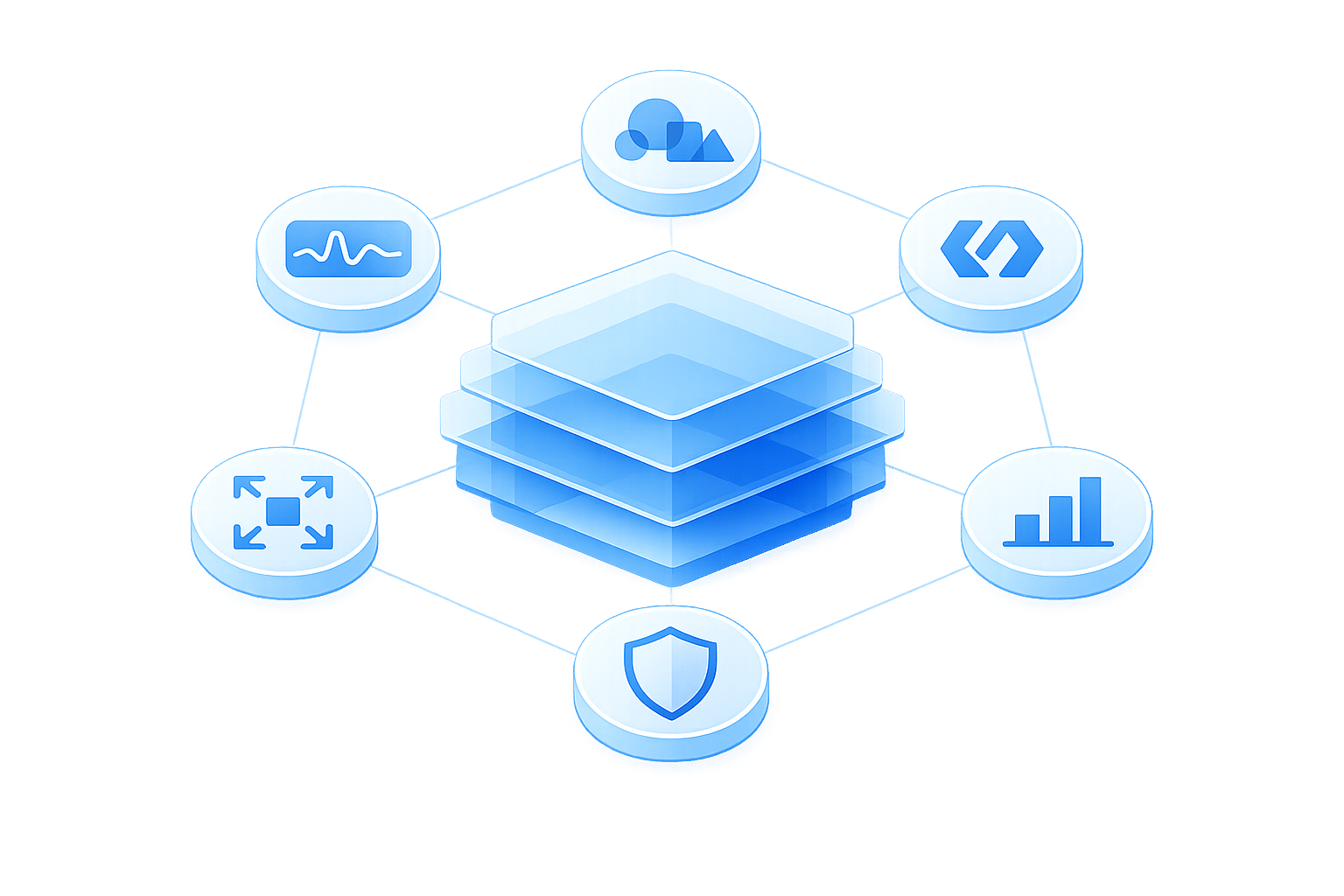
- Advanced Natural Language Processing (NLP): Understands intent, detects emotions, and supports multiple languages with accuracy.
- Omnichannel Support: Provides consistent service across platforms like email, social media, and messaging apps.
- 24/7 Availability: Handles routine queries anytime, improving response times and customer satisfaction.
- Knowledge Retrieval & Analytics: Ensures consistent answers and delivers insights to improve operations.
- Integration & Customization: Syncs with CRMs, e-commerce platforms, and other tools while allowing branding and workflow adjustments.
- Security & Compliance: Protects sensitive data with encryption, PII redaction, and certifications like SOC 2 and GDPR compliance.
Key Benefits: Companies see faster response times (up to 74% improvement), reduced costs, and scalable customer service. Tools like ChatSpark start at $19/month, offering flexible pricing for businesses of all sizes.
The right AI software doesn’t just automate - it enhances customer experiences, lowers costs, and scales effortlessly to meet growing demands.
Core Features to Prioritize in AI Customer Support Software
When selecting AI customer support tools, focus on features that go beyond basic automation. The right capabilities can turn a chatbot into a valuable tool that delivers tangible results and integrates smoothly into your existing systems.
Natural Language Processing and Multilingual Capabilities
Natural language processing (NLP) enables AI to grasp the intent behind a customer’s words, not just the literal text. Unlike older chatbots that relied on matching keywords, modern NLP understands that phrases like "I can't access my account" and "login failed" point to the same issue [1][7].
Advanced NLP systems use semantic retrieval to interpret meaning even when customer phrasing doesn’t align with your documentation. This ensures accurate responses and allows the AI to detect emotional cues like frustration or urgency. By identifying sentiment, the system can prioritize distressed customers or escalate issues to human agents when necessary [1][7][8].
"Source citations are not a nice-to-have feature - they are the primary quality control mechanism for AI-generated responses." - Inkeep [1]
Another critical feature is source citation for AI responses. This transparency allows both customers and agents to verify the origin of information, building trust in the system [1].
For businesses operating globally, native multilingual support is essential. High-quality AI doesn’t just translate - it processes intent directly in each language, recognizing nuances like formal versus informal speech and even handling mixed-language inputs, such as "I need to return this, pero no tengo el recibo" [10]. This capability improves customer satisfaction and boosts conversion rates.
"Adding a new language to your coverage isn't a hiring decision: it's a configuration one." - Antoine Goret, Crisp [9]
When assessing multilingual performance, avoid relying solely on overall metrics. For example, a global resolution rate of 78% might mask disparities, such as English at 91% but Japanese at 54%. This kind of gap could mean poor service for an entire customer segment [9]. A robust AI should also integrate seamlessly across platforms to provide a unified experience.
Omnichannel Support and Round-the-Clock Availability
Customers expect convenience, so your AI must deliver consistent support across all platforms - whether it’s your website, email, social media, messaging apps like WhatsApp, or workplace tools such as Slack. This eliminates the hassle of switching contexts for both customers and support teams [7].
Top-tier omnichannel systems ensure that when a conversation is escalated to a human agent, the full chat history follows. This spares customers from repeating themselves, reducing frustration [1][8]. Additionally, managing all conversations within a single workspace helps support teams maintain a clear view of customer interactions without juggling multiple tools [7].
Round-the-clock availability is another must-have. Customers operate in different time zones, and issues don’t adhere to business hours. AI can handle routine queries instantly, even at odd hours, which is especially crucial for B2B companies with global clients. By implementing AI, businesses have seen response times drop by as much as 80% [6][7].
To ensure consistent responses across channels, opt for AI systems using a RAG (retrieval-augmented generation) architecture. Analyze your channel usage data to identify where your customers are most active - whether on Slack, email, or social media - and prioritize those integrations [7]. This combination of omnichannel support and 24/7 availability creates a system that not only responds but also adapts and improves with every interaction.
Knowledge Retrieval and Performance Analytics
A centralized knowledge base ensures that customers receive consistent answers, no matter the platform. Your AI should pull from a unified repository that stays synchronized across all channels, reducing discrepancies in responses [1].
Integrated analytics take this a step further by providing insights into response times, resolution rates, and sentiment trends. For example, in 2025, ezCater used Level AI’s Real-Time Agent and Manager Assist to help agents navigate over 1,000 knowledge base articles during peak hours. This reduced call handling time by 13% and call hold time by 23%, enabling the company to handle 94% of calls within 30 seconds [8].
The most impactful analytics go beyond surface-level metrics. Breaking down performance by channel, language, time of day, and issue type allows businesses to identify specific bottlenecks. Sentiment analysis adds another layer of insight by tracking emotional patterns across conversations. If customer frustration spikes around a particular product feature or during specific time periods, it signals the need for immediate investigation to prevent broader dissatisfaction [7][8].
Integration and Customization Capabilities
Connecting with Your Existing Tools
Your AI support software should fit right into your current setup without requiring a complete overhaul. The best platforms offer smooth integration through native connectors that don’t need any coding, such as Freshdesk AI actions, marketplace apps, or REST APIs for building custom workflows [11].
A key feature to look for is CRM synchronization. When your AI integrates with systems like Salesforce or HubSpot, it gains access to customer history and account data, enabling it to deliver responses tailored to each individual [11][12]. For help desks, prioritize platforms with direct access to your data model - this ensures the AI pulls information from the same sources as your human agents, including conversations, user profiles, and knowledge base articles [11].
If you’re in e-commerce, specialized integrations can make a big difference. Tools that connect with Shopify, BigCommerce, or Magento let the AI access live order data, purchase history, and even handle tasks like returns or order edits without needing human involvement [11][12]. The best integrations allow two-way data exchange, so updates flow seamlessly between systems, triggering automated workflows or updating account details in real time [11].
Additionally, compatibility with tools like Zapier, Calendly, and Slack can simplify repetitive tasks. For instance, you can automate scheduling callbacks or alert teams about urgent issues. ChatSpark, for example, integrates natively with Zapier, Freshchat, Square, and Calendly, helping businesses streamline processes without needing engineering expertise.
"The best AI customer support tool is only as good as its integration with your existing helpdesk." – Twig [11]
When choosing a solution, focus on platforms that offer native connectors for your specific help desk. These typically deploy faster and ensure smoother data synchronization compared to custom API setups [11]. This level of integration helps create a unified support system that aligns perfectly with your brand’s voice.
Brand Customization and Growth Scalability
Beyond integration, your AI should be able to embody your brand’s personality. Opt for platforms that let you adjust the AI’s name, tone, and personality to match your company’s style [4]. Some tools even allow brand voice training using past transcripts and escalation guidelines, ensuring every interaction feels consistent [15].
Visual customization also matters. Being able to tweak chat widget colors, add your logo, and remove vendor branding can help create a polished, white-label experience [15]. For instance, ChatSpark lets businesses adjust branding and tone across all channels, so whether customers interact via your website, WhatsApp, or Slack, the AI maintains a consistent presence.
No-code workflow builders are another game-changer. These tools empower non-technical teams to design workflows for tasks like handling VIP complaints or processing returns - no coding required [14][15]. The AI should also be trainable on your specific business data, such as product catalogs, internal documents, and historical support tickets, rather than relying on generic information [13][15].
Scalability is crucial too. AI agents can handle growing support demands without requiring a larger team, keeping costs under control. For example, in early 2026, RTR Vehicles implemented an AI system that resolved 92% of inquiries autonomously, cut response times from 4.2 hours to just 8.3 seconds, and saved over saved over $15,000 per month in labor costs5,000 per month in labor costs (calculate your potential savings with an ROI calculator) [13].
For businesses on the rise, flexible pricing models are a smart choice. Per-resolution pricing - where you pay only for successful outcomes - tends to scale better than per-seat models, which can become costly as your team grows [16][5]. ChatSpark offers plans starting at $19/month for solo entrepreneurs, with options scaling up to custom enterprise solutions, so you can grow your business without needing to switch platforms.
Security, Scalability, and Implementation
Data Security and Regulatory Compliance
When your AI software handles customer conversations, it essentially becomes a vault for sensitive data - think credit card numbers, social security numbers, and personal addresses. To protect this information, end-to-end encryption is a must. Look for platforms offering AES-256 encryption for stored data and TLS 1.2 or higher for data in transit [17][19]. Without these security measures, sensitive customer data could be exposed to breaches or interception.
An essential feature to prioritize is automated PII redaction. This ensures the AI can identify and mask personally identifiable information before it’s stored or used for training purposes [17][19]. Beyond safeguarding data, these measures help build trust - a crucial factor, especially as customer confidence in ethical AI usage has dropped from 58% in 2023 to just 42% by April 2026 [6]. Every layer of protection you add is a step toward restoring that trust.
When it comes to compliance, certifications are critical. Platforms with SOC 2 Type 2 and ISO 27001 certifications, verified by independent audits, should top your list [17]. For businesses handling healthcare data, HIPAA compliance is non-negotiable. If you’re serving European customers, features like data residency controls - which let you specify whether data stays in the EU or US - are essential to meet GDPR requirements [17].
To take security even further, consider zero-trust architecture. This approach requires real-time authentication for every action the AI performs, rather than relying on static permissions [17]. Why is this important? Research shows that in multi-agent systems, a single compromised agent can corrupt 87% of downstream decisions within just four hours [17]. Using runtime authorization with policy-aware gateways ensures every request is inspected, adding another layer of protection [17].
"The most trustworthy AI platforms are those that empower business experts to define outcomes while giving technical teams the controls to ensure safety." – Max Lowenthal, Director of Agent Product Management, Decagon [20]
Once your security and compliance measures are in place, the next step is to focus on a careful implementation process that integrates these safeguards into your customer support strategy.
How to Implement AI Customer Support Software
After addressing security concerns, the next challenge is implementing your AI system effectively. This step isn’t just about deployment - it’s about aligning the technology with your business goals to improve customer support operations.
Start by assessing your pain points. Are you dealing with high ticket volumes, slow response times, or limited after-hours support? Pinpoint these issues early and identify which regulations, like GDPR or HIPAA, apply to your data [18][6]. Laying this groundwork minimizes compliance issues down the line.
Next comes integration. Connect your AI system to current tools like your CRM and help desk using secure API endpoints and OAuth authentication [20][1]. Tools like ChatSpark simplify this process with native integrations for platforms such as Zapier, Freshchat, Square, and Calendly, making it easier for businesses without dedicated tech teams.
Once integrated, train the AI on your business data. Define workflows using natural language rules to guide its responses [20][1]. Before going live, test the system in a "shadow mode" for 10–14 days. In this phase, the AI drafts responses for human review, allowing you to validate its accuracy and build trust with your team [24]. Be sure to test for edge cases like prompt injection or goal hijacking to confirm the system can handle unexpected scenarios [17][5].
"AI should enhance, not replace, human support. It's best used for routine tasks, while complex, emotional, or sensitive cases use human interaction from agents who can provide nuance and empathy." – IBM Think [24]
Once deployed, continuous monitoring is essential. Keep an eye on tool executions, watch for behavioral anomalies, and identify knowledge gaps where the AI might struggle [17][1]. Set confidence thresholds so the AI knows when to escalate uncertain cases to human agents [21][1]. A phased rollout - starting with straightforward tasks like password resets before tackling more complex issues - minimizes risks and builds confidence in the system [22][23].
Choosing the Right AI Software for Your Business
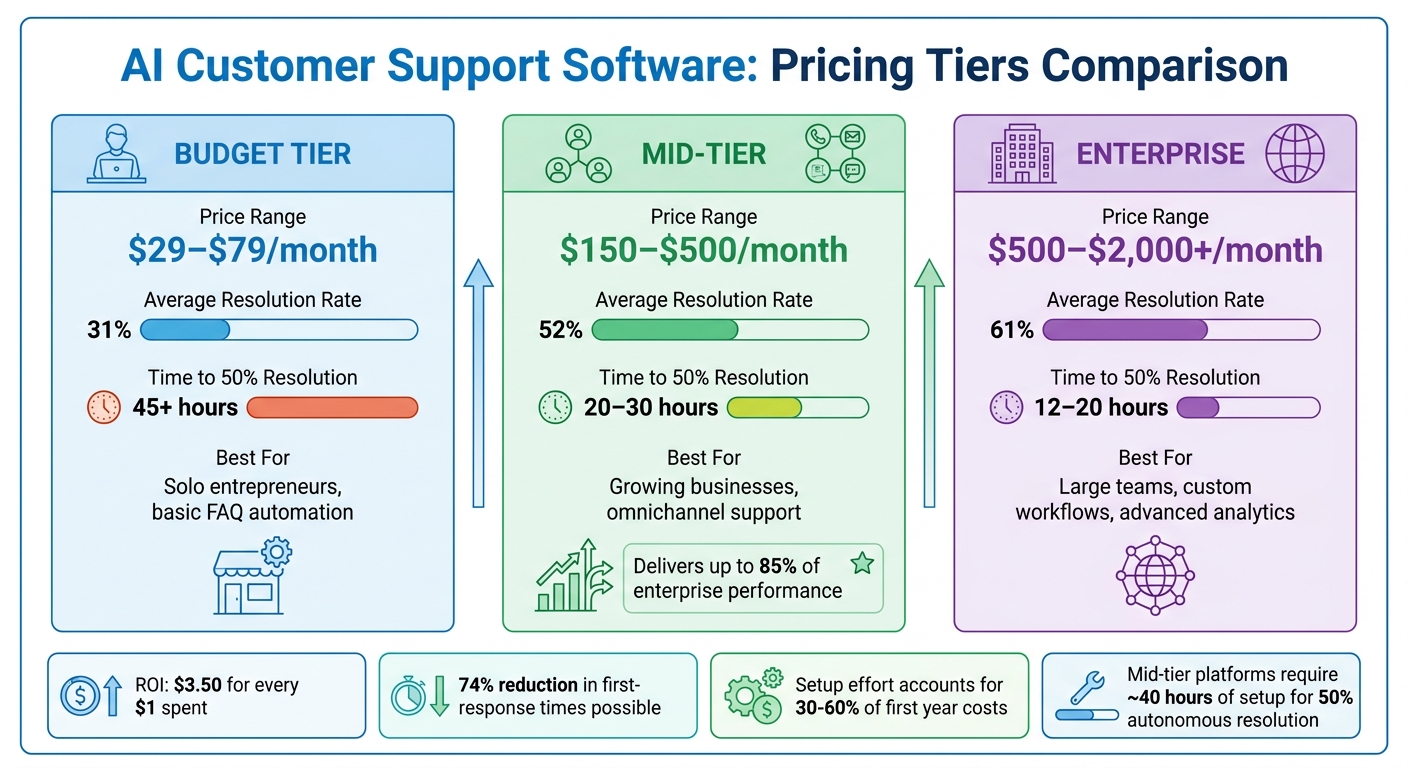
AI Customer Support Software Pricing Tiers Comparison Guide
Aligning Features with Your Business Requirements
When it comes to picking AI customer support software, the key is to focus on what your business truly needs. Forget about chasing the tool with the most features. Instead, zero in on one that can handle your specific workload consistently and effectively.
To gauge whether a platform is worth the investment, compare its cost against the potential savings in labor. For example, if your team resolves 40% of 1,000 monthly tickets (at $15 per ticket), that’s a savings of about $6,000. A platform priced at $500 per month makes financial sense in this scenario, while one costing $2,000 per month doesn’t.
"The best AI customer support tool isn't the one that does the most - it's the one that does your specific job reliably." – BotHero Team [3]
Start by automating high-volume, low-complexity tasks like order tracking, password resets, or basic FAQs. These are quick wins that can yield faster returns compared to tackling more nuanced issues right away [3]. Many mid-tier tools in the $150–$500/month range can deliver up to 85% of the performance you'd get from enterprise-level options [3]. For instance, ChatSpark’s Pro plan costs $129/month and includes 2,000 messages along with essential integrations - offering a solid balance of features without the hefty price tag.
| Tier | Price Range | Avg. Resolution Rate | Time to 50% Resolution | Best For |
|---|---|---|---|---|
| Budget | $29–$79/month | 31% | 45+ hours | Solo entrepreneurs, basic FAQ automation |
| Mid-Tier | $150–$500/month | 52% | 20–30 hours | Growing businesses, omnichannel support |
| Enterprise | $500–$2,000+/month | 61% | 12–20 hours | Large teams, custom workflows, advanced analytics |
Once you’ve identified a tool that fits your needs, make sure to validate its performance through thorough testing.
Testing and Tracking Results
Even after finding a tool that checks all the right boxes, its effectiveness needs to be put to the test. Use a carefully prepared dataset of 100–200 anonymized customer inquiries with pre-approved answers to evaluate its ability to understand industry-specific terms and detect customer intent [3][1].
Platforms that include features like confidence scoring and smooth human handoff processes have been shown to reduce customer complaints by 74% [3]. Keep in mind, though, that even the best AI systems resolve only about 68% of tickets without human help, leaving the remaining 32% for more complex or sensitive cases [3].
To ensure your AI tool delivers consistent results, monitor key metrics such as Zero-Touch Resolution (ZTR), which measures how often the AI resolves issues entirely on its own [25]. Another critical metric is resolution durability - check to see if customers need to follow up on the same issue within 7 and 30 days. An intent recognition rate of 85% is standard, while anything above 95% signals exceptional performance [25].
Allow for a 60–90 day window to monitor and retrain the AI for optimal performance [3]. During this time, identify any gaps in the knowledge base, as missing documentation can lead to errors [1]. For mid-tier platforms, achieving 50% autonomous resolution typically requires about 40 hours of setup and training. This setup effort often accounts for 30–60% of the first year’s costs [3]. Also, keep in mind that incorrect responses can occur 3–12% of the time, depending on the quality of the underlying data [3]. Regular monitoring and updates are essential as your AI system scales.
Conclusion
Choosing the best AI customer support software comes down to understanding your business needs. A critical feature to prioritize is the ability to base responses on your own documentation. Platforms that use Retrieval-Augmented Generation (RAG) ensure answers are grounded in your content rather than generic AI training. This reduces the risk of incorrect responses and strengthens user trust by providing source citations [1]. Such capabilities also pave the way for seamless integration with existing systems.
Make sure the platform integrates smoothly with tools like your CRM and help desk, while also offering clear pathways for escalating complex queries. Analytics are another essential feature - look for tools that highlight gaps in your documentation. Additionally, ensure the platform meets strict security standards, such as SOC 2 Type II and GDPR compliance, which is crucial given that 73% of consumers are willing to switch brands after repeated poor support experiences [2].
The numbers back it up: companies see an ROI of $3.50 for every $1 spent, and AI implementations can cut first-response times by as much as 74% within the first year [2]. With the AI customer support market expected to grow from $12.06 billion in 2024 to $47.82 billion by 2030 [2], it’s essential to select a solution that fits your operational goals and future growth plans.
FAQs
How can I tell if the AI’s answers are accurate?
To ensure the AI performs as expected, it's crucial to test it thoroughly before rolling it out. Pay close attention to how well it resolves issues, the accuracy of the information it provides, and its ability to avoid generating false or misleading content. Features like source citations and confidence scores can help you verify the reliability of its responses. Additionally, conduct regular evaluations using established benchmarks to keep the AI delivering consistent and precise answers. This not only improves performance but also helps build and maintain trust with your users.
What data should I connect first for the fastest ROI?
To get started, link your existing knowledge base or company documentation. This step ensures that AI-generated responses are rooted in reliable, verified information. The result? More accurate answers and a quicker return on investment.
How do I roll out AI safely without hurting customer trust?
To use AI in customer support effectively and responsibly, focus on transparency, accuracy, and an excellent customer experience. Make sure customers have the option to connect with a human agent easily to avoid any unnecessary frustration. Test AI systems thoroughly to ensure they provide reliable and accurate responses, using grounded systems when possible. Regular monitoring and ongoing training are key to minimizing errors and maintaining quality. A clear, well-organized rollout that prioritizes customer control can help build trust and improve satisfaction.