AI customer support software is transforming how businesses handle customer inquiries, offering faster responses, lower costs, and improved efficiency. Companies can save up to 90% per ticket by using AI, with costs dropping from $8–$15 for human agents to just $0.69–$0.99 for AI. With ticket volumes rising 30–50% annually and 77% of agents reporting burnout, AI offers scalable solutions to manage growing demands.
Key Takeaways:
- Cost Savings: AI resolves tickets at a fraction of the cost of human agents, delivering up to an 8x ROI.
- Efficiency: Autonomous AI agents can handle 70–92% of interactions independently, reducing workload and response times.
- Scalability: AI supports 24/7 operations, multilingual capabilities, and global expansion without adding staff.
- Features to Look For: Omnichannel support, integration with CRMs, confidence scoring, and Retrieval-Augmented Generation (RAG) for accurate responses.
- Pricing Models: Options include per-seat, per-resolution, flat-rate, and usage-based models - each with pros and cons.
By aligning AI capabilities with business goals, companies can cut costs, improve customer satisfaction, and scale operations efficiently. This guide breaks down how to choose the right solution, manage costs, and measure success.
Identifying Your Customer Support Requirements
Before diving into AI solutions, it’s essential to pinpoint your biggest support challenges. Consider this: ticket volumes often rise by 30–50% annually, while resolving a single ticket with a human agent costs anywhere from $8.00 to $15.00. On top of that, 77% of support agents report burnout due to heavier workloads [1]. The question isn’t whether AI can help - it’s about determining which pain points to tackle first. By clarifying your needs, you can better align AI capabilities with your business goals.
Common Customer Support Challenges
One of the biggest hurdles for rapidly growing companies is keeping up with increasing ticket volumes. Hiring more agents to match demand simply doesn’t scale when inquiries double each year. Manual processes lead to inconsistent service - response times fluctuate depending on the shift, agent expertise varies, and maintaining 24/7 support becomes costly and difficult. Expanding globally adds even more complications, as providing support in multiple languages requires either expensive multilingual staff or risking poor service quality in certain regions.
Cost inefficiency makes these challenges even harder to manage. Between salaries, benefits, training, and overhead, human agents cost $8.00–$15.00 per ticket. Compare that to AI, which can handle tickets for just $0.69 to $0.99 per resolution [2]. For teams managing 10,000 tickets a month, this difference could mean saving $80,000–$140,000. NIB Health Insurance, for example, cut customer service costs by 60% and reduced human agent calls by 15%, saving $22 million overall [4].
Matching AI Capabilities to Your Business Goals
Different AI tools are designed to meet different objectives. For instance, AI-augmented helpdesks aim to boost human agent efficiency by 20–40% through features like intelligent routing and response suggestions [3]. This is a great option if your goal is to enhance productivity without reducing your team size. On the other hand, autonomous AI agents are built to handle 70–92% of interactions independently [3], making them a strong choice for businesses focused on cutting labor costs.
Take RTR Vehicles as an example. In early 2026, they implemented an AI Genesis Digital Hire to manage e-commerce support. The results were impressive: a 92% auto-resolution rate, response times dropping from 4.2 hours to just 8.3 seconds, and monthly labor savings exceeding $15,000. They went from four full-time agents to one part-time agent, who only handled complex escalations [3]. This success was possible because the AI was tailored to their specific needs - managing repetitive tasks like order tracking and fitment questions.
For companies prioritizing technical accuracy in B2B support, it’s crucial to choose platforms using Retrieval-Augmented Generation (RAG). This ensures responses are based on real documentation, avoiding inaccuracies or "hallucinations." If your focus is on 24/7 availability and faster response times, fully automated platforms can deliver instant answers regardless of time zone. In fact, 92% of companies that adopt AI report improved response times [2]. Once you’ve clarified your goals, you can start identifying the key features needed to achieve them.
Core Features Your Business Needs
With your challenges clearly defined, the next step is to focus on features that directly address them. Start by analyzing the past 90 days of tickets - chances are the top 20 repetitive inquiries make up 60–80% of your ticket volume [4]. These Tier 1 issues are ideal for automation.
Your AI should be capable of handling all communication channels - email, chat, social media, and voice - while maintaining a unified conversation history. This prevents customers from having to repeat themselves when switching between channels. For transactional tasks, ensure the AI integrates with your CRM (e.g., Salesforce, HubSpot, Shopify) to perform actions like processing refunds or checking order statuses, rather than just providing answers [5][3].
Confidence scoring is another must-have. This feature ensures the AI escalates to a human agent when it’s uncertain about a response [5]. This avoids frustrating customers with incorrect answers. Additionally, since 89% of customers expect the option to speak with a person [4], clear escalation paths are critical. By incorporating these features, businesses can achieve ticket deflection rates of 60–75% while maintaining trust and customer satisfaction [2].
Core Features to Evaluate in AI Customer Support Software
Once you've identified your specific needs, it's time to assess the technical features that separate basic chatbots from more advanced AI systems. One of the most critical distinctions lies in the difference between multichannel and omnichannel support. Multichannel support simply means being available across platforms like email, chat, and social media, but these operate independently. In contrast, omnichannel support links interactions across channels, creating a seamless experience. For example, if a customer starts a conversation on Facebook and later moves to email, the AI retains the context, so they don't have to repeat themselves [6]. Below are some key features that define effective AI customer support.
Omnichannel Support
For omnichannel support to work effectively, state synchronization is crucial. This ensures that when an issue is resolved on one channel, that resolution is reflected across all others in real time. Without synchronization, teams risk duplicating efforts or creating inconsistent records, which can frustrate customers [6].
Another must-have is context-aware human handoff. When an issue is escalated to a human agent, the AI should pass along the full conversation history, along with intent flags, sentiment analysis, and actionable suggestions. This eliminates the need for customers to re-explain their problem, which is a common pain point. It's worth noting that live chat with AI boasts an 87% customer satisfaction rate, compared to 61% for email and 44% for phone support - but only when the handoff process is smooth [2, 3, 12, 13].
AI-Powered Knowledge Retrieval
A cornerstone of effective AI support is Retrieval-Augmented Generation (RAG). This technology allows AI to base its responses on your company’s existing documentation, help center articles, and past support tickets [12, 1]. RAG minimizes the risk of the AI generating inaccurate or "hallucinated" answers. Unlike basic keyword searches, modern AI uses semantic retrieval to understand the intent behind customer queries, ensuring it provides relevant answers even when phrased differently [12, 14].
Another critical feature is confidence scoring. The AI assigns a confidence level to each response it generates. If the confidence score falls below a certain threshold, the system automatically escalates the query to a human agent. This combination of RAG and confidence scoring ensures the AI delivers accurate and reliable assistance [5].
Customization and Branding Options
Generic responses can weaken your brand identity, which is why customization is so important. Advanced platforms let you define your brand voice and messaging guidelines, instead of relying on the AI to infer it from past interactions. As Postscript explains:
"A machine making assumptions about your brand voice isn't the same as you defining it yourself" [8].
Personalized interactions matter - 82% of consumers say tailored experiences influence their brand choices in at least half of their shopping situations [7]. A great example is cycling apparel brand Isadore, which used AI to personalize email and on-site experiences in late 2022. By aligning interactions with individual customer behaviors, they saw a 50% increase in email revenue compared to the previous year and a 140% boost in conversion rates within 90 days for visitors shown AI-recommended products [9]. Achieving this level of personalization requires AI capable of adjusting tone, timing, and emotional responses while staying consistent with your brand’s identity [16, 17].
Understanding Pricing Models and Total Costs
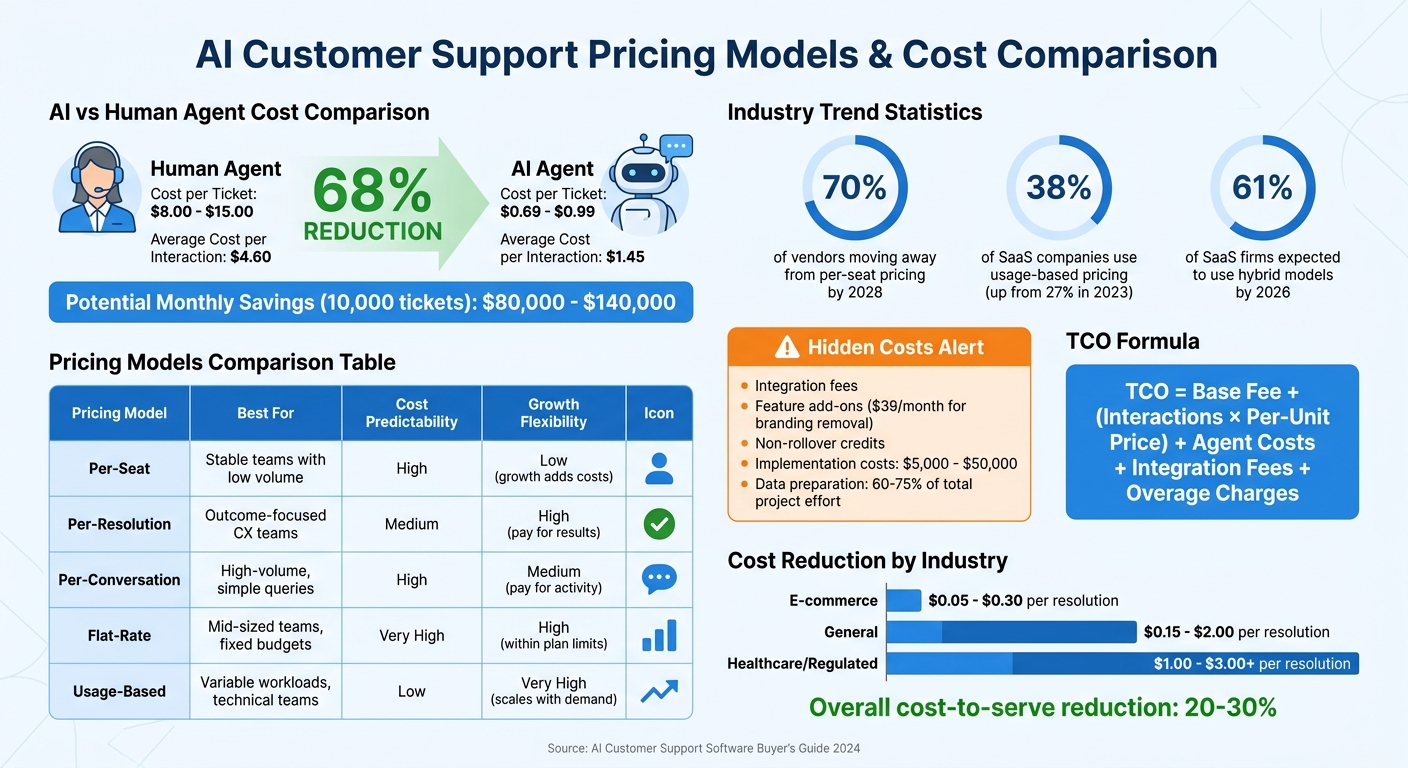
AI vs Human Customer Support: Cost Comparison and Pricing Models
AI support pricing models are shifting fast - 70% of vendors are expected to move away from per-seat pricing by 2028 [10]. As Alfons Marques, Founder of Technova Partners, aptly puts it:
"When an AI agent replaces the work of three human seats, charging per-seat makes no sense for the buyer."
Grasping the nuances of these pricing structures can help you avoid unexpected expenses and select a model that grows alongside your business.
Common Pricing Structures
AI customer support platforms typically employ one of five pricing models, each offering a different balance between cost predictability and scalability:
| Pricing Model | Best For | Cost Predictability | Growth Flexibility |
|---|---|---|---|
| Per-Seat | Stable teams with low volume | High | Low (growth adds costs) |
| Per-Resolution | Outcome-focused CX teams | Medium | High (pay for results) |
| Per-Conversation | High-volume, simple queries | High | Medium (pay for activity) |
| Flat-Rate | Mid-sized teams, fixed budgets | Very High | High (within plan limits) |
| Usage-Based | Variable workloads, technical teams | Low | Very High (scales with demand) |
- Per-seat pricing charges a fixed monthly fee per human agent. While predictable, it penalizes growth since costs rise even if AI handles most tasks.
- Per-resolution pricing ties costs to outcomes, charging only for successfully resolved issues. This approach aligns vendor goals with yours, but clarity on what qualifies as a "resolution" is critical to avoid disputes [10][13].
- Flat-rate pricing is ideal for teams needing predictability. For instance, ChatSpark’s Pro plan is $129/month for up to 2,000 messages, regardless of team size.
- Usage-based pricing charges based on metrics like API calls or tokens, making it flexible but less predictable - costs can spike during high-demand periods [10][11].
The industry is increasingly adopting hybrid models, which combine a base fee with usage-based charges. 38% of SaaS companies now use usage-based pricing, up from 27% in 2023, and hybrid models are expected to reach 61% of SaaS firms by 2026 [10]. This trend reflects how AI reduces dependence on human agents while managing workload fluctuations more efficiently.
Hidden Costs to Watch For
The sticker price rarely tells the whole story. Jonathan Bar, Founder of Corebee, highlights this:
"The gap between the pricing page and your invoice typically looks like this: Advertised price: $50/agent/month; Actual cost after add-ons: $80-150/agent/month."
To calculate your Total Cost of Ownership (TCO), use this formula:
TCO = Base Fee + (Interactions × Per-Unit Price) + Agent Costs + Integration Fees + Overage Charges [10].
Here are key hidden costs to consider:
- Integration fees: Connecting the AI platform to CRMs, help desks, or payment systems may incur extra charges.
- Feature add-ons: Tools like advanced reporting or support for additional channels (e.g., SMS or phone) often come with extra fees. Some platforms even charge up to $39/month just to remove their branding [11][14].
- Non-rollover credits: Many plans don’t roll unused credits into the next billing cycle, so you’re paying for capacity even if it’s unused [11][14].
- Escalation costs: If the AI fails to resolve an issue, you might pay twice - once for the AI interaction and again for a human agent to step in [10].
Implementation costs can be especially steep. Setup fees for mid-market teams range from $5,000 to $50,000, covering data migration, workflow design, and custom integrations [15][16]. Additionally, data preparation and knowledge structuring account for 60–75% of total project effort in AI deployments [17].
Planning Your Budget for Growth
Factoring in hidden costs is critical when planning for growth. Smart budgeting involves projecting expenses at different scales. For example, calculate costs at your current volume, then model scenarios for 2× or 3× growth to spot where tiered overage charges could become prohibitive [15][13].
AI support offers compelling cost advantages. While human support typically costs $8.00 to $15.00 per resolution, AI automation costs range from $0.15 to $2.00 [12]. When implemented effectively, AI can reduce overall cost-to-serve by 20–30% [16]. Costs vary by sector - e-commerce resolutions may cost $0.05–$0.30, while regulated industries like healthcare can range from $1.00 to $3.00+ per resolution due to compliance needs [12].
When negotiating contracts, include clauses that limit annual price increases to 3–5% to avoid budget creep [10]. Also, watch for pricing "cliffs" where crossing a volume threshold triggers a significant jump in costs [11]. Understanding these dynamics ensures you choose a pricing model that supports your growth rather than hindering it.
Armed with these insights, you're better prepared to evaluate pricing models and anticipate costs as you scale. Following a complete guide to AI customer support implementation ensures these technical steps are handled correctly. Up next, we’ll dive into strategies for seamless implementation and integration.
Implementation and Integration Steps
Rolling out AI successfully requires careful planning, smooth integration, and thorough team training. When done right, businesses can see a 30–40% drop in support costs within the first year [18].
Preparing Your Systems for Deployment
Before launching AI for customer support, mapping out a clear plan is essential. A well-structured roadmap tailored to your business needs ensures the deployment stays on track. Most AI rollouts follow a six-week timeline, balancing efficiency with thorough preparation:
| Implementation Phase | Timeline | Key Activities |
|---|---|---|
| Discovery & Foundation | Week 1 | Conduct technical audits, set up a sandbox, document workflows and data insights [18] |
| Kick-off & Content | Week 2 | Define success metrics, convert SOPs to AI instructions (AOPs) [18] |
| Build & Test | Weeks 3–4 | Configure routing rules, run internal workflow tests [18] |
| Convergence & Training | Week 5 | Finalize escalation protocols, train the team on monitoring tools [18] |
| Go-Live | Week 6 | Begin controlled rollout (10–20% of traffic), make adjustments |
Start by creating a sandbox environment to test workflows without impacting live customers [18]. Whitelisting internal email addresses allows you to simulate real support scenarios and identify potential gaps or edge cases.
One crucial step is converting Standard Operating Procedures (SOPs) into Agent Operating Procedures (AOPs). These are detailed, natural-language instructions the AI can follow. For example, instead of a vague SOP like "Check the customer's account status", an AOP would specify: "Query the CRM for account status, check for overdue invoices, and escalate to a billing specialist if the balance exceeds a set threshold." This level of clarity ensures the AI knows exactly how to handle specific tasks [18].
Connecting with Existing Tools
How well your AI integrates with existing systems determines whether it becomes a seamless part of your workflow or just another disconnected tool. Focus on the "Golden Four" integrations: ticketing systems (e.g., Zendesk, Freshdesk), CRM platforms (e.g., Salesforce, HubSpot), knowledge bases, and identity/permission systems [19].
Modern platforms like ChatSpark simplify this process with no-code connectors through tools like Zapier. This eliminates the need for lengthy custom coding projects, which used to take 6–12 months [19]. For instance, ChatSpark's Pro plan integrates directly with tools like Freshchat, Square, and Calendly, enabling the AI to check appointment availability or process payments seamlessly.
To ensure smooth operations, establish a clear intent taxonomy that categorizes customer requests [21]. Organize categories such as billing inquiries, technical support, and account management, and configure routing rules to direct each type to the appropriate system or team. When escalations occur, the AI should pass along a complete "context package" to human agents. This package includes the full chat history, actions already attempted, and customer sentiment indicators [18][21]. As Shantanu Kumar, Chief Solutions Architect at Dude Lemon, explains:
"Support automation creates durable value only when customers get faster answers and agents get cleaner escalations they can trust." [21]
Once integrations are in place, the next step is equipping your team to work effectively with the new system.
Training Your Team to Work with AI
The success of your support team hinges on their ability to collaborate with AI rather than compete against it. Begin with a "shadow mode" pilot where the AI drafts responses, but human agents review them for 10–14 days before enabling autonomous replies [20]. This builds trust in the system and allows for accuracy checks. Hands-on training using real support tickets and complex case studies is essential [22]. Show agents how the AI handles routine inquiries, where it escalates, and how to access the context package during handoffs. Additionally, train them on monitoring tools to identify areas where the AI might need fine-tuning.
Introduce Agent Assist features that provide real-time suggestions, summarize lengthy conversations, and bring up relevant knowledge base articles [18][23]. These tools empower agents to focus on complex, nuanced situations that the AI can't resolve. Some organizations even offer certifications in AI Fundamentals, turning support staff into "AI strategists" who can optimize and guide the system's performance [23].
Measuring Performance and Improving Results
Once your AI system is up and running, keeping an eye on the right metrics can make all the difference. These metrics help ensure your automation is efficient, meets customer expectations, and delivers real value.
Tracking Performance Metrics
Key performance metrics fall into three categories: efficiency, customer experience, and business impact. For efficiency, focus on Resolution Rate and First Response Time (FRT). The Resolution Rate measures how many inquiries the AI resolves without human help, while FRT tracks how fast the AI responds - usually in fractions of a second [36,37].
When it comes to customer experience, Customer Satisfaction Score (CSAT) and Customer Effort Score (CES) are essential. CSAT gathers immediate feedback on a 1–5 scale, with strong results typically ranging from 4.0 to 4.5 (or 80–90% positive) [26]. CES, on the other hand, measures how easy it is for customers to get their issues resolved. A high-effort experience can lead to 96% of customers becoming less loyal, as highlighted by Harvard Business Review:
"A low-effort experience is a stronger predictor of customer loyalty than a high satisfaction score" [24].
Other critical metrics include Escalation Rate (how often the AI passes an issue to a human) and AI Accuracy Rate (how often the AI provides accurate and contextually appropriate responses). For mature systems, the goal is an automation rate of 60–80% with accuracy exceeding 90% during quality reviews [26]. AI customer support can also significantly cut costs, reducing the average cost per interaction from $4.60 to $1.45 - a 68% savings [4]. However, scaling automation must not come at the expense of customer satisfaction.
These metrics set the stage for refining your AI system through structured feedback.
Using Feedback to Improve AI Performance
To fine-tune your AI, collect feedback through post-interaction surveys using tools like CSAT, NPS, and CES [39,40,41]. Encourage agents to flag issues such as incorrect answers, missing information, or unnecessary escalations to identify areas for improvement [42,43]. Allocate 2–3 hours each week to review a random sample of 50–100 interactions, evaluating them for accuracy, completeness, and tone [27].
For example, Motel Rocks, an online fashion retailer, used sentiment analysis to better understand customer needs. This approach led to a 9.44% increase in CSAT scores and a 50% drop in ticket volume [25]. Confidence thresholds can also make a difference - for instance, setting the AI to escalate conversations automatically if its confidence level falls below 85% [43,44]. Additionally, using Retrieval-Augmented Generation (RAG) ensures the AI references verified documentation, keeping hallucination rates below 3% [28].
Keeping Your AI System Updated
Maintaining long-term performance requires regular updates and monitoring. Check automated resolution rates and error alerts daily, review QA and CSAT metrics weekly, and generate ROI reports monthly [41,42]. Quarterly audits of the top 20 inquiry types can help identify repetitive tasks suitable for AI and more complex ones that need human involvement [11,42]. By 2025, it’s expected that 65% of support queries will be resolved without human intervention, up from 52% in 2023 [4].
ChatSpark’s Pro plan offers analytics and reporting tools that track performance across 2,000 messages per month, helping businesses identify areas for improvement. Mature AI teams report an average ROI of 41% in the first year, climbing to 124% by year three [4]. To keep your system sharp, update your knowledge base based on escalations and failed interactions, and reassess your metrics framework quarterly to ensure it aligns with your business goals [27].
Conclusion
Selecting the right AI customer support software boils down to aligning your business needs, carefully evaluating options, and executing a solid implementation plan. According to the 10/20/70 rule [29], only 30% of success hinges on technology, while 70% depends on factors like data preparation, process updates, and team involvement. Alarmingly, 40% of AI projects fail when requirements aren't clearly defined [31].
Start by assessing your support needs - look at query volume, complexity, and the channels you operate on. For high-volume, repetitive inquiries, autonomous AI agents with containment rates of 70–85% [1] are a great match. On the other hand, for complex, high-touch scenarios, AI-enhanced helpdesks that improve agent productivity by 20–40% may be a better choice. Be sure to test your selected solution with challenging, real-world scenarios to see how it handles uncertainty. This evaluation process lays the foundation for a phased, structured rollout.
When deploying AI, take it step by step. Begin with simpler, high-volume tasks like FAQs or order tracking to achieve quick wins and demonstrate measurable ROI [30]. Before deployment, clean and standardize your data, and update workflows and decision-making protocols - outdated processes and poor data can derail progress [29].
The financial benefits are clear, with AI delivering substantial ROI [1] and reducing costs compared to human support [2]. However, these benefits only come to life if you keep a close eye on performance and adjust based on real-world feedback.
The AI customer support market is on a rapid growth trajectory, expected to rise from $12.06 billion in 2024 to $47.82 billion by 2030 [1]. With 73% of consumers ready to switch brands after repeated bad experiences [1], the pressure to get this right is intense. This fast-changing landscape highlights the importance of strategic alignment and thoughtful execution. Choose a solution that automates routine tasks but also strengthens human connections. Done right, AI doesn't replace your team - it empowers them to deliver faster, smarter, and more personalized support on a larger scale.
FAQs
How do I know if I need AI agent assist or a fully autonomous AI agent?
The decision comes down to what you’re aiming to achieve with your support system and how your operations are structured. AI agent assist works alongside human agents, taking care of repetitive tasks and improving efficiency, while leaving the trickier, nuanced issues to the human team. On the other hand, fully autonomous AI agents manage most interactions on their own, making them a great fit for high-demand setups where minimizing human involvement is key. Think about the complexity of your support needs, how much automation you want, and your budget to make the right call.
How can I ensure AI answers are accurate and avoid hallucinations?
To keep AI responses accurate and reduce errors, it's essential to use high-quality, diverse training data and establish strict quality control processes. Key strategies include refining prompt design, applying validation logic, and ensuring continuous monitoring of outputs. Adding source citations and using confidence scoring can also boost trustworthiness. Regular updates and careful system monitoring are crucial for maintaining accuracy and reducing mistakes over time.
Which AI support pricing model is cheapest for my ticket volume?
The most affordable pricing model largely depends on how many tickets you're handling and how the platform structures its costs. Per-resolution or per-ticket models tend to work best when you're dealing with a high volume of tickets. On the other hand, per-seat or per-conversation models can become pricier as your ticket count rises. While freemium plans might look like a bargain at first, they often result in higher expenses as your usage increases. For businesses managing large ticket volumes, per-resolution pricing usually provides the most cost-efficient option.