AI chatbots are transforming ecommerce by increasing sales and reducing customer support requests. Here's how:
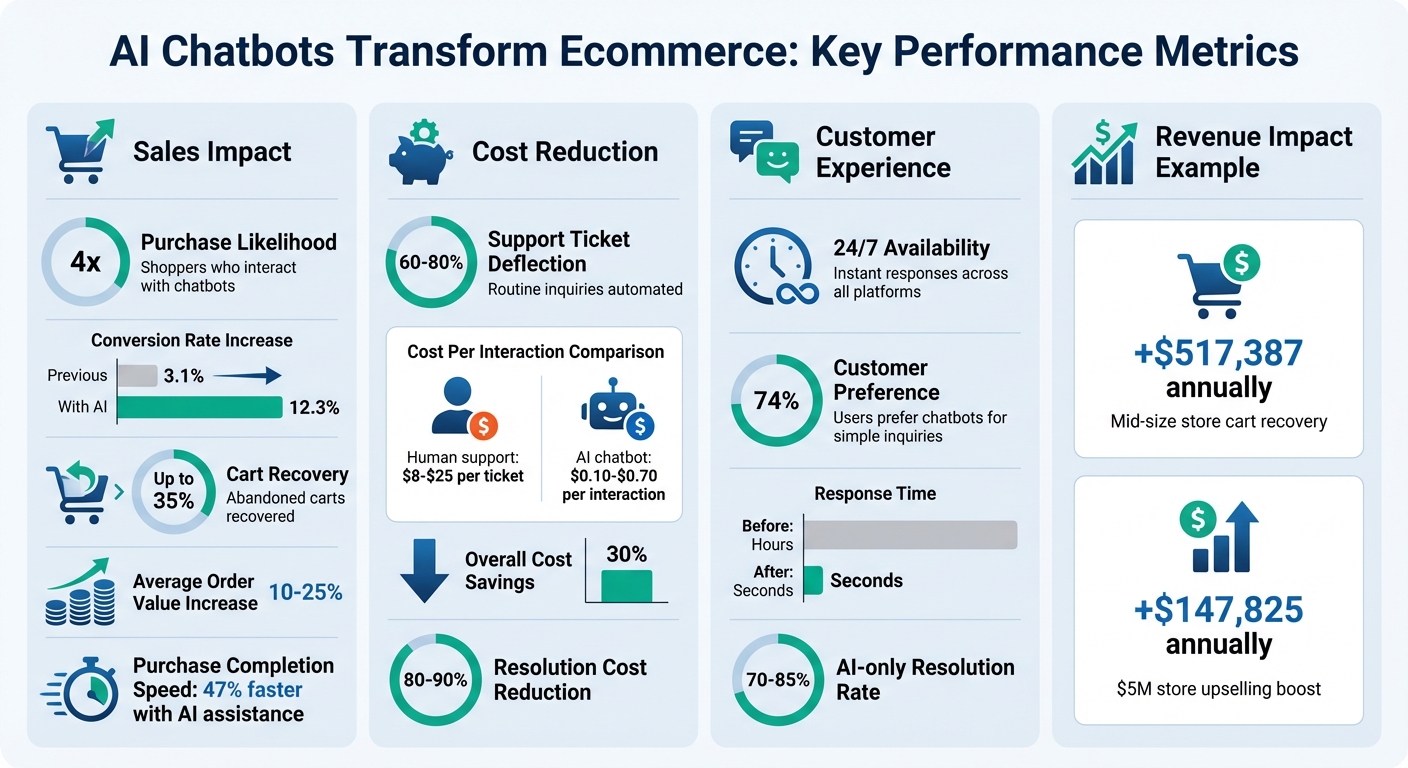
- Boost Sales: Shoppers who interact with AI chatbots are 4x more likely to purchase, with conversion rates jumping from 3.1% to 12.3%. Chatbots also recover up to 35% of abandoned carts by addressing concerns in real time.
- Cut Costs: AI chatbots handle 60–80% of routine inquiries, reducing support costs from $8–$25 per human ticket to just $0.10–$0.70 per interaction.
- 24/7 Support: Chatbots provide instant responses across platforms like websites, Instagram, and WhatsApp, meeting customer expectations for quick answers anytime, anywhere.
- Personalized Recommendations: By analyzing customer behavior, chatbots suggest products tailored to individual needs, increasing average order values by 10–25%.
- Streamlined Operations: Automate FAQs like "Where is my order?" or "What’s the return policy?" to free up human agents for complex issues.
For ecommerce businesses, tools like ChatSpark offer affordable plans starting at $19/month, enabling businesses of all sizes to improve customer experience, recover lost sales, and reduce operational costs.
AI Chatbot Impact on Ecommerce Sales and Support Costs
How AI Chatbots Increase Sales
Conversational AI chatbots play an active role in turning casual browsing into actual purchases. By analyzing customer behavior in real time, they can identify buying signals and respond at just the right moment. Let’s dive into three practical ways AI chatbots boost sales.
Personalized Product Recommendations
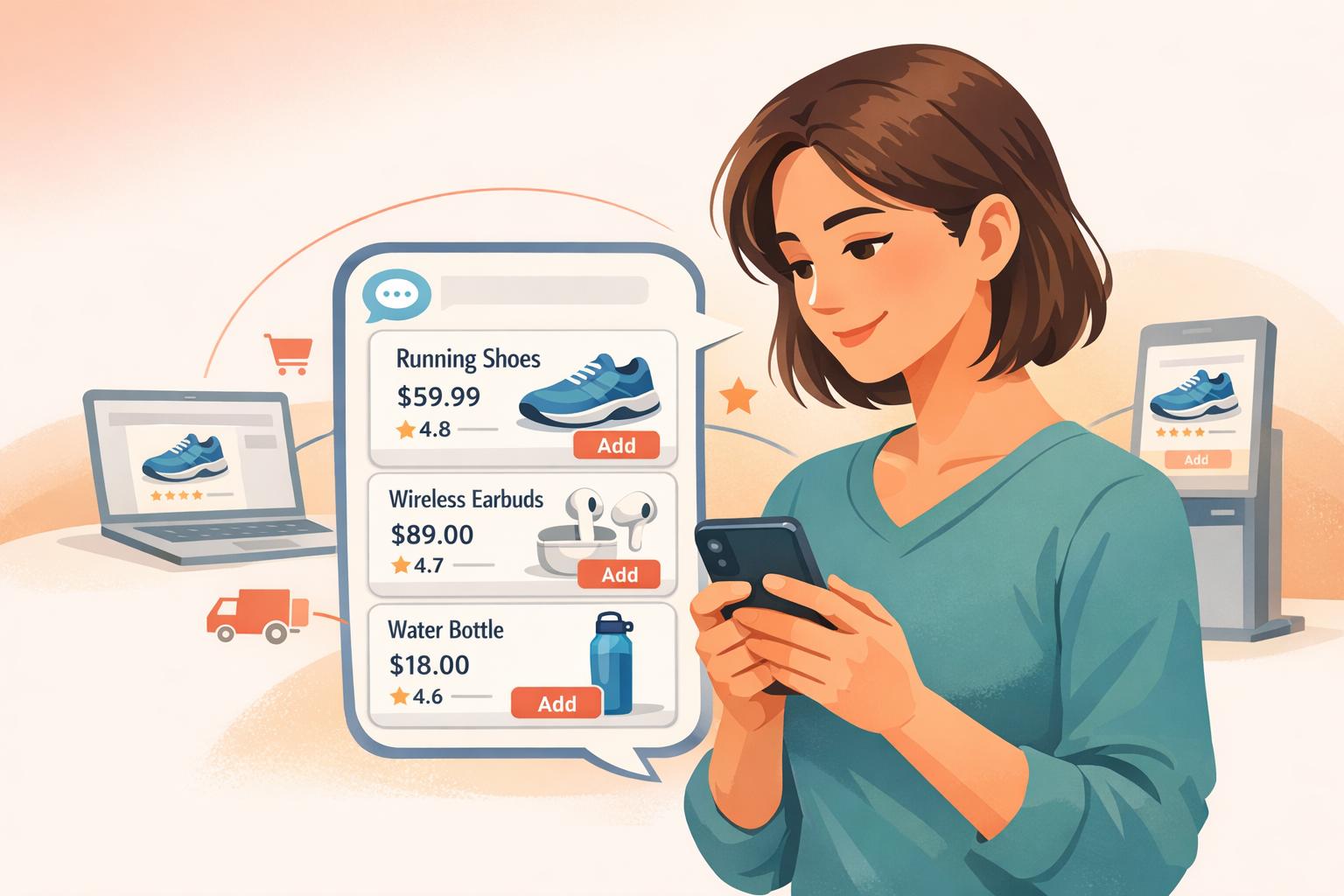
ChatSpark uses behavioral cues like page views, time spent on specific items, and cart activity to suggest products that align with a shopper’s needs. For instance, if someone is exploring laptops for video editing, ChatSpark can recommend models with the appropriate GPU and RAM for their budget.
Here’s a real-world example: Decathlon, a sports retailer, used an AI chatbot to manage its extensive inventory of over 10,000 SKUs. The bot achieved a resolution rate of more than 96% while driving measurable revenue through automated product suggestions [5]. Similarly, NIVEA launched a WhatsApp chatbot that analyzed user selfies and skin-tone data to recommend personalized "cocoa shade" products. The campaign not only exceeded its reach goal by 207% but also collected valuable customer preference data [5].
These personalized recommendations don’t just improve the shopping experience - they also drive results. AI-driven suggestions have been shown to increase average order values by 10% to 25% [1][6]. Beyond helping customers find the right products, ChatSpark also tackles a major e-commerce challenge: cart abandonment.
Recovering Abandoned Carts
Did you know that about 70% of online shopping carts are abandoned? Shoppers often leave due to unexpected costs or unanswered questions [7]. ChatSpark steps in at critical moments with tools like exit-intent triggers (activated when a user’s cursor moves toward the close button) and hesitation detection (signaled by actions like prolonged pauses on pricing pages or rapid scrolling).
Instead of relying on delayed follow-up emails, ChatSpark engages shoppers immediately. It might ask, “Do you have any questions about shipping or sizing?” to address concerns in real time. This proactive approach can recover up to 35% of abandoned carts, far outperforming the 5–10% recovery rate typical of email-only strategies [2]. For a mid-size store, this could mean an additional $517,387 in annual revenue [1].
ChatSpark doesn’t rely solely on discounts to win back shoppers. It first resolves the hesitation - whether it’s clarifying shipping details or simplifying checkout forms - before offering targeted incentives like free shipping or a small discount. By reducing friction at these pivotal moments, ChatSpark ensures more shoppers complete their purchases.
Upselling and Cross-Selling During Conversations
AI chatbots like ChatSpark also excel at suggesting complementary products to enhance a shopper’s purchase. For example, if someone is buying a tent, the bot might recommend a sleeping bag suited for the same temperature range, explaining why it’s a great fit. These suggestions feel helpful rather than pushy.
ChatSpark knows when to make these recommendations, such as when users spend significant time on a product page or browse multiple items in the same category [2][6]. Shoppers assisted by AI bots complete purchases 47% faster and are 40% more likely to click through, with a 25% higher chance of finalizing the sale [8][2].
For a store generating $5 million annually, applying upselling strategies to 30% of orders with a 10% boost in average order value could add $147,825 in revenue each year [1]. By connecting directly to your product catalog, ChatSpark ensures its recommendations are accurate and up-to-date, creating a seamless shopping experience that naturally encourages higher spending.
While increasing sales is key, managing customer support efficiently during periods of growth is equally important - a topic we’ll explore next.
Reducing Customer Support Requests with AI Chatbots
Growing sales is exciting, but the flood of customer inquiries that often follows can overwhelm support teams. That’s where ChatSpark steps in, automating responses to common questions and resolving issues instantly. This not only reduces the workload on your team but also ensures they can focus on handling more complex, nuanced customer concerns.
Automating Responses to FAQs
Did you know that 20–35% of inbound ecommerce support messages are about order status and tracking alone? [9] ChatSpark tackles these repetitive inquiries by directly connecting to your Order Management System (OMS) and Product Information Management (PIM). This allows it to perform live lookups and provide accurate, personalized answers in real time.
For example, when a customer asks, "Where’s my package?", ChatSpark pulls the actual tracking details from your system. It’s just as effective for questions about return policies, shipping fees, delivery times, or promotional offers [9]. With 74% of users preferring chatbots for inquiries [10], ChatSpark can deflect between 60% and 80% of support tickets [9], freeing up your human agents to focus on more challenging issues like billing disputes or damaged product claims.
To get the most out of this automation, review the past 30 days of support tickets and pinpoint the top 5–7 types of inquiries [9]. Training the AI on these key issues ensures it addresses what customers care about most.
24/7 Availability Across Multiple Channels
Today’s customers expect instant support, anytime, anywhere. ChatSpark delivers just that, offering consistent responses across platforms like your website, Instagram, Facebook, WhatsApp, Telegram, and Slack. This ensures no question goes unanswered, no matter the time or channel.
This constant accessibility doesn’t just improve response times - it also boosts sales. AI chatbots can increase conversion rates by 10–30% by answering purchase-related questions instantly [12]. For instance, if a shopper in Tokyo asks about sizing at 2:00 AM EST, ChatSpark provides immediate answers, eliminating the need to wait for your U.S.-based team to clock in.
The cost savings are another huge advantage. While a human support interaction costs between $8 and $15, an AI bot interaction costs just $0.10 to $0.50 [1]. For ecommerce businesses, this translates to approximately 30% lower operational costs for customer service [10], all while maintaining high-quality support. This around-the-clock availability not only drives conversions but also builds customer trust and satisfaction.
Improving Customer Satisfaction with Instant Solutions
Speed is everything in customer service. ChatSpark can resolve simple issues in seconds, cutting out long wait times and frustrating phone menus. Whether it’s answering questions about product availability, shipping options, or return policies, instant solutions make customers more likely to complete their purchase and return for future orders.
To keep ChatSpark performing at its best, regularly update your help center articles and product documentation. The bot’s success depends on the quality of the data it accesses [11]. Additionally, set clear escalation triggers - such as detecting frustration in a customer’s tone or handling complex billing questions - so the bot knows when to hand off to a human agent. When this happens, ChatSpark preserves the full conversation history, allowing your team to pick up seamlessly without asking the customer to repeat themselves [11].
Using ChatSpark Analytics to Improve Performance
Launching a chatbot is just the beginning. The real magic lies in understanding how it performs - what's working and what needs improvement. ChatSpark's analytics dashboard gives you the tools to fine-tune your bot, helping boost sales and cut down on support ticket volumes over time.
Analyzing Interaction Data
ChatSpark doesn't just assist with customer support and sales - it also delivers data that helps you make smarter decisions. For example, the AI Resolution Rate tracks the percentage of conversations your bot handles without needing human help. Ideally, this should sit between 70% and 85% - anything lower might mean your bot isn’t resolving issues or capturing leads as it should[13].
Another key metric is Knowledge Coverage, which measures how often your bot confidently answers customer questions. A score above 80% indicates strong training, while anything below 70% points to gaps that need immediate attention. As ChatSpark's documentation advises:
If Knowledge Coverage is below 70%, review your Top Unanswered Questions and add that information to your training data.[13]
The Top Unanswered Questions feature is a goldmine for improvement. It lists the questions your bot couldn’t answer, giving you a clear roadmap to expand your knowledge base[13][14]. On the flip side, the Top Rated Replies metric highlights responses that customers appreciated, so you can replicate those successful communication styles in other areas[13].
Refining Chatbot Strategies
Turning data into action is where the real improvement happens. A weekly training routine can make all the difference. By reviewing your Top Unanswered Questions and adding 2–3 new training items each week, you’ll steadily increase your bot’s ability to handle queries independently[13].
ChatSpark also provides Automated Monthly ROI Email Reports, which summarize key trends, cost savings (based on an average of $30 per hour for human support), and a checklist of unanswered questions[14][15]. These reports help you spot patterns and make adjustments with ease.
Another tool to watch is the Message Trends chart. It shows your busiest times, helping you ensure the bot is ready to handle peaks and that human support is on standby when needed[13]. To further refine your bot, review 10–20 conversation transcripts (e.g., about shipping, returns, or product inquiries) to catch tone issues or inaccuracies[16]. By consistently improving these metrics, ChatSpark not only enhances customer support but also contributes to revenue growth.
Conclusion
AI chatbots have become a game-changer for ecommerce, solving two major challenges: converting casual browsers into paying customers and managing high volumes of customer support inquiries. Tools like ChatSpark tackle these problems head-on by automating repetitive tasks, offering personalized shopping assistance, and providing 24/7 availability across multiple platforms.
The numbers speak for themselves. Chatbots can cut support ticket volumes by up to 60%, reduce resolution costs by as much as 80-90%[4], and slash response times from hours to mere seconds. They also drive results where it counts - boosting conversion rates from a typical 2-3% to as high as 8%[1]. Considering that 53% of shoppers abandon their carts if they don’t get quick answers[4], instant support isn’t just helpful - it’s critical for protecting your bottom line.
Key Takeaways
To make the most of chatbots in ecommerce, here are some practical steps to get started:
- Review recent support tickets: Analyze the last 30 days of inquiries to identify common, repetitive questions[3][4].
- Build a detailed knowledge base: Include product information, policies, and FAQs to ensure your chatbot can provide accurate answers[4][17].
- Use proactive engagement: Set up triggers like exit intent or time-on-page markers to reach out to shoppers at the right moments[3][6].
Focus your efforts on high-impact workflows first - start with order tracking, personalized product recommendations, and abandoned cart recovery. For example, AI-powered cart recovery alone can achieve recovery rates between 15-25%[4]. Once your chatbot is live, use ChatSpark’s analytics tools, such as AI Resolution Rate and Top Unanswered Questions, to fine-tune its performance and improve results over time.
Next Steps
ChatSpark makes it easy to integrate AI chatbots into your ecommerce strategy with flexible pricing plans. Starting at just $19 per month, solo entrepreneurs can access powerful tools to enhance their operations. For growing businesses, the Plus plan ($59/month) and Pro plan ($129/month) offer higher message limits, advanced integrations with platforms like Zapier and Freshchat, and unbranded widgets for a seamless customer experience.
Ready to level up your ecommerce game? Start automating support, recovering lost sales, and delivering instant answers with ChatSpark’s affordable and scalable plans. Plans start at just $19/month - explore your options today!
FAQs
How do I know which support questions to automate first?
To streamline your support operations, begin by pinpointing the most frequent and repetitive inquiries that consume a large chunk of your team’s time. These typically revolve around topics like:
- Order status: "Where’s my order?"
- Shipping details: "How long will delivery take?"
- Returns and refunds: "How do I return an item?"
- Product information: "What are the specs or features?"
By automating responses to these predictable and straightforward questions, you can significantly ease the workload on your support team. This not only boosts efficiency but also ensures a smoother experience for your customers.
What data should I connect so the chatbot can answer accurately?
To make chatbot interactions more accurate and tailored, integrate data such as product details, real-time inventory, customer inquiries, order statuses, and past conversation history. By tapping into these data points, the chatbot can deliver more relevant responses, helping to streamline assistance and enhance the overall customer experience.
Which chatbot metrics should I track to prove ROI?
Tracking important metrics such as ROI, cost savings, revenue generated from chatbot-driven purchases, cart recovery rates, reduced support ticket volume, and customer retention is essential. These figures provide a clear picture of how your chatbot contributes to increasing sales and streamlining operations.