When visitors land on your website, they expect quick answers - whether it’s 2:00 AM or during business hours. Chatbots meet this demand by offering automated, 24/7 support for tasks like answering FAQs, qualifying leads, and assisting with purchases. By 2025, over 85% of customer interactions are projected to be handled without human involvement, making chatbots a key tool for businesses.
Here’s why chatbots matter:
- Reduce customer service costs by 30%.
- Boost lead capture rates by up to 40%.
- Convert visitors 2–3× better than static forms.
Despite these benefits, only 9% of online stores currently use chatbots, presenting an opportunity for early adopters to stand out. This guide covers everything you need to know about integrating chatbots into your site, from setting goals and selecting platforms to designing conversations and tracking performance. Whether you run a small business or a large enterprise, chatbots can streamline operations and improve customer experience.
Key Takeaways:
- Define Goals: Identify areas to automate (e.g., FAQs, lead generation) and set measurable targets like reducing response time or increasing conversions.
- Choose the Right Platform: Look for features like multilingual support, analytics, and omnichannel functionality.
- Design Conversations: Focus on natural, concise, and helpful interactions with clear escalation paths for complex issues.
- Test and Improve: Regularly monitor chatbot performance, analyze conversations, and update its knowledge base based on user feedback.
Chatbots are no longer optional - they’re essential for staying competitive in today’s fast-paced digital landscape.
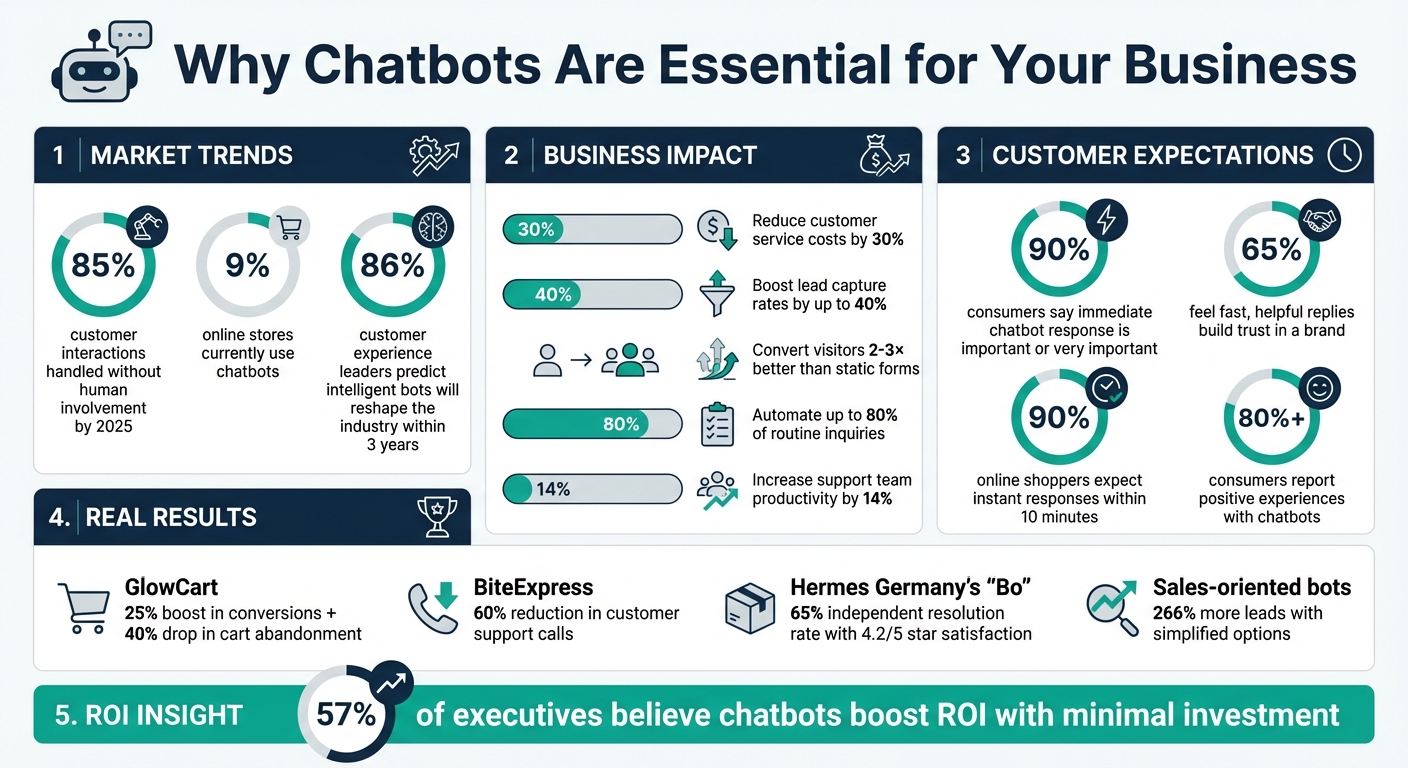
Chatbot ROI Statistics: Cost Savings, Conversion Rates, and Customer Engagement Metrics
Set Your Chatbot Goals and Use Cases
Before diving into chatbot implementation, it’s essential to define what you want it to achieve. Skipping this foundational step can leave you with a chatbot that handles surface-level tasks but doesn’t solve your core challenges.
Identify Your Business Objectives
Start by pinpointing areas where your business is losing time or money. Are your support agents bogged down with repetitive questions? Are potential customers abandoning their carts because they can’t get quick answers about product details? To get a clear picture, review support tickets, analyze drop-off points in your sales funnel, and gather input from your team about time-consuming tasks [6][8].
Turn these pain points into measurable goals. For example, aim to reduce average response times from 10 minutes to under 30 seconds, increase lead capture by 40% [7], or cut support costs by 30% [6]. Track key performance indicators (KPIs) such as Containment Rate, Goal Completion Rate, and CSAT (Customer Satisfaction Score) from post-chat surveys.
Here’s why this is so important: 90% of consumers say that getting an immediate response from a chatbot is either important or very important, and 65% feel that fast, helpful replies build trust in a brand [10]. On top of that, Accenture reports that 57% of executives believe chatbots can boost ROI with minimal investment [10].
Once you’ve outlined your objectives, you can focus on aligning your needs with the right chatbot functionalities.
Match Chatbot Features to Your Needs
Now that you’ve defined your goals, it’s time to match them with the right chatbot features. If your focus is automating customer support, prioritize capabilities like automated FAQ responses, troubleshooting guides, and 24/7 availability for handling repetitive inquiries [1][2]. For lead generation, look for features such as proactive engagement triggers (e.g., greeting visitors shortly after they land on a key page), qualifying questions to segment prospects, and seamless routing to your sales team [1][2].
Different industries benefit from tailored features. For example:
- eCommerce: Product recommendations and abandoned cart recovery tools.
- Healthcare: Appointment scheduling and symptom checkers.
- SaaS: User onboarding flows and feature guidance [1].
The type of chatbot you choose also depends on the complexity of your tasks. Rule-based bots vs AI chatbots are both effective; rule-based bots are ideal for structured tasks like booking appointments or answering FAQs, while AI-powered bots excel in handling open-ended conversations and improving through interaction [1][5].
Start small. Focusing on two or three high-impact functions is a smarter move than overloading your chatbot with too many features. For instance, sales-oriented bots with simplified options have been shown to generate 266% more leads compared to those with overly complex choices [8]. Keep it focused and effective.
Select a Chatbot Platform
Choosing the right chatbot platform can make a world of difference in how your business handles digital interactions. With over 85% of customer interactions now managed without human involvement [4], it’s critical to pick a platform that aligns with your technical needs, operational goals, and budget.
Key Selection Criteria
The first step is to assess how easily the platform integrates with your existing setup. Many CMS platforms support embedding JavaScript snippets, so most chatbot solutions are technically compatible [7][9]. The real challenge is ensuring you retain control after installation. Opt for platforms that offer advanced retrieval features, allowing your bot to pull answers directly from your business documents, PDFs, and help pages instead of relying on generic responses [7].
Language support is another key factor. Look for platforms that support 85+ languages and offer customizable visual builders so you can align the chatbot's design with your brand [7].
Analytics tools are essential. They help you identify where users drop off, which questions go unanswered, and how often the bot resolves issues versus escalating them to human agents [10]. Pricing for chatbot platforms can vary widely, ranging from $0–$100/month for basic options, $2,000–$10,000 for AI-powered solutions, and $10,000–$50,000+ for enterprise-grade deployments [1][7].
Omnichannel functionality is increasingly important. A single bot that works across your website, WhatsApp, Facebook Messenger, and Slack ensures consistent responses and saves you the hassle of managing separate systems for each channel [7][13].
Integration Methods by Website Type
The process of adding a chatbot depends on the type of website you’re using:
- WordPress: Use plugins or tools like "Insert Headers and Footers" to add chatbot code without risking changes during theme updates [7].
-
Shopify: Requires editing the
theme.liquidfile under Online Store > Themes. It’s a bit more involved but still manageable [7]. -
Custom HTML Sites: Simply insert the JavaScript snippet before the closing
</body>tag. - Wix/Squarespace: Use the built-in Code Injection or Header/Footer settings directly from the dashboard [7].
- Custom Tech Stack: May involve API, Webhooks, or CDN integration, which can be more complex.
Regardless of the platform, make sure your chatbot is optimized for mobile. A bot that slows down your mobile site or disrupts its design can hurt both user experience and SEO [4].
| Website Type | Integration Method | Complexity |
|---|---|---|
| WordPress | Plugins or "Insert Headers and Footers" | Low |
| Shopify | Edit theme.liquid file |
Medium |
| Wix/Squarespace | Built-in Code Injection settings | Low |
| Custom HTML | JavaScript snippet before </body> |
Medium |
| Custom Tech Stack | API/Webhooks/CDN integration | High |
These steps ensure a smooth setup process, regardless of your website’s infrastructure.
ChatSpark Platform Overview
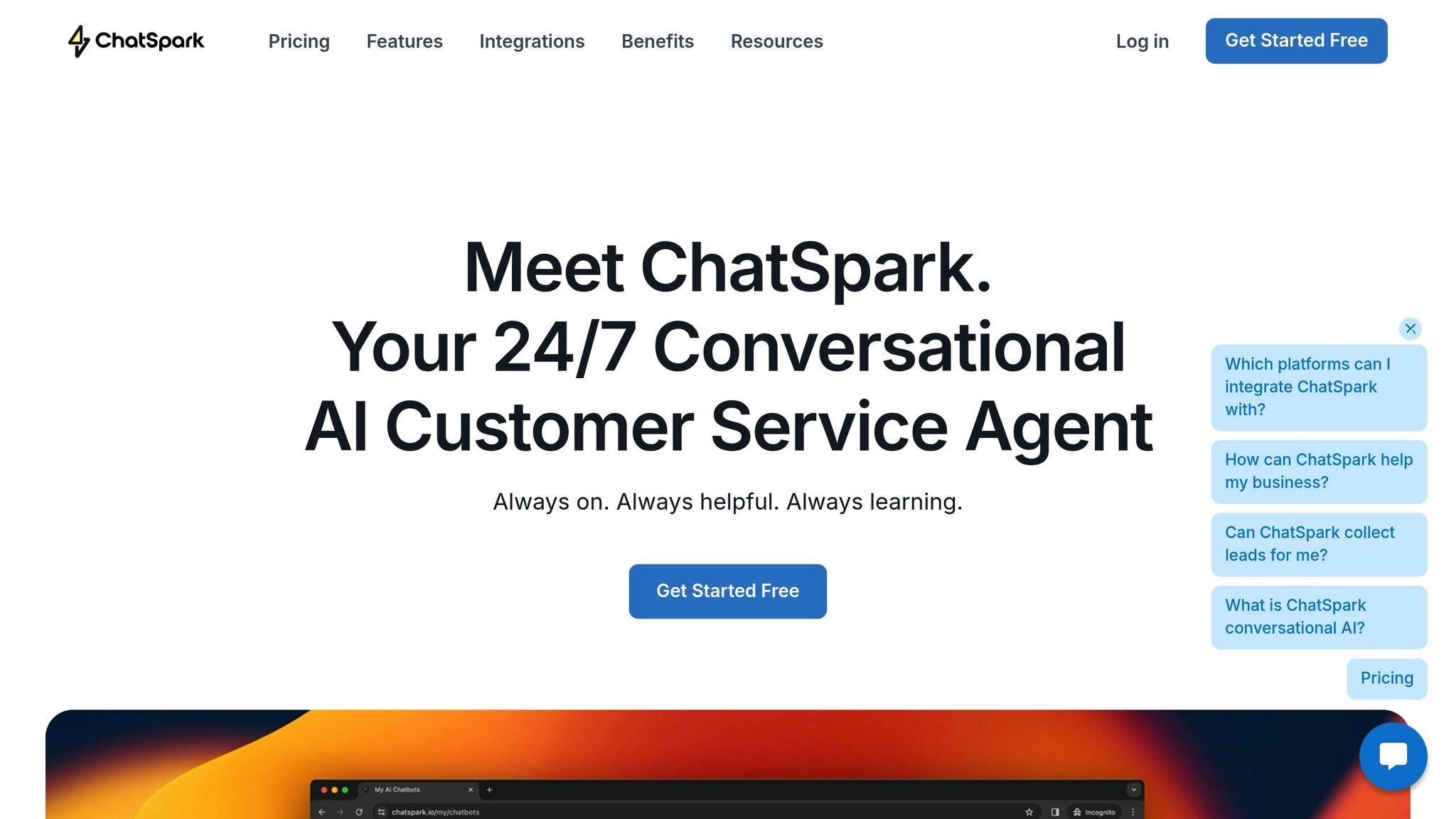
If you’re looking for a solution that checks all the boxes, ChatSpark is worth considering. It’s designed to deliver seamless, automated support across multiple channels.
ChatSpark provides 24/7 automated assistance for websites, Instagram, Facebook, WhatsApp, Telegram, and Slack - all managed from a single dashboard. With support for over 85 languages, it’s equipped to handle a global audience [12].
The platform is easy to integrate: just embed a simple code snippet and customize the chat window to reflect your brand. ChatSpark also offers built-in integrations with tools like Zapier, Freshchat, Square, and Calendly, eliminating the need for custom API work.
Pricing starts at $19/month for the Basic plan, which includes 100 messages/month, 1 agent, and 25 pages per agent. The Pro plan, at $129/month, offers 2,000 messages/month, 500 pages per agent, unbranded widgets, and full integrations. For larger businesses, Enterprise plans provide custom message limits and dedicated account management, allowing you to scale as your needs grow.
One standout feature is ChatSpark’s AI-powered knowledge retrieval. You can upload existing FAQs and policy documents to get your bot up and running quickly - no need to manually script every interaction. For businesses that handle sensitive data, ChatSpark supports secure deployment. However, it’s important to confirm compliance with industry-specific regulations like GDPR or HIPAA [4][2].
Design Your Chatbot Conversations
After choosing your platform, the next step is crafting conversations that feel natural. This is where many businesses falter - they end up with bots that come across as stiff and unhelpful.
Conversation Design Best Practices
Effective chatbot conversations align with Grice's Cooperative Principle: keep responses concise, truthful, relevant, and clear [14]. Aim to limit replies to 3–4 text bubbles per turn and use transitional phrases to maintain a smooth conversational flow [14].
Your chatbot should have a defined persona that mirrors your brand. This includes a name, an avatar, and consistent character traits. For instance, a gaming company might use a casual, playful tone, while a financial services firm should maintain a professional and direct approach [11][6]. This consistency is crucial because 60% of consumers feel chatbots fail to solve their issues and prefer speaking to a human. Your chatbot needs to work harder to earn trust [16].
Personalization is key to creating engaging interactions. Use variables to include the user's name or reference their previous choices. Instead of generic button labels like "Submit" or "Confirm", opt for conversational alternatives such as "Yeah, sure!" or "Looks right to me 👍" [14]. Adding images or GIFs can also enhance the user experience when used thoughtfully [16].
Interactive turn-taking is another important element. Avoid overwhelming users by personalizing responses, asking questions that encourage participation, and using buttons or quick replies to simplify decision-making and reduce typing errors [14][15]. If your bot needs time to fetch data, keep users engaged during the wait [16].
"Conversation design is not a simple act of writing down text in a conversational format... it is a combination of several disciplines including copywriting, UX design, interaction design, and psychology." - Landbot [14]
Finally, prepare for unexpected scenarios by implementing fallback responses and seamless escalation triggers.
Handle Errors and Escalations
Even the most well-designed chatbot will encounter situations where it can't provide an answer. When this happens, acknowledge the confusion and offer alternatives, such as rephrasing the question or selecting from a list of common topics [15][3].
To improve your bot’s understanding, create multiple intents for the same answer to account for variations in how users phrase questions. Regularly monitor your fallback rate - the percentage of sessions where the bot fails to respond correctly - to identify gaps in your knowledge base [17][6].
Escalating to human agents should be a smooth process. Set up triggers, like specific keywords (e.g., "damaged item" or "speak to manager"), to automatically transfer the conversation to a live agent [15][17]. When handing over, ensure the bot provides a brief summary of the user's issue so the agent doesn’t have to make the user repeat themselves [2][15]. Always give users an easy option to request human assistance at any point in the conversation [3][17].
A great example of this is Hermes Germany’s AI chatbot "Bo", launched in 2024. It achieved a 65% independent resolution rate and a 4.2 out of 5-star customer satisfaction score. For complex issues like damaged packages, "Bo" seamlessly escalated the chat to a live agent, ensuring quick resolutions without frustrating users [17].
Lastly, transparency is non-negotiable. Make it clear that your chatbot is an AI. Pretending it’s human can damage trust - 40% of users feel upset when they find out they were unknowingly interacting with a bot [10].
"Pretending your AI assistant is a human is a trust-breaker." - BotsCrew [10]
Add Your Chatbot to Your Website
Once your chatbot conversations are ready and tested, the next step is deploying it on your website. While the technical setup is simple, where and how you place your chatbot can make a big difference in user engagement.
Embed Chatbots with Widgets
To embed your chatbot, start by logging into your ChatSpark dashboard and copying the unique JavaScript embed code. Then, go to your website's backend, locate the <body> tag, and paste the code just before the closing tag. This ensures the chatbot loads efficiently.
When it comes to placement, the bottom-right corner of the screen is the go-to spot for chat widgets. Users naturally look there, and it keeps the chatbot accessible without interfering with the main content. For maximum impact, consider where the widget appears on your site. Add it to your homepage for general navigation help, product or pricing pages to answer buying questions, and checkout pages to reduce cart abandonment. For instance, in 2025, the e-commerce store GlowCart saw a 25% boost in conversions and a 40% drop in cart abandonment after implementing an AI chatbot on their site [7].
To increase engagement, you can set up triggers for the chatbot. For example, have it appear a few seconds after the page loads or use "exit intent" technology to display the widget when users are about to leave. These strategies help you connect with visitors at the right moments.
Before launching, test the chatbot thoroughly. Check for JavaScript errors and ensure it works seamlessly on mobile devices. Since over 85% of customer interactions are now handled by AI chatbots, ensuring compatibility across devices is crucial. Also, customize the chatbot’s appearance - such as the icon, colors, and welcome message - to align with your brand’s look and feel.
CMS-Specific Integration
If your website runs on a popular CMS like WordPress, Shopify, Wix, or Squarespace, integrating ChatSpark can be even easier. Refer to the "Integration Methods by Website Type" section for detailed, platform-specific instructions.
ChatSpark offers tailored guides for these platforms, making the integration process smooth and efficient. Once integrated, make sure to allowlist your domain in the ChatSpark dashboard to authorize the widget on your live site.
After setup, test the chatbot thoroughly across different devices and browsers. Use incognito mode to check how it functions for first-time visitors, and ensure the chat bubble doesn’t block essential UI elements like "Add to Cart" buttons or navigation menus on mobile devices. With 90% of online shoppers expecting instant responses within 10 minutes, a well-integrated chatbot can significantly enhance customer satisfaction and cut support costs by up to 30% [18][10].
Test, Launch, and Improve Your Chatbot
Test Functionality and Track Analytics
Before rolling out your chatbot, put it through thorough testing to ensure it recognizes user intent accurately and delivers the right answers. Walk through the entire conversation flow, from the initial greeting to the resolution or handoff, and stress-test it with unexpected inputs like emojis, symbols, or vague requests to see how it handles edge cases.
Make sure your chatbot performs seamlessly across all major browsers and devices, providing quick and consistent responses. It’s also important to confirm compliance with data privacy laws, such as GDPR and CCPA. If your chatbot supports multiple languages, test how it handles different sentence structures and dialects. Considering that 50% of global customers report frustration after interacting with chatbots and 30% may abandon purchases after a negative experience [20], testing is not just a step - it’s a necessity.
"The goal isn't perfect AI, it's one that feels intuitive and helpful to your specific customers in your specific context." - UserTesting [20]
Once your bot is live, track key metrics like resolution rates, conversation completion rates, and customer satisfaction scores (CSAT). Tools like ChatSpark’s analytics dashboard can help you identify where users drop off or which queries cause issues. A smart approach is to start with a pilot launch, deploying the chatbot on a smaller scale to gather data and fine-tune its responses before going all in.
Use these findings to drive continuous improvement and ensure your chatbot stays effective.
Improve Based on User Feedback
Testing is just the beginning - continuous refinement is where the magic happens. Dive into conversation logs to spot patterns, especially missed intents. If certain questions keep triggering fallback responses, it’s a clear sign your bot’s knowledge base or training data needs an update. Real-world language samples from these interactions are a goldmine for improving your AI model and filling knowledge gaps.
Incorporate user feedback directly by adding quick surveys at the end of chats, like a thumbs-up or thumbs-down option, to gauge satisfaction with specific responses. Experiment with A/B tests for welcome messages and calls-to-action (CTAs) to find what drives better engagement. With AI-powered chatbots shown to boost support team productivity by 14% [19], these tweaks can quickly pay off.
"Continuous monitoring of chatbot metrics, analyzing conversation logs, gathering user feedback, and regularly updating the knowledge base and AI models are essential for ongoing improvement." - Salesforce [19]
Set up regular review sessions - weekly triage meetings work well - to analyze automated resolutions, handoff rates, and fallback occurrences. Export unresolved intents to guide future updates and content creation. Don’t forget to keep your knowledge base current by incorporating product updates, new features, and seasonal changes to avoid outdated information. Maintaining your chatbot isn’t a one-and-done task; it’s an ongoing process that ensures your bot remains sharp, relevant, and effective.
Conclusion
Adding a chatbot to your business can completely change the way you connect with customers. By setting clear objectives, choosing the right tools, designing user-friendly conversations, and constantly improving performance, you create a support system that’s always available. In fact, businesses can automate up to 80% of routine inquiries [22][23], offering instant responses that keep visitors engaged and satisfied.
The next step is selecting a solution that fits your needs. Platforms like ChatSpark make this process simple. With integration options for websites, WhatsApp, Facebook, Instagram, Telegram, and Slack, ChatSpark acts as a 24/7 digital concierge. It supports over 85 languages and mirrors your brand’s tone, whether it’s capturing leads, answering common questions, or guiding customers toward purchases. Its AI-powered knowledge retrieval ensures every interaction feels tailored and professional.
The impact of chatbots is undeniable. Eighty-six percent of customer experience leaders predict that intelligent bots will reshape the industry within three years, and over 80% of consumers already report positive experiences with chatbots [21][22]. Companies like GlowCart experienced a 25% boost in conversion rates and reduced cart abandonment by 40% after adopting an AI chatbot [7]. Similarly, BiteExpress managed to cut customer support calls by 60% [7].
Keeping your chatbot effective requires ongoing testing, analyzing data, and listening to user feedback. As customer expectations shift and your business expands, your chatbot should evolve too - handling thousands of conversations at once, integrating seamlessly with your CRM, and providing insights that drive smarter marketing and product strategies.
FAQs
How do chatbots help businesses save on customer service costs?
Chatbots are a game-changer for cutting customer service costs. By automating repetitive tasks - like answering FAQs, managing inquiries, and delivering instant support - they reduce the need for human agents. This means businesses can save on labor costs while ensuring customers get help around the clock.
In fact, chatbots can trim customer service expenses by as much as 30%. And the best part? They not only speed up response times but also boost customer satisfaction along the way.
What features should I prioritize when choosing a chatbot platform for my website?
When choosing a chatbot platform, focus on features that boost user interaction, simplify workflows, and match your brand’s identity. Prioritize tools like real-time responses to keep visitors engaged and guide them seamlessly through the sales process. A chatbot with 24/7 availability ensures you don’t miss out on capturing leads or providing support, even outside regular business hours. Integration is another must - make sure the platform connects easily with your website and backend systems, such as CRMs or payment gateways, to automate processes smoothly.
Your chatbot should feel like an extension of your brand. That means it needs to be customizable in tone, style, and appearance. Advanced features like natural language processing (NLP) are also essential, as they allow the bot to handle a wide range of queries and get smarter over time. To measure success, robust analytics tools are vital for tracking performance and improving user interactions. For a wider audience, look for platforms that offer multilingual capabilities and compatibility with popular channels like Instagram, WhatsApp, and Slack. These elements combine to create a chatbot experience that’s seamless, efficient, and tailored to your audience.
How can I make sure my chatbot reflects my brand's tone and personality?
To make sure your chatbot reflects your brand's personality and tone, start by defining your brand voice. Decide whether the tone should be friendly, professional, witty, or something else entirely. Identify key phrases and traits that represent your brand, and use these as a foundation to shape the chatbot’s responses and train its AI to communicate in a way that matches your style.
After that, focus on customizing the chatbot's dialogue to maintain consistency. From greetings to error messages and calls to action, every interaction should align with your brand's voice. Test the chatbot with real users, gather feedback, and analyze its performance to refine responses, making sure they feel natural and stay true to your brand.
Lastly, keep the chatbot fresh and updated. Regularly fine-tune its tone, especially after significant campaigns or product launches, to ensure it evolves alongside your brand. This way, every customer interaction reinforces your brand’s identity and values.