AI customer service automation is transforming how businesses interact with customers. By using tools like chatbots and virtual assistants, companies can provide faster, round-the-clock support while significantly reducing costs. These systems handle tasks like answering FAQs, processing refunds, and managing appointments across multiple channels such as websites, social media, and messaging apps. The result? Improved efficiency, personalized interactions, and scalable support that meets rising customer expectations.
Key Takeaways:
- Faster Support: AI delivers instant responses 24/7, eliminating wait times.
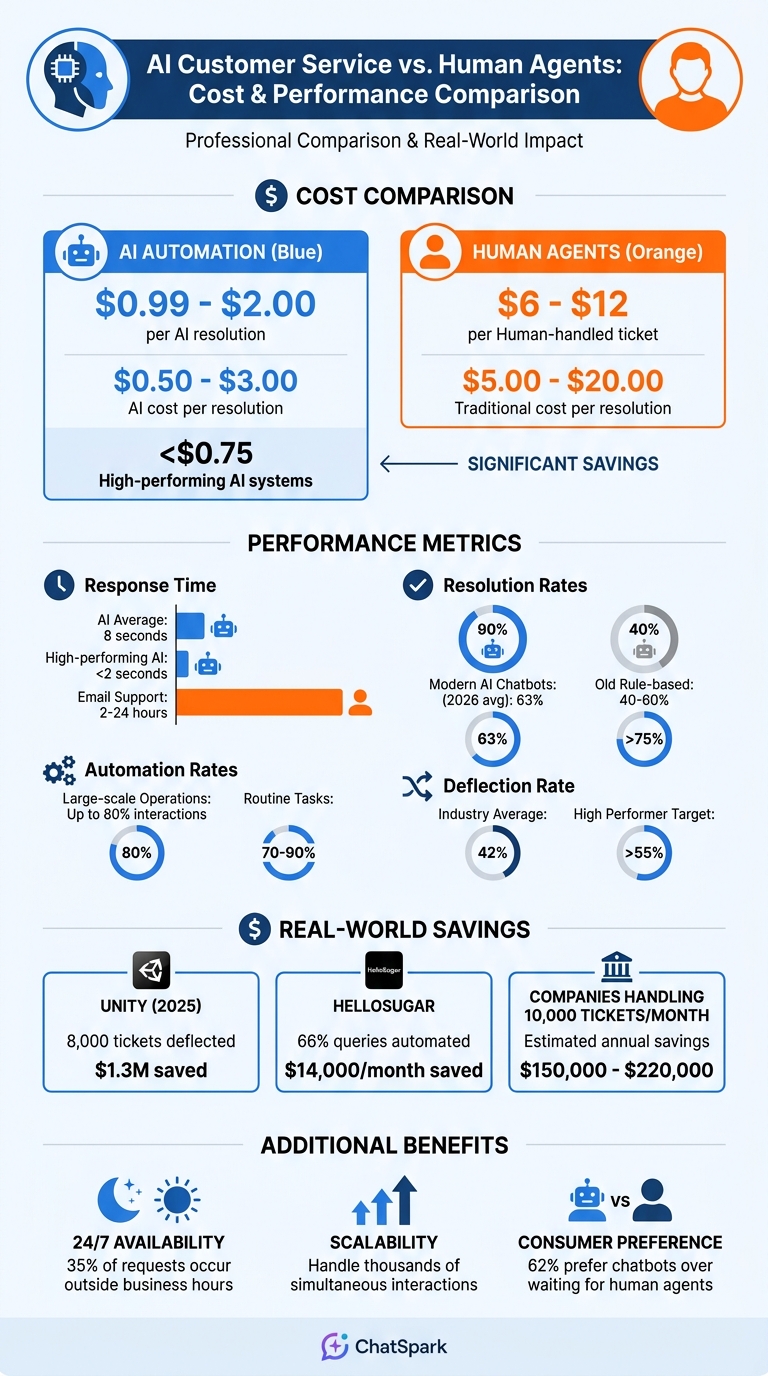
- Cost Savings: AI resolutions cost $0.99–$2.00 per ticket compared to $6–$12 for human agents.
- Scalability: AI can manage thousands of interactions simultaneously without increasing team size.
- Personalization: AI uses customer data to tailor responses and maintain consistent brand voice.
- Multi-Channel Support: Seamless integration across platforms like WhatsApp, Instagram, and email.
Businesses leveraging AI tools like ChatSpark can streamline operations, reduce costs, and deliver better customer experiences. The key is to define goals, follow an AI customer support implementation guide to build a strong knowledge base, and continuously refine performance using metrics like resolution rates and customer satisfaction scores. By doing so, companies position themselves for long-term growth in a competitive market.
Benefits of AI Customer Service Automation
AI vs Human Customer Service: Cost and Performance Comparison
AI is transforming customer service by improving efficiency, cutting costs, and elevating the customer experience. Its ability to streamline operations and deliver high-quality interactions makes it a game-changer for businesses.
Faster Response Times and 24/7 Availability
One of AI's standout features is its ability to respond instantly - no waiting, no delays. AI systems operate around the clock, ensuring customers get help whenever they need it. Unlike human agents, who might need to sift through various systems or transfer calls, AI can pull data from multiple sources simultaneously. This means customers receive quick, comprehensive answers in just seconds.
Scalability and Lower Costs
AI automation has completely reshaped the economics of customer support. Take Unity, for example. In 2025, they implemented an AI agent linked to their knowledge base, which managed to deflect 8,000 tickets and saved the company $1.3 million [2]. Here's the cost breakdown: human-handled tickets typically range from $6 to $12 each, while AI resolutions cost just $0.99 to $2.00 [3]. By 2026, many businesses shifted to outcome-based pricing, paying about $0.99 per successful resolution instead of monthly fees per agent seat [3].
AI also scales effortlessly. It can automate up to 80% of interactions for large-scale operations [2]. Routine tasks like answering FAQs or checking order statuses - areas where automation rates often hit 70% to 90% - can save companies handling 10,000 tickets monthly anywhere from $150,000 to $220,000 annually [3].
Personalized and Consistent Customer Interactions
AI takes personalization to a whole new level by leveraging customer data to craft responses tailored to individual histories. For example, BSH Group integrated AI across 40 different touchpoints - web, email, in-store, and CRM systems - in 2025. By identifying drop-off points and personalizing interactions in real time, they saw a 106% boost in conversion rates and a 22% rise in add-to-cart rates [4].
Today, 92% of brands use AI to deliver personalized customer experiences, and 82% of consumers say these tailored interactions influence their brand choices in at least half of their shopping decisions [4]. AI doesn't just personalize - it ensures a consistent tone and brand voice across every interaction.
"AI resolves more issues through automation, enhances agent productivity, and delivers more accurate, personalized service" [2].
- Tom Eggemeier, CEO of Zendesk
Core Components of AI Customer Service Automation
Creating an effective AI-driven customer service system involves four key components working together to provide efficient and personalized support. These components ensure routine inquiries are handled swiftly, while more complex issues are escalated to human agents when needed. Together, they form the backbone of a scalable and responsive customer service framework.
AI-Powered Knowledge Bases
A well-structured knowledge base is the foundation of any AI customer service system. It stores FAQs, guides, and troubleshooting steps in a way that AI can easily search and retrieve. Without this structure, even the most advanced AI is prone to errors. As eDesk aptly notes, "AI without a well-structured knowledge base is just a very confident guessing machine" [1]. With access to a robust knowledge base, AI can provide accurate responses in under 10 seconds - far faster than the typical 2–24 hour wait for email support [6].
Conversational AI Chatbots
Modern AI chatbots leverage natural language processing (NLP) to understand customer queries, even when phrased in unexpected ways. Unlike older rule-based systems that resolved only 40–60% of inquiries, today's AI chatbots achieve resolution rates of 80–90% by interpreting intent and context [6]. For example, HelloSugar, a salon chain, used AI chatbots to automate 66% of its customer queries, saving $14,000 monthly and doubling its locations without increasing its support team [6].
But chatbots alone aren't enough - support must be accessible across multiple channels.
Multi-Channel Deployment
AI customer service systems shine when deployed across various platforms, such as websites, WhatsApp, Instagram, email, and even voice. This ensures customers can get help wherever they are. With 35% of customer requests occurring outside regular business hours and 62% of consumers preferring chatbots over waiting for human agents, multi-channel support has become essential [6]. Tools like ChatSpark's omnichannel integration also maintain conversation history across platforms, so customers don’t have to repeat themselves when switching between channels [6].
Automated Escalations and Workflows
When AI encounters challenges it can't resolve, automated escalations ensure a seamless transition to human agents. By analyzing factors like sentiment and confidence levels, the system routes complex or sensitive queries to the right agent, complete with chat transcripts and context [5][6]. Additionally, API-driven workflows can handle tasks like processing refunds in Shopify, updating CRM records in Salesforce, or creating support tickets. This approach goes beyond deflecting issues - it focuses on solving them [1][6].
Understanding these components lays the groundwork for implementing AI customer service automation with ChatSpark.
How to Implement AI Customer Service Automation with ChatSpark
Here’s a clear roadmap to setting up AI customer service automation using ChatSpark.
Step 1: Define Your Goals and Analyze Customer Needs
Start by reviewing your support data to identify recurring questions that are ideal for automation. Dive into metrics like response times, resolution rates, and common complaint patterns to pinpoint customer pain points. For example, frequent inquiries about order tracking, return policies, or product details should take priority when building your knowledge base.
Gather all necessary resources, such as FAQs, product manuals, policy documents, and troubleshooting guides. Make sure these are organized in easily uploadable formats like PDFs, Word files, or direct URLs. This will form the foundation of your AI’s knowledge.
Step 2: Select the Right ChatSpark Plan
Choose a plan that matches your business size and support needs. Here’s a quick comparison of ChatSpark’s offerings:
| Plan | Monthly Price | Messages | Training Pages | Best For |
|---|---|---|---|---|
| Basic | $19 | 100 | 25 | Solo entrepreneurs testing AI support |
| Plus | $59 | 250 | 50 | Small businesses with moderate inquiries |
| Pro | $129 | 2,000 | 500 | Growing companies needing omnichannel use |
| Enterprise | Custom | Custom | Custom | Large organizations with complex needs |
If your needs are minimal, the Basic plan is a low-risk way to start. For scaling businesses, the Plus plan adds useful features like 5 AI Actions and API access. The Pro plan supports omnichannel deployment across platforms like WhatsApp and Instagram, while Enterprise plans offer tailored solutions, including unlimited AI Actions and dedicated account management.
Step 3: Set Up and Customize ChatSpark Agents
Personalize your ChatSpark agent to align with your brand. Start by giving it an internal name and a public-facing Agent Name (e.g., "Alex"). Add a custom avatar and set your brand’s primary color using a hex code to match your website’s design.
Craft a welcoming message that reflects your brand’s personality and set up to five clickable prompts for common inquiries like “Track my order” or “Return policy.” Use the personality field to establish clear guidelines, such as “Do not discuss competitor products” or “Always offer a human handoff for complex questions.” For critical information like legal disclaimers, pre-set canned responses to ensure accuracy.
Integrate ChatSpark with tools like Zapier, Freshchat, Square, or Calendly. On Pro and Enterprise plans, you can expand your reach by connecting to platforms like WhatsApp, Instagram, and Slack. Customize lead capture fields to collect customer details such as Name, Email, or Phone, tailoring it to your business needs.
Once your agent is set up, move on to designing workflows and setting boundaries.
Step 4: Design Workflows and Set Up Guardrails
Create workflows to handle routine tasks while ensuring complex issues are escalated appropriately. For instance, you can automate processes like refund handling, CRM updates, and ticket generation.
Set guardrails by defining restricted topics and crafting a “Custom Unknown Response” for situations where the AI lacks specific information. This prevents the AI from giving incorrect answers and ensures a smooth customer experience.
This step solidifies your automation strategy, ensuring both efficiency and reliability in handling customer inquiries.
Step 5: Test, Deploy, and Scale Across Channels
Once workflows are in place, test the system thoroughly before full deployment. Run internal tests with various scenarios, from simple FAQs to more complex queries, to evaluate the AI’s accuracy, tone, and escalation processes. Use the ChatSpark dashboard to review unanswered questions and identify areas needing improvement.
Start with a soft launch on your website, closely monitoring interactions during the first week. When confident in the system’s performance, gradually expand to other channels like WhatsApp, Instagram, and Facebook Messenger. This phased rollout allows you to fine-tune workflows and address any issues without disrupting your broader customer base.
Keep an eye on metrics like conversation volume, resolution rates, and customer satisfaction to ensure the AI scales effectively and continues to meet your customer service goals.
Measuring and Improving AI Customer Service Performance
When it comes to AI customer service, tracking the right metrics is the key to understanding performance and identifying areas for improvement. For example, the AI Resolution Rate - which measures how often AI successfully resolves customer issues - averages 63% in 2026, with top performers exceeding 75% [8]. Another critical metric is the Deflection Rate, which reflects the percentage of customers who find answers on their own through self-service tools. Across industries, this averages 42% [8].
AI-Specific Metrics to Watch
Focusing on AI-specific indicators can reveal how well your system is functioning. One such metric is the Knowledge Base (KB) Hit Rate, which tracks how often the AI retrieves useful, relevant information. If this rate falls below 72%, it may point to gaps in your documentation [8]. Another important measure is the Hallucination Rate - the frequency of factual errors in AI responses. To keep this in check, review 50–100 interactions weekly, aiming for a rate below 2% [9]. Additionally, monitor the Human Override Rate, which indicates how often agents must rewrite AI-generated suggestions. High-performing systems typically maintain this rate around or below 8%, compared to an average of 12% [8].
From a cost perspective, AI-driven resolutions are significantly more efficient, costing between $0.50 and $3.00 per resolution compared to $5.00–$20.00 for human agents. High-performing systems also excel in speed, delivering responses in under 2 seconds versus the industry average of 8 seconds [8].
"Measure the wrong things, and you'll optimize for the wrong outcomes. Measure the right things, and the business improvements follow naturally." - AIAgentSquare.com [8]
| Metric | 2026 Average | High Performer Target |
|---|---|---|
| AI Resolution Rate | 63% | >75% |
| Deflection Rate | 42% | >55% |
| Time to First Response | 8 seconds | <2 seconds |
| Cost Per Resolution | $1.87 | <$0.75 |
| KB Hit Rate | 72% | >85% |
Key Metrics to Track
To maintain a comprehensive view of performance, organize your KPIs based on the roles of your team. Executives should focus on metrics like ROI and cost per resolution. Managers can zero in on containment and utilization rates, while analysts should track intent accuracy and confidence scores [7].
Another important indicator is the CSAT Delta, which compares customer satisfaction between AI and human-resolved cases. Ideally, this delta should fall between -5% and +5% [8]. A significant gap could signal that efficiency is being prioritized at the expense of customer trust. Similarly, the Escalation Rate - the percentage of cases that require human intervention - can highlight areas where workflows or documentation need improvement. While the industry average is 31%, top systems keep this below 20% [8].
Creating a "Golden Dataset" of 100–200 real customer inquiries with verified answers is another effective way to measure progress. This dataset can be used to test updates, compare model performance, and track improvements over time [7]. Set confidence thresholds at 90% or higher to ensure only high-confidence AI responses are auto-resolved, with anything lower requiring human review [11].
How to Continuously Improve Performance
Improving AI performance is an ongoing process, and these metrics can guide your efforts. For example, review fallback patterns weekly - instances where the AI says, "I don't understand." These often indicate gaps in your documentation rather than errors in the model itself [10]. High escalation rates on specific topics may also suggest that your AI lacks the necessary language or authority to handle those inquiries effectively.
Conduct regular audits of resolved and escalated interactions to ensure issues are genuinely resolved. This hands-on review can uncover problems that raw metrics might miss [10]. By updating your documentation and refining workflows, you can boost your KB Hit Rate from 72% to over 85% [8].
Take inspiration from real-world examples. In early 2024, European open banking firm tink introduced an AI assistant and reduced their Average Handling Time by 39% in just three months [12]. They achieved this by closely monitoring key metrics and iterating on real conversation data. A quarterly review cycle - focusing on achievements, diagnosing missed targets, and creating a 90-day improvement roadmap - can help refine your system further [8].
Finally, tools like ChatSpark's dashboard can help identify unanswered questions, enabling you to update your AI's training materials. As your knowledge base expands and workflows improve, you'll see resolution rates rise and costs drop. This creates a compounding effect, driving efficiency gains that can transform your customer service operations.
Conclusion
AI-driven customer service automation has moved beyond basic tasks to handle more complex responsibilities like processing refunds, updating customer records, and managing warranty claims - all without human involvement. This shift from simply deflecting inquiries to fully resolving them has significantly reduced costs, dropping from $15–$25 per interaction to just $0.50–$2.00, while providing near-instant resolutions[6].
The market data paints a clear picture of this transformation. The AI customer service market is expected to grow from $12.06 billion in 2024 to $47.82 billion by 2030[6]. Adoption rates are also skyrocketing - by 2026, 71% of mid-market and enterprise teams are projected to have active AI deployments, compared to just 23% in 2024[13]. Real-world examples highlight the impact of these trends. In November 2025, HelloSugar, a salon chain, implemented AI agents to handle 66% of customer queries. This saved $14,000 monthly and allowed them to double their locations without increasing staff[6]. Similarly, Indian appliance brand Atomberg successfully managed over 2,500 daily WhatsApp queries, achieving an 86% resolution rate for tasks like warranty claims and order tracking[6].
These advancements now offer businesses 24/7, omnichannel support. Voice AI agents, for instance, can answer calls within seconds while maintaining natural, conversational interactions[1]. Omnichannel systems ensure seamless context across platforms like chat, email, voice, and social media[13]. This technology enables companies to scale operations instantly without the proportional costs of hiring additional staff.
To maximize the benefits, it's essential to monitor key performance indicators like resolution rates and deflection metrics. Continuously refining your AI systems ensures they adapt to real-world interactions and evolving processes. As your AI grows more effective, you'll deliver personalized, consistent support while achieving faster response times and scalable automation. Businesses adopting AI customer service tools today aren't just cutting costs - they're setting the stage for long-term growth, improved customer satisfaction, and operational efficiency that keeps pace with demand.
FAQs
Which support issues should I automate first?
Start by focusing on automating routine tasks that tend to be repetitive and time-consuming - areas where AI excels. For instance, handling refunds, order tracking, password resets, or answering FAQs are perfect examples. These tasks usually involve high volumes but are relatively straightforward. By automating them, you can reduce the workload on your team, speed up response times, and allow human agents to concentrate on more complex or sensitive customer issues. This approach not only enhances customer satisfaction but also streamlines operations effectively.
How can I stop the AI from giving incorrect answers?
To minimize errors, it's essential to provide the AI with accurate and relevant context for its responses. When the AI encounters a situation it can't confidently handle, it should easily transfer the issue to a human agent for resolution. Regular performance monitoring is also crucial to spot and address areas where the AI may struggle. Together, these practices enhance accuracy and reduce mistakes.
What does it take to connect ChatSpark to my tools and channels?
Getting ChatSpark up and running with your existing tools and communication channels takes a few straightforward steps. First, make sure your systems - like CRMs or messaging platforms - are ready to handle data flow and updates.
ChatSpark offers no-code connectors and integration tools, making it easy to link popular channels like WhatsApp, email, or Slack. Before you go live, double-check that your policies and security controls are in place to safeguard data and ensure compliance.
Once connected, deploy AI across your channels and keep an eye on key performance metrics, such as response times. This will help you fine-tune operations and get the most out of your setup.