Omnichannel customer support connects communication channels like live chat, email, social media, and messaging apps into a single, unified experience. Unlike multichannel setups, omnichannel systems carry customer context across platforms, eliminating the need for users to repeat themselves. AI chatbots like ChatSpark enhance this process by managing conversations across multiple channels, maintaining consistency, and reducing response times.
Key Highlights:
- Unified Support: Customers can switch channels without losing context.
- AI Efficiency: Tools like ChatSpark handle queries 24/7, ensuring faster responses.
- Improved Metrics: Businesses see higher satisfaction rates and reduced costs.
- Channel Prioritization: Focus on high-traffic platforms like live chat and social media.
- Smart Features: Context continuity, unified knowledge bases, and human escalation ensure smooth interactions.
Omnichannel AI solutions are transforming customer support, making it more seamless, efficient, and customer-friendly. This guide explores how to set goals, choose platforms, and implement tools like ChatSpark for better results.
Key Elements of an Omnichannel AI Chatbot Strategy
Setting Business Goals and KPIs
Before rolling out ChatSpark, it's essential to define measurable goals. Focus on targets like cutting down response times, boosting customer satisfaction (CSAT) scores, and increasing first-contact resolution rates. For instance, if 35% of your customer inquiries come in after regular business hours [3], this underscores the importance of automated responses during those times.
Establish specific service-level agreements (SLAs) for each channel to set performance expectations. For example:
- Live chat: 60 seconds
- Social media DMs: 2 hours
- Email: 4 hours (during business hours)
These benchmarks provide a baseline to evaluate performance and pinpoint areas needing improvement.
Priority Communication Channels for US Businesses
After setting your goals and SLAs, the next step is identifying the most valuable communication channels. Start by reviewing data from the past 90 days to determine where most of your inbound traffic originates. Typically, businesses focus on two primary channels - like live chat and email - before adding secondary platforms based on customer activity.
For many US businesses, the following channel hierarchy works well:
- Website live chat: Ideal for real-time customer inquiries and capturing leads.
- Instagram and Facebook Messenger: Great for discovery-driven interactions, with 67% of Instagram users expecting responses within an hour [3].
- WhatsApp and SMS: Perfect for mobile-first users seeking order updates or proactive notifications.
- Slack or Telegram: Useful for B2B teams managing internal workflows.
The payoff is clear: omnichannel customers tend to spend 1.5 times more than those using a single channel, and improving cross-channel experiences can boost sales revenue by 2%–7% [2]. With ChatSpark's Pro plan ($129/month), you can manage all six channels in one place, avoiding the hassle of juggling multiple tools.
Core Technical Features for Omnichannel Chatbots
Once you've prioritized your channels, focus on the technical features that ensure smooth interactions across all platforms. Three key capabilities separate a decent chatbot from one that excels: a unified knowledge base, context continuity, and smart agent handoff.
- Unified knowledge base: This ensures consistent answers across channels. For example, what ChatSpark says on Instagram will align with the information on your website, eliminating discrepancies and maintaining brand consistency.
- Context continuity: Conversation history flows seamlessly across platforms, so customers don’t have to repeat themselves. This continuity strengthens the user experience through thoughtful technical design.
- Smart agent handoff: The AI knows when to step aside. If confidence drops below a certain threshold (e.g., 40%) or negative sentiment is detected, the system escalates to a human agent. ChatSpark integrates with tools like Freshchat and Zapier to make these transitions smooth and trackable.
Between February and April 2026, Jungle Lodges & Resorts generated over 3,300 qualified leads using ChatSpark across their website and messaging apps. Notably, 35% of these inquiries came in after hours - leads that would have been missed without AI [3].
Designing Consistent Customer Experiences Across Channels
Building Conversation Flows That Work Across Channels
Start by identifying what your customers need. A good way to do this is by analyzing around 200 recent support interactions and categorizing them into specific intents - like "track my order", "reset my password", or "request a refund." Most businesses typically identify between 12 and 25 core intents, which then form the foundation for every conversation flow you create.
Once you've established those intents, design each flow with three fallback levels to handle potential issues:
- First fallback: The bot clarifies by offering options.
- Second fallback: If clarification doesn't work, suggest related solutions.
- Third fallback: If the issue persists, escalate to a human agent while providing them with the full conversation history.
This structure works seamlessly across platforms - whether it's WhatsApp, your website, or Instagram - because the logic remains consistent, even if the delivery adjusts slightly to fit each channel. Once your conversation flows are solid, the next step is centralizing your information to ensure consistency.
Keeping a Single Source of Truth
Inconsistent responses can quickly undermine customer trust. If your chatbot gives one answer on live chat but a different one on Facebook Messenger, customers will notice - and it won't reflect well on your brand.
To avoid this, centralize all your support content into a unified knowledge base. This means gathering FAQs, product guides, and support articles from scattered locations - like Google Docs, Notion, or your CRM - and consolidating them into a single source that tools like ChatSpark can access across all channels. Here's how ChatSpark's training capacity scales with different plans:
| Plan | Training Capacity | Best For |
|---|---|---|
| Basic | 25 pages | Solo entrepreneurs testing AI support |
| Plus | 50 pages | Small businesses with moderate inquiries |
| Pro | 500 pages | Growing companies with omnichannel needs |
| Enterprise | Custom | Large organizations with complex demands |
Before launching, plan to spend 6–10 hours reviewing your existing content to catch any contradictions or outdated information. Then, allocate another 8–15 hours to fill in gaps - usually 30–50 short articles covering your most common support scenarios. This upfront effort pays off. In March 2026, Illinois Tool Works (ITW) used ChatSpark to handle an average of 1,831 chats per month across two major product lines, saving $119,225 while maintaining a consistent tone and message across their website [1].
Once your knowledge base is unified, the next step is ensuring your chatbot communicates in a way that aligns with your brand's personality.
Configuring Brand Voice and Tone in ChatSpark
Your knowledge base determines what your chatbot says. Your brand voice determines how it says it.
Start by creating a one-page brand blueprint for your AI agent. This should include the agent's name, role, key traits, and a list of topics that should always be escalated to a human - such as billing disputes, legal concerns, or fraud claims. Use ChatSpark's persona settings to fine-tune the tone (like formal, friendly, or empathetic) and set rules for response length and emoji usage. For instance:
- A B2B software company might prefer short, professional responses without emojis.
- A consumer brand might go for a more casual, warm tone with emojis on platforms like Instagram.
Additionally, set a sentiment threshold to ensure that negative customer interactions automatically trigger a handoff to a human agent. Configuring the full persona and escalation setup usually takes 3–6 hours, but it's one of the most impactful steps you can take to ensure your chatbot delivers a consistent and effective customer experience.
Deploying ChatSpark Across Key Support Channels
Now it’s time to bring ChatSpark to your primary customer channels. While the exact setup depends on the platform, the process follows a similar framework. By aligning deployment with your strategy and ensuring a seamless customer experience, you can effectively integrate ChatSpark into your most important touchpoints.
Website and Live Chat
Your website often serves as the most critical interaction point - especially on pages like pricing or checkout, where customers are close to making a decision. To maximize impact, start by embedding the ChatSpark widget on these high-value pages rather than deploying it site-wide. Customize the widget’s appearance to match your brand, adjusting colors, avatar, and placement so it blends naturally with your site design.
For training the AI, upload your product documents (like PDFs or CSVs) or allow ChatSpark to crawl specific website URLs. Configure AI Actions to automate common tasks such as checking orders via Shopify, scheduling appointments through Calendly or Google Calendar, and managing support tickets in platforms like Zendesk or HubSpot. You can also set office hours, enabling autoresponders to handle after-hours inquiries, reducing customer frustration during off-peak times. With the Pro plan, you can configure up to 40 AI Actions - enough to cover most workflows for mid-sized businesses. Companies using ChatSpark on their websites typically experience an AI resolution rate of 80% or higher, with response times averaging under 2 seconds [4].
Social Media Platforms
To deploy ChatSpark on social media, you’ll need the Pro plan ($129/month) or higher, as omnichannel support across all six platforms is only available at this tier. A key point to note: each AI agent is assigned to a single channel. For instance, if you want to manage both Facebook Messenger and Instagram DMs, you’ll need to create two agents. However, both agents can share the same training data, ensuring consistent responses.
For Facebook Messenger, connect the AI agent to your Facebook Page. For Instagram DMs, link your Business account to enable auto-responses to customer inquiries. Since Instagram is heavily used by visual and e-commerce brands, make sure your training data includes detailed product information, pricing, and shipping timelines. On both platforms, keep responses concise and conversational - customers expect quick, casual replies, not lengthy, formal messages. Additionally, set up escalation triggers for keywords like "complaint", "lawyer", or "manager", or for sentiment scores below -0.6, to ensure high-risk conversations are routed to a human agent immediately.
Once social media is covered, you can expand ChatSpark to messaging apps and internal communication tools.
Messaging Apps and Internal Channels
To integrate ChatSpark with messaging apps, connect via the WhatsApp Business API for rich media support, use a bot token for Telegram to engage tech-savvy users, and embed it into Slack to assist your support team with ticket routing and accessing knowledge bases.
On all messaging platforms, it’s important to comply with US privacy standards by notifying customers when they’re interacting with an AI. Use tools like PII redaction and AES-256 encryption to safeguard sensitive data during transmission [5]. For example, between July and October 2025, a global construction products company implemented ChatSpark across its messaging channels for a flagship brand. The AI managed 10,754 messages, captured 153 new leads, and achieved a 98% resolution rate. This deployment saved over 66 days of agent time and $47,880 in costs, all from an initial $4,000 investment - resulting in an impressive 1,097% ROI.
Measuring and Scaling Omnichannel Chatbot Performance
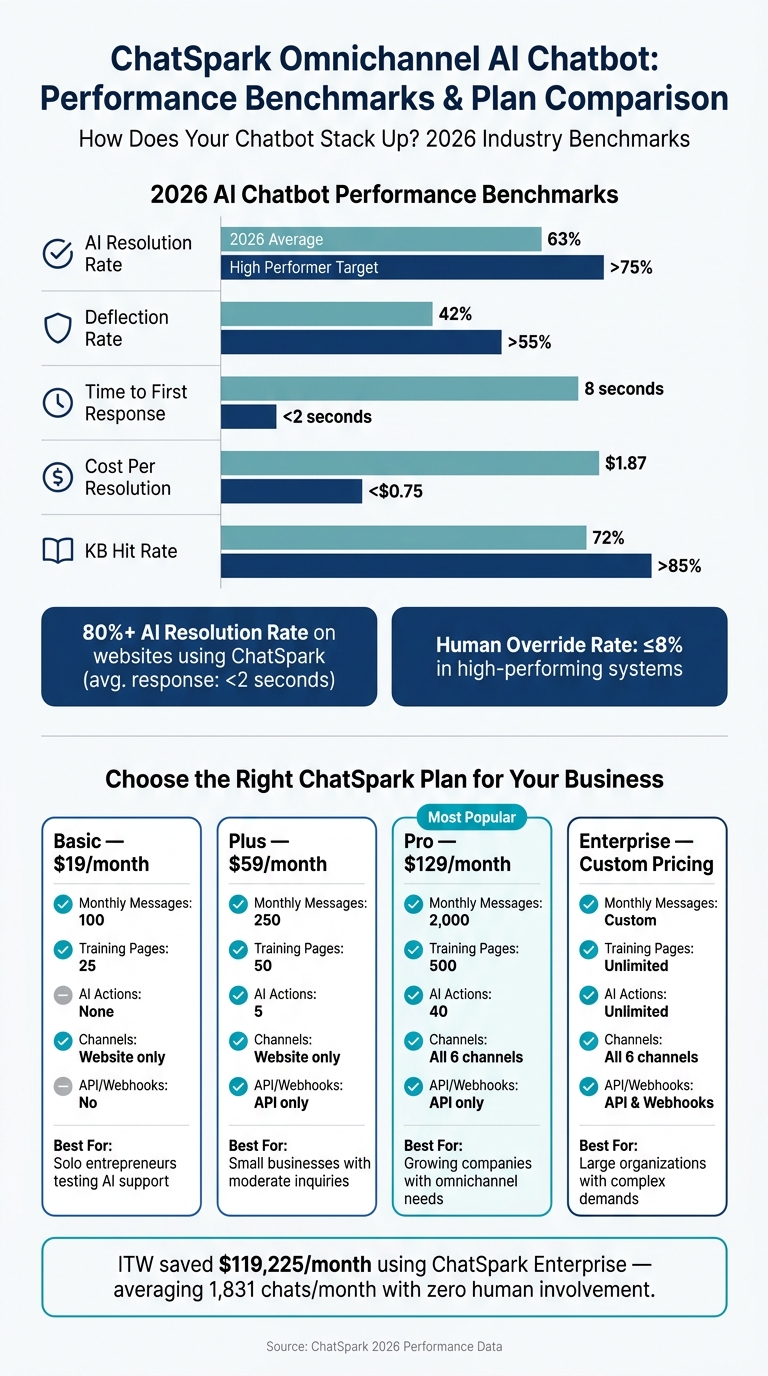
ChatSpark Omnichannel AI Chatbot: Plans, Metrics & Performance at a Glance
Tracking Key Performance Metrics
Once ChatSpark is live across your channels, the next big question is: is it actually delivering results? If you're using the Pro or Enterprise plans, you'll have access to dashboards that highlight critical metrics. Among the most important are:
- AI Resolution Rate: How often the bot resolves conversations without human intervention.
- Deflection Rate: The percentage of tickets that never reach a human agent.
- KB Hit Rate: The frequency with which the AI finds useful answers in your knowledge base.
These metrics align with your key performance indicators (KPIs), helping you ensure every channel meets its goals. Let’s take a look at how the industry measures up in 2026 and what top-performing systems aim for:
| Metric | 2026 Average | High Performer Target |
|---|---|---|
| AI Resolution Rate | 63% | >75% [6] |
| Deflection Rate | 42% | >55% [6] |
| Time to First Response | 8 seconds | <2 seconds [6] |
| Cost Per Resolution | $1.87 | <$0.75 [6] |
| KB Hit Rate | 72% | >85% [6] |
In addition to these benchmarks, keep an eye on CSAT scores to compare customer satisfaction between AI-resolved and human-resolved cases. If there's more than a 5% gap, your bot might be closing tickets efficiently but leaving customers less than happy. Also, track your Human Override Rate - how often agents need to step in and rewrite AI suggestions. High-performing systems keep this number at or below 8% [6]. These insights will help you pinpoint areas for improvement and refine your chatbot’s performance.
Improving Chatbot Performance Over Time
The quickest way to make your chatbot better? Study its failures. Analyze 20–30 escalated or unresolved conversations to identify recurring issues, like outdated responses, misunderstood intent, or entirely missing topics. ChatSpark simplifies this process with its "Unanswered Questions" list, which highlights queries the AI couldn’t handle.
Pay special attention to fallback triggers - those moments when the bot responds with something like, "I don’t understand." These are clear signs of knowledge base gaps. When updating your documentation, focus on using clear headers, bullet points, and numbered steps. This kind of structured content helps the AI pull accurate answers 2–3 times more effectively than dense, unorganized text.
"Measure the wrong things, and you'll optimize for the wrong outcomes. Measure the right things, and the business improvements follow naturally." - AIAgentSquare.com [6]
One practical way to validate updates is by maintaining a "golden dataset" - a set of 100–200 real customer questions with verified answers. Run this dataset through your chatbot after every major update to confirm that your changes are improving performance and not just shifting problems around. These insights are essential for scaling your chatbot effectively.
Scaling With ChatSpark Plans
As your support needs grow, your ChatSpark plan should grow with them. Start small with the Basic plan ($19/month) if you’re just looking to automate FAQs on your website. When you’re ready for integrations, AI Actions, and advanced analytics, the Plus ($59/month) and Pro ($129/month) plans unlock more features. Improved chatbot performance makes it easier to scale while keeping up with increasing support demands.
| Feature | Basic ($19) | Plus ($59) | Pro ($129) | Enterprise (Custom) |
|---|---|---|---|---|
| Monthly Messages | 100 | 250 | 2,000 | Custom |
| Training Pages | 25 | 50 | 500 | Unlimited |
| AI Actions | None | 5 | 40 | Unlimited |
| Channels | Website only | Website only | All 6 channels | All 6 channels |
| API/Webhooks | No | API only | API only | API & Webhooks |
For businesses handling high volumes, the Enterprise plan is the way to go. It offers unlimited AI Actions, webhooks for custom integrations, role-based access controls, and a dedicated account manager. Take ITW (Illinois Tool Works) as an example: in March 2026, they used ChatSpark’s Enterprise tools to manage two large product lines, averaging 1,831 chats per month without human involvement. According to Lorri G., their Customer Service & Technical Support Manager, this saved them $119,225 in operational costs [6].
To measure your ROI, multiply the number of automated resolutions by the average cost of an agent (approximately $30/hour). This gives you a clear, actionable figure to justify scaling your chatbot solution.
Conclusion and Key Takeaways
Recap of Key Benefits
Creating an omnichannel support strategy goes beyond simply being available on multiple platforms - it's about ensuring every customer interaction feels smooth and connected, no matter where it takes place.
ChatSpark makes this possible with a combination of powerful tools. Its Unified Identity Resolution links customer profiles across platforms like email, phone, and social media, so customers don’t have to repeat their issues when switching channels. The Shared Memory Layer stores conversation history centrally, allowing customers to pick up where they left off - whether they started on your website and continued on WhatsApp or another channel. Plus, a single training set ensures your brand voice stays consistent across all interactions.
With multilingual support spanning over 85 languages, the platform effectively bridges communication gaps for diverse audiences in the U.S. Its bi-directional CRM integration with platforms such as Salesforce and HubSpot ensures customer records are always up to date, in real time.
Together, these features create a foundation for support that can easily grow with your business.
Next Steps for Getting Started
Ready to take the first step? Start small by launching a chatbot on your busiest channel - usually your website. Use the Basic plan ($19/month) to handle FAQs and measure its initial impact. Once you’ve established consistent results, consider upgrading to the Pro plan ($129/month) to unlock access to six channels, advanced AI capabilities, and GA4 tracking.
As you progress, focus on identifying gaps in your support system and refining your knowledge base with well-organized content. Use real customer interactions to validate your updates. With data-driven decisions guiding your efforts, scaling your support system becomes far more manageable.
FAQs
How do I choose the best channels to launch first?
Start by diving into your support data to pinpoint where your audience is most engaged and which platforms bring in the most traffic. Your website should be your first priority for direct interaction. After that, branch out to platforms that align with your business goals. For instance, WhatsApp works well for mobile-focused users, Instagram is ideal for e-commerce, and Slack fits seamlessly into B2B workflows. Whatever channels you choose, make sure you're delivering consistent value across all of them.
What data should I use to train a unified knowledge base?
To build a strong unified knowledge base, gather essential business documents into one dependable hub. Include resources like FAQs, product manuals, policy documents, troubleshooting guides, technical manuals, and internal wikis. Take the time to audit this content - eliminate duplicates, correct formatting issues, and update anything outdated. When your data is well-organized and up-to-date, it ensures AI systems using Retrieval-Augmented Generation (RAG) can deliver accurate and consistent responses across all channels.
When should the bot hand off to a human agent?
When the bot identifies signals like frustration or urgency through sentiment analysis, low confidence in its responses, or the use of high-risk keywords (like legal, complaint, or fraud), it should escalate the conversation to a human agent. Human involvement becomes crucial in handling sensitive matters such as legal issues, fraud reports, or situations where complex expertise is required. Establishing clear escalation rules ensures smooth handoffs and helps maintain a positive customer experience.