Want to make your website work smarter, not harder? Conversational AI can help you provide instant, human-like responses to your visitors 24/7. It answers FAQs, qualifies leads, and handles support tasks - all while reducing your team's workload. Here's how it works and why it matters:
- What it is: Conversational AI uses advanced language models to understand and respond to queries naturally, unlike basic chatbots with canned replies.
- Key benefits: Faster responses, consistent quality, and the ability to handle multiple conversations at once without increasing costs.
- How businesses use it: From answering FAQs to guiding buyers, it simplifies customer interactions and improves satisfaction.
To get started, ensure your website content is accurate and well-organized. Use tools like ChatSpark to set up your AI assistant and connect it with your knowledge base. Test it thoroughly, track its performance, and update it regularly to keep it effective. Businesses that invest in conversational AI can save time, cut costs, and keep customers engaged.
Preparing Your Website for Conversational AI
Getting your website ready for conversational AI is all about creating content that ensures smooth, accurate interactions with your customers. Before launching an AI assistant, make sure your site’s information is up-to-date and consistent across the board.
Auditing and Structuring Website Content
Start by identifying your most crucial content - FAQs, pricing details, product specifications, return policies, and support documents. Create a list of these resources and assign someone to keep each one accurate. Focus on your top 20 pages first, as these typically generate the majority of customer queries [1].
Next, check for inconsistencies. Sometimes, different pages offer conflicting details. Search for terms like "return policy" or "shipping time" across your site to spot discrepancies. To refine your content further, review your last 100 customer inquiries from emails, chat logs, or support tickets. Look for recurring questions that aren’t clearly answered on your site and update your content to address them [2].
"AI-ready documentation is help center content structured so that AI chatbots can extract, ground, and cite accurate answers from it without making things up." - Henrik Roth, Co-Founder, HappySupport [1]
Formatting Content for Better AI Retrieval
Most conversational AI tools rely on Retrieval-Augmented Generation (RAG), which means they pull information from your existing content in real time to answer questions. The better your content is organized, the better the AI performs [3].
Here’s how to format your content effectively:
- Use a clear heading structure (H1 → H2 → H3) to help the AI understand topics and subtopics.
- Include a concise 40- to 60-word summary under each H2 heading to provide a quick, quotable answer [1].
- Keep each article or knowledge base entry focused on one topic to avoid confusion.
- Define abbreviations when they first appear (e.g., "Single Sign-On (SSO)") so the AI can connect technical terms to the plain-language questions customers might ask [4].
"AI chatbots are only as good as the knowledge base behind them. Feed it ambiguous content and it confuses customers or makes things up." - Helpable [4]
These practices not only make your content easier for AI to process but also ensure it’s clear and accessible for your audience.
Aligning Content with U.S. Audience Standards
Once your content is well-structured, tailoring it to U.S. standards can make it even more effective. For example, use USD for pricing, format dates as Month DD, YYYY (e.g., June 6, 2026), and include explicit time zones like "2:00 PM ET" instead of just "2 PM." These small details reduce confusion and help the AI provide answers that feel relevant to U.S. users [2].
Language also plays a role. Phrases like "getting started" are more relatable to American audiences than formal terms like "onboarding." U.S. users are also more likely to type out long, conversational queries - averaging 22 to 25 words in AI interfaces. Your content should reflect this natural, conversational tone rather than sounding overly formal or technical [5]. When your language aligns with how users naturally communicate, the AI is better equipped to deliver accurate, helpful responses.
Designing Effective Conversational Experiences
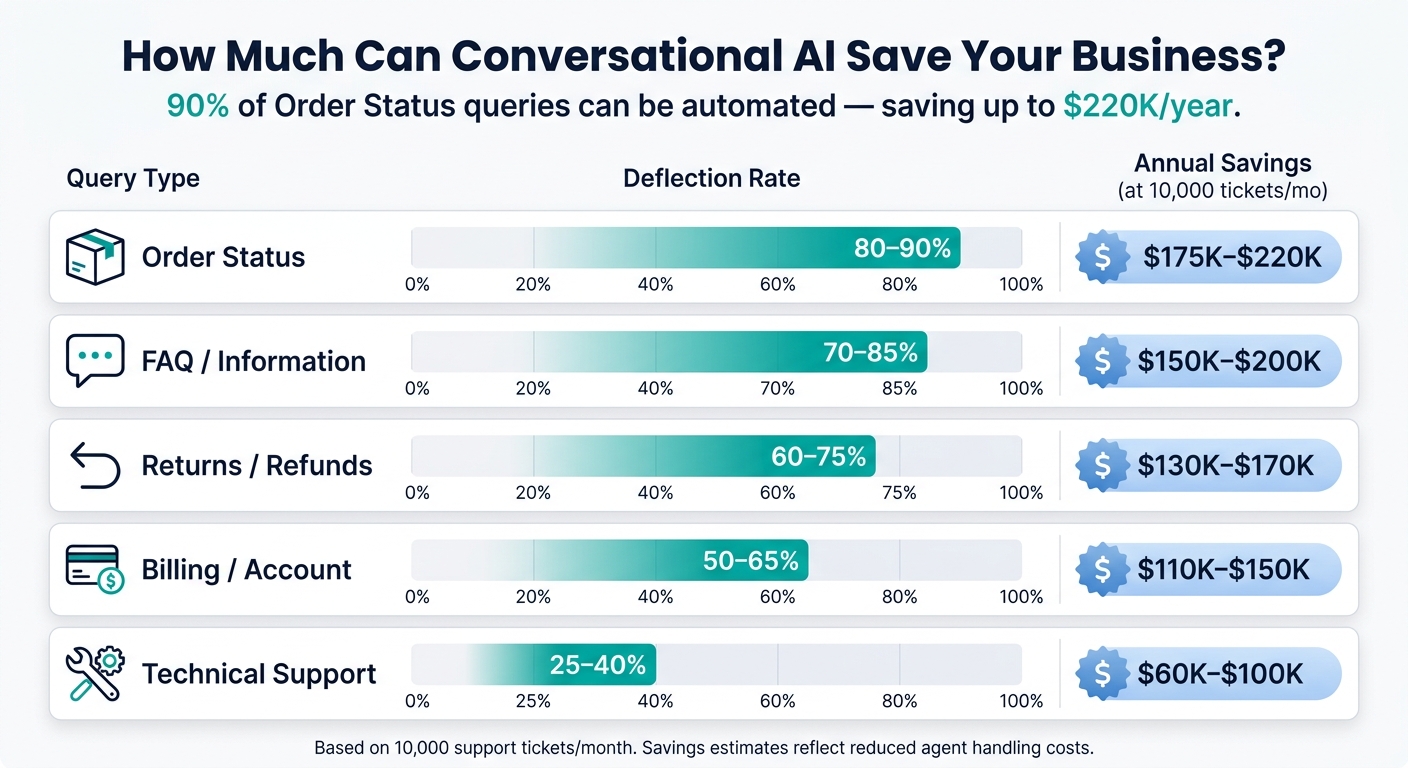
Conversational AI Query Deflection Rates & Annual Savings by Type
Once your website content is tailored for U.S. audiences, the next step is to craft conversations that feel genuinely helpful - like interacting with a knowledgeable human, not a machine. This involves understanding visitor needs and designing AI responses that align with those expectations.
Mapping Visitor Journeys and Automation Goals
To create meaningful AI interactions, start by analyzing visitor behavior. Metrics like time spent on a page, scroll depth, and repeat visits can reveal user intent and help you trigger relevant prompts[6][7].
For example, high exit rates on FAQ pages or frequent cart abandonments highlight friction points. These moments are prime opportunities for well-timed AI interventions. A targeted prompt could answer a lingering question, guide users toward completing a purchase, or collect lead information before escalating to a human agent.
By identifying these critical points, you can set clear goals for automation - whether it’s reducing repetitive questions, simplifying decision-making, or improving lead capture. These insights lay the groundwork for creating conversation flows that feel tailored and purposeful.
Building Conversation Flows for U.S. Website Visitors
Generic chat widgets are a missed opportunity. Instead, customize the opening message based on the page’s context. For instance, on a pricing page, the AI could ask, “Need help figuring out which plan is right for you?” On a product page, it might surface common questions specific to that item[8].
A unified widget that seamlessly transitions between AI and live agents ensures a smoother experience for users[8]. For more complex responses, use progressive disclosure: start with a concise answer and offer users the option to dive into additional details. This keeps the conversation focused and easy to follow.
The impact of well-structured conversation flows can be significant, especially for businesses managing high volumes of customer interactions. For example, automating common queries like order status updates can deflect up to 90% of those requests, translating into substantial cost savings. Here’s a breakdown:
| Query Type | Deflection Rate | Annual Savings (at 10,000 tickets/mo) |
|---|---|---|
| Order Status | 80–90% | $175K–$220K |
| FAQ / Information | 70–85% | $150K–$200K |
| Returns / Refunds | 60–75% | $130K–$170K |
| Billing / Account | 50–65% | $110K–$150K |
| Technical Support | 25–40% | $60K–$100K |
By aligning conversation flows with user behavior, you can create more efficient and satisfying interactions. The next step? Ensuring these interactions reflect a consistent brand personality.
Defining a Consistent Persona and Tone
Once your conversational flows are in place, it’s crucial to make sure your AI assistant represents your brand effectively. Think of it as an extension of your identity - 72% of CX leaders believe AI agents should embody their brand’s personality[9].
Start by defining 3–5 adjectives that describe your brand voice. Be specific - terms like “warm but direct” are more actionable than vague descriptors like “friendly”[9][10]. Create a vocabulary guide with words the AI should always use and those it should avoid, ensuring consistency in tone. To make the assistant feel like part of your brand, give it a name, a simple avatar, and use your primary brand colors[11][13].
While the tone can adapt to different contexts, the overall voice should remain consistent. For example, a detailed and enthusiastic tone might suit product inquiries, while a calm and empathetic approach works better for complaints. As Yvonne Gando, Senior Director of UI/UX at Salesforce, explains:
"It's not about personality in the marketing sense; it's about character in the systems sense."[12]
Lastly, establish clear boundaries for the AI. Define when it should handle queries independently and when to escalate to a human agent. This balance ensures the AI remains helpful without overstepping, especially in sensitive situations[12].
Implementing Conversational AI with ChatSpark
Once you've defined your conversation flows and brand persona, it's time to bring everything to life. ChatSpark simplifies this process, from setup to a full-scale launch across your site.
Setting Up ChatSpark for Your Website
To get started, head over to chatspark.io and create your first AI agent in the dashboard. During setup, you'll need to configure a few details:
- An internal name for your team
- A public-facing name visitors will see
- A 64x64 pixel avatar
- Your brand colors to ensure the widget matches your site's design
Next, select one of three tone presets: Professional, Friendly, or Casual. Write a welcome message and include up to five suggested prompts to guide visitors - these act as conversation starters tailored to your most common queries.
To embed the widget on your site, copy the JavaScript snippet from your dashboard and paste it just before the closing </body> tag. If you're using a CMS like WordPress, install the dedicated plugin and input your AI Agent ID. For Shopify, Wix, or Squarespace, use their "Code Injection" settings to add the snippet.
Once your agent is set up and embedded, you're ready to integrate knowledge sources.
Connecting Knowledge Sources and Tools
The quality of your AI's responses depends on the data it has access to. ChatSpark offers three main ways to train your AI:
- File uploads: Add content in formats like PDF, Word, CSV, or TXT.
- Website crawling: Train the AI using content from your entire site or specific pages, such as FAQs or return policies.
- Rich text editor: Manually input training data directly into the dashboard.
Each "page" of training data is capped at 750 words. For example, the Basic plan provides 25 pages, equating to around 18,750 words of training material.
If you use helpdesk platforms like Zendesk, Freshdesk, Salesforce, or Intercom, ChatSpark can import resolved tickets while automatically removing personal information (e.g., names, emails, phone numbers). This allows you to use real support history without privacy concerns.
For more advanced integration, the Pro plan ($129/month) unlocks tools like Zapier, Calendly, Google Calendar, and Square. These integrations can automate actions like bookings or payments directly within the chat. To create context-aware triggers, add class="cs-trigger-agent" to any button or link on your site. Use specific trigger text, such as "Tell me more about the Enterprise Plan", rather than generic labels like "Help" - this ensures the AI has a clear starting point for the conversation.
Once your data and tools are connected, the next step is to test everything thoroughly.
Testing and Launching the AI Assistant
Before making your AI assistant live, use the preview icon in the ChatSpark dashboard to simulate visitor interactions. Test common questions, edge cases, and fallback behaviors to ensure your setup is solid. A good fallback, like a automated lead capture form requesting a name, email, and phone number, should activate when the AI can't answer a query or when a visitor requests a human agent.
To ease into the launch, start with a pilot run on a high-traffic page, such as your pricing or FAQ page. This controlled approach helps you identify any gaps in the AI's knowledge and refine its responses without affecting your entire site. Once you're satisfied with its performance, expanding to the rest of your site is a breeze using the same dashboard tools.
Measuring and Improving Your Conversational AI
Once your AI assistant is live, the work doesn’t stop there. To keep it performing at its best, you’ll need to measure its performance and make continuous refinements.
Tracking Key Performance Metrics
To understand how well your AI is doing, focus on three important metrics:
- AI Resolution Rate: This measures how often your assistant resolves conversations without needing human help. A good target is between 70% and 85%.
- Fallback Rate: This tracks how often your AI says, "I don't understand." If this rate is over 10%, it’s a sign that your knowledge base needs improvement.
- Knowledge Coverage: This shows how much of your business content the AI has been trained on. Aim for coverage above 80% [14].
| Metric | Target Benchmark | What It Tells You |
|---|---|---|
| AI Resolution Rate | 70% – 85% | How well the AI handles conversations independently [14] |
| Fallback Rate | < 10% | Gaps in training data or understanding [15] |
| Knowledge Coverage | 80%+ | Completeness of AI training on your business content [14] |
If your resolution rate falls below 70%, it could mean users are hitting dead ends. This not only frustrates customers but can also hurt conversions and drive up support costs.
Using Data to Improve AI Performance
Improving your AI starts with understanding where it struggles. Most platforms provide a list of unanswered questions - review these weekly and update your training data to fill those gaps [14]. Over time, these small, consistent updates can make a big difference.
Also, pay attention to where users drop off during conversations. If people abandon a flow at a certain point, it’s worth revisiting that section. Simplify the language, adjust the flow, and test your changes to see if engagement improves. By continuously refining these areas, you can ensure your AI stays effective as it evolves.
Maintaining and Scaling for U.S. Businesses
Keeping your training data up to date is critical. Things like product pricing, policies, and services can change frequently. Conduct quarterly reviews to audit your training data, update outdated content, and ensure fallback responses are still relevant. For businesses operating across multiple states, make sure region-specific details - like shipping zones, taxes, or service availability - are accurate.
Scaling your AI as your business grows is straightforward. Add new knowledge pages as needed and set up more trigger points on your site. If your conversation volume increases, upgrading your plan can help manage the growth. For instance, ChatSpark’s Plus plan charges $0.40 per regular ticket without per-seat fees [15], helping you keep costs predictable even as traffic spikes.
Conclusion: Getting the Most Out of Conversational AI
In today’s fast-paced world, conversational AI has become a critical tool for U.S. businesses. With 90% of consumers expecting responses within 10 minutes, an AI assistant ensures timely engagement while cutting down on support costs. Whether it’s 2:00 PM Eastern or 11:00 PM Pacific, an AI assistant provides instant replies, addressing one of the main reasons customers leave: slow response times. Plus, with 40–80% of support questions being simple, repetitive tasks, AI can handle these efficiently, freeing your team to focus on more complex, high-value interactions.
To make the most of conversational AI, it’s all about starting with the basics. Review your content structure, create smooth conversation flows, and set up clear escalation rules for when a human touch is necessary. Placing the assistant on your busiest pages ensures it’s working where it matters most. Over time, you can measure its performance, refine its responses, and expand its capabilities.
Consistency in your brand voice is key. Your AI assistant should represent your brand seamlessly, meeting U.S. expectations for professionalism and reliability. Escalation rules act as safeguards, ensuring that sensitive issues - like billing or compliance concerns - are passed to human agents who can handle them appropriately.
Think of conversational AI as a continuous process, not a one-and-done setup. Regular updates, such as filling in content gaps, refining conversation flows, or refreshing pricing and policy information, can significantly improve both customer satisfaction and operational efficiency over time.
Ready to dive in? Start by tackling your most frequent queries, like support FAQs or lead generation. Deploy your assistant on three to five high-traffic pages and review sample conversations weekly for the first month or so. With this focused approach, you’ll quickly see the benefits of conversational AI in action.
FAQs
What’s the fastest way to make my site content AI-ready?
Getting your site content ready for ChatSpark requires careful attention to quality and organization. Start by using clear and specific titles. For example, opt for How to Reset Your Password instead of something vague or generic.
Structure your content effectively by incorporating headers, bullet points, and consistent formatting. This makes it easier for users to find the information they need quickly.
Focus on uploading the most essential materials, such as:
- FAQs
- Pricing details
- Company policies
Avoid cluttering your content with irrelevant materials like promotions or unrelated information. Lastly, double-check that all your content is accurate, current, and consistent with your brand's tone and messaging. This ensures your site is not only helpful but also reflects your brand's identity.
How do I know when the AI should hand off to a human?
Setting up a system with hard and soft triggers for handoffs is essential to ensure smooth transitions between AI and human support. Here's how it works:
- Hard triggers are for urgent or critical situations. These include cases like when a customer explicitly requests to speak with a human or when sensitive issues arise, such as billing disputes or legal concerns. These triggers ensure immediate escalation to a human agent to address the matter appropriately.
- Soft triggers are more subtle and based on patterns. For instance, they might activate when the AI detects low confidence in its responses, identifies negative sentiment in customer messages, or notices repeated unresolved questions. These triggers help preemptively route the conversation to a human before frustration builds.
Strive for an escalation rate of around 10–15%. This strikes a balance between maintaining operational efficiency and delivering high-quality support when human intervention is necessary.
Which metrics should I monitor first after launch?
When evaluating how well your AI is serving customers and delivering results, it's crucial to focus on metrics that align with these goals. Start with resolution rates and containment rate - these indicate how effectively your AI handles issues without needing human intervention.
Keep an eye on first response time to ensure users are getting timely assistance, and use customer satisfaction scores to gauge the quality of interactions. If your AI is designed to drive leads, metrics like lead capture rates and task completion rates can help measure how well it guides users and contributes to revenue growth.