AI feedback analysis helps businesses quickly process customer feedback from surveys, support tickets, social media, and more. By using Natural Language Processing (NLP) and Machine Learning (ML), companies can identify trends, detect issues, and act on insights faster than traditional methods. Here's a quick breakdown:
- Centralize Feedback: Gather feedback from all platforms into one system.
- Automate Sentiment Analysis: Use AI to classify feedback as positive, negative, or neutral.
- Spot Patterns with NLP: Categorize feedback into themes like product quality or customer service.
- Real-Time Alerts: Set notifications for critical feedback to address issues immediately.
- Turn Insights Into Action: Use findings to prioritize tasks, improve products, and reduce churn.
Advanced strategies include predictive analytics to foresee trends and training AI on company-specific data for better accuracy. Combining AI automation with human review ensures context and empathy remain part of the process. Track metrics like CSAT, churn rates, and resolution times to measure success. Tools like ChatSpark simplify this process by consolidating feedback and providing actionable insights.
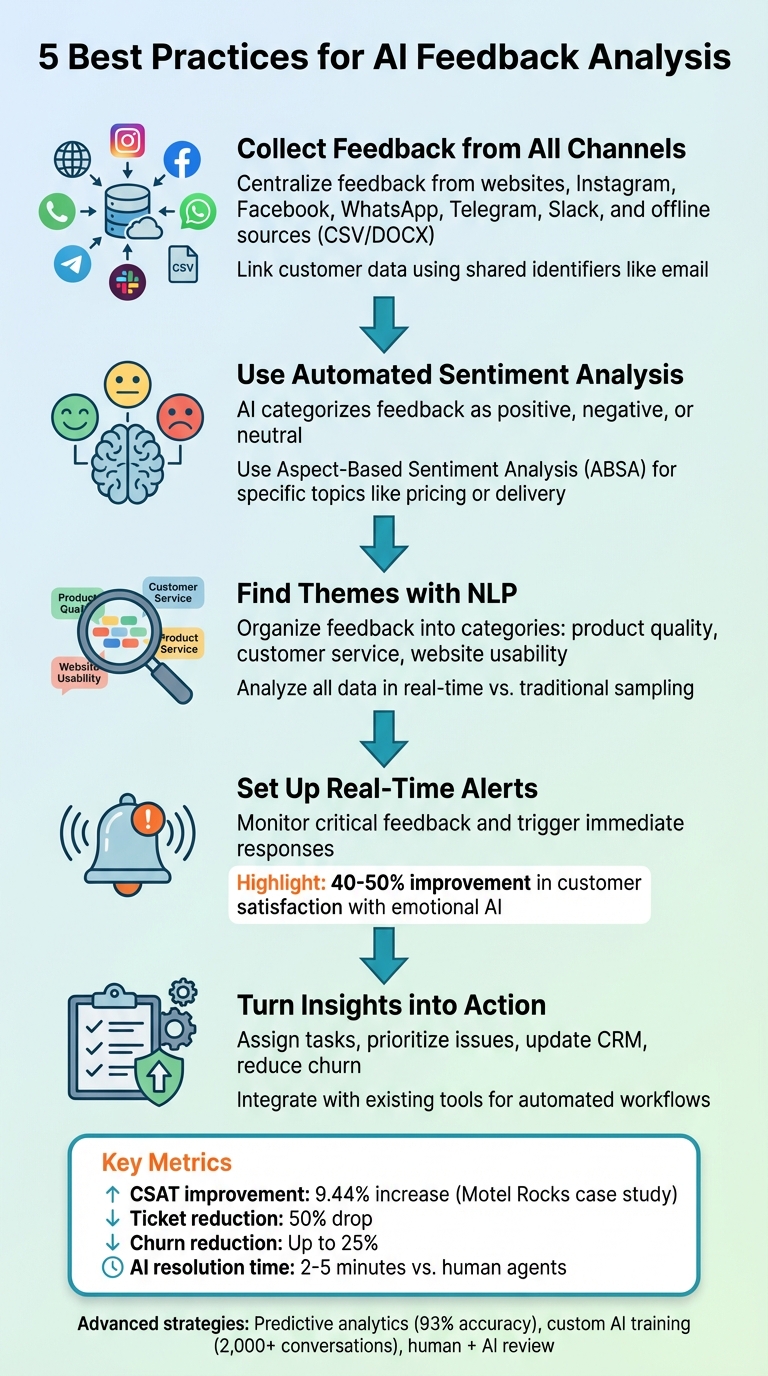
5-Step AI Feedback Analysis Best Practices Framework
How We Turned Customer Feedback into Actionable Insights with AI (In Just 2 Hours!)
Checklist: Best Practices for AI Feedback Analysis
To make the most of AI feedback analysis, it’s essential to follow a structured process that transforms scattered customer input into actionable insights. Here’s how to do it effectively.
1. Collect Feedback from All Channels in One Place
Start by centralizing feedback from every channel into a single, unified system. Tools like ChatSpark make this seamless by capturing conversations from platforms like websites, Instagram, Facebook, WhatsApp, Telegram, and Slack. This consolidation allows AI to process massive amounts of data at once, eliminating the need for manually sorting through fragmented sources [7][4].
Offline data, such as CSV or DOCX files, can also be uploaded for analysis [7]. To further streamline the process, platforms often link feedback from the same customer using shared identifiers like email addresses [7].
"The first technical step is to connect these disparate sources into a unified feed for your AI to analyze." – Team Mosaic [4]
Once feedback is centralized, the next step is to dive into sentiment analysis.
2. Use Automated Sentiment Analysis
Sentiment analysis categorizes feedback as positive, negative, or neutral. It starts by gathering unstructured text from various touchpoints and cleaning it - removing spam and irrelevant characters [8][9]. AI models then assign a sentiment score to each piece of feedback, while more advanced tools use Aspect-Based Sentiment Analysis (ABSA) to link opinions to specific topics like pricing or delivery speed [8][9].
To ensure accuracy, customize AI models with terms specific to your industry. However, human oversight remains crucial to catch subtleties like sarcasm or nuanced cultural references that AI might miss [5][9].
3. Find Themes and Patterns with NLP
Natural Language Processing (NLP) helps organize feedback into categories such as "product quality", "customer service", or "website usability." This makes it easier to spot recurring themes and visualize trends across your data [6][5].
Unlike traditional sampling methods, AI can analyze all the data in real time [10]. Start by cleaning and normalizing the information - transcribing audio and fixing errors - then train the AI to recognize your company’s specific terminology [3][10][4]. Adding metadata, like customer profiles and interaction history, provides even deeper context for analysis [10].
"NLP is the engine that allows AI to understand human language... decipher complex B2B jargon, industry-specific acronyms, and the subtle intent behind a customer's words." – Team Mosaic [4]
Once trends are identified, real-time monitoring ensures you can act on them immediately.
4. Set Up Real-Time Monitoring and Alerts
Real-time monitoring helps you respond to urgent issues before they escalate. Set up alerts for critical feedback, such as negative sentiment from high-value accounts or mentions of specific keywords [4][9]. For example, you could create a workflow where negative comments from VIP customers trigger a two-hour service response [9].
Some companies use emotional AI to detect feelings like frustration or disappointment, leading to improvements in customer satisfaction scores of 40% to 50% [4]. By linking sentiment analysis to automated actions, feedback can be routed directly to account managers or support teams as soon as it’s flagged [4][9]. This approach ensures problems are addressed promptly, rather than discovered during periodic reviews [4].
5. Turn Insights into Action
Once patterns and sentiments are identified, use them to drive meaningful action. Assign tasks, prioritize urgent issues, or update your CRM with customer concerns [4][9]. Define clear goals, such as reducing churn, improving first-contact resolution, or speeding up product development [4]. By integrating AI insights with existing tools, you can automatically summarize recurring requests for product teams or route critical complaints to the right personnel [4].
"The era of manual, reactive customer feedback analysis is over. The question is no longer if you should adopt AI, but how quickly you can build a strategy that turns customer conversations into your most valuable asset." – Team Mosaic [4]
Advanced Strategies for Better AI Feedback Analysis
Advanced methods can provide deeper insights and refine your feedback analysis approach.
1. Use Predictive Analytics to Spot Trends
Predictive analytics helps identify potential issues before they escalate. By analyzing patterns across thousands of interactions and sentiment data, AI can predict which customer groups are most likely to churn. It can also highlight product features that might trigger future complaints, enabling teams to address these proactively [11][2].
Linking feedback themes to key performance indicators (KPIs) like revenue or customer retention can quantify the business impact. For example, predictive models can estimate how operational changes might improve metrics like Customer Lifetime Value (LTV) or Net Promoter Score (NPS). Research shows that predictive NPS models can reach up to 93% accuracy when trained on robust datasets [11][12].
To maximize the value of predictive analytics, connect feedback to business outcomes. For instance, correlate specific complaints with churn rates or revenue loss. This approach turns abstract feedback into actionable insights, helping stakeholders prioritize solutions that directly boost loyalty and profits [1].
These predictive insights also enhance the customization of AI tools for your business needs.
2. Train AI Models with Your Business Data
Tailoring AI tools to your company's unique data ensures more precise and relevant analysis. Start by identifying critical challenges, such as reducing churn or speeding up product development. Then consolidate data from all available sources - like CRMs, helpdesks, and Slack - into a unified dataset. Ensure consistency by standardizing timestamps and removing personally identifiable information (PII) [13][9].
Google advises uploading at least 2,000 conversations per business unit to create a strong training foundation [13]. To further refine the model, provide at least 100 examples per question and 40 examples per answer choice [13]. Incorporate your company’s specific terminology, product names, and acronyms to help the AI understand concepts that generic models might miss [4][9].
For example, Motel Rocks reported a 9.44% increase in customer satisfaction (CSAT) and a 50% drop in support tickets by using domain-specific AI models [2]. Well-trained models can also achieve 80% to 90% agreement with human reviewers in real-world applications [9].
Once the AI is customized, human involvement becomes essential for refining its performance further.
3. Combine AI Automation with Human Review
AI is excellent at processing large volumes of feedback, but human expertise is crucial for interpreting context, recognizing sarcasm, and applying insights strategically [5][2]. While automation handles repetitive tasks, human oversight ensures that the analysis remains accurate and empathetic [5][4].
"Position AI as an augmentation tool, not a replacement. Use AI to handle the 80% of repetitive analysis so your team can focus on the 20% of high-value, strategic work that requires human empathy and critical thinking." – Team Mosaic [4]
To continuously improve AI performance, establish a feedback loop. Regularly review AI classifications and provide adjustments to enhance accuracy over time. Schedule recurring sessions with CX leads, bot trainers, and marketing teams to address questions like, "What caused the spike in handoff rates?" [14]. Use human reviewers to prioritize urgent issues - like security concerns or bugs - while AI handles lower-priority tasks such as feature requests [15].
Measuring Success: Key Metrics to Track
Tracking the right metrics is essential to understanding how AI feedback impacts your business. These metrics not only show how well AI is working but also help guide improvements. By focusing on the data, businesses can bridge the gap between AI insights and actionable strategies.
1. Customer Satisfaction Scores
Customer Satisfaction Score (CSAT) is a quick way to measure how happy customers are with an AI interaction, typically rated on a 1–5 scale. In the U.S., top AI systems often score between 4.2 and 4.5 out of 5[16]. Ideally, AI interactions should perform within 5–10 points of human agents[16].
For example, Motel Rocks, an online fashion retailer, used Zendesk Copilot for sentiment analysis. The result? A 9.44% boost in CSAT scores and a 50% drop in support tickets[2].
Other key satisfaction metrics include:
- Net Promoter Score (NPS): Measures customer loyalty by asking how likely they are to recommend your brand.
- Customer Effort Score (CES): Tracks how easy it is for customers to resolve an issue[17].
It’s also worth diving deeper into customer emotions during interactions. Emotional AI, which detects feelings like frustration or confusion, has helped some companies improve CSAT by 40–50%[4]. To stay on top of customer sentiment, deploy micro-surveys right after AI interactions. These can reveal when your AI needs fine-tuning[16].
2. Retention Rates and Churn Reduction
While satisfaction metrics capture short-term success, retention metrics highlight long-term impact. Churn rate - the percentage of customers who leave - can be reduced by up to 25% with AI-driven feedback analysis. AI helps identify customers who are at risk of leaving, often catching patterns that manual reviews miss[9, 28].
Another key metric is Customer Lifetime Value (CLV, which estimates the total revenue a customer will bring over time. AI can analyze sentiment data to pinpoint high-value customer segments and link emotional tone to business outcomes[17]. For instance, comparing churn rates between happy customers (Promoters) and unhappy ones (Detractors) can show how sentiment affects your bottom line[20].
Studies reveal that improving customer satisfaction from "poor" to "excellent" can reduce churn by 75% and nearly triple revenue growth over three years[17]. For example, Australian manufacturer RapidG centralized customer interaction data with Zendesk, cutting response times by 90%[18].
AI can also trigger proactive measures. If negative feedback is flagged, Customer Success Managers can step in before a customer decides to leave[9, 29].
3. Operational Efficiency Metrics
Operational efficiency metrics show how well your AI is streamlining processes. Key metrics include:
- Average Resolution Time (ART): Measures how long it takes to resolve an issue from start to finish. Leading AI systems handle routine queries in 2–5 minutes, much faster than human agents[16].
- Automation Rate: Tracks the percentage of interactions handled by AI. Advanced systems often automate 40–60% of interactions[16].
- Cost Per Resolution: Compares the cost of AI-resolved issues to human-resolved ones. AI interactions typically cost $1–$5, while human interactions range from $15–$25 in the U.S.[16].
For example, Rentman, a software developer, used Zendesk QA to analyze customer conversations and agent performance, achieving CSAT scores as high as 96%[18]. Similarly, Athena, a marketing consultancy, used Sprinklr Insights to monitor customer feedback across social media and reviews. This allowed them to identify emerging issues within 10 minutes while tracking over 850 topics at once[19].
Lastly, accuracy rate is crucial. Leading AI systems in the U.S. achieve 85–92% accuracy for routine queries[16]. If your AI accuracy drops below 75%, it could be causing more harm than good by frustrating customers and increasing the workload for human agents[16]. Always prioritize accuracy over speed - incorrect answers can erode trust and create more problems for your team[16].
Conclusion
AI feedback analysis moves you from guesswork to actionable customer insights. By centralizing feedback from all channels, automating sentiment analysis with NLP, setting up real-time alerts, and converting insights into action, you can build a system that delivers real results. Advanced strategies like predictive analytics, custom AI models, and human-in-the-loop workflows enhance your ability to spot churn risks and identify trends as they happen.
Tracking key metrics ensures you’re making a tangible impact. Metrics like CSAT scores, retention rates, resolution times, and automation rates help determine whether your AI system is driving meaningful outcomes or just adding noise. The real challenge isn’t collecting data - it’s creating a system that turns feedback into action.
This is where tools like ChatSpark make all the difference. ChatSpark consolidates feedback from platforms like websites, Instagram, Facebook, WhatsApp, Telegram, and Slack into one system, streamlining responses and driving faster action. With 24/7 automated support and analytics capabilities in over 85 languages, it ensures feedback isn’t just gathered - it’s acted on. For instance, Cynet saw a 14-point CSAT increase and a 47% ticket deflection rate by using AI to handle common Tier 1 issues[4]. This shows how the right AI tools can transform customer feedback into a powerful resource.
Start with the basics, monitor the right metrics, and expand as you uncover deeper insights. Listen to your customers and take immediate action.
FAQs
How can AI feedback analysis help improve customer satisfaction?
AI feedback analysis helps businesses better understand their customers by pinpointing sentiments, preferences, and concerns with precision. By leveraging tools like sentiment analysis and topic modeling, AI can sift through massive amounts of feedback from sources like surveys, social media posts, and support tickets. This makes it easier for companies to identify key issues and areas for improvement without delay, paving the way for more tailored and proactive solutions.
Automating this process not only saves time but also uncovers insights that might have gone unnoticed in manual reviews. AI can even monitor customer sentiment in real-time, enabling teams to address problems quickly and focus on solutions with the greatest impact. When customers feel genuinely heard and appreciated, their satisfaction and loyalty naturally grow, creating a stronger and more positive connection with the brand.
Why is human oversight important in AI-driven feedback analysis?
Human oversight plays a key role in ensuring AI-driven feedback analysis produces insights that are both accurate and aligned with your business objectives. While AI excels at processing massive datasets quickly, it often takes human judgment to interpret subtle nuances, confirm results, and identify biases that could skew the algorithms.
By integrating human expertise, businesses can create more balanced feedback systems, fine-tune AI models as they evolve, and uphold trust by prioritizing data privacy. This partnership ensures that AI insights translate into ethical and actionable steps to enhance the customer experience.
How does predictive analytics help prevent customer churn?
Predictive analytics plays a key role in reducing customer churn by spotting patterns in behavior or feedback that signal dissatisfaction or disengagement. AI models dig into data like customer sentiment from feedback, support interactions, and usage habits to uncover early warning signs. This gives businesses the chance to act quickly and address concerns before customers decide to leave.
AI tools also streamline the process by automating the analysis of massive datasets. This not only saves time but boosts accuracy, ensuring companies can respond faster to emerging issues. With this data-driven insight, businesses can craft tailored retention strategies, keep customers engaged, and ultimately increase their lifetime value.