Support teams lose time and money when they rely on outdated manual workflows. AI copilots are changing this by providing instant answers, automating repetitive tasks, and improving team efficiency. Here’s what you need to know:
- Manual workflows waste time. Agents spend hours navigating disconnected tools, searching for information, and switching between tasks. This inefficiency costs businesses millions annually.
- AI copilots solve these problems. They instantly pull relevant data, automate routine tasks, and provide accurate, context-aware responses.
- The results are clear. Companies using AI copilots see faster response times, reduced errors, and increased productivity - saving both time and money.
Example: Microsoft’s AI copilot reduced case handling time by 12% and boosted resolution rates by 10%. Meanwhile, Guide achieved a 3x higher reply rate on sales leads with AI-powered outreach.
AI copilots don’t just speed up workflows - they transform how businesses operate, helping teams focus on meaningful work while delivering better outcomes.
What Pre-CoPilot Workflows Look Like
Before AI tools entered the picture, support agents had to navigate a maze of disconnected systems just to handle even the simplest customer inquiries. Their process often began with fragmented intake channels - email, WhatsApp, Instagram DMs, and live chat - where urgent requests were easily buried. From there, agents manually selected tickets from a general queue, spending valuable time just figuring out which issues to prioritize [5].
Once a ticket was chosen, the real juggling act began. Agents opened multiple windows to piece together the context they needed. They’d check the CRM for account details, dig through chat histories for previous conversations, and consult back-office systems for order or billing information [5]. If they needed additional information, they’d turn to knowledge bases that were often outdated or message colleagues on Slack, waiting for a response. Every reply had to be written from scratch or by hunting for pre-written macros, which added the challenge of matching the right tone and following strict guidelines [5].
And the work didn’t stop there. Agents had to jump between tools for tasks like resets, updates, and invoicing - an administrative load that could eat up as much as 600 hours over 18,000 tickets [6] [7]. After resolving an issue, they still needed to summarize the case, apply tags, and log the outcome [5] [7]. On top of that, compiling customer histories across multiple platforms added another layer of inefficiency.
Manual Workflow Example in Customer Support
Here’s a typical scenario: An agent receives a billing ticket about a duplicate charge. They start by pulling up the customer’s account details in the CRM. Next, they switch to the payment processor to review the transaction history and then consult the internal wiki for the refund policy. If the wiki is outdated, they message a colleague on Slack and wait for clarification. Once they’ve crafted a response, they return to the ticketing system to tag the issue as "billing", write a summary, and mark it as resolved. This entire process, even for a single repetitive question, can cost a company around $10 when factoring in salary, benefits, and overhead [6].
Where Manual Workflows Fail
These manual workflows come with serious drawbacks, leading to delays, errors, and inefficiencies. Long wait times frustrate customers, while inconsistent answers and repetitive tasks contribute to agent burnout. Even handling a simple "empty" ticket - opening, reading, tagging, replying, and sending - takes about two minutes. Multiply that by thousands of daily inquiries, and the costs quickly spiral out of control [7].
The problem is only getting worse. By 2025, 75% of support professionals reported facing an overwhelming surge in customer inquiries [7]. Manual processes simply can’t keep up. The stakes are high: 43% of customers say one bad support experience is enough to make them walk away from a brand forever, and poor customer service puts $3.7 trillion in global sales at risk annually [7].
Task switching adds to the chaos, costing workers up to 40% of their productive time. On average, it takes 23 minutes to fully refocus after an interruption [9]. For agents managing 126 business emails a day - roughly one every four minutes - this constant switching creates cognitive overload. This "hyperactive hive mind" workflow, dominated by endless unstructured conversations, makes it nearly impossible for agents to focus on meaningful work [9].
These inefficiencies highlight the urgent need for an AI-driven copilot to streamline and simplify customer support workflows.
Where Time and Accuracy Break Down
Manual workflows take a real toll on productivity, and the numbers paint a clear picture. Knowledge workers switch between apps and tools more than 300 times a day [12]. Each switch forces the brain to reset through processes like "goal shifting" and "rule activation", which involve updating working memory and adapting to new task rules [9]. The kicker? It takes about 23 minutes to fully refocus after just one interruption [9]. On top of that, retrieving scattered information only adds to the chaos.
Here’s the reality: workers spend an average of three minutes on a single task before switching to another [9]. This constant task switching can eat up as much as 40% of productive time [9], with an estimated global cost of $450 billion annually [9]. These inefficiencies highlight the need for an AI solution to streamline workflows, reduce manual errors, and save time.
Another massive time sink is searching for information. Knowledge workers spend 2.5 hours daily hunting through disconnected systems [12]. For example, when a customer asks about an order, agents might have to dig through the CRM for account details, sift through emails for recent updates, and navigate the order management system for shipping info. Each platform comes with its own login, search syntax, and navigation quirks. By the time they piece it all together, the customer has likely been waiting far too long.
Manual data entry compounds these problems. Sales reps, for instance, dedicate around 70% of their time to non-revenue tasks due to administrative burdens [14]. This not only slows them down but also leads to errors - typos and mistakes that disrupt billing, shipping, and other critical processes. In 2025, Schneider Electric discovered that the "Toggle Tax" - the inefficiency of switching between tools like Outlook, Teams, and Salesforce - was so frustrating that their 5,000 sellers across 30 countries stopped updating the CRM entirely [14].
"You're paying for 50 people but getting productivity of 34. Because 16 people-worth of time disappears into context hunting." - Stuart Leo, Founder, Waymaker [12]
Accuracy also suffers over time. When decisions made in Slack don’t get recorded in the CRM, agents end up relying on outdated or incomplete data. Data and analytics leaders estimate that 19% of their organization's data is inaccessible, often hiding critical business insights [13]. Without access to real-time updates from meetings, emails, or documents, agents face a constant "reset" with every customer interaction [11]. They may forget promises made during earlier calls or miss important details flagged by other teams. This leads to duplicated work, inconsistent responses, and a frustrating experience for everyone involved.
These inefficiencies make a strong case for adopting an AI-powered workflow. By consolidating tools and automating repetitive tasks, businesses can save time, improve accuracy, and create smoother operations overall.
How an AI CoPilot Changes the Flow
An AI Copilot removes the "let me check" pause by instantly pulling information from meetings, chats, documents, and emails - all in real time[3]. Instead of hopping between systems, agents get immediate answers to detailed questions without leaving their workspace. It also takes over repetitive tasks like drafting client emails, summarizing meetings, and creating proposal drafts, letting agents focus on tasks that require more strategic thinking[16][18].
In February 2024, Microsoft introduced Copilot to nearly 10,000 support agents in its customer service division. Under the leadership of Nathalie D'Hers, CVP of Microsoft Digital, this rollout delivered a 12% cut in case handling time and boosted successful case resolutions by 10%[3]. Microsoft's HR team also saw benefits, cutting initial response times for employee questions about benefits and payroll by 26%[3].
"Our HR service professionals are able to handle employee inquiries more efficiently. So far we are seeing a 26 percent reduction in initial response time thanks to Copilot." - Kathleen Hogan, Executive Vice President and Chief People Officer, Microsoft[3]
Unlike earlier AI tools, copilots retain context across ongoing conversations, avoiding the need for a "context reset"[11]. They operate within specific environments by using metadata, usage logs, and application states, rather than relying on abstract patterns alone. This approach ensures more accurate responses and allows the AI to remember constraints and assumptions when addressing follow-up questions[11]. These advancements open the door to impactful applications across various departments.
Beyond just answering questions, copilots can propose next steps based on context, identify high-potential prospects, craft tailored responses, and break complex goals into actionable tasks[17][18]. For example, in December 2025, Guide, a San Francisco-based software company, implemented Amplemarket's Duo Copilot for sales. According to Co-Founder and CEO Troy Sultan, the AI saved him over two hours per week on manual prospecting and achieved a 3x higher reply rate on leads by uncovering social signals and reactivating closed-lost opportunities in the CRM[15].
Features That Enable Better Workflows
The measurable improvements delivered by copilots stem from three standout features: instant data retrieval, context-aware reasoning, and seamless system integration.
- Instant data retrieval allows copilots to search across vast knowledge bases, including CRM records, support tickets, internal wikis, and email threads, surfacing relevant information in seconds[21][10].
- Context-aware reasoning ensures the AI operates within the specific guidelines, workflows, and approved resources of an organization[10][11].
- Seamless integration with tools like Salesforce, Dynamics 365, or Slack enables agents to stay within their familiar environments without disruptions.
Another key feature is multi-turn continuity, where the copilot retains context throughout a conversation. This means agents can refine their requests, adjust parameters, or narrow down focus without starting over each time[11]. For critical decisions, many organizations use a "suggest-only" mode where the AI provides recommendations, but human approval is required before execution[11][10].
AI CoPilot Use Cases
Real-world examples highlight the versatility of AI copilots:
- Customer Support: For delayed shipments, the copilot retrieves order details, checks shipping logs, and drafts a full response with tracking information and an updated delivery estimate.
- Cross-Departmental Data Retrieval: A sales rep preparing for a demo call can quickly check if a prospect has any unresolved support tickets. The copilot scans the support database, providing ticket history, sentiment analysis, and resolution status, enabling the rep to address concerns proactively.
- Complex Inquiries: When an employee asks HR about parental leave policies, 401(k) matching, and remote work eligibility in one message, the copilot extracts information from multiple documents, summarizes the key points, and provides links for further details. This capability contributed to a 26% reduction in HR response times[3].
- Lead Qualification and Outreach: Guide used Amplemarket's Duo Copilot to analyze social signals, job changes, and CRM activity, identifying high-intent prospects. The system drafted personalized outreach emails and reactivated closed opportunities, resulting in a 3x higher reply rate on leads[15].
"Duo Copilot is saving me probably at least two hours per week... The real value I get from Duo is that outbound is happening that otherwise just wouldn't be happening!" - Troy Sultan, Co-Founder and CEO, Guide[15]
- Proactive Issue Detection: The copilot monitors live customer interactions for changes in sentiment. If a customer becomes frustrated, it flags the issue for escalation and suggests de-escalation scripts, preventing minor frustrations from escalating into major complaints[21].
These capabilities ensure that AI copilots not only streamline routine workflows but also empower teams to act faster, make data-driven decisions, and deliver better outcomes every day.
Example Workflow Across CRM, Projects, and Finance
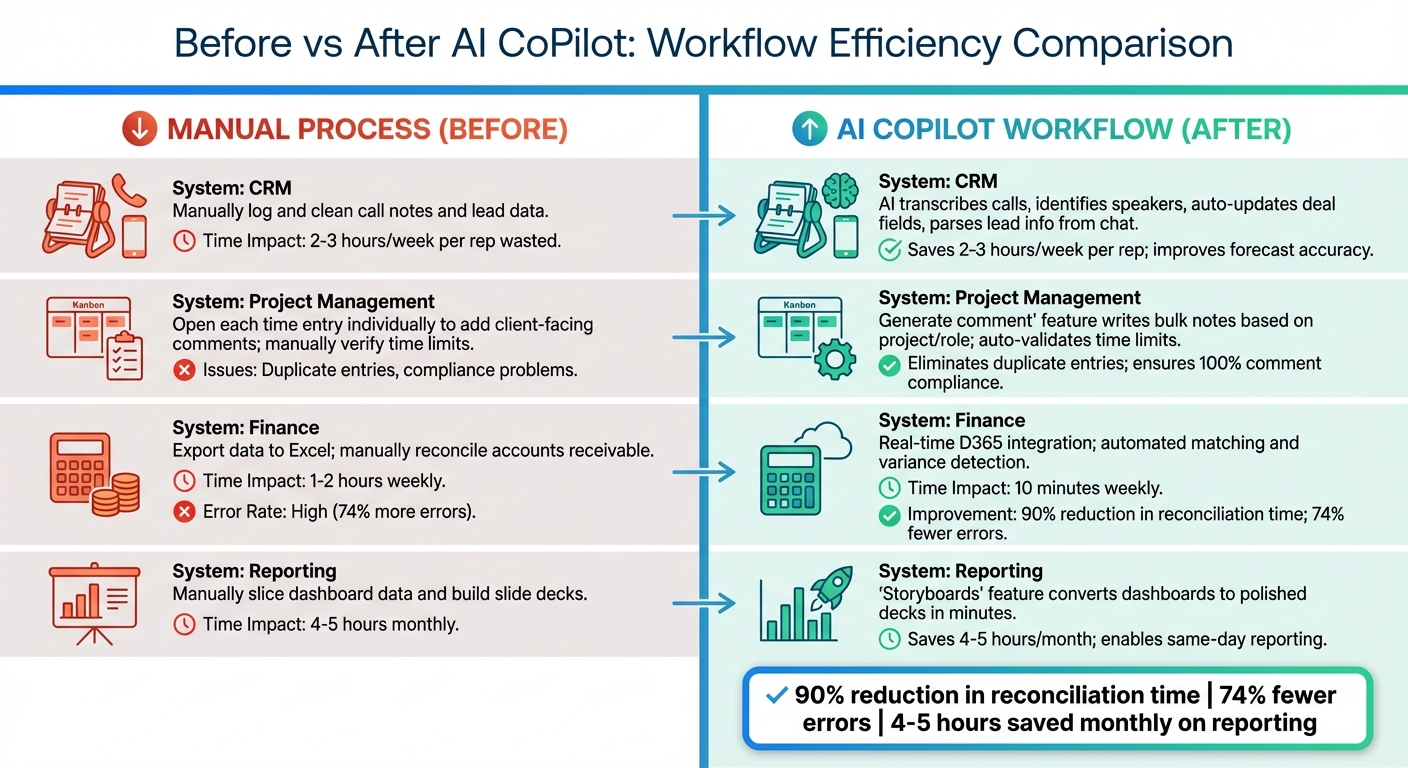
Before vs After AI CoPilot: Workflow Efficiency Comparison
Imagine a sales manager preparing for a quarterly business review. They need data from Salesforce (pipeline status), Dynamics 365 Project Operations (billable hours), and Dynamics 365 Finance (revenue reconciliation). Without an AI CoPilot, this process involves exporting spreadsheets from each system, manually aligning account names, and resolving discrepancies. It’s a tedious task, taking 4–6 hours and often leading to errors.
Now, with an AI CoPilot, the process becomes much simpler. The manager can type a single query: "Generate Q1 business review for Enterprise accounts with revenue over $50,000." In minutes, the system pulls CRM data, validates billable hours, flags discrepancies, and delivers a polished, review-ready deck. The task that once took hours is now completed in under 10 minutes, reducing reconciliation errors by 74% [2][24][25].
In early 2026, Ninth Post, a media operations company, revamped its manual workflows by introducing an AI-driven system to handle data reconciliation across Google Analytics, CRM, and ad dashboards. Previously, this required 25 hours of manual verification each month. Post-implementation, the AI handled data extraction, variance detection, and Slack reporting autonomously. This change cut response times by 62% and saved the company around $50,000 annually in operational costs [2].
Another example comes from Fabrikam Ironworks, a manufacturer that implemented a "Lead Catcher" workflow in 2025 using Microsoft Copilot Studio and Power Automate. When a customer inquired about "Modern Doors" via chat, the system captured the intent, split the customer’s name into CRM-ready fields, created a lead, and sent a personalized email - all without human intervention [17]. This eliminated manual data entry and ensured immediate follow-up, showcasing how automation can transform workflows.
Comparison Table: Before and After AI CoPilot
Here’s a breakdown of how AI CoPilot workflows have improved processes across various systems:
| System | Manual Process (Before) | AI CoPilot Workflow (After) | Specific Improvement |
|---|---|---|---|
| CRM | Manually log and clean call notes and lead data. | AI transcribes calls, identifies speakers, auto-updates deal fields, and parses lead info from chat [17][23]. | Saves 2–3 hours/week per rep; improves forecast accuracy [23]. |
| Project Management | Open each time entry individually to add client-facing comments; manually verify time limits. | "Generate comment" feature writes bulk notes based on project/role; auto-validates time limits [22]. | Eliminates duplicate entries; ensures 100% comment compliance [22]. |
| Finance | Export data to Excel; manually reconcile accounts receivable (1–2 hours weekly). | Real-time D365 integration; automated matching and variance detection (10 minutes weekly) [24]. | 90% reduction in reconciliation time; 74% fewer errors [24][2]. |
| Reporting | Manually slice dashboard data and build slide decks (4–5 hours monthly). | "Storyboards" feature converts dashboards to polished decks in minutes [25]. | Saves 4–5 hours/month; enables same-day reporting [24]. |
These examples highlight how AI-powered workflows simplify tasks, improve accuracy, and save time, making them a game-changer for businesses.
Why Instant Answers Build Trust and Adoption
Real-time, accurate answers don't just improve workflow efficiency - they also play a key role in building trust with customers and driving adoption among agents.
When customers receive immediate responses, they no longer view support as a frustrating bottleneck. Instead, it becomes a valuable resource. Take ServiceNow's "Autonomous Workforce" bot as an example. By February 2026, this system had resolved 90% of Level 1 IT support tickets related to networking, hardware, and software access. In specific categories, the resolution rate exceeded 99% - a remarkable achievement. Its success wasn’t just about speed; the bot relied on a live configuration management database to ensure accuracy, eliminating guesswork.
"A system that says 'I can resolve 70% of this autonomously and here's exactly why I'm escalating the other 30%' is more trustworthy than one that hallucinates an answer."
– Nenshad Bardoliwalla, Group VP for AI Products, ServiceNow[4]
This level of transparency fosters trust, which is vital for both customers and agents. Holland America Line demonstrated this with "Anna", an AI-powered virtual agent launched in 2024 using Microsoft Copilot Studio. Handling thousands of conversations weekly, Anna delivers faster, more personalized responses to both customers and advisors. This allows human staff to focus on complex guest needs while the AI handles routine inquiries. The result? A system that inspires confidence and proves the value of AI in streamlining support workflows[8].
For agents, trust in AI tools directly impacts their willingness to adopt them. Large-scale rollouts show how these tools improve efficiency and reduce workload. When CoPilot was deployed to 6,500 agents between April and July 2023, organizations saw a 12% decrease in case resolution time and a 10% increase in independently resolved cases. Even more telling, 77% of agents opted to keep using the tool because it eliminated repetitive tasks, allowing them to focus on more meaningful work[7,54]. This kind of performance ensures that AI tools become an integral part of daily operations.
Impact on Individual Agents vs Teams
The benefits of an AI CoPilot can differ significantly depending on whether you're looking at individual performance or team-wide results. For individual agents, the focus shifts to saving time and tackling more complex tasks. On the other hand, teams benefit from handling larger workloads while maintaining quality standards. These distinctions become clear when analyzing specific performance metrics.
For example, IT administrators using Copilot saw task completion times for routine activities - like email summarization and report generation - drop by 29.79% [26]. Software engineers experienced a 15% increase in productivity, resolving an additional 0.33 tickets per week, which translates to roughly 48 extra tickets per month [27]. They also spent 20% less time actively coding and reduced pull request (PR) review time by 26%, saving approximately three full workdays per ticket. Additionally, they merged 10% more pull requests weekly, indicating a shift toward higher-impact work [28].
Teams also demonstrated notable improvements. A global B2B SaaS company with 600 agents used a governed AI copilot to tackle a 28% surge in backlog caused by a pricing announcement. Within just 30 days, the team achieved an 18% sustained ticket deflection rate, reduced their median resolution time from 18.4 hours to 14.0 hours, and boosted customer satisfaction scores by 4.6 points for matched intents [1]. In another case, an AI-driven solution autonomously resolved 90% of Level 1 IT support tickets [4].
Interestingly, the benefits aren't distributed evenly across all levels of expertise. Senior engineers reduced their coding time by 22%, while junior developers saw only a 4% reduction. This highlights the importance of critical evaluation skills when working with AI outputs and underscores the need for tailored training to maximize the effectiveness of these tools [28].
Metrics Comparison: Individual vs Team Results
A deeper dive into the data shows how these impacts differ between individuals and teams:
| Metric | Individual Agent Impact | Team/Organizational Impact |
|---|---|---|
| Task Completion Time | 29.79% reduction [26] | 60% reduction in specific processes (e.g., order processing) [26] |
| Throughput | +0.33 tickets resolved per week [27] | +48 tickets resolved per month [27] |
| Capacity Boost | 15% increase in individual capacity [27] | 1–2 additional medium-to-large deliverables per month [27] |
| Work Cycle Efficiency | 20% reduction in coding time [28] | 10% increase in merged pull requests per week [28] |
| Quality Scores | Less repetitive manual work [3] | +4.6 point increase in customer satisfaction [1] |
| Volume Handling | Faster "first drafts" [16] | 18–20% total ticket deflection [1] |
| Seniority Impact | 22% coding time reduction (Seniors) [28] | 4% coding time reduction (Juniors) [28] |
This comparison highlights how AI copilots can drive efficiency and productivity at both individual and team levels, offering tailored benefits depending on the context.
From Interruption to Flow State
The transition from fragmented workflows to uninterrupted productivity is making a big impact. In 2024, Microsoft introduced its internal AI copilot across departments, saving an impressive 900,000 hours in just three months [31]. That’s like giving an entire workforce the time to focus on more meaningful tasks.
This kind of efficiency directly tackles some of the biggest productivity drains. Studies reveal that task switching can eat up to 40% of productive time, with workers needing an average of 23 minutes to fully regain focus after an interruption [32]. By maintaining complete context, AI eliminates the constant need to reload information when switching between tools or tasks. The result? A smoother workflow with fewer mental disruptions.
The numbers speak for themselves. Microsoft’s HR team sped up initial response times by 26%, while support teams saw a 12% reduction in case handling time and a 10% improvement in resolution rates [3]. At Impact Networking, power users saved 9 hours per week, which translates to an extra workday per person. For a 100-user deployment, this added up to an annual net ROI of $1.72 million [20]. Similarly, HUB International’s deployment of AI to over 20,000 employees boosted productivity by 85% in specific use cases, with workers saving an average of 2.5 hours per week [19].
"AI didn't just speed up the work. It changed what the work is." – CODERCOPS [33]
This shift highlights the power of an AI copilot in transforming workflows from frequent interruptions to a state of sustained focus.
Beyond just saving time, AI enables professionals to focus on higher-value tasks. For example, it can handle 60% of routine inquiries - like tracking orders, resetting passwords, and triaging basic issues - that would otherwise disrupt workflow [29]. PepsiCo demonstrated this with its unified workspace powered by AI, achieving 90% to 95% daily active usage among its 320,000 employees. The AI acted as a "GPS for customer service", delivering instant answers and allowing agents to concentrate on solving complex problems instead of wasting time gathering information [30]. The result? Work doesn’t just get faster - it becomes more meaningful, with professionals freed up to focus on what truly matters.
FAQs
What systems should an AI copilot connect to first?
To get the best results from an AI copilot, it should first integrate with systems that house the most relevant and actionable data - think CRM platforms, project management tools, and financial systems. These are the backbone of many operations, containing key information that supports decision-making and automation. By tapping into these systems, the AI can deliver real-time insights, simplify workflows, and establish trust with users. Focusing on these core integrations right away ensures tangible benefits before branching out to other internal tools for more specialized tasks.
How do you prevent an AI copilot from giving wrong answers?
Preventing incorrect responses from AI copilots involves a combination of strategies aimed at improving accuracy and reliability. Start by establishing clear boundaries and workflows to guide the AI's behavior, ensuring it operates within defined parameters. For tasks that are critical or high-stakes, human oversight is essential - this provides an additional layer of review and judgment that AI alone cannot guarantee.
Another key approach is leveraging feedback loops to help the system learn and improve over time. This means regularly analyzing its outputs, identifying errors, and using that information to fine-tune future responses. Routine audits of the AI's performance, coupled with quick adjustments when issues arise, are also crucial for maintaining quality and trustworthiness.
By combining these safeguards - structured prompts, human verification, and continuous refinement - you can significantly reduce errors and enhance confidence in the AI's capabilities.
Which workflows deliver ROI fastest with an AI copilot?
Workflows that bring quick ROI with an AI copilot typically focus on automating repetitive tasks and delivering clear, measurable results. Key areas where AI can make a big difference include:
- Sales: Gaining pipeline insights or speeding up deal processes.
- Customer support: Providing faster responses to customer inquiries.
- Document creation: Simplifying tasks like drafting and reporting.
These workflows not only save time but also improve overall efficiency. For instance, studies reveal that employees can save 20–30 minutes per document and cut 30–40% of the time spent on creating first drafts.