An AI copilot for business is a smart assistant integrated directly into the tools you use daily, like CRMs, email platforms, and project management software. Unlike standalone chatbots, these copilots work alongside you, understanding your workflow, anticipating your needs, and helping complete tasks faster and more efficiently.
Here’s what you need to know:
- Purpose: AI copilots assist with repetitive tasks (e.g., drafting emails, updating records) so you can focus on higher-level work.
- Technology: Powered by Large Language Models (LLMs) and Natural Language Processing (NLP), they use real-time data to provide tailored, context-aware support.
- Key Features: Embedded in your tools, proactive suggestions, and multi-step workflow management.
- Impact: Users report up to 70% productivity gains, faster task completion, and improved efficiency across teams like sales, customer service, and operations.
- Market Growth: By 2025, the AI copilot market is expected to generate over $13 billion annually.
AI copilots are reshaping how businesses operate by simplifying workflows and making day-to-day tasks easier to manage.
What an AI CoPilot Is
An AI copilot is essentially a smart, conversational assistant built directly into the business tools your team already uses - whether it's your CRM, email platform, project management software, or customer service system. Unlike standalone chatbots that work independently, copilots are deeply integrated into these systems. They interpret your actions in real time and offer relevant help without requiring you to jump between apps.
The technology that powers these copilots is built on Large Language Models (LLMs), which serve as the reasoning engine, and Natural Language Processing (NLP), which enables them to understand plain English commands. Jared Spataro, CMO of AI at Work at Microsoft, likens the LLM to a car engine - crucial, but only one part of a larger system that needs wheels, steering, and fuel to function effectively [9]. To make their suggestions more relevant, copilots also employ Retrieval-Augmented Generation (RAG), which taps into internal data, past interactions, and ongoing tasks. This ensures that the assistance they provide is tailored to your specific business needs [5].
These copilots work under a human-in-the-loop model, meaning you’re always in control, reviewing and approving the AI’s suggestions. Essentially, they’re there to enhance your capabilities by taking care of repetitive tasks - like entering data, drafting emails, or finding information - so you can spend more time on strategic decisions and creative problem-solving.
"You remain the pilot-in-command, but with a conversational, intuitive AI-powered partner that handles the heavy lifting." - Candace Marshall, VP of Product Marketing, Zendesk [3]
The impact of AI copilots is already being seen in productivity metrics. For example, product teams have cut backlog review time by 50% to 60%, while knowledge retrieval is up to five times faster. Overall, these improvements have led to productivity increases ranging from 25% to 55% [1]. These gains are made possible by the streamlined workflows copilots introduce.
At their core, copilots operate on an "Observe → Reason → Assist" workflow. They monitor your activity and data, use LLMs to determine what you might need next, and then provide targeted help - whether that’s drafting a response, updating a record, or pulling up the right piece of information [1].
"We're just telling the system, 'Hey, do this task,' but behind the scenes, the copilot orchestrates complex business workflows to deliver a result that would have previously required the user to access multiple actions." - Carlos Lozano, Director of Product Management for Salesforce AI [5]
How AI CoPilots Differ From Traditional AI Assistants
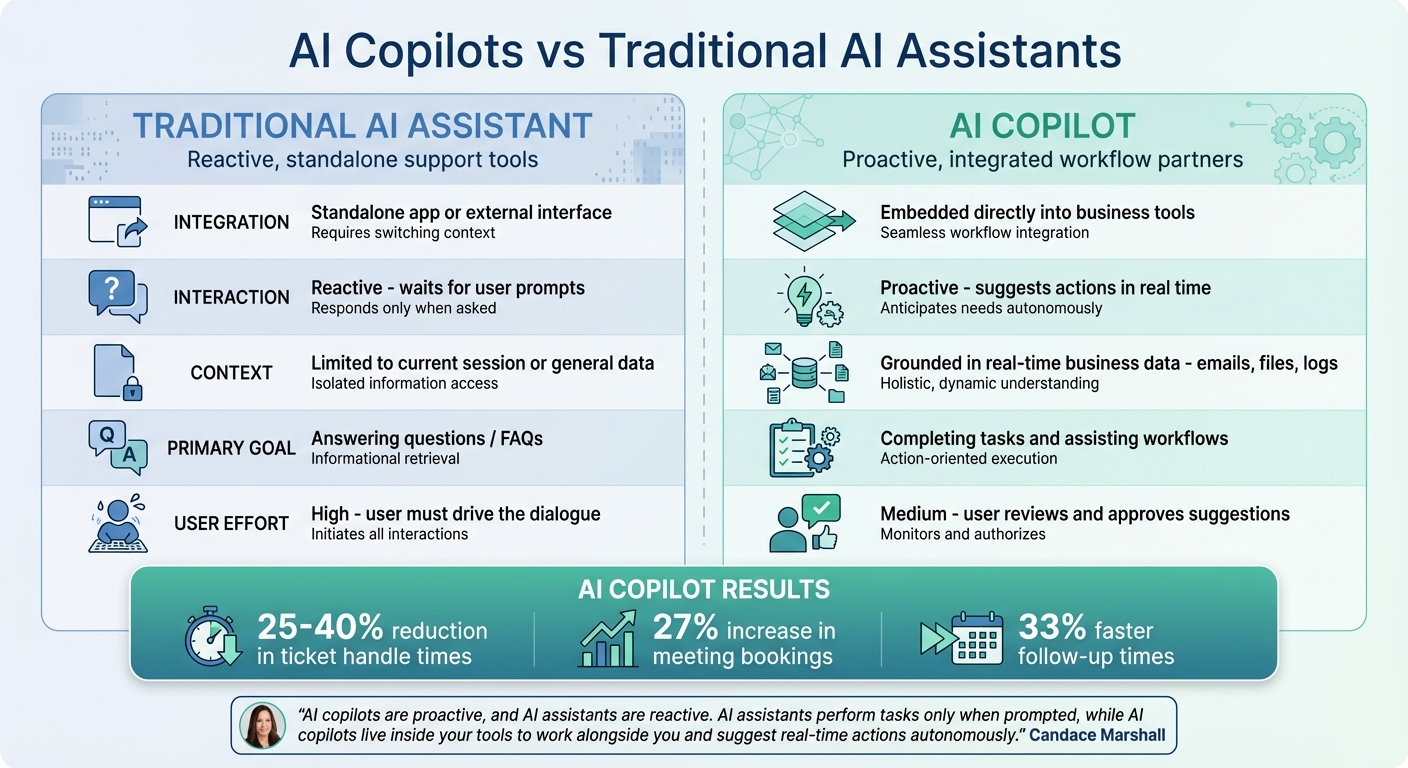
AI Copilots vs Traditional AI Assistants: Key Differences
The difference between AI copilots and traditional AI assistants marks a major evolution in how businesses leverage artificial intelligence. While both use similar underlying technologies, their integration, behavior, and functionality set them apart in significant ways.
Integration
Traditional AI assistants operate as separate tools, requiring users to switch between apps. For example, you might ask a traditional assistant a question, get an answer, and then manually transfer that information back into your workflow. AI copilots, on the other hand, are embedded directly into the tools you already use - whether it's your CRM, email client, document editor, or project management software [3][12]. This deep integration means copilots have access to real-time context, like the email you're composing, the customer record you're viewing, or the code you're writing. This setup allows them to seamlessly assist without disrupting your workflow.
Proactivity
Traditional AI assistants are purely reactive - they only respond when you prompt them. AI copilots, however, are designed to anticipate your needs. They actively monitor your work environment and can suggest actions before you even ask.
"AI copilots are proactive, and AI assistants are reactive. AI assistants perform tasks only when prompted, while AI copilots live inside your tools to work alongside you and suggest real-time actions autonomously." - Candace Marshall, Vice President, Product Marketing, AI and Automation, Zendesk [3]
For instance, if a copilot notices an urgent customer email, it can immediately draft a response, helping you resolve the issue faster.
Functionality
The capabilities of traditional AI assistants are often limited to answering questions or handling straightforward tasks like scheduling or retrieving information. AI copilots, however, are designed to handle more complex, multi-step workflows across various business systems [4][11]. For example, if you ask a copilot to process a refund, it can verify billing eligibility, calculate the refund amount, update records, and queue the approval - all without additional input from you [13][14]. Traditional assistants, lacking deep integration, simply can't manage such workflows [3][12].
The impact of these functional upgrades is clear. Businesses using AI copilots have reported significant results: support teams have seen ticket handle times drop by 25% to 40%, while sales teams have achieved a 27% increase in meeting bookings and 33% faster follow-up times [1].
Here’s a quick comparison of their key differences:
| Feature | Traditional AI Assistant | AI Copilot |
|---|---|---|
| Integration | Standalone app or external interface | Embedded directly into business tools |
| Interaction | Reactive (waits for user prompts) | Proactive (suggests actions in real time) |
| Context | Limited to current session or general data | Grounded in real-time business data (emails, files, logs) |
| Primary Goal | Answering questions / FAQs | Completing tasks and assisting workflows |
| User Effort | High (user must drive the dialogue) | Medium (user reviews and approves suggestions) |
The Role of Real-Time Data vs Static Training Data
What sets AI copilots apart from traditional AI systems is their ability to work with timely and relevant information. Traditional AI models rely on static datasets with knowledge cutoffs - often stuck in the past, like early 2022. This means they can't incorporate anything beyond their training period, leaving them with outdated insights [5].
AI copilots, however, address this gap by tapping into live data. Using a technique called grounding, copilots align their reasoning with your business's up-to-date information. By leveraging Retrieval-Augmented Generation (RAG), they dynamically pull data from sources like CRMs and internal databases, ensuring their responses reflect your business's current situation. Jared Spataro, CMO of AI at Work at Microsoft, highlights this approach:
"The critical pattern in using copilots in business right now is grounding the LLM in your own very particular data" [9].
This grounding method drastically reduces errors. Traditional models often produce plausible but incorrect responses - commonly referred to as hallucinations. In contrast, copilots query real-time databases and retrieve facts through API calls. Whether you need live inventory updates, recent warehouse credit usage, or the status of a customer’s latest order, copilots deliver accurate, fact-based answers instead of risky guesses [15].
The results speak for themselves. Businesses using copilots report faster ticket handling times (25–40%), sales follow-ups completed 33% faster, and a fivefold increase in knowledge retrieval speed. Product teams have also cut backlog processing times by up to 60% by analyzing live user feedback and project tickets through copilots [1]. These improvements highlight how seamlessly copilots integrate into workflows, transforming real-time business operations into a more efficient and reliable process.
Where AI CoPilots Fit in Business Workflows
AI copilots don’t work in isolation - they integrate directly into the tools teams already rely on daily. Instead of requiring employees to bounce between different applications, copilots bring intelligence and automation into familiar platforms like Microsoft 365, Salesforce, Dynamics 365, and customer service systems. This setup allows, for instance, a sales rep to summarize a customer call, update CRM records, and draft a follow-up email - all without leaving their primary workspace. By embedding so seamlessly, these copilots create a unified layer that connects and optimizes business data.
This integration relies on an orchestrator, a coordination layer that links the AI to various business data sources, such as emails, files, meetings, and databases. For example, if someone in finance needs a variance report, the copilot can pull live data from ledgers and bank statements to generate an instant response. Similarly, when an IT admin needs to onboard a new employee, the copilot can execute a predefined checklist across systems, with human approval where necessary.
Different teams use copilots in ways tailored to their specific workflows. Sales teams, for example, can use them to analyze call transcripts and product usage data, creating "health snapshots" for customer renewals. These snapshots might include details like license usage and unresolved support issues, enabling proactive outreach before contracts end. Customer service agents, on the other hand, can pull context from billing logs and account details to suggest solutions - like issuing partial credits - that only need a quick review before implementation. Operations teams can automate repetitive tasks, such as rotating credentials or setting up accounts and permissions for new hires, saving time and reducing errors.
The impact of these workflows is measurable. Take Commonwealth Bank of Australia: in October 2025, they introduced an AI copilot connected to their internal knowledge base to assist employees with IT issues. Over six months, it processed more than 2.3 million messages, allowing staff to focus more on customer support instead of troubleshooting technical problems [11]. Similarly, Morgan Stanley deployed a copilot powered by OpenAI to assist financial advisors. This tool pulls from a massive library of research and client data, automating tasks like compliance checks and report generation that would otherwise require time-consuming manual effort [11].
AI copilots are also evolving to operate autonomously, responding to triggers like incoming emails or new support tickets instead of waiting for manual input. This shift means they can handle complex, multi-step processes, transforming them from helpful tools into essential systems that streamline workflows across entire organizations.
Common Misconceptions About AI CoPilots
Let’s clear up some of the persistent myths surrounding AI copilots. One of the biggest misconceptions is that copilots are fully autonomous systems. They’re not. These tools are designed to work with humans, not operate independently. Unlike standalone AI agents, copilots rely on human oversight to review and approve their actions at every step [2][3]. This is a key distinction that lays the groundwork for understanding other common myths.
Another popular myth? That copilots will replace human jobs. The reality is quite the opposite. Copilots are built to enhance human productivity, not replace it. They excel at handling repetitive tasks - like summarizing meeting notes or drafting email responses - giving employees more time to focus on strategic, high-value responsibilities [1][3]. Ryan Goodman, Founder of DataTools Pro, captures this balance perfectly:
"Work that requires human accountability, typically requires a human in the loop." [4]
Even with advancements in automation, AI is projected to handle up to 30% of work hours by 2030. However, it still falls short when it comes to creative judgment and strategic decision-making, which are essential for more complex roles [11].
Another misconception is that copilots function like basic chatbots, offering generic, cookie-cutter responses. That’s far from the truth. Modern copilots are far more sophisticated, leveraging proprietary business data - like CRM records, internal emails, or meeting transcripts - to deliver tailored, context-specific insights [5][9]. As Jared Spataro, CMO of AI at Work at Microsoft, puts it:
"The critical pattern in using copilots in business right now is grounding the LLM in your own very particular data." [9]
How Businesses Use AI CoPilots Day to Day
AI copilots are transforming how businesses handle daily tasks, saving time and boosting efficiency. Take email management, for example. These tools can integrate with platforms like Outlook and Gmail to summarize lengthy email threads and draft replies that consider context from calendars and CRMs. This alone can save professionals hours each week that would otherwise be spent sifting through inboxes [7] [8].
In customer support, AI copilots assist teams by offering context-aware response suggestions during live chats, performing real-time sentiment analysis, and pulling up relevant interaction histories instantly. For IT departments, they handle routine issues like password resets, cutting ticket volumes by up to 74% [1] [17].
Sales teams are also reaping the benefits. AI copilots analyze CRM data to pinpoint leads, craft personalized outreach emails, and automate updates to records. These tools help sales professionals follow up faster and manage their pipelines more effectively [3] [5] [16].
Even data analysis becomes more accessible with AI copilots. They allow non-technical employees to ask questions in plain language - like "What were the top-selling products last quarter?" - and instantly receive answers. For Microsoft 365 users, this capability has led to a 70% increase in productivity, thanks to features like instant data summaries and forecasting [17] [19].
Carlos Lozano, Director of Product Management at Salesforce AI, sheds light on how these tools work behind the scenes:
"We're just telling the system, 'Hey, do this task,' but behind the scenes, the copilot is orchestrating a complex workflow of business processes and data to deliver a result that would have previously required the user to access multiple actions." [18]
The impact of AI copilots is evident across industries. IBM, for instance, reported saving 3.9 million hours in 2024 through AI automation [11]. Meanwhile, developers using AI copilots for coding and debugging complete tasks 55% faster [17]. These examples highlight how AI copilots have become a staple in modern business operations.
Key Capabilities to Look for in an AI CoPilot
Finding the right AI copilot means zeroing in on features that align with your business workflow. The best tools go beyond basic chatbots or standalone assistants, offering capabilities that truly elevate team efficiency and customer satisfaction.
Omnichannel Support
Your team likely operates across multiple platforms - Slack, Microsoft Teams, email, web portals, and social media are just a few examples. A robust AI copilot should integrate seamlessly with these environments, helping your team avoid constant app-switching. This kind of setup reduces cognitive overload and allows for instant responses to questions about orders, payments, or returns. The result? Quicker resolutions and happier customers [3]. Plus, having a unified system ensures data remains consistent and reliable across your enterprise [10].
Multilingual Capabilities
If your business spans countries and languages, multilingual support isn’t just a nice-to-have - it’s essential. Top-tier AI copilots can communicate fluently in over 100 languages, offering localized assistance tailored to users’ native tongues.
"With the capability to communicate in many different languages, AI copilots provide unparalleled global support to users in their native tongue, regardless of their location." – Moveworks [10]
This feature isn’t just about translation; it’s about delivering accurate, localized service. For instance, multilingual support can cut down customer issue resolution times by 25–40% and help sales teams follow up with leads 33% faster [1]. Industries like legal or healthcare, where precise terminology is critical, benefit immensely from AI tools that handle specialized language requirements without errors.
Customizable Branding
Maintaining a consistent brand voice across all channels is another must-have. A customizable AI copilot ensures your company’s tone and style are reflected in every interaction, from customer support to marketing communications [1].
But it’s not just about tweaking surface-level settings. The ideal copilot should pull from internal data - like CRM records and company documents - to generate responses that align with your brand’s identity. Whether it’s drafting emails, handling customer questions, or creating marketing content, consistency is key to maintaining a professional and unified presence [10].
Why AI CoPilots Are Becoming Business Infrastructure
AI copilots have shifted from being experimental tools to becoming core components of business operations. The stats speak volumes: 85% of organizations have integrated AI agents or copilots into their workflows, and 70% of Fortune 500 companies are actively using these systems [20][21]. This transformation is reshaping how businesses function.
The financial benefits of embedding copilots into workflows are hard to ignore. Companies report 26–31% reductions in operating costs and 40–45% efficiency gains in areas like customer service and finance [6]. For smaller businesses, the return on investment ranges from 132% to 353% over three years [20]. PepsiCo, for example, achieved a daily active usage rate of over 90% after implementing AI into their operations [6].
AI copilots have also proven their worth in proactive roles. Morgan Stanley's AI copilot boasts a 98% adoption rate among wealth advisors, significantly improving content retrieval accuracy and saving hours of manual effort. Similarly, Providence Health physicians using the Nuance DAX Copilot save over two hours weekly on documentation, reducing burnout and boosting patient satisfaction [6].
"It'll be unthinkable not to have intelligence integrated into every product and service. It'll just be an expected, obvious thing." – Sam Altman, CEO, OpenAI [20]
The market growth potential is enormous. The enterprise AI market is expected to expand from $14.4 billion in 2025 to $126 billion by 2035, with the AI copilot segment projected to generate over $13 billion annually by the end of 2025, growing at a rate of more than 150% year-over-year [6].
"The playing field is poised to become a lot more competitive, and businesses that don't deploy AI and data to help them innovate in everything they do will be at a disadvantage." – Paul Daugherty, Chief Technology and Innovation Officer at Accenture [20]
From streamlining operations to redefining cost structures, AI copilots have firmly established themselves as indispensable to modern business infrastructure.
FAQs
What makes a tool a true AI copilot?
A true AI copilot is more than just a tool - it’s an intelligent assistant designed to work within business workflows. By leveraging advanced AI, such as large language models (LLMs), it doesn’t just automate tasks; it also delivers real-time insights and supports decision-making. What sets it apart is its ability to interpret user input, retain context, and handle complex actions effortlessly. Through multi-turn conversations, deep contextual understanding, and smooth integration into systems, it boosts productivity in a way that basic automation simply can’t match.
How does an AI copilot use my company’s live data safely?
An AI copilot works within a secure system to handle live data safely, balancing access and privacy. These systems are designed to control who can access the data, process it securely, and adhere to strict privacy regulations. This setup ensures that sensitive information stays protected while the AI provides real-time insights. Businesses can gain the advantages of live data without risking security or confidentiality.
What should we check before rolling out an AI copilot?
Before rolling out an AI copilot, make sure it’s equipped to manage multi-turn conversations, align with your specific workflows, and work smoothly with your current systems. These features are key to delivering precise, real-time support while meeting the unique demands of your business.