Constantly switching between tabs is killing your productivity. The average worker toggles between apps over 1,100 times daily - every 40 seconds. This disrupts focus, costs time, and drains mental energy. Worse, regaining deep focus takes over 23 minutes, leading to decision fatigue and errors.
Here’s why replacing tools won’t help:
- Switching tools is expensive: It wastes time on onboarding, increases costs, and doesn’t solve the root issue.
- Tool overload is the problem: Most tools don’t integrate well, forcing manual toggles and creating mental clutter.
- Employees resist new tools: Complex systems often go unused, leading to inefficiency and frustration.
The smarter solution? Use AI CoPilots to unify access to your tools. Instead of replacing systems, they bring everything into one interface, cutting down interruptions and making workflows smoother. For example, Schneider Electric saved thousands of hours by using AI to reduce toggles between CRM, email, and internal tools.
Key benefits of AI CoPilots:
- Reduce app switches from 1,200/day to minimal.
- Automate data entry and sync across platforms.
- Save up to 15 hours/week for leaders and teams.
- Lower error rates and improve decision-making speed.
Stop paying the "Toggle Tax." Focus on simplifying access, not swapping tools, to reclaim time and reduce stress.
How Modern Work Became Multi-Tab by Default
The rise of multi-tab chaos can be traced back to companies piling on specialized tools - CRM systems for customer data, Slack for communication, project management platforms for deliverables, and analytics dashboards - without retiring outdated systems. Today, enterprises manage an average of over 1,000 applications [7]. This tool overload has turned employees into the glue holding disconnected systems together.
Here’s the catch: most of these tools weren’t built to work seamlessly with each other. Without proper integration, employees are left to manually bridge the gaps, often switching between 22 different applications just to complete a single supply-chain transaction. In extreme cases, this can mean 3,600 toggles in a single day [8].
Platforms like Slack and Teams, designed to keep everyone connected, have created a new issue: constant interruptions. These "always-on" tools demand availability, even during deep work, leading to micro-interruptions that derail focus. It’s no wonder 43% of employees report feeling fatigued from constant context switching [7]. Switching apps every 40 seconds makes sustained focus nearly impossible [5].
Ironically, project management tools - meant to streamline workflows - have added to the fragmentation. By breaking projects into micro-tasks like "outline", "research", "draft", and "edit", they’ve created artificial transitions. Each step often requires a new tab, a different system, and a mental reset, turning what should be a unified process into a patchwork of disconnected actions.
And then there’s the psychological toll. Open tabs act like nagging reminders of incomplete tasks, adding to mental clutter. With the average knowledge worker juggling 37 open tabs at any moment [1], browsers have shifted from being helpful tools to sources of stress.
These scattered systems highlight a bigger issue: simply swapping out tools won’t fix the deeper problem of constant context switching.
Why Replacing Tools Is Rarely the Answer
When dealing with the chaos of too many open tabs or inefficient workflows, the first impulse might be to overhaul everything by replacing tools. But here's the kicker: swapping tools rarely fixes the real problem - the constant mental juggling caused by context switching.
Switching tools comes with hefty financial and operational costs. It pulls resources away from crucial product development and spikes API maintenance expenses [4]. Add to that the extended onboarding time required to train teams on unfamiliar systems, and scalability takes a hit [4]. And let’s not forget the staggering toll of context switching itself: teams lose up to 9% of their annual time, which translates to nearly five full weeks of productivity gone [7]. Replacing tools doesn’t eliminate this "toggle tax"; it merely trades one set of frustrations for another. The cycle of disruption continues.
Then there’s the human side of the equation. Forcing teams to abandon tools they’re comfortable with often leads to resistance and morale issues [7]. When tools are overly complicated or demand too much manual data entry, employees simply stop using them. This neglect results in messy CRM systems that no longer reflect reality [10]. As AI Implementation Strategist Mike Allton puts it:
"The more complex the tools became, the less the humans used them" [10].
Frustrated employees often resort to unauthorized workarounds, which can compromise data accuracy and reliability.
The problem is even more pronounced among younger workers. 20% of Gen Z employees have left jobs due to outdated or overly complicated tools, and another 49% say they’d consider switching companies over difficult-to-use systems [7]. Learning curves for new tools further eat into productivity, adding to the frustration.
At its core, the issue isn’t about the tools themselves - it’s about inefficiencies in accessing information. Replacing your CRM or other systems doesn’t magically reduce the mental strain of constant transitions. Instead, it forces your team to adapt to new navigation rules while still dealing with the same cognitive overload.
Tool Replacement vs. Tool Access: What's the Difference?
Tool replacement involves swapping out your current software - whether it's a CRM, project management system, or IDE - with a completely new platform. While this might sound like a fresh start, it often comes with hefty migration costs, time-consuming retraining, and the risk of vendor lock-in. Plus, the data ends up siloed in the new system, which can lead to further complications and inefficiencies.
On the other hand, a unified access layer takes a different approach. Instead of forcing you to abandon your existing tools, it connects them through APIs and integrated access. This creates a single interface where your team can pull data from multiple platforms without leaving the tools they already use [11][12].
"Standardizing around a single AI tool doesn't work when different models are better at different tasks... consolidate the access layer, not the options" [11].
- JetBrains' Colette Des Georges
This shift in focus - from replacing tools to optimizing access - can make a big difference. For example, JetBrains has upgraded their IDEs to let developers use various AI models directly within their coding environment. This eliminates the need to constantly switch between browsers, keeping workflows smooth and uninterrupted [11].
Salesforce has also embraced this philosophy with their "Customer Zero" initiative. By integrating Slack-native Einstein bots, they enabled employees to pull data from existing systems directly into Slack. This system handled 370,000 queries and saved an impressive 50,000 employee hours in just three months [12]. The benefit? No more disruptive tab switching - data retrieval happens right where the work is being done.
This approach ties into what CRM analyst Brent Leary calls the proximity principle:
"The closer AI is to where work is already happening, the greater its ROI" [12].
How AI CoPilots Reduce Context Switching
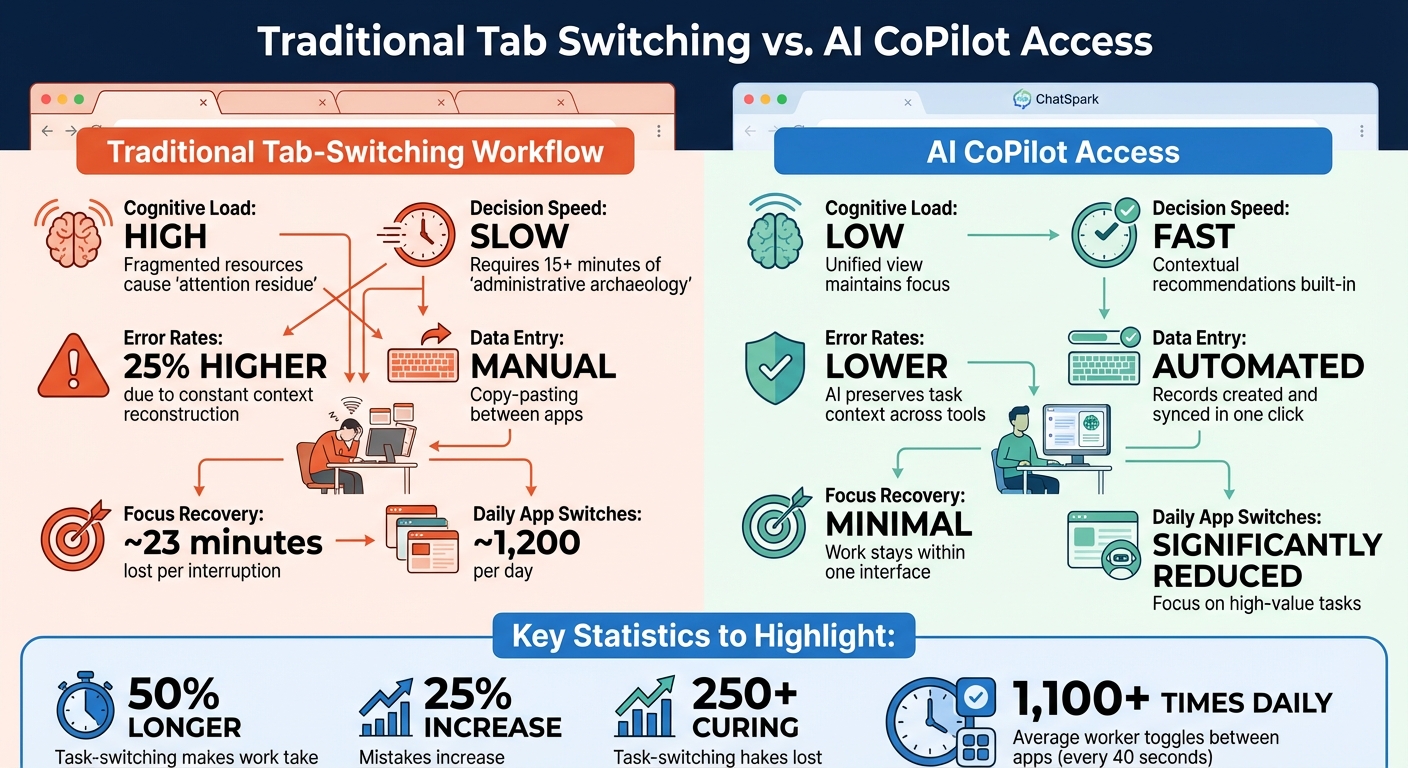
Traditional Tab Switching vs AI CoPilot Workflow Comparison
AI CoPilots simplify your workflow by cutting out the constant need to jump between tabs, making your day more efficient and less fragmented.
Take ChatSpark CoPilot, for example. Instead of replacing your tools, it brings them together in one place. No more bouncing between your CRM, email, analytics dashboard, and internal documents. The AI pulls all the data you need into a single, streamlined interface. This means fewer interruptions and quicker decisions. Imagine being able to check a customer's purchase history, support tickets, and email trail - all while drafting a response - without switching screens. That’s the power of "context integrity", where the AI remembers what you're working on and why, saving you from having to mentally reset every time you change tasks.
Switching between tasks isn’t just annoying - it’s costly. Every interruption leaves part of your attention stuck on the previous task, slowing you down.
In late 2025, Schneider Electric rolled out ChatSpark CoPilot for Sales to 5,000 employees in 30 countries. The AI scanned email signatures to update Salesforce with just one click and pulled pricing details and product specs into Outlook drafts. This eliminated what they referred to as the "Toggle Tax" - the hidden cost of switching between Outlook, Salesforce, and Teams. The result? Enough time saved to match the output of hundreds of new hires[10].
"The most profitable thing you can do with AI is use it to remove the friction from the workflows you already have. You need to stop paying the Toggle Tax."
- Mike Allton, AI Implementation Strategist, The AI Hat[10]
Traditional Tab Switching vs. AI CoPilot Access
| Feature | Traditional Tab-Switching Workflow | AI CoPilot Access |
|---|---|---|
| Cognitive Load | High; fragmented resources cause "attention residue"[5] | Low; unified view maintains focus[13] |
| Decision Speed | Slow; requires 15+ minutes of "administrative archaeology"[14] | Fast; contextual recommendations are built-in[10] |
| Error Rates | 25% higher due to constant context reconstruction[5] | Lower; AI preserves task context across tools[13] |
| Data Entry | Manual; copy-pasting between apps[10] | Automated; records created and synced in one click[10] |
| Focus Recovery | ~23 minutes lost per interruption[5] | Minimal; work stays within one interface[13] |
| Daily App Switches | ~1,200 per day[12] | Significantly reduced[16] |
The numbers are clear: frequent task-switching makes work take 50% longer and increases mistakes by 25%[5]. AI CoPilots change the game by consolidating your tools and keeping your workflow seamless. This leads to faster decisions, fewer errors, and a noticeable boost in productivity across different roles.
Examples Across Sales, Ops, and Leadership
Sales
Sales teams often juggle multiple tools like CRM platforms, email systems, LinkedIn, and intent dashboards just to prepare for a single call. AI CoPilots simplify this by merging all these tools into one interface. A great example is Schneider Electric, which introduced ChatSpark CoPilot to 5,000 users across 30 countries in December 2025. This move saved enough administrative time to equate to hiring hundreds of additional representatives[10].
At Guide, Co-Founder and CEO Troy Sultan used ChatSpark CoPilot from July to December 2025 for founder-led sales. The AI handled prospecting and multichannel outreach, saving Sultan over two hours weekly. Not only did reply rates triple, but AI-generated leads showed a 109% higher interest compared to manual efforts[18]. With a unified task list, Sultan no longer needed to switch between tabs for account research. By bringing workflows into one place, ChatSpark CoPilot eased mental strain and sped up decision-making.
Operations teams face similar challenges, but AI CoPilots address them in a completely different way.
Operations
Operations teams rely on ticketing systems, ERPs, and spreadsheets to keep things running smoothly. AI CoPilots streamline these processes by integrating scattered data into a single, intuitive interface. For example, instead of manually reconciling bank statements with General Ledger entries, AI can automatically match transactions by date and amount - all in one place[19]. Support teams managing hundreds of tickets can also benefit, as AI consolidates customer history, unresolved issues, and past conversations into a single view.
Data cleanup is another area where AI CoPilots shine. Operations managers can use agentic browsers to standardize column headers and date formats across multiple CSV files, such as Accounts Receivable, Accounts Payable, and General Ledger, in just one step[19]. This reduces the mental effort of switching between systems while improving overall accuracy.
Leadership
At the executive level, leaders often need quick insights from scattered sources like CRM dashboards, Slack conversations, meeting transcripts, and analytics platforms. ChatSpark CoPilot consolidates all this information into one searchable record, saving users an average of 15 hours per week. It automates tasks like note-taking, follow-ups, and data entry while enabling real-time transcriptions and cross-platform searches across email, Slack, and CRM systems[20]. Leaders can even ask natural language questions like, "Which deals stalled this quarter?" and get answers based on actual metadata from tools like Salesforce, Snowflake, or Tableau - all without opening those platforms[15].
"Deals don't close because you're fast - they close because you're trusted. And with Read AI, I'm closing more."
- Sienna Hartvigson, Account Executive, Read AI[20]
Instead of spending 10–15 minutes switching between tabs to prepare for a meeting, leaders receive synthesized briefs that summarize deal history and stakeholder priorities[17]. This streamlined approach helps leaders make quicker, better-informed decisions while maintaining context across all their data sources.
What to Look for in a Low-Friction Solution
Not every tool that claims to "integrate everything" actually helps reduce the hassle of switching between tabs. The real game-changer is whether the solution truly consolidates your workflow. While data syncing can move information, it doesn’t always eliminate the need to jump between tools[14]. The best solutions bring the work directly to you, rather than making you chase it.
Let’s also talk about how these tools scale with your day-to-day operations.
Scalability and Integration
The most effective tools integrate seamlessly into the platforms your team already uses - think Slack, WhatsApp, or your CRM. When a tool operates directly within your existing workspace, there’s no steep learning curve or "onboarding fatigue"[21]. Constantly switching between apps not only disrupts focus but also adds unnecessary clutter.
Look for solutions that offer smooth, bidirectional syncing. This ensures data is entered once and automatically updates across all connected systems, cutting out manual re-entry and avoiding information silos[2]. For example, ChatSpark CoPilot connects with platforms like Zapier and WhatsApp, allowing work to flow effortlessly while reducing mental strain by keeping everything in one place.
Of course, seamless integration isn’t enough - it also needs to be user-friendly.
Natural Language Interface
A natural language interface makes interacting with tools intuitive. Instead of memorizing complex commands, you can simply ask questions like, "Which deals stalled this quarter?" and get relevant answers. This multi-turn conversation feature keeps track of the context throughout your interactions, so you’re not repeatedly explaining your needs. The aim is context-aware reasoning, where the AI understands your specific environment - including repositories, metadata, and app states - rather than responding generically[15]. This reduces decision delays because you’re not constantly reconstructing context while switching tabs.
Pricing and ROI
Here’s the kicker: the cost of losing context is far more expensive than most subscription fees. For a 50-person company, time wasted searching for information across disconnected tools can add up to a staggering $1.9 million annually[9]. On top of that, context switching can eat up 40% of productive time[3], while decision-making quality drops by 35% in environments with heavy tab switching[22].
ChatSpark offers a range of plans designed to deliver measurable ROI by saving time and increasing efficiency:
| Plan | Price (Monthly) | Key Features |
|---|---|---|
| Basic | $19 | 100 Messages/mo, 1 Agent, 25 Pages/Agent, Analytics |
| Plus | $59 | 250 Messages/mo, 1 Agent, 50 Pages/Agent, Analytics |
| Pro | $129 | 2,000 Messages/mo, 1 Agent, 500 Pages/Agent, Zapier Integration, Unbranded |
| Enterprise | Custom | Unlimited Messages & Agents, Priority Support, Dedicated Account Manager |
"The hidden cost of tool sprawl dwarfs the subscription costs by 100x."
- Waymaker[9]
When assessing ROI, focus on time savings - how much administrative work the tool eliminates for your team. Even reclaiming 5% of a salesperson’s time can be as impactful as hiring hundreds of new employees in larger organizations[10]. This saved time reduces mental fatigue and speeds up decision-making, making every dollar spent on the tool worthwhile.
Fewer Tabs, Better Decisions
Closing unnecessary tabs gives back more than just time - it improves decision-making. Consider this: the average knowledge worker switches between apps and tabs over 1,100 times a day - roughly every 40 seconds. Each switch can take about 23 minutes to fully regain focus [5][6][3]. That’s not just a productivity hit; it’s a direct impact on the quality of decisions being made.
"Deep, focused work is like maintaining momentum on a highway. Every context switch is a red light - you don't just lose speed, you burn extra fuel to accelerate again."
- Asrify [3]
The numbers speak for themselves. A 50-person company can lose $1.875 million annually searching for information across scattered systems. For a 5,000-employee organization, reclaiming just 15 minutes per day per employee could save over $3.1 million each year [9][7]. Tools like ChatSpark CoPilot tackle this issue head-on by merging workflows into a single interface, eliminating the need for what some call "administrative archaeology" [9][14]. The result? Saved time and sharper decision-making across the board.
When teams reduce tab switching, they free up mental energy for the decisions that matter most. Instead of wasting brainpower on questions like "Where did I see that data?" or "Which tab has the report?", they can focus on driving meaningful outcomes [2][5]. Unified AI platforms don’t just cut down on wasted time - they bring clarity, allowing teams to work in flow states rather than fragmented bursts [5].
Looking ahead, productivity is no longer about managing tools - it’s about creating environments where teams can make smarter, faster decisions without distractions. Reducing tab overload isn’t just a matter of efficiency; it’s about unlocking your team’s full potential in a seamlessly connected workspace [5].
FAQs
Why does tab switching hurt focus so much?
Switching between tabs interrupts your focus by adding cognitive strain, requiring your brain to constantly pause, reset, and reconstruct mental contexts. This repeated process drains mental energy, causing fatigue and making it tougher to stay deeply focused. Studies reveal it takes about 23 minutes on average to fully refocus after each switch, which can seriously affect both productivity and decision-making.
How can I reduce tab switching without replacing our CRM?
To cut down on constant tab switching while keeping your current CRM, consider using AI tools to simplify workflows and tackle repetitive tasks right inside your existing setup. Streamlining your systems of record - like project boards or pipelines - can also help reduce the need for juggling multiple tabs. Another key step is establishing a single source of truth for your data and workflows, which can ease mental strain and boost overall productivity.
What should I look for in an AI CoPilot to cut context switching?
To cut down on constant tab switching, opt for an AI CoPilot that brings everything you need into a single interface. The right tool will display relevant information exactly when you need it, handle repetitive tasks automatically, and offer easy access to your go-to resources. This setup not only reduces mental strain but also eliminates the productivity loss often caused by the "toggle tax", keeping you focused and efficient.